Rocket.chat.electron: MacOS Catalina - unable to start app
My Setup
- Operating System: MacOS Catalina
- App Version: latest
- Installation type: App Store
- [x] I have tested with the latest version
- [x] I can simulate the issue easily
Description
Current Behavior
When launched the app, a prompt will show as below:
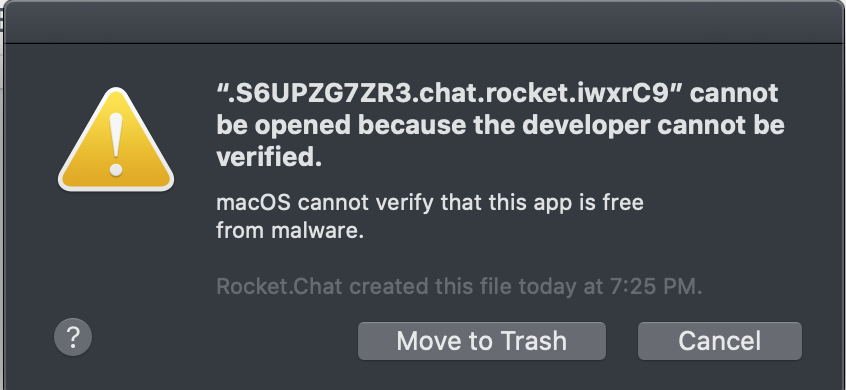
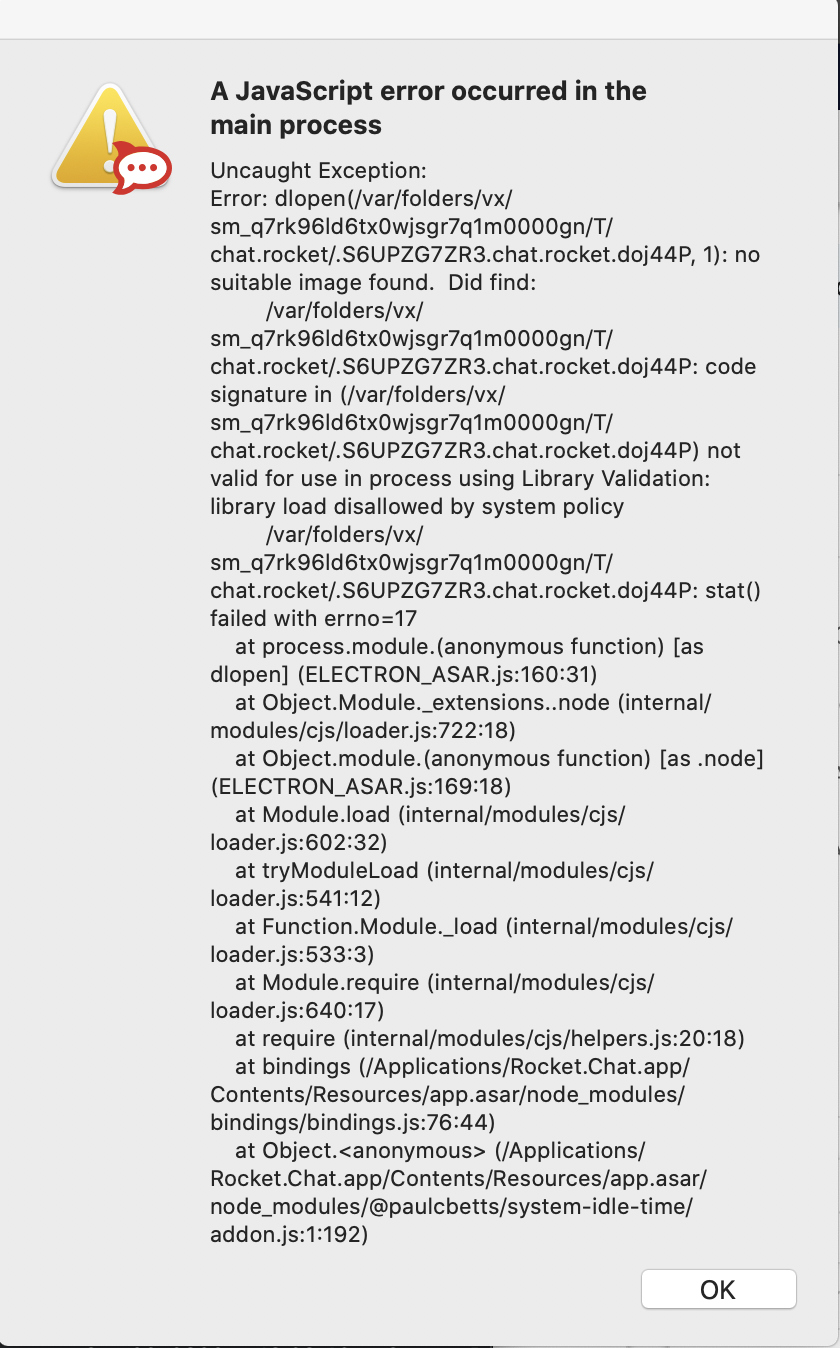
After pressing Cancel or Move to Trash, the below error prompt follows.
Uncaught Exception:
Error: dlopen(/var/folders/x3/74xf8_6j2t7b3wy17c7cdw0r0000gp/T/chat.rocket/.S6UPZG7ZR3.chat.rocket.Ets2bj, 1): no suitable image found.  Did find:
    /var/folders/x3/74xf8_6j2t7b3wy17c7cdw0r0000gp/T/chat.rocket/.S6UPZG7ZR3.chat.rocket.Ets2bj: code signature in (/var/folders/x3/74xf8_6j2t7b3wy17c7cdw0r0000gp/T/chat.rocket/.S6UPZG7ZR3.chat.rocket.Ets2bj) not valid for use in process using Library Validation: library load disallowed by system policy
    /var/folders/x3/74xf8_6j2t7b3wy17c7cdw0r0000gp/T/chat.rocket/.S6UPZG7ZR3.chat.rocket.Ets2bj: stat() failed with errno=17
    at process.module.(anonymous function) [as dlopen] (ELECTRON_ASAR.js:160:31)
    at Object.Module._extensions..node (internal/modules/cjs/loader.js:722:18)
    at Object.module.(anonymous function) [as .node] (ELECTRON_ASAR.js:169:18)
    at Module.load (internal/modules/cjs/loader.js:602:32)
    at tryModuleLoad (internal/modules/cjs/loader.js:541:12)
    at Function.Module._load (internal/modules/cjs/loader.js:533:3)
    at Module.require (internal/modules/cjs/loader.js:640:17)
    at require (internal/modules/cjs/helpers.js:20:18)
    at bindings (/Applications/Rocket.Chat.app/Contents/Resources/app.asar/node_modules/bindings/bindings.js:76:44)
    at Object.<anonymous> (/Applications/Rocket.Chat.app/Contents/Resources/app.asar/node_modules/@paulcbetts/system-idle-time/addon.js:1:192)
Then it will stuck with no window at all. Relaunching or reinstalling the app does not help.
Further note that in Security & Privacy settings it shows the below:
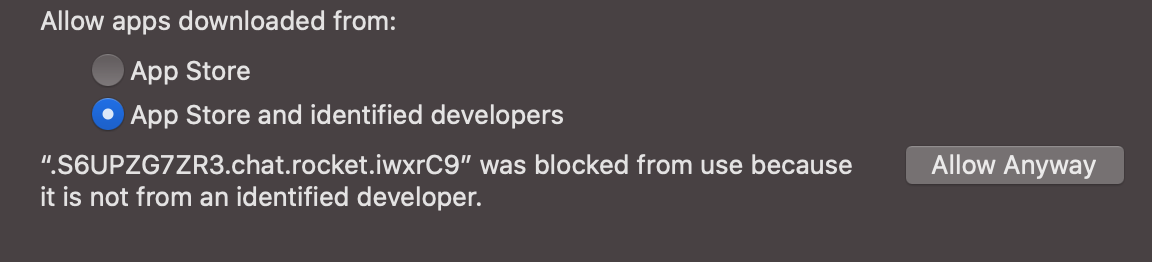
However, since the file is randomly generated during launch, there is no way to force MacOS to allow the app to run before the above prompt happens.
Expected Behavior
The app should work as normal.
 beeing
All 9 comments
Same here.
I just installed macOS Catalina and now getting this error.
First, a system window that says:
“.S6UPZG7ZR3.chat.rocket.FA8bs1” cannot be opened because the developer cannot be verified.
Below that it says:
“macOS cannot verify that this app is free from malware”
With a “Move to trash” or Cancel option.
Either option thet gives a rocket.chat window that says:
A JavaScript error occurred in the main process
Uncaught Exception:
_Error: dlopen(/var/folders/vx/sm_q7rk96ld6tx0wjsgr7q1m0000gn/T/chat.rocket/.S6UPZG7ZR3.chat.rocket.FA8bs1, 1): no suitable image found. Did find:
/var/folders/vx/sm_q7rk96ld6tx0wjsgr7q1m0000gn/T/chat.rocket/.S6UPZG7ZR3.chat.rocket.FA8bs1: code signature in (/var/folders/vx/sm_q7rk96ld6tx0wjsgr7q1m0000gn/T/chat.rocket/.S6UPZG7ZR3.chat.rocket.FA8bs1) not valid for use in process using Library Validation: library load disallowed by system policy
/var/folders/vx/sm_q7rk96ld6tx0wjsgr7q1m0000gn/T/chat.rocket/.S6UPZG7ZR3.chat.rocket.FA8bs1: stat() failed with errno=17
at process.module.(anonymous function) [as dlopen] (ELECTRON_ASAR.js:160:31)
at Object.Module._extensions…node (internal/modules/cjs/loader.js:722:18)
at Object.module.(anonymous function) [as .node] (ELECTRON_ASAR.js:169:18)
at Module.load (internal/modules/cjs/loader.js:602:32)
at tryModuleLoad (internal/modules/cjs/loader.js:541:12)
at Function.Module._load (internal/modules/cjs/loader.js:533:3)
at Module.require (internal/modules/cjs/loader.js:640:17)
at require (internal/modules/cjs/helpers.js:20:18)
at bindings (/Applications/Rocket.Chat.app/Contents/Resources/app.asar/node_modules/bindings/bindings.js:76:44)
at Object. (/Applications/Rocket.Chat.app/Contents/Resources/app.asar/node_modules/@paulcbetts/system-idle-time/addon.js:1:192)_
Server Setup Information
Running a private server installed about 2 months ago. My mobile app still works.
 vincentdavis
on 8 Oct 2019
vincentdavis
on 8 Oct 2019
Yes, completely broken on Catalina. I've been able to make every other app work without notarization by rightclicking and selecting open, but Rocket Chat's.... lets say "unique" strategy of creating a new executable every run renders that impossible.
 rodalpho
on 8 Oct 2019
rodalpho
on 8 Oct 2019
👀
 wreiske
on 9 Oct 2019
wreiske
on 9 Oct 2019
My temporary solution:
sudo spctl --master-disable
open Rocket.Chat app
after app is running you can disable master
sudo spctl --master-disable
Maybe this could work as well, without disabling master:
sudo spctl --add -v /Applications/Rocket.Chat.app
 primozc
on 9 Oct 2019
primozc
on 9 Oct 2019
My temporary solution:
sudo xattr -cr /Applications/Rocket.Chat.app
sudo codesign --force --deep --sign - /Applications/Rocket.Chat.app
 xboston
on 9 Oct 2019
xboston
on 9 Oct 2019
My temporary solution:
sudo xattr -cr /Applications/Rocket.Chat.app
sudo codesign --force --deep --sign - /Applications/Rocket.Chat.app
if someone gets "xcrun: error: invalid active developer path" error message while doing this. try to fix it with installing xcode:
xcode-select --install
 idarlund
on 10 Oct 2019
idarlund
on 10 Oct 2019
There are a few of us trying to solve the same problem over at https://github.com/electron-userland/electron-builder/issues/4040#issuecomment-542385927.
 semireg
on 15 Oct 2019
semireg
on 15 Oct 2019
@semireg I've been following your saga. Unfortunatelly, I still have no clue that could help...
 tassoevan
on 16 Oct 2019
tassoevan
on 16 Oct 2019
My temporary solution:
sudo xattr -cr /Applications/Rocket.Chat.app
sudo codesign --force --deep --sign - /Applications/Rocket.Chat.app
Thank you very much! This code helped me create a valid MAS package!
 Gimanh
on 10 Nov 2020
Gimanh
on 10 Nov 2020
Related issues
 jswolf19
·
4Comments
jswolf19
·
4Comments
 ankar84
·
4Comments
ankar84
·
4Comments
 rgembalik
·
4Comments
rgembalik
·
4Comments
 dryabchenko
·
5Comments
dryabchenko
·
5Comments
 SQUIDwarrior
·
3Comments
SQUIDwarrior
·
3Comments
Most helpful comment
My temporary solution: