Rocket.chat.electron: Desktop notifications not working (Ubuntu)
My system:
- Operating system: Ubuntu 18.04.1 LTS
- App version: 2.14.6
I do not receive any notifications while using the app Rochat.Chat desktop (downloaded through Ubuntu software). I did not change anything, and all the others apps do provide notifications (Thunderbird mail, Owncloud, etc.).
When I try the Test desktop notification button no notification appears. Here are my settings:


Also, the notification settings of my desktop should be fine (again, didn't change anything there):
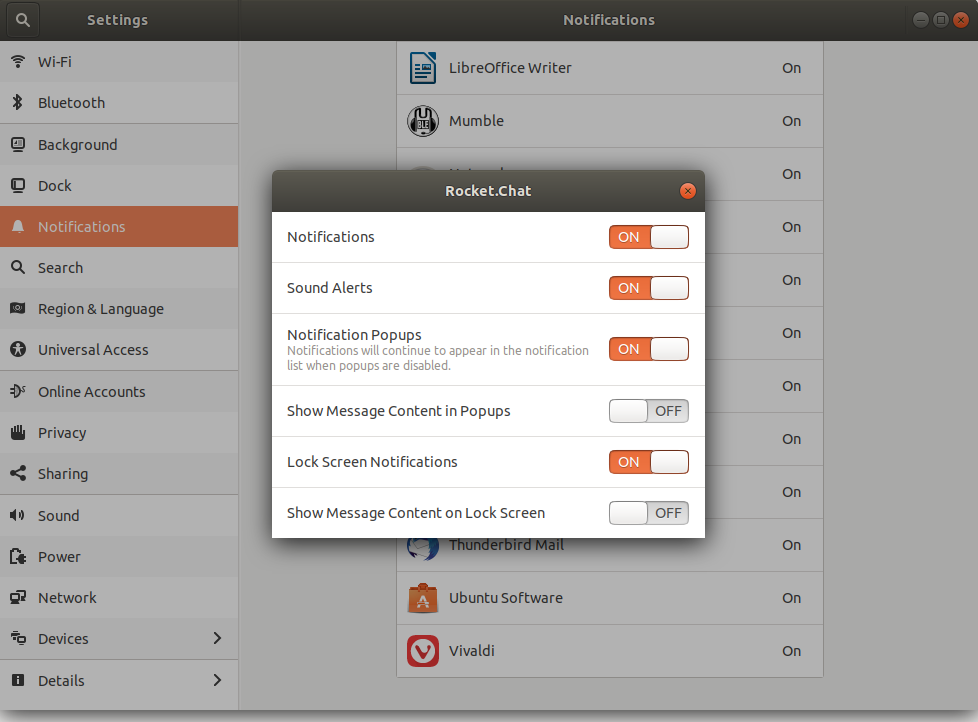
EDIT: when I use the Rocket chat through my browser all notifications work.
 Jes124
All 31 comments
Same here, Ubuntu 18.10 with app version 2.14.6 installed via Ubuntu Software.
 leandrohsilveira
on 11 Jan 2019
leandrohsilveira
on 11 Jan 2019
I'm not sure, but maybe this should be classified as a snap issue too. @Jes124, do you installed it through Ubuntu Software, like @leandrohsilveira?
 tassoevan
on 11 Jan 2019
tassoevan
on 11 Jan 2019
I think it's definitely a packaging/version issue:
(See screenshot bellow) The latest stable version has been updated to 2.14.6, while the candidate version remained 2.7.0. I reverted the snap to 2.7.0, which was the previous version published on the stable snap channel and it works well. Someone may have pushed 2.14.6 as a stable version instead of candidate.

If you install 2.14.6 version snap packaged, the notifications are not working as reported previously. I can also confirm that. They work well in version 2.7.0. If you want to revert to a working version (2.7.0) you can do a revert until you react version 2.7.0 (do this in a terminal):
sudo snap revert rocketchat-desktop
 oserban
on 11 Jan 2019
oserban
on 11 Jan 2019
I can confirm that issue can be reproduced on 18.04 Ubuntu with rocketchat installed using the deb packaged (2.14.6) published on github release page. So this is not unique to the snap version.
oserban
on 11 Jan 2019
Weird. I personally use Bionic (18.04) and I haven't noticed that, while the built snap looked like it was not following the Gnome look-and-feel. However, I changed the mechanism for notifications to keep some code cross-platform and ironically it failed for Windows and MacOS, which needed the change. I'll revert it.
tassoevan
on 11 Jan 2019
The snap version has been updated to 2.14.7, but this made things worst unfortunately. The server settings were lost and I had to redo the setup. Plus there are a bunch of js errors raised for missing code/libraries:
```bash
Error: Cannot find module '../dialog'
at Module._resolveFilename (module.js:543:15)
at Function.Module._resolveFilename (/snap/rocketchat-desktop/9/resources/electron.asar/common/reset-search-paths.js:35:12)
```
oserban
on 13 Jan 2019
@oserban Thanks for making me aware of it. No changes in the codebase explain these errors, therefore it must be a building/deploying issue.
tassoevan
on 14 Jan 2019
@tassoevan Yes, downloaded through Ubuntu software
Jes124
on 14 Jan 2019
I had same problem in Centos7 with xfce4. Found a way to fix it: Menu -> Help -> Reset app data. It warns that configuration will be lost, something something will be lost, but it just actually fixed the problem and nothing else was touched.
I have seen multiple issues here with these notifications, so I suspect some spaghetti code around it exists (haven't checked and not really willing to). Posting here, so that you know it.
 carl-di-ortus
on 1 Feb 2019
carl-di-ortus
on 1 Feb 2019
Resetting app data did nothing for me. Notifications haven't been working at all so far no matter what I tried (Snap version 2.14.7, Ubuntu 18.04 with Cinnamon). Notifications work fine in chrome, so it's definitely an issue with the app in my case.
 dominikandreas
on 8 Feb 2019
dominikandreas
on 8 Feb 2019
Same here. Rocketchat Snap version 2.14.7 on Ubuntu 18.10. A new install didn't change anything.
The "Reset app data" possible fix, did not work for me.
 dattn
on 11 Feb 2019
dattn
on 11 Feb 2019
@Jes124
I received notification, but the button "Notification Test " don't work.
Are you testing with open.rocketchat or another server?
 oguhpereira
on 13 Feb 2019
oguhpereira
on 13 Feb 2019
We have the same issue but on windows 7/10 (2.14.7). Clicking the TEST DESKTOP NOTIFICATION Button produces a Errormessage in the DevTools console.
Uncaught (in promise) TypeError: g is not a function
at 201f8e192f9ed2ed2b316010222f67a2251c89c8.js:221
at 201f8e192f9ed2ed2b316010222f67a2251c89c8.js:1
at
 philipooo
on 15 Feb 2019
philipooo
on 15 Feb 2019
@philipooo It was an issue recently fixed in Rocket.Chat server. Updating the server to 0.74.3 should do the trick.
tassoevan
on 15 Feb 2019
@oguhpereira We make use of an own private server via Rocketchat.
Jes124
on 18 Feb 2019
Seems to be fixed in Rocketchat Snap Version 2.15.0 on Ubuntu 18.10
 gsbab
on 27 Feb 2019
gsbab
on 27 Feb 2019
@gsbab Great, seems indeed fixed. Desktop notifications are working again and amount of unread messages are shown in the upright corner.
Jes124
on 28 Feb 2019
Actually for me also the notifications are working. But the System tray icon is still not showing up (Ubuntu 16.04, deb). Not sure if these issues are related. I created an own task:
https://github.com/RocketChat/Rocket.Chat.Electron/issues/1118
 phlegx
on 28 Feb 2019
phlegx
on 28 Feb 2019
Updated to 2.15.0 client version and still not working for Ubuntu 18.10.
But the company server is at 0.74.0 now.
leandrohsilveira
on 4 Mar 2019
Same here, clean install of Ubuntu 18.04, installed snap package 0.74.3
Client is on Windows 10 is version 2.15.2, same issue on mac os Client
Notification-Test works, but no real notifications at all appear
 LittleNo
on 25 Apr 2019
LittleNo
on 25 Apr 2019
Not working. Help.
 archiecodes
on 6 May 2019
archiecodes
on 6 May 2019
Again not working. Desktop 2.17.7, Server 3.0.2. Linux, Debian 10 with Gnome.
 HeikoSchlittermann
on 3 Mar 2020
HeikoSchlittermann
on 3 Mar 2020
Confirming bug. Ubuntu 18.04. RC 2.17.7. Button "Test Desktop notifications" do nothing
 bingosoft
on 5 Mar 2020
bingosoft
on 5 Mar 2020
Same here. Desktop notifications are not working. Ubuntu 19.04, RC 2.17.7. Test Desktop notifications button do nothing.
 kovacsdavid
on 9 Mar 2020
kovacsdavid
on 9 Mar 2020
Same on Debian 11
 pboesch
on 13 Mar 2020
pboesch
on 13 Mar 2020
pboesch notifications@github.com (Fr 13 Mär 2020 16:16:44 CET):
Same on Debian 11
It may be related to "mute focused chats", I switched this off and now I
got notifications. But I didn't cross-check, if this was the root cause.
Best regards from Dresden/Germany
Viele Grüße aus Dresden
Heiko Schlittermann
SCHLITTERMANN.de ---------------------------- internet & unix support -
Heiko Schlittermann, Dipl.-Ing. (TU) - {fon,fax}: +49.351.802998{1,3} -
gnupg encrypted messages are welcome --------------- key ID: F69376CE -
! key id 7CBF764A and 972EAC9F are revoked since 2015-01 ------------ -
HeikoSchlittermann
on 14 Mar 2020
It may be related to "mute focused chats", I switched this off and now I got notifications. But I didn't cross-check, if this was the root cause.
Where do you find this setting?
pboesch
on 16 Mar 2020
pboesch notifications@github.com (Mo 16 Mär 2020 17:19:43 CET):
pboesch notifications@github.com (Fr 13 Mär 2020 16:16:44 CET):
Same on Debian 11
It may be related to "mute focused chats", I switched this off and now I got notifications. But I didn't cross-check, if this was the root cause. Best regards from Dresden/Germany Viele Grüße aus Dresden Heiko Schlittermann -- SCHLITTERMANN.de ---------------------------- internet & unix support - Heiko Schlittermann, Dipl.-Ing. (TU) - {fon,fax}: +49.351.802998{1,3} - gnupg encrypted messages are welcome --------------- key ID: F69376CE - ! key id 7CBF764A and 972EAC9F are revoked since 2015-01 ------------ -Where do you find this setting?
mon compte | preferences | alertes sonores | Mettre en sourdine les conversations ciblées

    [x] oi
    [ ] non     <-- I believe, this was the default
But using the "test notifications" button doesn't work either
--
Heiko
HeikoSchlittermann
on 16 Mar 2020
If that could help to debug, I got the following error message on the Developer Tools while trying to use the "test notifications" button:
notifications.js:77
Uncaught (in promise) TypeError: Only absolute URLs are supported
at getNodeRequestOptions (snap/rocketchat-desktop/157/resources/app.asar/node_modules/electron-fetch/lib/index.js:1220)
at snap/rocketchat-desktop/157/resources/app.asar/node_modules/electron-fetch/lib/index.js:1293
at new Promise ()
at snap/rocketchat-desktop/157/resources/app.asar/node_modules/electron-fetch/lib/index.js:1290
Running version 2.17.9 installed from snapstore on Ubuntu 20.04
 vincentchalamon
on 22 Jun 2020
vincentchalamon
on 22 Jun 2020
Ubuntu 18.04
Installed via snap
Rocket chat client 2.17.10
No notifications, test notification button do nothing.
Get the same error as vincentchalamon
 holyt
on 20 Jul 2020
holyt
on 20 Jul 2020
Good observation about the reason can be found here: https://github.com/RocketChat/Rocket.Chat.Electron/issues/1509#issuecomment-629671004
 krystiangorecki
on 21 Jul 2020
krystiangorecki
on 21 Jul 2020
Related issues
 agentirons
·
4Comments
agentirons
·
4Comments
 SQUIDwarrior
·
3Comments
SQUIDwarrior
·
3Comments
 bbrendon
·
4Comments
bbrendon
·
4Comments
 engelgabriel
·
5Comments
engelgabriel
·
5Comments
 wowansm
·
3Comments
wowansm
·
3Comments
Most helpful comment
Same here. Rocketchat Snap version 2.14.7 on Ubuntu 18.10. A new install didn't change anything.
The "Reset app data" possible fix, did not work for me.