Robotjs: Not working on new macOS 10.14 Mojave
Expected Behavior
const robot = require('robotjs');
robot.keyTap('a');
// taps key 'a'
Current Behavior
const robot = require('robotjs');
robot.keyTap('a');
// nothing happens
Possible Solution
Still investigating
Steps to Reproduce (for bugs)
- Use a Mac running macOS 10.14
- Try running
robot.keyTap('a');
Context
We're using this in our macOS and Windows desktop application to emit keyboard macros
Your Environment
- RobotJS version: 0.5.1
- Node.js version: 10.11.0
- npm version: 6.4.1
- Operating System: macOS 10.14
 nfrasser
All 14 comments
Here's the output of npm test
> [email protected] test /Users/palette/Development/octalimage/robotjs
> run-script-os


> [email protected] test:darwin:linux /Users/palette/Development/octalimage/robotjs
> jasmine 'test/**/*.js'

Started
...FFFF.....FF......

Failures:
1) Integration/Keyboard types
  Message:
    Error: Timeout - Async callback was not invoked within timeout specified by jasmine.DEFAULT_TIMEOUT_INTERVAL.
  Stack:
    Error: Timeout - Async callback was not invoked within timeout specified by jasmine.DEFAULT_TIMEOUT_INTERVAL.
        at ontimeout (timers.js:425:11)
        at tryOnTimeout (timers.js:289:5)
        at listOnTimeout (timers.js:252:5)
        at Timer.processTimers (timers.js:212:10)

2) Integration/Mouse clicks
  Message:
    Error: Timeout - Async callback was not invoked within timeout specified by jasmine.DEFAULT_TIMEOUT_INTERVAL.
  Stack:
    Error: Timeout - Async callback was not invoked within timeout specified by jasmine.DEFAULT_TIMEOUT_INTERVAL.
        at ontimeout (timers.js:425:11)
        at tryOnTimeout (timers.js:289:5)
        at listOnTimeout (timers.js:252:5)
        at Timer.processTimers (timers.js:212:10)

3) Integration/Mouse scrolls vertically
  Message:
    Error: Timeout - Async callback was not invoked within timeout specified by jasmine.DEFAULT_TIMEOUT_INTERVAL.
  Stack:
    Error: Timeout - Async callback was not invoked within timeout specified by jasmine.DEFAULT_TIMEOUT_INTERVAL.
        at ontimeout (timers.js:425:11)
        at tryOnTimeout (timers.js:289:5)
        at listOnTimeout (timers.js:252:5)
        at Timer.processTimers (timers.js:212:10)

4) Integration/Mouse scrolls horizontally
  Message:
    Error: Timeout - Async callback was not invoked within timeout specified by jasmine.DEFAULT_TIMEOUT_INTERVAL.
  Stack:
    Error: Timeout - Async callback was not invoked within timeout specified by jasmine.DEFAULT_TIMEOUT_INTERVAL.
        at ontimeout (timers.js:425:11)
        at tryOnTimeout (timers.js:289:5)
        at listOnTimeout (timers.js:252:5)
        at Timer.processTimers (timers.js:212:10)

5) Mouse Move the mouse.
  Message:
    Expected false to be truthy.
  Stack:
    Error: Expected false to be truthy.
        at UserContext.<anonymous> (/Users/palette/Development/octalimage/robotjs/test/mouse.js:20:34)
  Message:
    Expected false to be truthy.
  Stack:
    Error: Expected false to be truthy.
        at UserContext.<anonymous> (/Users/palette/Development/octalimage/robotjs/test/mouse.js:21:34)

6) Mouse Move the mouse smoothly.
  Message:
    Expected 811 to equal 100.
  Stack:
    Error: Expected 811 to equal 100.
        at UserContext.<anonymous> (/Users/palette/Development/octalimage/robotjs/test/mouse.js:42:26)
  Message:
    Expected 707 to equal 100.
  Stack:
    Error: Expected 707 to equal 100.
        at UserContext.<anonymous> (/Users/palette/Development/octalimage/robotjs/test/mouse.js:43:26)

20 specs, 6 failures
Finished in 34.203 seconds
Current workaround is to downgrade Xcode 9 or Command Line tools to the 10.13 versions. Then Robot.js runs as before.
nfrasser
on 25 Sep 2018
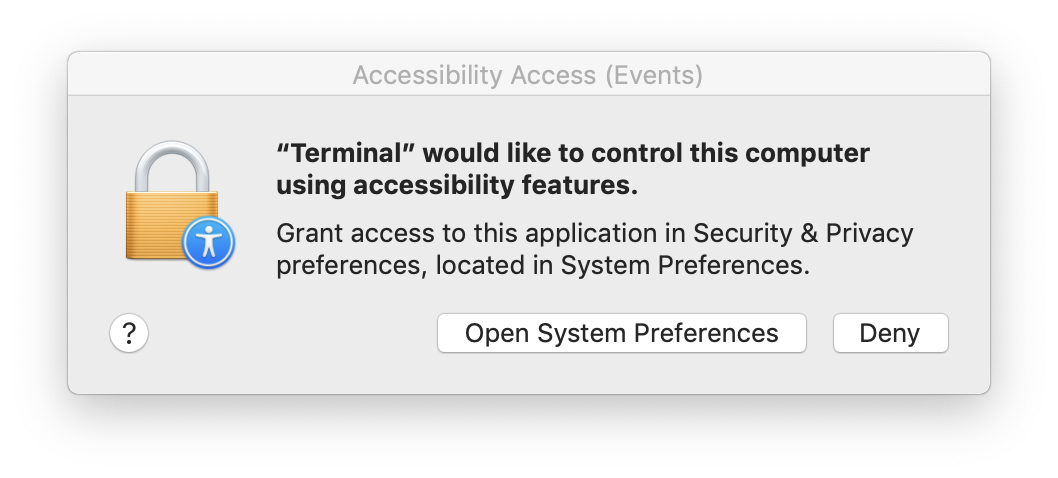
On Mojave the one needs the accessibility permission to send clicks.
 pronebird
on 10 Oct 2018
pronebird
on 10 Oct 2018
On Mojave the one needs the accessibility permission to send clicks.
How to pop up the Accessibility Access dialog box?
 GJune
on 20 Nov 2018
GJune
on 20 Nov 2018
@GJune it pops up automatically, just send some clicks with robotjs. I use it with Mocha for instance.
pronebird
on 20 Nov 2018
this worked for me!
open System Preferences > Security & Privacy > Accessibility (you might have to unlock the settings by clicking the lock icon in the bottom left hand corner) > check "Terminal" app in the list "Allow the apps below to control your computer"
 doodybrains
on 29 Nov 2018
doodybrains
on 29 Nov 2018
@doodybrains I believe folks use robotjs on CI. This is impossible to do there.
pronebird
on 30 Nov 2018
@pronebird oh ok. this helped me for my own use of robotjs..thought it might be related.
doodybrains
on 1 Dec 2018
Another potential insight: We were bundling robotjs in a ".app" and had to set the NSAppleEventsUsageDescription in Info.plist to get the accessibility permissions prompt.
This is no longer an issue for me; the maintainer(s) may close this if the CI issue (as noted by @doodybrains) cannot be addressed.
nfrasser
on 27 Jun 2019
For me terminal was already checked. Unchecking and rechecking it did the trick! :)
 sancarn
on 30 Sep 2019
sancarn
on 30 Sep 2019
It looks solved to me.
You may reopen this issue if it has been closed in error.
 oktapodia
on 24 Nov 2019
oktapodia
on 24 Nov 2019
https://github.com/octalmage/robotjs/issues/548
Mouse stuff seems broken to me in Catalina.
 brandonros
on 12 Feb 2020
brandonros
on 12 Feb 2020
For me terminal was already checked. Unchecking and rechecking it did the trick! :)
This is an issue I'm facing as well. If you deploy a new version of your app (I'm using Electron), even if the accessibility permission is already granted to the older version, it needs to be ungranted then granted again for robotjs to work.
This is annoying and there's no way to prompt the user to grant accessibility permissions again because they are already granted!
@oktapodia this looks like a macOS problem and not a robotjs problem I think, wdyt about this?
#535 seems to be the same issue.
 aabuhijleh
on 8 Mar 2020
aabuhijleh
on 8 Mar 2020
Any word on fixing mouse support in catalina?
 greggreenhaw
on 25 Apr 2020
greggreenhaw
on 25 Apr 2020
Related issues
 piyushpatil027
·
3Comments
piyushpatil027
·
3Comments
 tms1337
·
4Comments
tms1337
·
4Comments
 poojas2288
·
8Comments
poojas2288
·
8Comments
 Glutch
·
6Comments
Glutch
·
6Comments
 HopefulLlama
·
3Comments
HopefulLlama
·
3Comments
Most helpful comment
this worked for me!
open System Preferences > Security & Privacy > Accessibility (you might have to unlock the settings by clicking the lock icon in the bottom left hand corner) > check "Terminal" app in the list "Allow the apps below to control your computer"