Robotjs: error installing with npm in windows 10
npm i robotjs don't work
not install in windows 10
Possible Solution
not idea
Context
Your Environment
- RobotJS version: npm version last
- Node.js version: 8.11.2
- npm version: 5.6.0
- Operating System: Windows 10 Home 64x
 brakdag
All 22 comments
It might be worth updating Node before doing the instructions below.
Run this command from an administrative shell to install the "software" dependencias (Visual Studio, Python) on windows:
npm install --global --production windows-build-tools, recent feedback has been using npm install -g windows-build-tools as an alternative.
Install node-gyp globally:
npm install -g node-gyp
Then try installing the package again:
npm install robotjs
This solved the issue for me.
 antoniojps
on 28 May 2018
antoniojps
on 28 May 2018
I am having issues as well. Same Windows as @brakdag
I did install all the packages as @antoniojps mentions here. But when I try to initialize the library, I still get an error message:
Uncaught Exception:
Error: A dynamic link library (DLL) initialization routine failed.
    at process.module.(anomjmous function) [as dlopen] (ELECTRON
    at Object.ModuIe._extensions..node
    at Object.module.(anonymous function) [as .node] (ELECTRON
    at Module.load
    at tryModuIeLoad
    at Function.ModuIe._Ioad (module.js:4963)
    at Module.require
    at require (internal/module.js:11:18)
    at
(C: \ Users\AIexa n d 170)
at Object. < anonymous>
 zircuitz
on 30 May 2018
zircuitz
on 30 May 2018
Same here, can't install robotjs, I did what @antoniojps advised, the 3 commands, here is the last one :
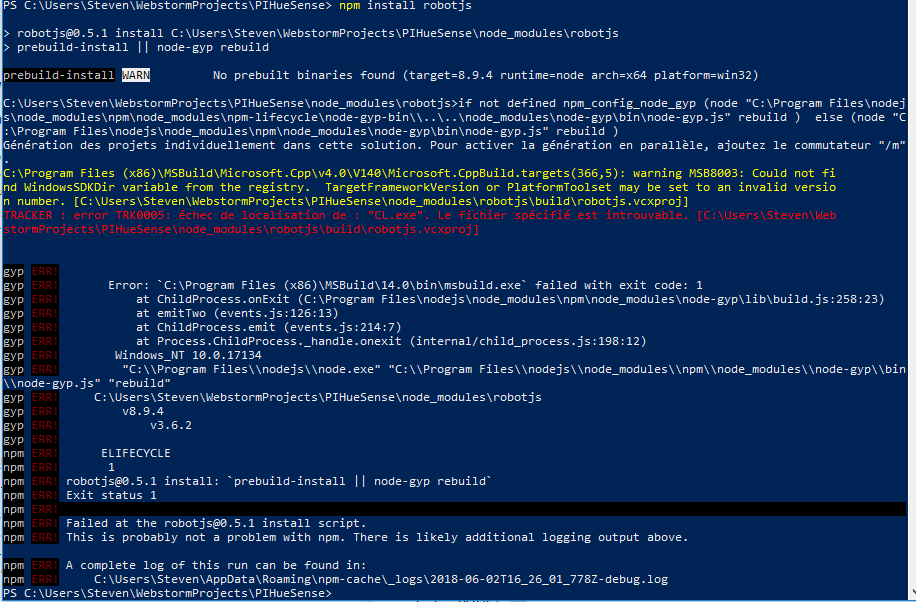
Someone knows where does it come from ?
Thanks a lot :)
 sbucaille
on 2 Jun 2018
sbucaille
on 2 Jun 2018
This seems to be a problem with the version requirements for NodeJS recompiled binaries.
The latest release does not have binaries for Windows 10 64Bit. When the node-pre-gyp fails due to lack of binaries, it falls back to building robotjs. For that you need some prerequisites, which are listed in the readme (https://github.com/octalmage/robotjs#building).
Can you try installing the required items and then trying again?
 Deltatiger
on 4 Jun 2018
Deltatiger
on 4 Jun 2018
cannot install either.
win10: 1803 17134.5
node: v8.11.1
npm: 5.6.0
with windows-build-tools installed.
C:\Users\liu\.node-gyp\8.11.1\x64\node.lib : fatal error LNK1127: library is corrupt [F:\dev\robot\node_modules\robotjs
\build\robotjs.vcxproj]
gyp ERR! build error
gyp ERR! stack Error: `C:\Program Files (x86)\MSBuild\14.0\bin\msbuild.exe` failed with exit code: 1
gyp ERR! stack     at ChildProcess.onExit (E:\Program Files\nodejs\node_modules\npm\node_modules\node-gyp\lib\build.js:258:23)
gyp ERR! stack     at emitTwo (events.js:126:13)
gyp ERR! stack     at ChildProcess.emit (events.js:214:7)
gyp ERR! stack     at Process.ChildProcess._handle.onexit (internal/child_process.js:198:12)
gyp ERR! System Windows_NT 10.0.17134
gyp ERR! command "E:\\Program Files\\nodejs\\node.exe" "E:\\Program Files\\nodejs\\node_modules\\npm\\node_modules\\node-gyp\\bin\\node-gyp.js" "rebuild"
gyp ERR! cwd F:\dev\robot\node_modules\robotjs
gyp ERR! node -v v8.11.1
gyp ERR! node-gyp -v v3.6.2
gyp ERR! not ok
npm ERR! code ELIFECYCLE
npm ERR! errno 1
npm ERR! [email protected] install: `prebuild-install || node-gyp rebuild`
npm ERR! Exit status 1
npm ERR!
npm ERR! Failed at the [email protected] install script.
npm ERR! This is probably not a problem with npm. There is likely additional logging output above.
 lgh06
on 7 Jul 2018
lgh06
on 7 Jul 2018
it worked, after I install a newer nodejs 8.11.3
lgh06
on 9 Jul 2018
When I try to run my project got following error:
0 info it worked if it ends with ok
1 verbose cli [ 'C:\Program Files (x86)\nodejs\node.exe',
1 verbose cli 'C:\Program Files (x86)\nodejs\node_modules\npm\bin\npm-cli.js',
1 verbose cli 'start' ]
2 info using [email protected]
3 info using [email protected]
4 verbose run-script [ 'prestart', 'start', 'poststart' ]
5 info lifecycle [email protected]~prestart: [email protected]
6 silly lifecycle [email protected]~prestart: no script for prestart, continuing
7 info lifecycle [email protected]~start: [email protected]
8 verbose lifecycle [email protected]~start: unsafe-perm in lifecycle true
9 verbose lifecycle [email protected]~start: PATH: C:Program Files (x86)nodejsnode_modulesnpmbinnode-gyp-bin;E:im-frontendfrontendnode_modules.bin;C:WINDOWSsystem32;C:WINDOWS;C:WINDOWSSystem32Wbem;C:WINDOWSSystem32WindowsPowerShellv1.0;C:Program Files (x86)QuickTimeQTSystem;C:Program Files (x86)SkypePhone;C:Program FilesMicrosoft SQL Server110ToolsBinn;C:Program FilesGitcmd;C:Program FilesTortoiseGitbin;C:Program Files (x86)nodejs;C:WINDOWSSystem32OpenSSH;C:Ruby24-x64bin;C:Ruby24bin;C:Program FilesMicrosoft VS Codebin;C:Usersvihnu pramodAppDataLocalMicrosoftWindowsApps;C:Usersvihnu pramodAppDataRoamingnpm;
10 verbose lifecycle [email protected]~start: CWD: E:im-frontendfrontend
11 silly lifecycle [email protected]~start: Args: [ '/d /s /c', 'npm-run-all -p watch-css start-js' ]
12 silly lifecycle [email protected]~start: Returned: code: 1 signal: null
13 info lifecycle [email protected]~start: Failed to exec start script
14 verbose stack Error: [email protected] start: npm-run-all -p watch-css start-js
14 verbose stack Exit status 1
14 verbose stack at EventEmitter.
14 verbose stack at emitTwo (events.js:100:13)
14 verbose stack at EventEmitter.emit (events.js:185:7)
14 verbose stack at ChildProcess.
14 verbose stack at emitTwo (events.js:100:13)
14 verbose stack at ChildProcess.emit (events.js:185:7)
14 verbose stack at maybeClose (internal/child_process.js:827:16)
14 verbose stack at Process.ChildProcess._handle.onexit (internal/child_process.js:211:5)
15 verbose pkgid [email protected]
16 verbose cwd E:im-frontendfrontend
17 error Windows_NT 10.0.17134
18 error argv "C:\Program Files (x86)\nodejs\node.exe" "C:\Program Files (x86)\nodejs\node_modules\npm\bin\npm-cli.js" "start"
19 error node v5.6.0
20 error npm v3.6.0
21 error code ELIFECYCLE
22 error [email protected] start: npm-run-all -p watch-css start-js
22 error Exit status 1
23 error Failed at the [email protected] start script 'npm-run-all -p watch-css start-js'.
23 error Make sure you have the latest version of node.js and npm installed.
23 error If you do, this is most likely a problem with the imdevelopment-frontend package,
23 error not with npm itself.
23 error Tell the author that this fails on your system:
23 error npm-run-all -p watch-css start-js
23 error You can get information on how to open an issue for this project with:
23 error npm bugs imdevelopment-frontend
23 error Or if that isn't available, you can get their info via:
23 error npm owner ls imdevelopment-frontend
23 error There is likely additional logging output above.
24 verbose exit [ 1, true ]
 pramodDesign
on 17 Aug 2018
pramodDesign
on 17 Aug 2018
@pramodDesign What did you try to run? Could you give us more information?
Deltatiger
on 19 Sep 2018
@pramodDesign
19 error node v5.6.0
20 error npm v3.6.0
You've old version and you need to "have the latest version of node.js and npm installed."
 A-312
on 28 Nov 2018
A-312
on 28 Nov 2018
I had the exact same problem, I tried the stable build the latest build and all the sorts. But i was using node x64 bit, uninstall that and download node x86 (32 bit). It seems to solve the problems and has not caused me an error since. Hope this helps.
Ran the one command:
npm install robotjs
PC Specs:
System Type: 64-bit Operating System, x4-based processor
Operating System: Windows 10 Pro
 Kilometres
on 22 Dec 2018
Kilometres
on 22 Dec 2018
As of today, the latest windows build tools (5.1.0) freezes after installing python.

So use version 4.0.0 instead of 5.1.0 -> npm install --global --production [email protected]
 AirFusion45
on 20 May 2019
AirFusion45
on 20 May 2019
It might be worth updating Node before doing the instructions below.
Run this command from an administrative shell to install the "software" dependencias (Visual Studio, Python) on windows:
npm install --global --production windows-build-toolsInstall node-gyp globally:
npm install -g node-gypThen try installing the package again:
npm install robotjsThis solved the issue for me.
@antoniojps It does not work for me. I always get the same error:

It seems I can't install robotjs on windows...
 lucasctd
on 24 Jun 2019
lucasctd
on 24 Jun 2019
For the people who can't install robotjs because of node-gyp, I've been able to fix it by downloading node version 10. The person who told me this way of fixing it, told me that the npm install for this libary uses a file that is nolonger included in node version 12, for this reason downloading an older version seems to fix it. I can't remember the source so sorry for that.
@lucasctd I had the same error the method above worked for me but I would check your node version first before trying it.
ps: I did this for windows, I have no clue if this will work for other systems.
 blizzard190
on 25 Jun 2019
blizzard190
on 25 Jun 2019
Finally, after 2 years I found a solution that works for me:
npm install -g windows-build-tools
instead of
npm install --global --production windows-build-tools
 Tymski
on 5 Jul 2019
Tymski
on 5 Jul 2019
@Tymski this looks like the way to go! After installing it several times it finally installed correctly. Thanks!
 evertdhont
on 10 Aug 2019
evertdhont
on 10 Aug 2019
For anyone still having a problem with this:
- Use NodeJS 10 (LTS)
- Try
npm install -g windows-build-tools --vs2017
 AfzalivE
on 19 Aug 2019
AfzalivE
on 19 Aug 2019
The support will be improved in the near next release
 oktapodia
on 24 Nov 2019
oktapodia
on 24 Nov 2019
- Please use
nvmand switch to the versionnode@8 - Complete installation of all prerequisites from node-gyp
 liketurbo
on 14 Jan 2020
liketurbo
on 14 Jan 2020
Another thing you can try is to install node-gyp locally as a development dependency
npm i --save-dev node-gyp
npm i robotjs works for me after that (remember to run as administrator) whereas it doesn't work with node-gyp installed globally for some reason
Tymski
on 15 Jan 2020
I tried running Node14.15.1 and I was getting this error.
If you have node installed on windows as an actual app do the following steps to get rid of this error.
- uninstall nodejs from add or remove programs
- install nvm globally and install/use node version 12.0.0 ( https://github.com/coreybutler/nvm-windows)
- npm i robotjs
Fool proof.
Cheers
 shawn-p-m
on 9 Dec 2020
shawn-p-m
on 9 Dec 2020
@ShawnMeister you link a solution for Linux/Mac
(https://github.com/nvm-sh/nvm#installing-and-updating)
"nvm is a for Mac/Linux only"
whereas this issue is for Windows 10
"error installing with npm in windows 10"
Tymski
on 10 Dec 2020
@ShawnMeister you link a solution for Linux/Mac
(https://github.com/nvm-sh/nvm#installing-and-updating)
"nvm is a for Mac/Linux only"
whereas this issue is for Windows 10
"error installing with npm in windows 10"
Ahh my mistake. I edited it
shawn-p-m
on 10 Dec 2020
Related issues
 poojas2288
·
8Comments
poojas2288
·
8Comments
 vnsharma-systango
·
9Comments
vnsharma-systango
·
9Comments
 linonetwo
·
12Comments
linonetwo
·
12Comments
 pg07codes
·
3Comments
pg07codes
·
3Comments
 piyushpatil027
·
3Comments
piyushpatil027
·
3Comments
Most helpful comment
It might be worth updating Node before doing the instructions below.
Run this command from an administrative shell to install the "software" dependencias (Visual Studio, Python) on windows:
npm install --global --production windows-build-tools, recent feedback has been usingnpm install -g windows-build-toolsas an alternative.Install node-gyp globally:
npm install -g node-gypThen try installing the package again:
npm install robotjsThis solved the issue for me.