Robomongo: Robo 3T 1.3.1 CA Certificate Problem
With RoboMongo 1.2 we don't have this error, just happened in 1.3.1 version and mongodb 4.0
Cannot connect to the MongoDB at db-xxx.xx.com:27017.
Error:
SSL tunnel failure: Network is unreachable or SSL connection rejected by server. Reason: couldn't connect to server db-xxx.xx.com:27017, connection attempt failed: SocketException: Secure.Transport: One or more parameters passed to a function were not valid.
 jsocola
All 7 comments
Hi @jsocola , thanks for reporting the problem. Can you share the followings for further investigation?
- SSL settings (Screenshot of Connection Settings -> SSL tab)
- Your OS and version (Win 7, Ubuntu 18.04 etc..)
 simsekgokhan
on 21 Apr 2020
simsekgokhan
on 21 Apr 2020
Thanks for you help
On Mac
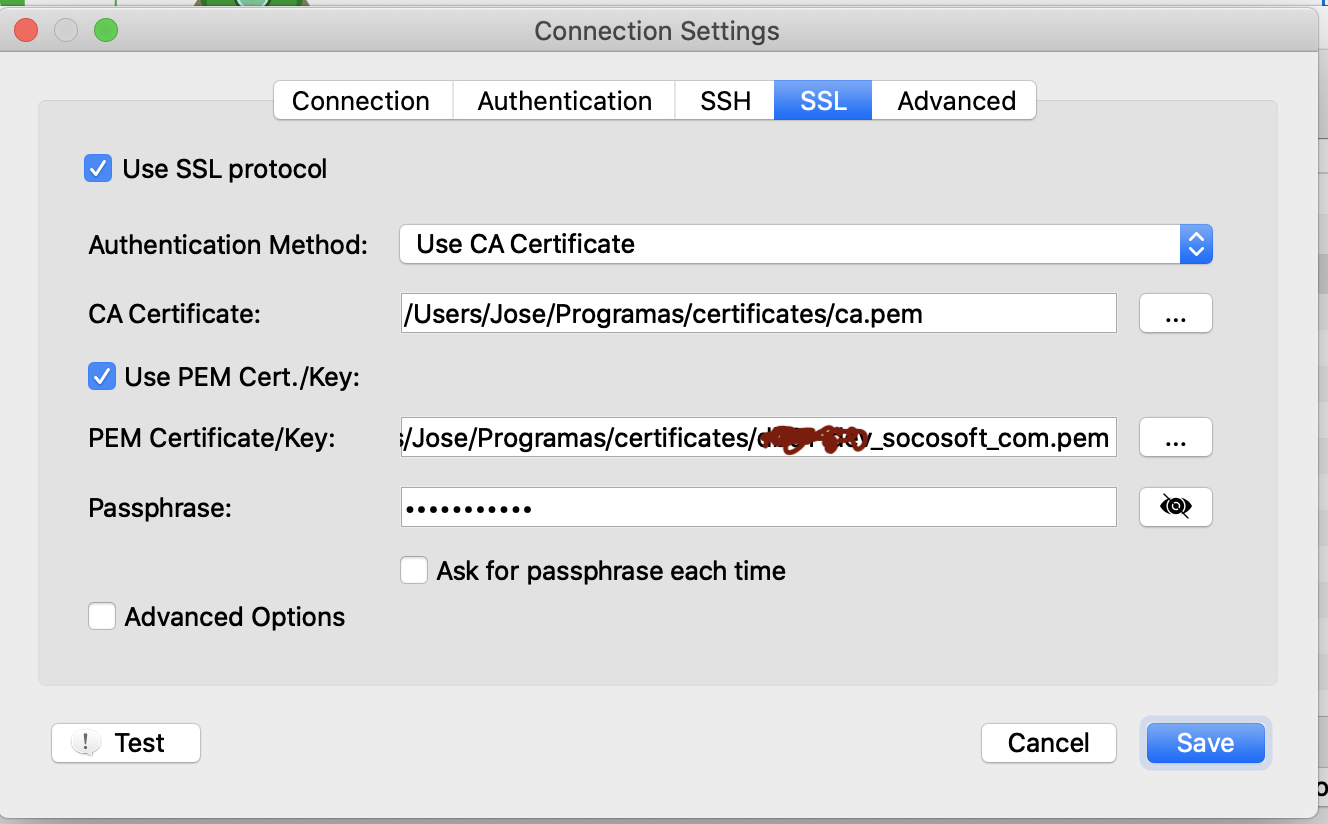
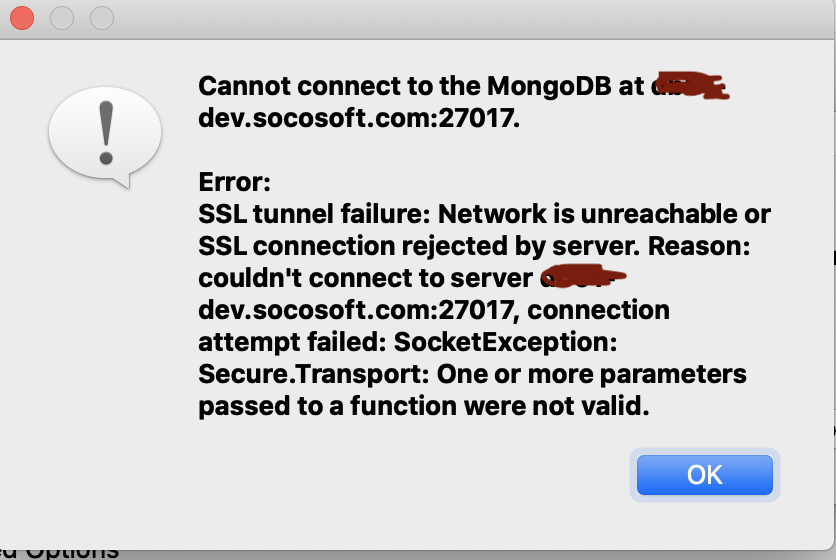
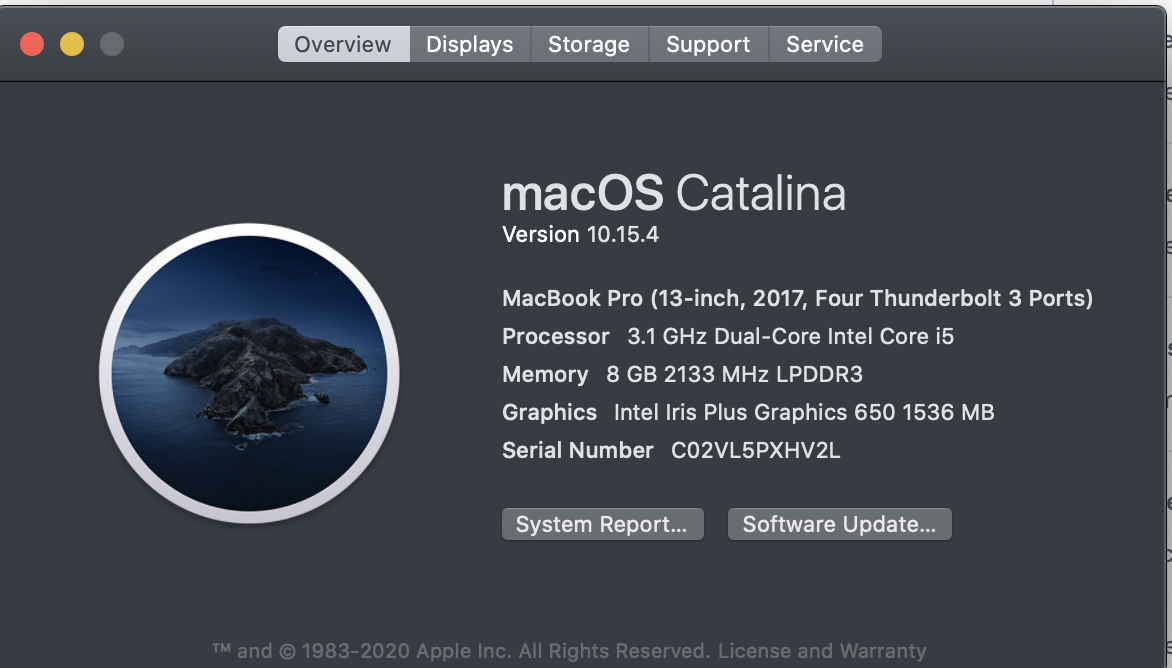
On windows
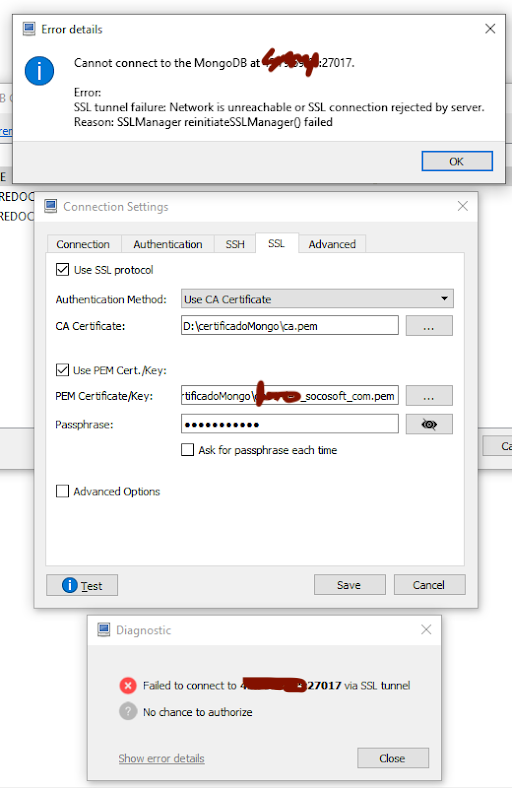
jsocola
on 25 Apr 2020
I'm having the same issue as well
 BeeShall
on 13 May 2020
BeeShall
on 13 May 2020
So I figured out what the issue was. Looks like macOS Catalina did something with their CA certs thing so that your CA bundle is no longer trusted. So, in the SSL section, if you select the Authentication Method to be Self Signed Certificate, your issue will be solved.
BeeShall
on 15 May 2020
On windows we have the same problem, I have try changed to Self Signed Certificate but have the same message, I think I can remove ca from server and it's will working but it's important have ca here. We move to Compass, it's working fine but we like Robo 3T
jsocola
on 20 May 2020
Hi @jsocola , thx a lot for details. We have reproduced your problem on Catalina.
But, seems that the problem is reproducible with mongo from the shell too which means that Robo is behaving as expected.
/// --- Server
mongod --dbpath /opt/4.2/ --sslMode requireSSL --sslPEMKeyFile /opt/mongodb.pem --sslCAFile /opt/client.pem --bind_ip_all --verbose

/// --- Client
// 1) connects
mongo --ssl --sslAllowInvalidCertificates --sslPEMKeyFile /opt/client.pem
// 2) fails
mongo --ssl --sslCAFile /opt/mongodb.pem --sslPEMKeyFile /opt/client.pem
So the config (1st mongo command above) that worked for us on Robo is:
(This is also the same as what @BeeShall shared)
width="600"
/>
Does this config work for you?
simsekgokhan
on 1 Jul 2020
If you set the authentication method to “unsecured”, it works or at least
worked for me.
Hope it helps!
On Wed, Jul 1, 2020 at 8:36 AM Gökhan Şimşek notifications@github.com
wrote:
Hi @jsocola https://github.com/jsocola , thx a lot for details. We have
reproduced your problem on Catalina.
But, seems that the problem is reproducible with mongo from the shell
which means that Robo is behaving as expected./// --- Server
mongod --dbpath /opt/4.2/ --sslMode requireSSL --sslPEMKeyFile /opt/mongodb.pem --sslCAFile /opt/client.pem --bind_ip_all --verbose/// --- Client
// 1) connects
mongo --ssl --sslAllowInvalidCertificates --sslPEMKeyFile /opt/client.pem
// 2) fails
mongo --ssl --sslCAFile /opt/mongodb.pem --sslPEMKeyFile /opt/client.pemSo the config (1st mongo command above) that worked for us on Robo is:
(This is also the same as what @BeeShall https://github.com/BeeShall
shared)https://user-images.githubusercontent.com/19390749/86241545-c0ff9b00-bbab-11ea-936b-bfae4d5e0c7d.png
Does this config work for you?
—
You are receiving this because you were mentioned.Reply to this email directly, view it on GitHub
https://github.com/Studio3T/robomongo/issues/1732#issuecomment-652392266,
or unsubscribe
https://github.com/notifications/unsubscribe-auth/ADMK6CF323OPUHQCVLGOQW3RZMUTXANCNFSM4MLE6NKA
.>
Regards,
Bishal Regmi
https://beeshall.github.io
https://github.com/beeshall https://www.linkedin.com/in/beeshall
BeeShall
on 1 Jul 2020
Related issues
 rspeed
·
4Comments
rspeed
·
4Comments
 ghost
·
3Comments
ghost
·
3Comments
 lborg019
·
4Comments
lborg019
·
4Comments
 KyleGalvin
·
3Comments
KyleGalvin
·
3Comments
 imkratos
·
4Comments
imkratos
·
4Comments
Most helpful comment
So I figured out what the issue was. Looks like macOS Catalina did something with their CA certs thing so that your CA bundle is no longer trusted. So, in the SSL section, if you select the
Authentication Methodto beSelf Signed Certificate, your issue will be solved.