Robomongo: Unable to connect after MacOS Catalina Update
After upgrading to MacOS Catalina the configured connections to AWS DocumentDB broke as the CA was been revoked. See image below
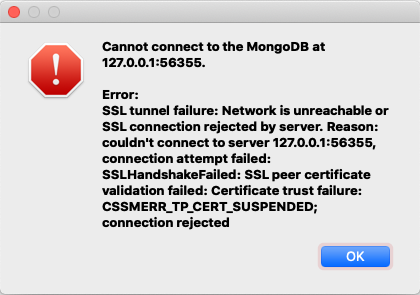
After adding the certificate to the key chain and trusting it manually it seems that I can connect from the command line and use mongoexport mongoimport correctly that makes me think that something is not right with Robo3t. May be no access to key chain from Robo3t?
Is there any new version of the app coming with anything in specific for MacOS Catalina?
Robo 3T 1.3.1
OS - macOS Catalina (10.15.3)
 ShakMR
All 4 comments
Having the same exact problem
 BeeShall
on 8 Apr 2020
BeeShall
on 8 Apr 2020
We solved this in the team by downgrading Robo3T to 1.2.1
ShakMR
on 15 Apr 2020
@ShakMR I have a solution for you! After a week of digging into what the issue was, I finally know what is happening.
Looks like macOS Catalina did something with their CA certs thing so that your CA bundle (rds-ca-bundle) is no longer trusted. So, in the SSL section, if you select the Authentication Method to be Self Signed Certificate, your issue will be solved.
BeeShall
on 15 May 2020
Hey @BeeShall that worked fine 😄 we can probably close this issue then.
ShakMR
on 18 May 2020
Related issues
 Imperial7
·
4Comments
Imperial7
·
4Comments
 matgenois
·
4Comments
matgenois
·
4Comments
 equero
·
3Comments
equero
·
3Comments
 fabritw
·
3Comments
fabritw
·
3Comments
 KyleGalvin
·
3Comments
KyleGalvin
·
3Comments
Most helpful comment
@ShakMR I have a solution for you! After a week of digging into what the issue was, I finally know what is happening.
Looks like macOS Catalina did something with their CA certs thing so that your CA bundle (rds-ca-bundle) is no longer trusted. So, in the SSL section, if you select the Authentication Method to be Self Signed Certificate, your issue will be solved.