Robomongo: Failed to refresh 'Collections' in robomongo1.3
In robomongo1.3 version, I get error when expanding "Collections" on mongo 2.6.10 database, but in robomongo1.2 version is ok.
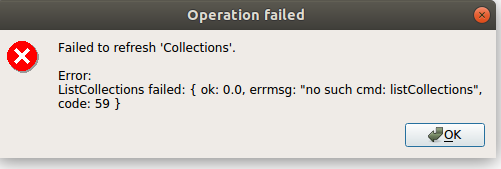
Failed to refresh 'Collections'.
Error:
ListCollections failed: { ok: 0.0, errmsg: "no such cmd: listCollections", code: 59, bad cmd: { $query:{listCollections: 1, filter: {}, cursor: {} }, $readPreference: {mode: "secondaryPreferred"} } }
 JerryChenn07
All 29 comments
I have the same error en robo3T 1.3.1.

 jnolascob
on 13 Apr 2019
jnolascob
on 13 Apr 2019
I had the same problem. I can see that Robo 3T can connect successfully (because it is able to get the list of databases), so I don't think it's a problem with authentication. But once I expand the Collections folder I get the same error message as cjr0707. Reverting to Robo 3T 1.2.1 works fine.
 nateweiss
on 16 Apr 2019
nateweiss
on 16 Apr 2019
I have the same error en robo3T 1.3.1.Reverting to Robo 3T 1.2.1 works fine.
 purlintan
on 20 Apr 2019
purlintan
on 20 Apr 2019
I've downgraded back to an earlier version now and all works as expected. We miss shell commands such as .countDocuments, can still use .count, so no impact currently
 danschofy
on 25 Apr 2019
danschofy
on 25 Apr 2019
I am having this issue on Ubuntu 16.04. Not able to use the application (v 1.3.1)
 PawanDalal
on 25 Apr 2019
PawanDalal
on 25 Apr 2019
Same problem in Windows and Mac version. With a 2.4 mongo db version doesn't work but with a newer version like 3.4.4 it works right.
Is there a way to download the previous 1.2.1 version?
Regards.
 anavioc
on 29 Apr 2019
anavioc
on 29 Apr 2019
Same error! Mongod version 2.6.9. Robo 3T version 1.3.
Failed to refresh 'Collections'.
Error:
ListCollections failed: { ok: 0.0, errmsg: "no such cmd: listCollections", code: 59, bad cmd: { $query: { listCollections: 1, filter: {}, cursor: {} }, $readPreference: { mode: "secondaryPreferred" } } }
 phoenix-gi
on 4 May 2019
phoenix-gi
on 4 May 2019
Same problem in Windows and Mac version. With a 2.4 mongo db version doesn't work but with a newer version like 3.4.4 it works right.
Is there a way to download the previous 1.2.1 version?
Regards.
Version 1.2.1 now available here:
https://download.robomongo.org/1.2.1/linux/robo3t-1.2.1-linux-x86_64-3e50a65.tar.gz
phoenix-gi
on 4 May 2019
same error on ubuntu 18.04 with robo 3t 1.3.1
@phoenix-gi Thank You for sharing the version 1.2.1 !!!
 outshow
on 5 May 2019
outshow
on 5 May 2019
Version 1.2.1 for mac available here. Try it.
https://download.robomongo.org/1.2.1/osx/robo3t-1.2.1-darwin-x86_64-3e50a65.dmg
phoenix-gi
on 6 May 2019
Same here. Can't list collections when connecting to Mongodb 2.6.5 from RoboMongo 1.3.
Does anyone have the windows 64 download link for 1.2.1?
 srlowe
on 7 May 2019
srlowe
on 7 May 2019
Same here. Can't list collections when connecting to Mongodb 2.6.5 from RoboMongo 1.3.
Does anyone have the windows 64 download link for 1.2.1?
Try it.
https://download.robomongo.org/1.2.1/windows/robo3t-1.2.1-windows-x86_64-3e50a65.exe
 Jons2k
on 9 May 2019
Jons2k
on 9 May 2019
Guys, this project is dead. The bugs won't be fixed. Look elsewhere.
 celesteking
on 13 Jun 2019
celesteking
on 13 Jun 2019
Version 1.2.1 for mac available here. Try it.
https://download.robomongo.org/1.2.1/osx/robo3t-1.2.1-darwin-x86_64-3e50a65.dmg
Works on Ubuntu 19
 KartaviK
on 22 Aug 2019
KartaviK
on 22 Aug 2019
Same bug on mac, trying to upgrade version.
 liuguangsen0409
on 13 Nov 2019
liuguangsen0409
on 13 Nov 2019
I have the same error and no solution for that..I think this company is not behind its product!!!

 Mert1980
on 3 Jan 2020
Mert1980
on 3 Jan 2020
Same bug on mac, trying to upgrade version.
Did you able to find a solution or a better working app???
Mert1980
on 3 Jan 2020
The problem persists...
I'm using Ubuntu 16.04 and Robomongo 1.3
 alxhotel
on 9 Jan 2020
alxhotel
on 9 Jan 2020
ubuntu 16.04 mongod v2.6.10 & robo 3T v1.3.1 (the latest version.)
This problem exists..
But robo3T 1.2.1 version works well.
And mongod v4.2.2 & robo 3T v1.3.1 (the latest version.)
robo 3T v1.3.1 works well.
Check version...
 crazyj7
on 15 Jan 2020
crazyj7
on 15 Jan 2020
Same problem.
Linux Mint 19.3
Robo 3T v1.3.1. MongoDB 2.6.10. Connecting through SSH Tunnel.
 vsile
on 24 Jan 2020
vsile
on 24 Jan 2020
Same problem
Ubuntu 19.10 64-bit
Robo 3T 1.3.1
MongoDB server 3.6.8 and 4.2.3
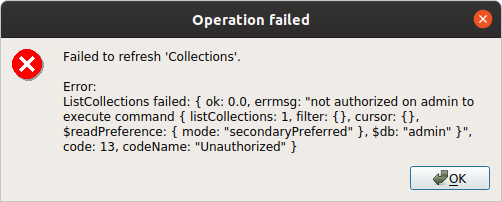
11:25:51 AM Info: Settings saved to: /home/***********/.3T/robo-3t/1.3.1/robo3t.json
11:25:51 AM Info: Connecting to localhost:27017...
11:25:51 AM Info: Establish connection successful. Connection: Localhost
11:25:51 AM Info: Database list refreshed. Connection: Localhost
11:25:58 AM Error: Failed to refresh 'Collections'. ListCollections failed: { ok: 0.0, errmsg: "not authorized on admin to execute command { listCollections: 1, filter: {}, cursor: {}, $readPreference: { mode: "secondaryPreferred" }, $db: "admin" }", code: 13, codeName: "Unauthorized" }
In both cases /etc/mongod.conf
security:
  authorization: enabled
Notes: "Test" connection from robo3t is OK
There's problem only with user created in mongo-shell with commands:
use admin
db.createUser(
  {
    user: "user_admin",
    pwd: "secret_passwod",
    roles: [ { role: "userAdminAnyDatabase", db: "admin" } ]
  }
)
Next users created with commands below are without any problem:
use test_chema
db.createUser(
  {
    user: "Tester",
    pwd: "secret_passwod",
    roles: [ { role: "readWrite", db: "test_chema" } ]
  }
)
 aplatkouski
on 8 Mar 2020
aplatkouski
on 8 Mar 2020
Using Robo 3T version 1.2.1 worked for me.
 dbelavy
on 22 May 2020
dbelavy
on 22 May 2020
for the record this isnt an issue with studio 3t as you can change the mongo shell version you're running. would be nice to bring that feature down to robo to mitigate this issue in the mean time
 rtorres280
on 28 May 2020
rtorres280
on 28 May 2020
garbage software
 felipemuhamed
on 27 Jun 2020
felipemuhamed
on 27 Jun 2020
I used Robo 3T v1.2.1 instead of Robo 3T v1.3.1 and it works perfectly .
Don't waste your time , just download Robo 3T v1.2.1 and then the problem is solved :)
 alireza1998dev
on 2 Jul 2020
alireza1998dev
on 2 Jul 2020
I don't get the failed to refresh error......It just doesn't refresh at all. I need to close the tab and then select view documents on the collection again. Frustrating!
 Pat-Gekoski
on 3 Jul 2020
Pat-Gekoski
on 3 Jul 2020
the url doesn't work for me, I fund another place to download: https://mac.softlookup.com/download.asp?ID=164475
 angelyaaaaa
on 10 Jul 2020
angelyaaaaa
on 10 Jul 2020
You can also download it from github: https://github.com/Studio3T/robomongo/releases/tag/v1.2.1
alxhotel
on 10 Jul 2020
Hi all, thanks for reporting the problem and sorry for answering so late.
Robo 1.3 does not support MongoDB 2.6: https://github.com/Studio3T/robomongo#supported-platforms
Older versions are here: https://github.com/Studio3T/robomongo/releases
 simsekgokhan
on 28 Jul 2020
simsekgokhan
on 28 Jul 2020
Related issues
 OmisNomis
·
3Comments
OmisNomis
·
3Comments
 perlun
·
4Comments
perlun
·
4Comments
 itoonx
·
4Comments
itoonx
·
4Comments
 juliashibalko
·
3Comments
juliashibalko
·
3Comments
 equero
·
3Comments
equero
·
3Comments
Most helpful comment
Version 1.2.1 for mac available here. Try it.
https://download.robomongo.org/1.2.1/osx/robo3t-1.2.1-darwin-x86_64-3e50a65.dmg