Robomongo: Failed to execute "listdatabases" command
HI, I got an error when used robo3T(1.2) to connect mongodb(3.4.1) on window 7:
failed to load list of databases, and the error detail is "Failed to execute "listdatabases" command. ".
But access control is not enabled for my mongo server. How can i solve this problem?
Here is the mongodb server log:
[thread1] connection accepted from 127.0.0.1:63516 #3487 (28 connections now open)
[conn3487] received client metadata from 127.0.0.1:63516 conn3487: { application: { name: "robo3t" }, driver: { name: "MongoDB Internal Client", version: "3.4.3-10-g865d2fb" }, os: { type: "Windows", name: "Microsoft Windows 7", architecture: "x86_64", version: "6.1 SP1 (build 7601)" } }
[conn3487] command admin.$cmd appName: "robo3t" command: listDatabases { listDatabases: 1, nameOnly: true } numYields:0 reslen:18812 locks:{ Global: { acquireCount: { r: 448 } }, Database: { acquireCount: { r: 223 } } } protocol:op_command 12014ms
[conn3487] end connection 127.0.0.1:63516 (28 connections now open)
 watoua
All 30 comments
Same happening here. Possibly something wrong with our data folder. Can anyone help?
 GCSBOSS
on 17 Sep 2018
GCSBOSS
on 17 Sep 2018
Hi @watoua, @GCSBOSS and all, thanks for reporting the problem.
Can you share the followings for further investigation please?
- Robo connection config. details (screenshots)
- Robo logs (see left-bottom of main window)
- Output of listDatabases command with mongo
// Example for Windows
E:\>mongo
MongoDB shell version v3.4.18
connecting to: mongodb://127.0.0.1:27017
MongoDB server version: 3.4.18
Welcome to the MongoDB shell.
> db.adminCommand( { listDatabases: 1 } )
{
        "databases" : [
...
}
Meantime, I suggest the following actions:
- Restart the mongodb server
- Try with MongoDB v3.4.18 (official latest 3.4 version)
 simsekgokhan
on 8 Nov 2018
simsekgokhan
on 8 Nov 2018
Hello. You need to go to Manage Connections > Edit > Authentication. Fill in the details there. That should work like magic.
 xplorer1
on 2 Dec 2018
xplorer1
on 2 Dec 2018
Hello guy! I am trying do that. error again
 Hung1239
on 12 Dec 2018
Hung1239
on 12 Dec 2018
We still need more details for further investigation.
Meantime, you can try the beta. Feel free to open the ticket if you find problem again.
Closing due to insufficient information about problem.
Robo 3T 1.3 Beta
https://github.com/Studio3T/robomongo/releases/tag/v1.3.0-beta
simsekgokhan
on 17 Feb 2019
Can confirm, latest beta fixes this issue.
 Qix-
on 3 Mar 2019
Qix-
on 3 Mar 2019
Thanks a lot for the feedback @Qix
simsekgokhan
on 4 Mar 2019
@simsekgokhan This is still an issue: Robo3t cant handle when there are zero databases on the server:
If i run this in the shell:
rs0:PRIMARY> db.adminCommand( { listDatabases: 1 } )
{ "databases" : [ ], "totalSize" : 0, "ok" : 1 }
Robo3t will result in: Failed to execute "listdatabases" command
Running version 1.3
 richarddd
on 2 Jul 2019
richarddd
on 2 Jul 2019
I just had this issue with 1.2 connecting to a new mongo 4.2
It's fixed when using robo3t version 1.3, which supports newer version of mongo
 avimar
on 2 Sep 2019
avimar
on 2 Sep 2019
Beta fixed it for me as well. Thanks!
 ShayNehmad
on 4 Sep 2019
ShayNehmad
on 4 Sep 2019
I have Robo 3T 1.3.1. I still have this problem.
 savanbthakkar
on 9 Sep 2019
savanbthakkar
on 9 Sep 2019
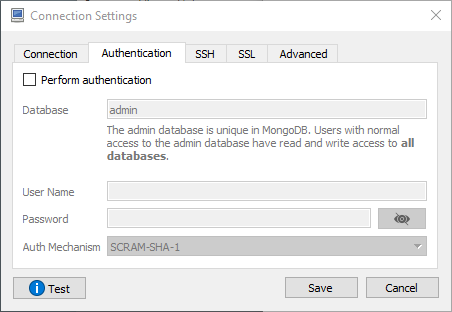
For me Have updated my Robo 3T version to 1.3.1 and hence I use it on local environment with out username and password, even after new installation, for some reason Perform authentication was enabled. I have to disable it. And it worked for me.
 maythamfahmi
on 10 Sep 2019
maythamfahmi
on 10 Sep 2019
Worked for me now. The problem was: It can't connect if there are no databases to list. I had to create a database and a collection for it. Error message is misleading, but once you create a database and a collection, it works.
savanbthakkar
on 10 Sep 2019
same problem
 FrancescoSaverioZuppichini
on 12 Sep 2019
FrancescoSaverioZuppichini
on 12 Sep 2019
@FrancescoSaverioZuppichini
Are you running a local version?
try to login to the server and create a db and insert something in to the collection.
Also check the Robo 3T client Version.
1.3.1 works fine without auth and list of DB is possible.
 Luk3rson
on 12 Sep 2019
Luk3rson
on 12 Sep 2019
1.3.1 works for me.
 jcezardasilva
on 4 Oct 2019
jcezardasilva
on 4 Oct 2019
I had the same problem with version 1.2.1, works with 1.3.1
 rossifedericoe
on 7 Oct 2019
rossifedericoe
on 7 Oct 2019
just install latest version of 3t
 Susheer
on 8 Oct 2019
Susheer
on 8 Oct 2019
Same issue with 1.2 version, but 1.3.1 works on my side too.
 ChihHaoChen
on 11 Oct 2019
ChihHaoChen
on 11 Oct 2019
You'll need to use 1.3 version! :)
 matheusalxds
on 6 Dec 2019
matheusalxds
on 6 Dec 2019

I am using the latest version but I can not connect to MongoDB at local host
 Mert1980
on 31 Dec 2019
Mert1980
on 31 Dec 2019
You'll need to upgrade mongodb to the last version, so you can to connect in your local database.
matheusalxds
on 2 Jan 2020
Actully I am using the latest version and I managed to connect to database after filling in the authentication field while creating a new connection. I had no issue yesterday but today I receive the error which can be seen on the picture. I could not figure out the reason???

Mert1980
on 3 Jan 2020
Just downloaded the latest 1.3.1 and ran it. It's working fine now.
 lisaiceland
on 14 Feb 2020
lisaiceland
on 14 Feb 2020
Thank you very much for the information.
14 Şub 2020 Cum, saat 02:15 tarihinde Lisaiceland notifications@github.com
şunu yazdı:
Just downloaded the latest 1.3.1 and ran it. It's working fine now.
—
You are receiving this because you commented.
Reply to this email directly, view it on GitHub
https://github.com/Studio3T/robomongo/issues/1566?email_source=notifications&email_token=ANEJLEVQJGK6NKVI3I2AU7DRCXWDJA5CNFSM4FMZITO2YY3PNVWWK3TUL52HS4DFVREXG43VMVBW63LNMVXHJKTDN5WW2ZLOORPWSZGOELXGXXY#issuecomment-586050527,
or unsubscribe
https://github.com/notifications/unsubscribe-auth/ANEJLETQ3HEWF2OIKYJITUDRCXWDJANCNFSM4FMZITOQ
.
Mert1980
on 14 Feb 2020
We still need more details for further investigation.
Meantime, you can try the beta. Feel free to open the ticket if you find problem again.
Closing due to insufficient information about problem.Robo 3T 1.3 Beta
https://github.com/Studio3T/robomongo/releases/tag/v1.3.0-beta
I just updated robo3t from version 1.2 to version 1.3 and it worked with mongodb new version (4+)
 donqhomo
on 30 Mar 2020
donqhomo
on 30 Mar 2020
I was also facing the same issue.
So i updated my robo3t from 1.2 to 1.3 with the latest mongodb version.
And it is working perfectly now
 babul101
on 2 Apr 2020
babul101
on 2 Apr 2020
It seems there were two issues here. I tried with the latest 1.3.1 and had the issue. As soon as I created a DB through Azure Cosmos DB portal, it worked.
 diegosasw
on 31 May 2020
diegosasw
on 31 May 2020

Just upgraded to Robo 3T for Mac 1.4 and now getting this.
 phil-warner
on 4 Sep 2020
phil-warner
on 4 Sep 2020
Because you need to add authentication and enable the checkbox for manually specify visible databases
 ledulla
on 18 Nov 2020
ledulla
on 18 Nov 2020
Related issues
 imkratos
·
4Comments
imkratos
·
4Comments
 Imperial7
·
4Comments
Imperial7
·
4Comments
 murshid1988
·
3Comments
murshid1988
·
3Comments
 stennie
·
4Comments
stennie
·
4Comments
 OmisNomis
·
3Comments
OmisNomis
·
3Comments
Most helpful comment
I just had this issue with 1.2 connecting to a new mongo 4.2
It's fixed when using robo3t version 1.3, which supports newer version of mongo