Robomongo: robo3t 1.1 failed to start on Ubuntu 17.04
Freshly untared version failed to start. At the same time Robomongo 1.0 works well:
~/robo3t$ bin/robo3t
This application failed to start because it could not find or load the Qt platform plugin "xcb"
in "".

Available platform plugins are: xcb.

Reinstalling the application may fix this problem.
Aborted (core dumped)
There were no changes in setup - just tar xvf ...
 maxp
maxp
All 51 comments
this looks like the output that I described in #1384. Can you check if running QT_DEBUG_PLUGINS=1 bin/robo3t will produce the same output as aforementioned issue?
 madmuffin1
on 16 Jun 2017
madmuffin1
on 16 Jun 2017
I use Ubuntu 17.04.
QT_DEBUG_PLUGINS=1 bin/robo3t
QFactoryLoader::QFactoryLoader() checking directory path "/home/maxp/robo3t/lib/platforms" ...
QFactoryLoader::QFactoryLoader() looking at "/home/maxp/robo3t/lib/platforms/libqxcb.so"
Found metadata in lib /home/maxp/robo3t/lib/platforms/libqxcb.so, metadata=
{
"IID": "org.qt-project.Qt.QPA.QPlatformIntegrationFactoryInterface.5.3",
"MetaData": {
"Keys": [
"xcb"
]
},
"className": "QXcbIntegrationPlugin",
"debug": false,
"version": 329472
}
Got keys from plugin meta data ("xcb")
QFactoryLoader::QFactoryLoader() checking directory path "/home/maxp/robo3t/bin/platforms" ...
loaded library "/home/maxp/robo3t/lib/platforms/libqxcb.so"
QLibraryPrivate::loadPlugin failed on "/home/maxp/robo3t/lib/platforms/libqxcb.so" : "Cannot load library /home/maxp/robo3t/lib/platforms/libqxcb.so: (/usr/lib/x86_64-linux-gnu/libboost_system.so.1.62.0: symbol _ZNSt7__cxx1112basic_stringIcSt11char_traitsIcESaIcEED1Ev, version GLIBCXX_3.4.21 not defined in file libstdc++.so.6 with link time reference)"
This application failed to start because it could not find or load the Qt platform plugin "xcb"
in "".
Available platform plugins are: xcb.
Reinstalling the application may fix this problem.
Aborted (core dumped)
so apparently this is a duplicate of #1384. The line just above "This application failed" is describing the root cause.
madmuffin1
on 16 Jun 2017
same problem here with Ubuntu 17.04. Apparently they are trying to fix the problem atm.
http://blog.robomongo.org/robomongo-is-robo-3t/
That's the link to the post at Robomongo page. You can see the comments if you scroll to the bottom of the page
 alejandroge
on 17 Jun 2017
alejandroge
on 17 Jun 2017
Hey guys, sorry for the inconvenience, seems like it is seen only on 17.04 and seems to work on 16.04 and 14.04. We are investigating the problem with high importance.
 simsekgokhan
on 19 Jun 2017
simsekgokhan
on 19 Jun 2017
ubuntu 17.04
sudo apt update
sudo apt upgrade
bin/robo3t
Error message:
Cannot mix incompatible Qt library (version 0x50700) with this library (version 0x50701)
已放弃 (核心已转储)
It's ok.
~/workspace/chinaso/svn/nodejs$ cd ~/workspace/robo3t-1.1.1-linux-x86_64-c93c6b
0/lib/
~/workspace/robo3t-1.1.1-linux-x86_64-c93c6b0/lib$ mkdir qt
~/workspace/robo3t-1.1.1-linux-x86_64-c93c6b0/lib$ mv *Qt* qt/
~/workspace/robo3t-1.1.1-linux-x86_64-c93c6b0/lib$ ~/workspace/robo3t-1.1.1-linux-x86_64-c93c6b0/bin/robo3t
It work!
 smalike
on 21 Jun 2017
smalike
on 21 Jun 2017
@smalike
I get the following error message
bin/robo3t: relocation error: /usr/lib/x86_64-linux-gnu/libproxy.so.1: symbol _ZTTNSt7__cxx1119basic_ostringstreamIcSt11char_traitsIcESaIcEEE, version GLIBCXX_3.4.21 not defined in file libstdc++.so.6 with link time reference
Is there any solution for it?
 maggo2801
on 21 Jun 2017
maggo2801
on 21 Jun 2017
Hi guys, can you try the method below? It worked in our labs.
mkdir ~/robo-backup
mv robo3t-1.1.1-linux-x86_64-c93c6b0/lib/libstdc++* ~/robo-backup/
robo3t-1.1.1-linux-x86_64-c93c6b0/bin/robo3t
in other words: deleting libstdc++* from lib folder solved the issue
ps. _still I see no reason to make a backup, since the downloaded version is not running anyways :))_
 rodislav
on 12 Jul 2017
rodislav
on 12 Jul 2017
It worked!!!
Thanks @simsekgokhan
 aashkafirst
on 16 Jul 2017
aashkafirst
on 16 Jul 2017
Faced the same issue with Ubuntu 16.04.
Deleting libstdc++ from lib folder worked also as temporary solution.
Thanks @simsekgokhan @rodislav
 somppa
on 17 Jul 2017
somppa
on 17 Jul 2017
@rodislav's solution worked for me as well :) :+1:
 murshid1988
on 21 Jul 2017
murshid1988
on 21 Jul 2017
Same here. Thank you for temporary solution :+1:
 nervgh
on 28 Jul 2017
nervgh
on 28 Jul 2017
It worked, thanks @simsekgokhan
 vietdien2005
on 31 Jul 2017
vietdien2005
on 31 Jul 2017
Is this ticket duplicated from #1384?
 antoniobusrod
on 31 Jul 2017
antoniobusrod
on 31 Jul 2017
Solution from @simsekgokhan worked
Thanks
 hphirke
on 3 Aug 2017
hphirke
on 3 Aug 2017
Hi! I had no luck. ubuntu 16.04 x64
martin@:~$ '/home/robo3t/bin/robo3t'
This application failed to start because it could not find or load the Qt platform plugin "xcb"
in "".
Available platform plugins are: xcb.
Reinstalling the application may fix this problem.
Abortado
Deleting libstdc++* didn't help either...
 mgscreativa
on 4 Aug 2017
mgscreativa
on 4 Aug 2017
Hi guys, can you try the method below? It worked in our labs.
```
mkdir ~/robo-backup
mv robo3t-1.1.1-linux-x86_64-c93c6b0/lib/libstdc++* ~/robo-backup/
robo3t-1.1.1-linux-x86_64-c93c6b0/bin/robo3t
You're a wizard Harry :tada:
 aviadhahami
on 6 Aug 2017
aviadhahami
on 6 Aug 2017
Ho luck for me! moving /lib/libstdc++* makes all text from the app go away! 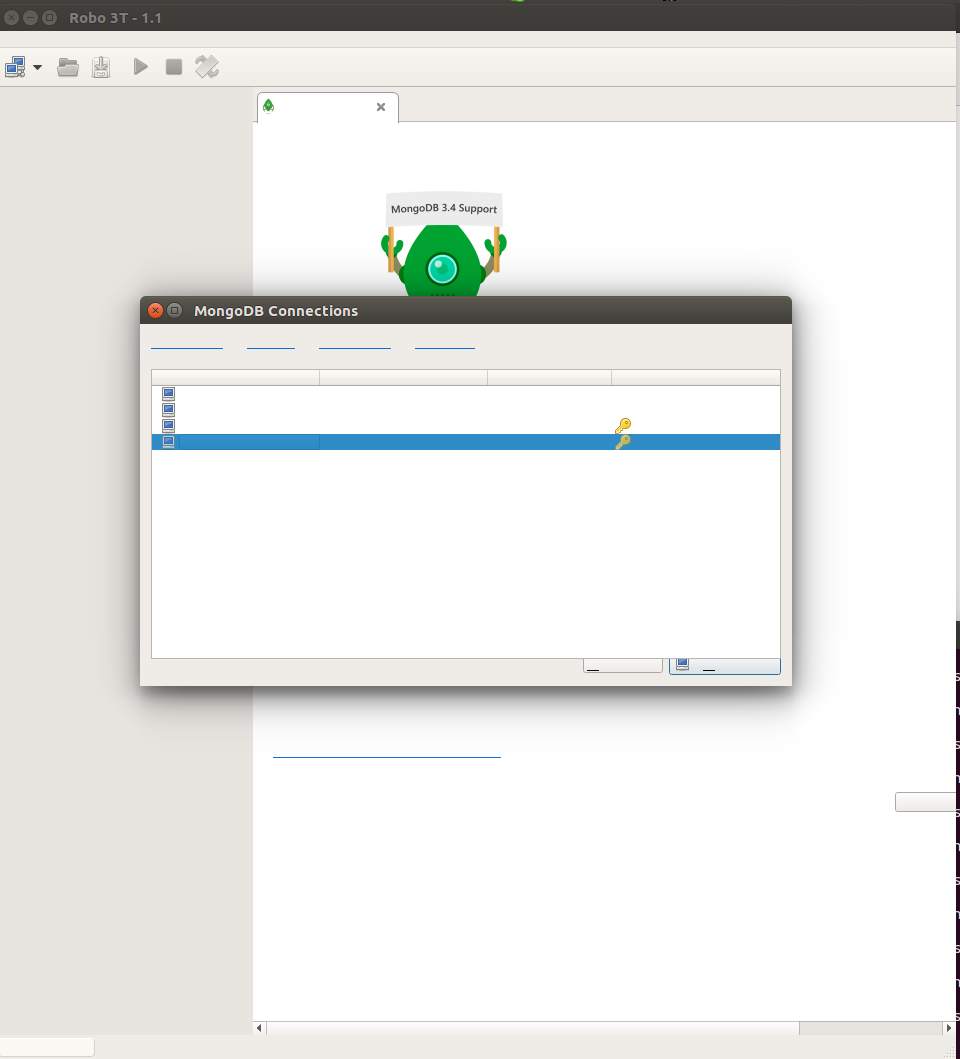
mgscreativa
on 7 Aug 2017
Its works!
Thanks @simsekgokhan
 FelipeRuizGarcia
on 10 Aug 2017
FelipeRuizGarcia
on 10 Aug 2017
I got the same error using Ubuntu 16.04 LTS. Moving those files out solved the problem. Thanks!
 dougbm
on 17 Aug 2017
dougbm
on 17 Aug 2017
Thanks!!! @rodislav
 miqueiaspenha
on 30 Aug 2017
miqueiaspenha
on 30 Aug 2017
Experienced the same problem on Ubuntu 17.10, Ubuntu 17.04, and Ubuntu 16.04 LTS.
Removing lib/libstdc++* fixed the problem. Thanks @simsekgokhan!
 Redsandro
on 16 Sep 2017
Redsandro
on 16 Sep 2017
Working on Ubuntu 17.04 and moving those files out solved the problem.
 spywarehunter
on 19 Sep 2017
spywarehunter
on 19 Sep 2017
The solution works on on ubuntu 16.06 LTS. Thanks a lot!!!
 bhargodevarya
on 20 Sep 2017
bhargodevarya
on 20 Sep 2017
Confirming on Linux Mint 18.2 Sonya. Removing lib/libstdc++* works.
 char0n
on 26 Sep 2017
char0n
on 26 Sep 2017
Thank you
@simsekgokhan
 jaffarc
on 1 Oct 2017
jaffarc
on 1 Oct 2017
Thanks @rodislav it works :dancer:
 websoftwares
on 2 Oct 2017
websoftwares
on 2 Oct 2017
`sudo tar -xf /opt/robo3t-1.1.1-linux-x86_64-c93c6b0.tar.gz
sudo ln -s /opt/robo3t-1.1.1-linux-x86_64-c93c6b0/bin/robo3t /usr/local/bin/robo3t
Now you can run robo3t in your terminal and it will work.`
 arpit-absyadav
on 6 Oct 2017
arpit-absyadav
on 6 Oct 2017
Hey Arpit, your comment is off topic :) and is more practical to update PATH in /etc/profile instead of polutting /use/local/bin.
rodislav
on 6 Oct 2017
It worked for me on Ubuntu 16.04
Thank you @simsekgokhan
 kswapnil213
on 16 Oct 2017
kswapnil213
on 16 Oct 2017
@simsekgokhan thanks the solution worked
 rahul356357
on 23 Oct 2017
rahul356357
on 23 Oct 2017
Deleting the libstdc++.so.6 file in the lib directory worked for me
 victor-3wp
on 24 Oct 2017
victor-3wp
on 24 Oct 2017
Deleted both libstdc++ files and it is now working. Ubuntu 17.10.
 imccausl
on 30 Oct 2017
imccausl
on 30 Oct 2017
Makes me wonder if you actually need that lib? Doesn't removing it break anything?
 vnenkpet
on 6 Nov 2017
vnenkpet
on 6 Nov 2017
Thaks a lot it resolved the problem
 Nayana-Amagi
on 7 Nov 2017
Nayana-Amagi
on 7 Nov 2017
Saved my day. Thanks!
 christianorossini
on 17 Nov 2017
christianorossini
on 17 Nov 2017
This solution worked! Many thanks!
 digitalh2o2
on 1 Dec 2017
digitalh2o2
on 1 Dec 2017
Thank you @rodislav
robo3t-1.1.1-linux-x86_64-c93c6b0
DISTRIB_ID=LinuxMint
DISTRIB_RELEASE=18.3
DISTRIB_CODENAME=sylvia
DISTRIB_DESCRIPTION="Linux Mint 18.3 Sylvia"
NAME="Linux Mint"
VERSION="18.3 (Sylvia)"
ID=linuxmint
ID_LIKE=ubuntu
PRETTY_NAME="Linux Mint 18.3"
VERSION_ID="18.3"
HOME_URL="http://www.linuxmint.com/"
SUPPORT_URL="http://forums.linuxmint.com/"
BUG_REPORT_URL="http://bugs.launchpad.net/linuxmint/"
VERSION_CODENAME=sylvia
UBUNTU_CODENAME=xenial
cat: /etc/upstream-release: Is a directory
For env above, it is happening too:
 rudiw
on 13 Dec 2017
rudiw
on 13 Dec 2017
Encountered this same issue while making a snap of the new robo3t. The proffered solution works for the snap too. The snap can be found: https://github.com/arubislander/robomongo-snap
 arubislander
on 18 Dec 2017
arubislander
on 18 Dec 2017
Hi All, again sorry for the inconvenience and for the delay. We have an enhancement to fix this problem. But, we cannot verify our fix for 16.04 (we can for 17.04), since we are unable to reproduce in our systems. We are asking your help to test the following beta for us (fingers crossed). Thanks in advance.
simsekgokhan
on 21 Dec 2017
@simsekgokhan Many Thanks it worked !!
 sangeeth18
on 28 Dec 2017
sangeeth18
on 28 Dec 2017
@rodislav , Thanks Worked me. :+1:
 Developer-Amit
on 29 Dec 2017
Developer-Amit
on 29 Dec 2017
@simsekgokhan 1.2 Beta is working fine on Ubuntu 17.10.
 stianl
on 2 Jan 2018
stianl
on 2 Jan 2018
Robo 3T 1.1.1 still only working on 17.04 after deleting libstdc++.so.6*.
 fernandokosh
on 18 Jan 2018
fernandokosh
on 18 Jan 2018
Faced the same issue with Ubuntu 17.10.
Deleting libstdc++ from lib folder worked for me.
Thanks @simsekgokhan @rodislav
 akshayarise
on 30 Jan 2018
akshayarise
on 30 Jan 2018
Encountered same issue:
his application failed to start because it could not find or load the Qt platform plugin "xcb"
Confirming on Linux Mint 18.3 Sylvia: Just running the command as mentioned above in the /lib folder will fix the issue.
rm libstdc++*.*
 ngminhtrung
on 2 Feb 2018
ngminhtrung
on 2 Feb 2018
Had the same issue on Ubuntu 16.04. It was resolved removing the libstdc++.. Thanks!
 kamatheuska
on 8 Feb 2018
kamatheuska
on 8 Feb 2018
I am facing the same issue on Ubuntu 14.04 for Robo 3T package (robo3t-1.1.1-linux-x86_64-c93c6b0.tar.gz) but it did not get resolved even after removing lib/libstdc++.
I am getting below two error on running ./robo3t after removal of libstdc++. in lib
./robo3t: /usr/lib/x86_64-linux-gnu/libstdc++.so.6: version `GLIBCXX_3.4.20' not found (required by ./robo3t)
./robo3t: /usr/lib/x86_64-linux-gnu/libstdc++.so.6: version `GLIBCXX_3.4.21' not found (required by ./robo3t)
 gauravparmar
on 15 Feb 2018
gauravparmar
on 15 Feb 2018
@simsekgokhan Joining late, but also confirming that beta 1.2 does work on Kubuntu 17.10.
 JSn1nj4
on 17 Feb 2018
JSn1nj4
on 17 Feb 2018
I am also having this issue in 17.04, Qt5.9.4
This application failed to start because it could not find or load the Qt platform plugin "xcb"
in "".

Reinstalling the application may fix this problem.
Aborted (core dumped)
I tried to remove the libstdc++* but got this error
error while loading shared libraries: libstdc++.so.6: cannot open shared object file: No such file or
directory
I am so new to Ubuntu and Qt, so I appreciate your help.
Not sure if this info will help:
echo $LD_LIBRARY_PATH
/usr/local/lib:/home/miminez/Qt5.9.4/Tools/QtCreator/lib/Qt/lib
Updating the Ubuntu version is not my option due to some dependencies.
 iammimi
on 21 Feb 2018
iammimi
on 21 Feb 2018
Related issues
 Imperial7
·
4Comments
Imperial7
·
4Comments
 axe-z
·
3Comments
axe-z
·
3Comments
 equero
·
3Comments
equero
·
3Comments
 rspeed
·
4Comments
rspeed
·
4Comments
 ghost
·
3Comments
ghost
·
3Comments
Most helpful comment
Hi guys, can you try the method below? It worked in our labs.