Robomongo: Can't edit/delete collection or documents [solved]
I'm using Mongodb Atlas and the connection with Robomongo is ok, but the problem is that i'm able to create or delete databases but not collections or documents.
I'm authenticated to the database as admin with Read and Write to any database. What can i do?
 HaraldBregu
All 7 comments
@HaraldBregu
Thanks a lot for your interest in Robomongo. We have just did a quick test, it works for us.
The problem seems to us related to permissions, we suggest to double check users, roles and permissions. Also please make sure you are connected to primary node one more time.

Please also see screenshots from a working example:


 simsekgokhan
on 8 Sep 2016
simsekgokhan
on 8 Sep 2016
@simsekgokhan i did exactly as you suggested, i created a new user with atlasAdmin Role in Atlas dashboard and than connected, but still cant delete or edit any document and collection. I can do it just from shell terminal.


// Cant do anything here.....

HaraldBregu
on 8 Sep 2016
When trying to update i have this error:

HaraldBregu
on 8 Sep 2016
@simsekgokhan i was not using the primary node from the cluster.
Now it work perfectly, thanks to the last error i found the solution.
Thank you
HaraldBregu
on 8 Sep 2016
Exactly, I was just writing that you are not connecting to primary.
Great that it works.
Support for Replica Sets is under development to be included in the next or the following release, which connects to primary automatically. This kind of problems will not exist in the future hopefully.
You can follow the latest releases and news here:
https://twitter.com/Robomongo
simsekgokhan
on 8 Sep 2016
Closing as solved
 juliashibalko
on 22 Sep 2016
juliashibalko
on 22 Sep 2016
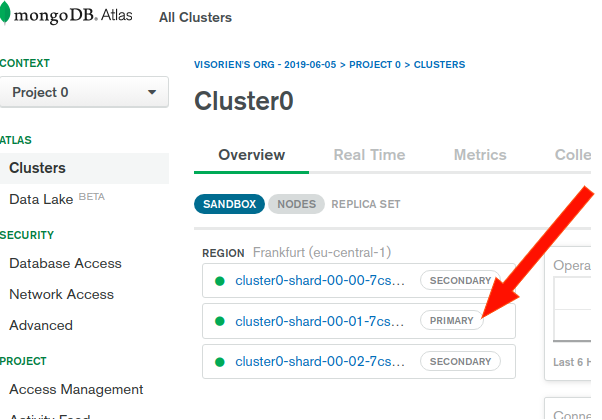
i was not using the primary node from the cluster.
In case anyone else didn't understand what he meant by this. It also took me a while to find the primary cluster. Here is a screenshot. Copy the long string that starts with cluster0 and place it into the Address field in Robomongo's connection interface.
 rotimi-best
on 30 Oct 2019
rotimi-best
on 30 Oct 2019
Related issues
 enBonnet
·
4Comments
enBonnet
·
4Comments
 perlun
·
4Comments
perlun
·
4Comments
 ghost
·
3Comments
ghost
·
3Comments
 OmisNomis
·
3Comments
OmisNomis
·
3Comments
 matgenois
·
4Comments
matgenois
·
4Comments
Most helpful comment
@simsekgokhan i was not using the primary node from the cluster.
Now it work perfectly, thanks to the last error i found the solution.
Thank you