Robomongo: Aggregate query causes skip/batch size controls to disappear and search results to be limited in 50 docs
Here is the query I was using:
db.getCollection('col_buckets').aggregate([
    {$match: {vDevId: "HMM1_5_F_17"}},
    {$limit: 500},
    {$sort: {startTime: -1}},
    {$unwind: "$values"},
    {$project: {'value': '$values.value', 'dischargeMs': '$values.dischargeMs', updateTime: "$values.updateTime",_id:0}},
    {$sort: {"updateTime": -1}}
    ])
Basically pulling values from an array in several documents.
The skip/batch controls disappear after running the query. The following screen shots show what happens.
Before running query...

After running query...

 LanceBeasley
All 24 comments
So it seems that 0.9 changed the way aggregates are run, using a cursor instead of just returning all documents. I'm reverting to the 0.8 releases until this can issue can be resolved. :(
 kfitzgerald
on 18 Mar 2016
kfitzgerald
on 18 Mar 2016
Confirmed. We will fix this problem in newest release. Thank you for reporting this issue!
 schetnikovich
on 25 Mar 2016
schetnikovich
on 25 Mar 2016
@LanceBeasley @kfitzgerald As a workaround, until we will make it more convenient for users, you can view all documents of the aggregate command using the following script:
var cursor = db.collection.aggregate([ ... ]);
while (cursor.hasNext()) {
   print(cursor.next());
}
If you have less than 10,000 documents this will probably work for you. If you have more, or you still need to view documents in a smaller portions, you can do the following:
var cursor = db.collection.aggregate([ ... ]);
cursor.shellPrint()
Now run this script. If you want to view the next page, select cursor.shellPrint() text and run only this selected script (Ctrl/Cmd + Enter):

Function shellPrint() is a part of MongoDB shell and it simply iterates over the cursor by DBQuery.shellBatchSize documents (which is 50 by default).
If you need to start from the beginning, remove any selection, and execute full script. You'll be on the first page.
Advanced
Method shellPrint is called automatically by MongoDB shell, when you "execute" cursor. It means that you can have a shorter version:

schetnikovich
on 30 Mar 2016
Thanks for the tip!
_Lance Beasley_
ENCO Electronic Systems http://www.encoelectronics.com/
On Wed, Mar 30, 2016 at 2:56 AM, Dmitry Schetnikovich <
[email protected]> wrote:
@LanceBeasley https://github.com/LanceBeasley @kfitzgerald
https://github.com/kfitzgerald As a workaround, until we will fix this
issue, you can view all documents of the aggregate command using the
following script:var cursor = db.collection.aggregate([ ... ]);
while (cursor.hasNext()) {
print(cursor.next());
}If you have less than 10,000 documents this will probably work for you. If
you have more, or you still need to view documents in a smaller portions,
you can implement simple paging yourself:function showNextPage(cursor) {
var n = 0;
while (cursor.hasNext() && n < 50) {
print(cursor.next());
n++;
}
}And use it in the following way:
var cursor = db.collection.aggregate([ ... ]);
showNextPage(cursor);If you want to view next page, select nextPage(cursor) text and run this
selected script (Ctrl/Cmd + Enter):[image: next-page]
https://cloud.githubusercontent.com/assets/678660/14135355/afe8b866-f665-11e5-8478-ec0bf69b577d.png—
You are receiving this because you were mentioned.
Reply to this email directly or view it on GitHub
https://github.com/paralect/robomongo/issues/1058#issuecomment-203305989
LanceBeasley
on 30 Mar 2016
As another workaround, you can specify { $out: "temp_result" } as the last step of the aggregation pipeline which will put the results in the temp_result collection. You can then view and query them as normal and drop the collection once you're done with it.
 stasm
on 23 Aug 2016
stasm
on 23 Aug 2016
any new report?
 WannerZoer
on 20 Oct 2016
WannerZoer
on 20 Oct 2016
Hi @WannerZoer,
this issue is in our to-do list. Now we are working on Replica Set implementation. Please check our feature list for future release: https://github.com/paralect/robomongo#whats-planned-for-the-next-releases
At moment we include this ticket into release, we will get back to you with all updates!
 juliashibalko
on 25 Oct 2016
juliashibalko
on 25 Oct 2016
Is there really no way to display more than 50 aggregated records?
 Nowaker
on 17 May 2017
Nowaker
on 17 May 2017
Hi @Nowaker , currently the workaround below, from https://github.com/Studio3T/robomongo/issues/1058#issuecomment-203305989, seems to do the trick.
var cursor = db.collection.aggregate([ ... ]);
while (cursor.hasNext()) {
   print(cursor.next());
}
 simsekgokhan
on 18 May 2017
simsekgokhan
on 18 May 2017
This does not work for me:
var cursor = db.collection.aggregate([ ... ]);
while (cursor.hasNext()) {
   print(cursor.next());
}
When I ran it, robomongo appeared busy for a few seconds then suddenly crashed. all unsaved scripts were lost.
env: windows 10 pro, Robomongo 1.0, MongoDB server 3.4.4
 abulhawa
on 11 Jun 2017
abulhawa
on 11 Jun 2017
Hi @abulhawa , Robomongo 1.0 does not support MongoDB 3.4.
Please use Robomongo 1.1 - Beta version with MongoDB 3.4 Support.
simsekgokhan
on 12 Jun 2017
Hi @simsekgokhan, thanks for this. I tried it, but Robomongo still crashes.
abulhawa
on 12 Jun 2017
@abulhawa , I just tried with Windows 10, was not able to reproduce the crash.
Can you please create a new ticket here https://github.com/Studio3T/robomongo/issues/new.
Please also include crash report/log file and exact/very similar script that you are running for further investigation.
simsekgokhan
on 12 Jun 2017
still only shows 50 using latest 1.1 release.
 thechile
on 16 Jun 2017
thechile
on 16 Jun 2017
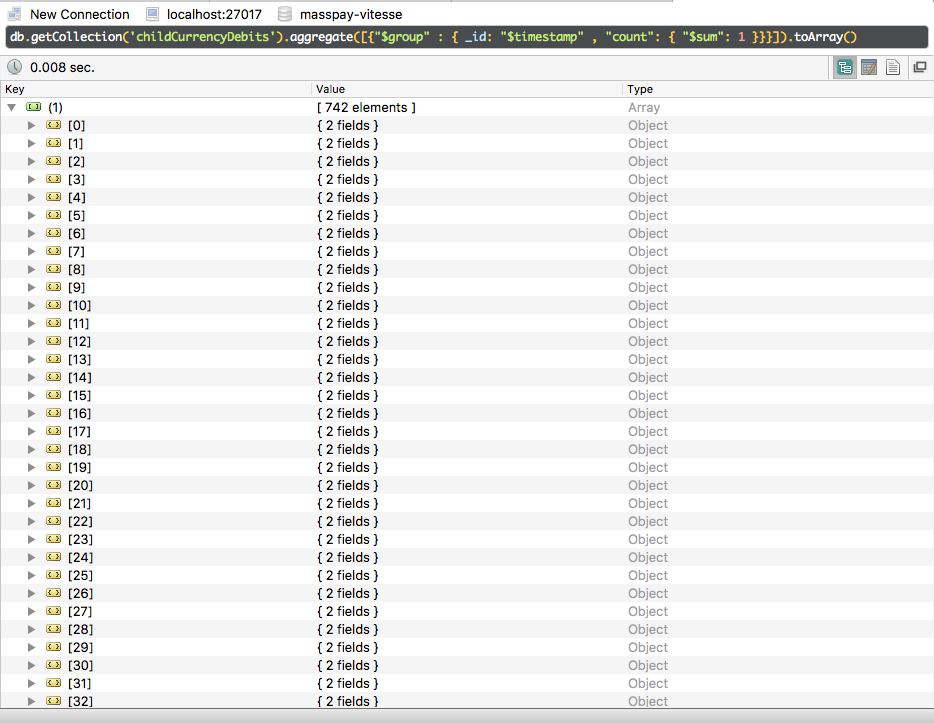
FINALLY GOT PERFECT SOLUTION AFTER TRYING FOR DAYS!!..
try using toArray with the query, it will return all the records in Array.
eg:
db.getCollection('debits').aggregate([{"$group" : { _id: "$timestamp"}}]).toArray()
 shishir99111
on 21 Jun 2017
shishir99111
on 21 Jun 2017
i'm using 1.1.1 version and still get this issue.
".toArray()" trick works, is a good workaround.
 yalopov
on 3 Jul 2017
yalopov
on 3 Jul 2017
You must be careful for use .toArray(), because it return all the documents to the memory. If many documents were returned, it can be fill the memory so much
 leandrosa
on 4 Jul 2017
leandrosa
on 4 Jul 2017
It'd be great to have this fixed! What's the rough cause, if I can ask?
 crertel-packlane
on 17 Aug 2017
crertel-packlane
on 17 Aug 2017
@crertel-packlane Studio3T bought RoboMongo, thats why its never getting fixed.
 donnyv
on 22 Aug 2017
donnyv
on 22 Aug 2017
Thanks for the trick but why it has not fixed so long time.
 benevbright
on 26 Oct 2017
benevbright
on 26 Oct 2017
As of the 0.9 release, results of a query are being returned as a cursor instead of just returning all documents. Otherwise one wouldn't be able to run larger queries. Not being able to iterate over the results makes this improvement insufficient. We will review this decision and -if needed - revert the change.
In the meantime, please use the $out stage to dump the results to a temp collection.
 tomasznaumowicz
on 27 Oct 2017
tomasznaumowicz
on 27 Oct 2017
As of 1.2.1 this still is not fixed. Is anyone maintaining this project?
 RachelScodes
on 18 Oct 2018
RachelScodes
on 18 Oct 2018
@RachelScodes it is working for me, robo 3T 1.2.1, on windows 10, MongoDB 3.6.3
abulhawa
on 18 Oct 2018
Hi all, sorry for the long delay, this issue should be fixed in Robo 3T 1.2.
Please see: https://blog.robomongo.org/robo-3t-1-2/#a2
@RachelScodes
Your problem might be different than this ticket (which is for "Aggregate query results are not pagaeble" problem). Please also see the blog link above.
Can you give more details about your problem?
Error screenshot, your script, versions of your OS, Robo, MongoDB. Thanks.
simsekgokhan
on 16 Nov 2018
Related issues
 OmisNomis
·
3Comments
OmisNomis
·
3Comments
 imkratos
·
4Comments
imkratos
·
4Comments
 kphamilton
·
3Comments
kphamilton
·
3Comments
 stennie
·
4Comments
stennie
·
4Comments
 murshid1988
·
3Comments
murshid1988
·
3Comments
Most helpful comment
@LanceBeasley @kfitzgerald As a workaround, until we will make it more convenient for users, you can view all documents of the
aggregatecommand using the following script:If you have less than 10,000 documents this will probably work for you. If you have more, or you still need to view documents in a smaller portions, you can do the following:
Now run this script. If you want to view the next page, select
cursor.shellPrint()text and run only this selected script (Ctrl/Cmd + Enter):Function
shellPrint()is a part of MongoDB shell and it simply iterates over the cursor byDBQuery.shellBatchSizedocuments (which is 50 by default).If you need to start from the beginning, remove any selection, and execute full script. You'll be on the first page.
Advanced
Method
shellPrintis called automatically by MongoDB shell, when you "execute" cursor. It means that you can have a shorter version: