Hi,
I have been trying to run nf-core RNA-Seq on the Bianca cluster at Uppmax. The main challenge there is that there is no ordinary internet connection available. I got some advice from NBIS, but I still cannot run it since I cannot get access to the uppmax profile. Is there a way to get around this? I did the following:
First I ran nf-core through nextflow on the Rackham cluster:
module load bioinfo-tools
module load Nextflow/20.04.0-edge

mkdir nfxdir
cd nfxdir
export NXF_HOME=`pwd`
cd ..
nextflow pull nf-core/rnaseq
nextflow run nf-core/rnaseq -profile uppmax #not sure this line is needed
Then I copied the nfxdir directory from Rackham to my account at Bianca
I then ran the following on Bianca
module load bioinfo-tools
module load Nextflow/20.04.0-edge

export NXF_HOME=`some long path`

export NXF_OFFLINE='TRUE'
Then when I run it, I get the following problem (which I don’t get at Rackham):
$ nextflow run nf-core/rnaseq -profile uppmax # I realize some params are missing, but if fails no matter what:
Unknown configuration profile: ‘uppmax’
I'm not sure I'm doing this the right way? Is there a way to make this work?
Best,
Johan
 johan-gson
All 22 comments
Hi @johan-gson I can maybe advise you of ways around the issue but it's probably better to put you in touch with others who have maybe experienced similar issues! Ping @MaxUlysse @alneberg @ewels @mahesh-panchal
 drpatelh
on 29 Oct 2020
drpatelh
on 29 Oct 2020
We would probably had more information on the nf-core/configs repo as well
 MaxUlysse
on 29 Oct 2020
MaxUlysse
on 29 Oct 2020
Can you have a look at this guide, it might be able to help you: https://www.github.com/SciLifeLab/Sarek/tree/master/docs%2FINSTALL_BIANCA.md
Probably not fully up to date, but I have sarek users on bianca, and it definitely helped them
MaxUlysse
on 29 Oct 2020
Hi, thank you for your help! It seems that they are doing something very similar to what I have done. Perhaps it is possible to somehow download the uppmax profile as well, and place that locally? I just don't know how?
johan-gson
on 29 Oct 2020
Is the file configs/conf/uppmax.config the same thing as the uppmax profile? can I somehow install that locally and skip the profile flag?
johan-gson
on 29 Oct 2020
Thanks @MaxUlysse ! Kudos to the docs 😎
Have you seen the docs for the nf-core download command @johan-gson ?
drpatelh
on 29 Oct 2020
I tried this on Rackham, but got stuck on that it couldn't find nf-core (since this is run through nextflow I guess it cannot be run directly), and I didn't get how to do it. Maybe I should experiment a bit more with this...
johan-gson
on 29 Oct 2020
nf-core tools is its own Python package that you can install via Bioconda or pip. It does require Nextflow to be installed too but in theory you can install it anywhere, download the files with nf-core download and then transfer them to Uppmax.
drpatelh
on 29 Oct 2020
As soon as I can have an access to a computer, my plan is to remake this sarek specific docs into a broader nf-core one in the nf-core/configs repo
MaxUlysse
on 30 Oct 2020
Is the file configs/conf/uppmax.config the same thing as the uppmax profile? can I somehow install that locally and skip the profile flag?
Your can try that, it should actually work
MaxUlysse
on 30 Oct 2020
How would I do that, exactly?
johan-gson
on 30 Oct 2020
i.e. I realize I can download the file, but I don't know where to put it and if I need to do something else as well?
johan-gson
on 30 Oct 2020
@johan-gson sorry, I was on sick leave.
You can put the file anywhere, just need to specify its path when launching your job with nextflow:
nextflow run ...... -c /path/to/file.config
Nice, this sounds like it is worth a try, thanks!
johan-gson
on 3 Nov 2020
Hmm, this seems to give me new problems. I should probably try the download command. Do I need to have nextflow installed for that? is it possible to install it on my Windows-computer (i.e. in Linux for Windows, Ubuntu). Unless it is very large? What would be your recommendation? I have access to Rackham, but I don't have an account there. I also have access to Hebbe, I think I only have my personal account. And then I have my Windows computer. And google colab.
johan-gson
on 4 Nov 2020
It seems I could run it on google colab, i.e. the download command. Others may find that useful, here's a link to the notebook: https://github.com/johan-gson/nf-core_on_Bianca/blob/main/DownloadOfflineFiles.ipynb
johan-gson
on 4 Nov 2020
Btw, just press the "open in colab" button if you are not used to this.
johan-gson
on 4 Nov 2020
Hi again,
I'm having trouble getting this to run with the download command - I get the following problem (singularity images):
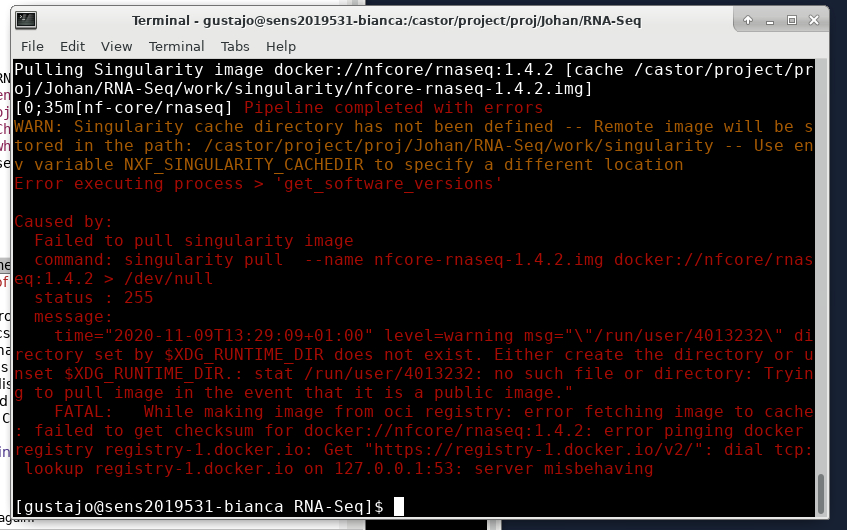
I prepared the offline folder using the google colab script above. What surprises me is that the singularity folder is empty, is that really how it should be? I did supply the --singularity flag together with the download command?
My script looks like this (copying text doesn't seem to work when connected to Bianca via chrome):
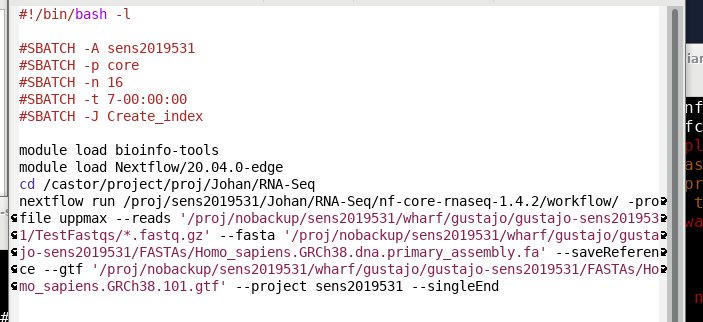
I have no idea what to do to fix this.
johan-gson
on 9 Nov 2020
Small note that this kind of discussion might be easier (faster) over Slack. We have an #uppmax channel on the nf-core slack: https://nfcore.slack.com/archives/CPHN84NQ4
You can join the nf-core Slack here: https://nf-co.re/join
 ewels
on 10 Nov 2020
ewels
on 10 Nov 2020
I would do this by running nf-core download on rackham. Singularity is installed there so it should work. It doesn't take loads of resources or space so it should be fine to run in your home directory.
I would be surprised if Singularity is installed by default on Google Colab? There should be an image file in that directory so if it's blank then it hasn't worked. If the image is not found there then Nextflow will try to download it.
ewels
on 10 Nov 2020
Hi! I have ran into similar problems.I am not sure it applies to your problem, but i am going to show you how i have done it:
The first step is to download all dependencies to my rackham project; The easiest way for me has been to get both the nf-core pipeline in question and the nf-core configs. i have done it by just cloning the repos, but i guess you could use the fancy nf-core download options.
Then you need to get the singularity images;
I have done it by starting a interactive job and then set my caches to the to a directory with enough space:
export SINGULARITY_LOCALCACHEDIR=.
export SINGULARITY_CACHEDIR=.
singularity pull nfcore project # fill in what you need
when that is finished you should have all the dependencies you need. Now you sftp that over to your bianca project via the wharf and move things to where they are supposed to be (i see you still have things in your wharf area). you can also find most of the ref genomes you need already there (/sw/data/uppnex/ToolBox/ReferenceAssemblies/ ).
I have found that if the nf-core pipelines dont find what they need they try to download it, and then you run into these types of problems.
I hope this has helped you and if you run into any more problems i would gladly help
 arontommi
on 10 Nov 2020
arontommi
on 10 Nov 2020
Thanks for the help! I have moved this discussion to the slack channel as suggested, and will therefore close this issue.
johan-gson
on 12 Nov 2020
Related issues
 prmac
·
10Comments
prmac
·
10Comments
 sstadick
·
6Comments
sstadick
·
6Comments
 carrere
·
11Comments
carrere
·
11Comments
 olgabot
·
7Comments
drpatelh
·
5Comments
olgabot
·
7Comments
drpatelh
·
5Comments