Rn-fetch-blob: download error on some devices
an error occured:
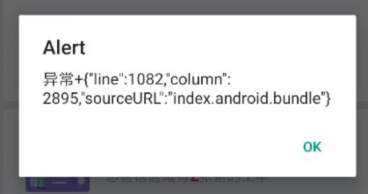
React Native Environment Info:
System:
OS: Windows 7
CPU: (4) x64 Intel(R) Core(TM) i5-6400 CPU @ 2.70GHz
Memory: 8.12 GB / 15.88 GB
Binaries:
Node: 8.12.0 - F:\install\nodejs\node.EXE
Yarn: 1.9.4 - C:\Users\GDYTAppData\Roaming\npmyarn.CMD
npm: 6.4.1 - F:\install\nodejs\npm.CMD
"rn-fetch-blob": "^0.10.15"
my code:
  RNFetchBlob.config({
    addAndroidDownloads: {
      useDownloadManager: true,
      title: "xxxx.apk",
      description: "xxxx",
      mime: "application/vnd.android.package-archive",
      mediaScannable: true,
      notification: true,
      path: RNFetchBlob.fs.dirs.DownloadDir + "/xxxx-" + version + ".apk"
    }
  })
    .fetch("GET", xxxxxxxx)
    .then(res => {
      android.actionViewIntent(
        res.path(),
        "application/vnd.android.package-archive"
      );
    })
 Jeijie
All 3 comments
@Jeijie You can check your file in DownloadDir folder. if it is exist and downloaded success. Please you can follow me to fix it. I have same issue on Mi A1( Android 9).
- Go to RNFetchBlob class in "node_modules\rn-fetch-blob\android\src\main\java\com\RNFetchBlob\RNFetchBlob.java"
- Find method "actionViewIntent"
- Replace "intent.setFlags(Intent.FLAG_GRANT_READ_URI_PERMISSION);"=>"intent.setFlags(Intent.FLAG_GRANT_READ_URI_PERMISSION|Intent.FLAG_ACTIVITY_NEW_TASK);"
- Add uses-permission: android:name="android.permission.REQUEST_INSTALL_PACKAGES" to your "AndroidManifest.xml" app.
 huytran123
on 28 May 2019
huytran123
on 28 May 2019
Same problem and this fixed. @Jeijie I suggest you review the name of issue.
 gbferreira
on 17 Jun 2019
gbferreira
on 17 Jun 2019
@gbferreira current version 0.10.15 not fixed this issue, why do you closed it? i think they fixe it and update version and then close this issue.
If you can fix it and update version, please do it. When i delete all node_modules, i have to fix it in my code :(,
huytran123
on 18 Jun 2019
Related issues
 minh-dai
·
3Comments
minh-dai
·
3Comments
 drewandre
·
4Comments
drewandre
·
4Comments
 baotoan1905
·
3Comments
baotoan1905
·
3Comments
 kevinresol
·
5Comments
kevinresol
·
5Comments
 adityakmr7
·
4Comments
adityakmr7
·
4Comments
Most helpful comment
@Jeijie You can check your file in DownloadDir folder. if it is exist and downloaded success. Please you can follow me to fix it. I have same issue on Mi A1( Android 9).