Rls: Cannot install rls (extension unusable)
Nightly exclued the block from rls-preview to build rustc without it, and now the extension stopped working?
It is asking me to install the Service.
Then this happens:
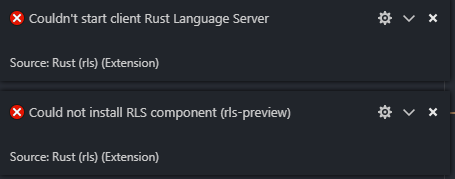
Log:
[Error - 10:09:40 AM] Starting client failed
Error: Error starting up rls.
    at ClientWorkspace.<anonymous> (C:\Users\Jens\.vscode\extensions\rust-lang.rust-0.4.9\out\src\extension.js:364:23)
    at Generator.throw (<anonymous>)
    at rejected (C:\Users\Jens\.vscode\extensions\rust-lang.rust-0.4.9\out\src\extension.js:14:65)
    at <anonymous>
 jens1o
All 24 comments
Hmm, I think the RLS is missing from today's nightly, but it shouldn't be renamed (and Rustup should not install the nightly update unless you force it to). Do you have the output from when you ran rustup update?
 nrc
on 24 Aug 2018
nrc
on 24 Aug 2018
It's true, nightlies did not ship with RLS today (waiting for https://github.com/rust-lang/rust/pull/53610):
$ rustup update
info: syncing channel updates for 'nightly-x86_64-unknown-linux-gnu'
info: latest update on 2018-08-24, rust version 1.30.0-nightly (63d66494a 2018-08-23)
warning: component 'rls-preview' is not available anymore on target 'x86_64-unknown-linux-gnu'
 Xanewok
on 24 Aug 2018
Xanewok
on 24 Aug 2018
Is there anything I can do?
No, @nrc I didn't have the output of it anymore.
jens1o
on 24 Aug 2018
Confirming that nightlies got built without rls-preview for some reason. I just updated on x86_64-apple-darwin, and it was removed. Output below:
rustup update
$ rustup update nightly
info: syncing channel updates for 'nightly-x86_64-apple-darwin'
info: latest update on 2018-08-24, rust version 1.30.0-nightly (63d66494a 2018-08-23)
warning: component 'rls-preview' is not available anymore on target 'x86_64-apple-darwin'
info: downloading component 'rustc'
 58.9 MiB /  58.9 MiB (100 %)   9.9 MiB/s ETA:   0 s
info: downloading component 'rust-std'
 46.5 MiB /  46.5 MiB (100 %)  11.5 MiB/s ETA:   0 s
info: downloading component 'cargo'
info: downloading component 'rust-docs'
info: downloading component 'clippy-preview'
info: downloading component 'rust-src'
info: downloading component 'rust-analysis'
info: removing component 'rustc'
info: removing component 'rust-std'
info: removing component 'cargo'
info: removing component 'rust-docs'
info: removing component 'clippy-preview'
info: removing component 'rust-src'
info: removing component 'rust-analysis'
info: removing component 'rls-preview'
info: installing component 'rustc'
info: installing component 'rust-std'
info: installing component 'cargo'
info: installing component 'rust-docs'
info: installing component 'clippy-preview'
info: installing component 'rust-src'
info: installing component 'rust-analysis'

  nightly-x86_64-apple-darwin updated - rustc 1.30.0-nightly (63d66494a 2018-08-23)
 urschrei
on 24 Aug 2018
urschrei
on 24 Aug 2018
Is it possible to prevent rustup from updating if rls isn't available?
 o01eg
on 24 Aug 2018
o01eg
on 24 Aug 2018
It was that way before, not sure why the nightlies were released without RLS.
For now you can use the workaround from https://github.com/rust-lang-nursery/rls/issues/641#issuecomment-415700561
Xanewok
on 24 Aug 2018
Also experiencing this. Output from rustup update:
info: syncing channel updates for 'stable-x86_64-unknown-linux-gnu'
info: syncing channel updates for 'nightly-x86_64-unknown-linux-gnu'
info: latest update on 2018-08-24, rust version 1.30.0-nightly (63d66494a 2018-08-23)
warning: component 'rls-preview' is not available anymore on target 'x86_64-unknown-linux-gnu'
info: downloading component 'rustc'
 70.5 MiB /  70.5 MiB (100 %)   8.0 MiB/s ETA:   0 s
info: downloading component 'rust-std'
 51.7 MiB /  51.7 MiB (100 %)   1.4 MiB/s ETA:   0 s
info: downloading component 'cargo'
  4.5 MiB /   4.5 MiB (100 %)   3.0 MiB/s ETA:   0 s
info: downloading component 'rust-docs'
  8.3 MiB /   8.3 MiB (100 %)   6.4 MiB/s ETA:   0 s
info: downloading component 'rust-std' for 'armv7-unknown-linux-gnueabihf'
 49.5 MiB /  49.5 MiB (100 %)   7.8 MiB/s ETA:   0 s
info: downloading component 'clippy-preview'
info: downloading component 'rust-std' for 'wasm32-unknown-unknown'
 10.6 MiB /  10.6 MiB (100 %)   8.1 MiB/s ETA:   0 s
info: downloading component 'rustfmt-preview'
info: downloading component 'rust-analysis'
info: downloading component 'rust-src'
info: removing component 'rustc'
info: removing component 'rust-std'
info: removing component 'cargo'
info: removing component 'rust-docs'
info: removing component 'rust-std' for 'armv7-unknown-linux-gnueabihf'
info: removing component 'clippy-preview'
info: removing component 'rust-std' for 'wasm32-unknown-unknown'
info: removing component 'rustfmt-preview'
info: removing component 'rust-analysis'
info: removing component 'rust-src'
info: removing component 'rls-preview'
info: installing component 'rustc'
The output ends abruptly because I tried to cancel it. It was already too late though so I currently don't have a working RLS.
 sunjay
on 24 Aug 2018
sunjay
on 24 Aug 2018
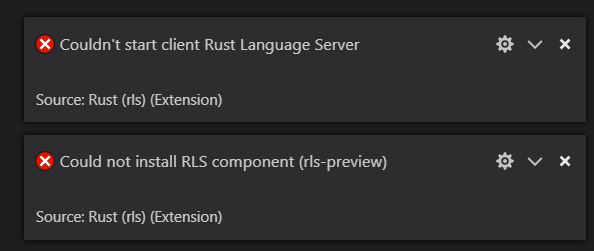
Same happens to me:
 dergroncki
on 25 Aug 2018
dergroncki
on 25 Aug 2018
Now, nightly(1.30.0-nightly (39e6ba821 2018-08-25)) build has RLS.
If you run rustup update nightly, you can add RLS.
 h-michael
on 26 Aug 2018
h-michael
on 26 Aug 2018
Yup! Confirmed! I was able to get it to work. The latest version is 39e6ba821 2018-08-25 exactly like you said. :)
You may have to run the following after rustup update in order to get back the right components:
rustup component add --toolchain nightly rls-preview rust-analysis rust-src
Works for me again, too.
jens1o
on 26 Aug 2018
This appears to have broken again with the latest nightly:
C:\Source\gatherer>rustup update
info: syncing channel updates for 'nightly-x86_64-pc-windows-msvc'
info: latest update on 2018-08-29, rust version 1.30.0-nightly (7061b2775 2018-08-28)
warning: component 'rls-preview' is not available anymore on target 'x86_64-pc-windows-msvc'
 jntrnr
on 29 Aug 2018
jntrnr
on 29 Aug 2018
It is broken only because rls and a few other tools couldn't be compiled for that nightly.
https://rust-lang-nursery.github.io/rust-toolstate/ <- shows you if everything for that nightly is fine
 razor950
on 29 Aug 2018
razor950
on 29 Aug 2018
@razor950 At least as I understand it nightlies shouldn't be available if the RLS isn't included (as mentioned earlier in this thread)
jntrnr
on 29 Aug 2018
ah, that would make sense but I've had it happen a few times already so I wasn't sure what the norm was.
Thanks for the clarification and hopefully it does get fixed soon, I'll rollback my nightly for now though.
razor950
on 29 Aug 2018
I'm having the same issue today:
Roberts-MacBook-Pro:src bert$ rustup update
info: syncing channel updates for 'stable-x86_64-apple-darwin'
info: syncing channel updates for 'nightly-x86_64-apple-darwin'
info: latest update on 2018-09-15, rust version 1.30.0-nightly (2ab3eba30 2018-09-14)
error: component 'rls-preview' for 'x86_64-apple-darwin' is unavailable for download
info: checking for self-updates
stable-x86_64-apple-darwin unchanged - rustc 1.29.0 (aa3ca1994 2018-09-11)
nightly-x86_64-apple-darwin update failed - rustc 1.22.0-nightly (f6d751454 2017-10-17)
$ rustup 'rls-preview' for 'x86_64-apple-darwin' is unavailable for download
error: Found argument 'rls-preview' which wasn't expected, or isn't valid in this context
 bertbeck
on 16 Sep 2018
bertbeck
on 16 Sep 2018
@bertbeck This will happen occasionally, when Rust upstream changes break RLS.
This is the intended behavior. Instead of silently removing the tools you want, rustup will warn you they aren't available.
Simply try updating again sometime later, after the components get fixed. Use update --force if you want to update and lose RLS/clippy/rustfmt.
 GabrielMajeri
on 16 Sep 2018
GabrielMajeri
on 16 Sep 2018
For those failing rustup update because of rls-preview, run rustup component remove rls-preview then run rustup update.
 0b01
on 6 Nov 2018
0b01
on 6 Nov 2018
For those failing
rustup updatebecause ofrls-preview, runrustup component remove rls-previewthen runrustup update.
Just want to add that removing rls-preview this way fixed my problem with rls being unavailable for download.
 AN3223
on 5 Jan 2019
AN3223
on 5 Jan 2019
@AN3223 note that this will install the current nightly, but you won't be able to install RLS for nightly again until it's fixed. So you'll have nightly rust without RLS
 leshow
on 7 Jan 2019
leshow
on 7 Jan 2019
Current solution:
rustup toolchain install nightly-2019-01-15
rustup default nightly-2019-01-15
rustup component add rls-preview rust-analysis rust-src --toolchain nightly-2019-01-15
 siman
on 22 Jan 2019
siman
on 22 Jan 2019
Does anyone know a solution for this in 2021?
 henryboisdequin
on 12 Jan 2021
henryboisdequin
on 12 Jan 2021
Find the latest nightly version that rls still builds on using https://rust-lang-nursery.github.io/rust-toolstate/
It'll be 1 day prior to the "in this state since" date - assuming it's failing.
At the time of this post that version is nightly-2021-07-05Download the latest version of nightly that rls still builds on, and override your project's rust version
rustup toolchain install nightly-2021-07-05
rustup override set nightly-2021-07-05-x86_64-unknown-linux-gnu
rustup component add rls rust-analysis rust-src
 hbriese
on 20 Jul 2021
hbriese
on 20 Jul 2021
This page also lists the latest version with rls and other components: https://rust-lang.github.io/rustup-components-history/
(2021-08-17 right now)
 MingweiSamuel
on 7 Sep 2021
MingweiSamuel
on 7 Sep 2021
Related issues
 benmarten
·
3Comments
benmarten
·
3Comments
 AndiDog
·
5Comments
AndiDog
·
5Comments
 dnsco
·
5Comments
dnsco
·
5Comments
 ZoeyR
·
3Comments
ZoeyR
·
3Comments
 dpc
·
4Comments
dpc
·
4Comments
Most helpful comment
For those failing
rustup updatebecause ofrls-preview, runrustup component remove rls-previewthen runrustup update.