Rls: Rename symbol doesn't rename shadowed variables
Versions
Command line tools:
$ uname -a
Darwin hodor.local 16.7.0 Darwin Kernel Version 16.7.0: Thu Jun 15 17:36:27 PDT 2017; root:xnu-3789.70.16~2/RELEASE_X86_64 x86_64
$ rustup -V
rustup 1.5.0 (92d0d1e9e 2017-06-24)
$ rustup run nightly -- rls -V
rls 0.1.0-nightly (5d4bbd9 2017-08-07)
$ rustup run nightly -- rustc -V
rustc 1.21.0-nightly (2bb8fca18 2017-08-23)
VS Code: 1.15.1
Extension: v0.2.2
How to reproduce
1 ) Create code similar to this:
use std::io; // line 1

fn main() {
    println!("Please enter a number: ");
    let mut guess = String::new(); // start off as a String
    io::stdin().read_line(& mut guess).expect("Failed to read line!");
    println!("Guess (raw): {}", guess);
    // ^-- all "guess" symbols here wil be renamed

    let guess : u32 = guess.trim().parse().expect("Failed to parse as number!");
    //  ^             ^
    //  |             |
    //  |             +--------------------- will be renamed
    //  +----------------------------------- will not be renamed
    println!("Guess (parsed): {}", guess);
    //                             ^-------- will not be renamed
}
2) Place cursor on first instance of guess variable (line 5)
3) F2 (to invoke Rename Symbol)
4) Only symbols refer to guess as aString type will be renamed (see comments).
Logging (RUST_LOG=rls_analysis=debug)
 booyaa
All 2 comments
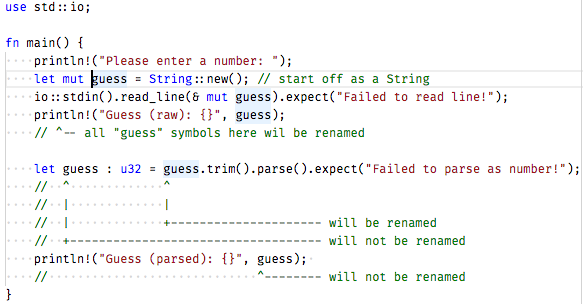
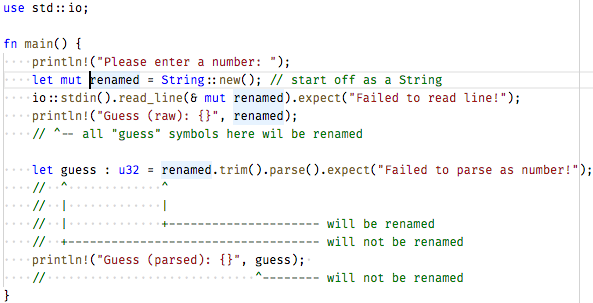
I've also taken some screenshots of before and after, it's interesting to note what ever powers semantic highlighting is probably the same thing that determines what symbols to rename.
before
after
booyaa
on 24 Aug 2017
This is the correct behaviour, no? They are two different variables, so they should be renamed separately.
 nrc
on 25 Aug 2017
nrc
on 25 Aug 2017
👍6
Was this page helpful?
0 / 5 - 0 ratings
Related issues
 wagnerf42
·
3Comments
wagnerf42
·
3Comments
 dpc
·
4Comments
dpc
·
4Comments
 liufuyang
·
5Comments
liufuyang
·
5Comments
 sunshowers
·
5Comments
sunshowers
·
5Comments
 1yefuwang1
·
3Comments
1yefuwang1
·
3Comments
Most helpful comment
This is the correct behaviour, no? They are two different variables, so they should be renamed separately.