Rke: external etcd - failed to update cluster after initial setup
RKE version:
v0.2.2 / v0.2.4
Docker version: (docker version,docker info preferred)
Client:
 Version:           18.06.3-ce
 API version:       1.38
 Go version:        go1.10.3
 Git commit:        d7080c1
 Built:             Wed Feb 20 02:26:51 2019
 OS/Arch:           linux/amd64
 Experimental:      false

Server:
 Engine:
  Version:          18.06.3-ce
  API version:      1.38 (minimum version 1.12)
  Go version:       go1.10.3
  Git commit:       d7080c1
  Built:            Wed Feb 20 02:28:17 2019
  OS/Arch:          linux/amd64
  Experimental:     false
Operating system and kernel: (cat /etc/os-release, uname -r preferred)
NAME="Red Hat Enterprise Linux Server"
VERSION="7.5 (Maipo)"
ID="rhel"
ID_LIKE="fedora"
VARIANT="Server"
VARIANT_ID="server"
VERSION_ID="7.5"
PRETTY_NAME="Red Hat Enterprise Linux Server 7.5 (Maipo)"
ANSI_COLOR="0;31"
CPE_NAME="cpe:/o:redhat:enterprise_linux:7.5:GA:server"
HOME_URL="https://www.redhat.com/"
BUG_REPORT_URL="https://bugzilla.redhat.com/"

REDHAT_BUGZILLA_PRODUCT="Red Hat Enterprise Linux 7"
REDHAT_BUGZILLA_PRODUCT_VERSION=7.5
REDHAT_SUPPORT_PRODUCT="Red Hat Enterprise Linux"
REDHAT_SUPPORT_PRODUCT_VERSION="7.5"
Type/provider of hosts: (VirtualBox/Bare-metal/AWS/GCE/DO)
vmware
Steps to Reproduce:
- Configure
<cluster>.ymlwith an external etcd Server (see below) rke up --config <cluster>.yml- assure cluster got up (
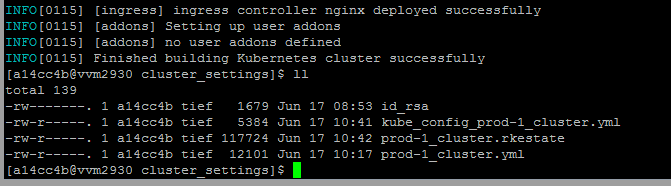
KUBCEONFIG=./kubce_config_<cluster>.yml get nodes)

- run
rke up --config <cluster>.ymlagain
Results:
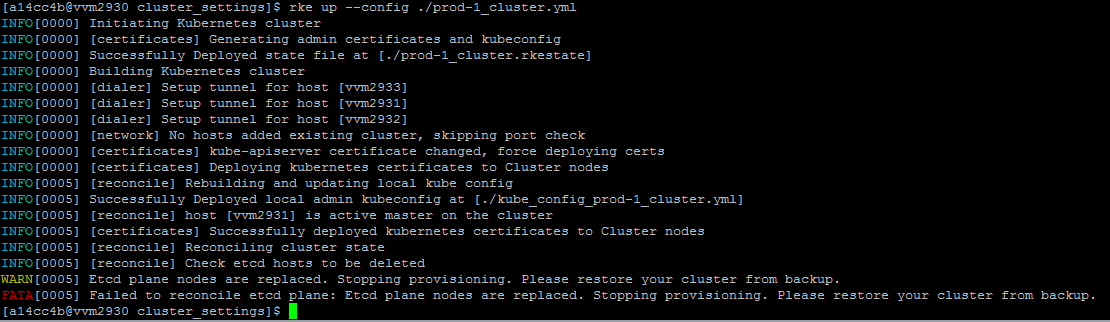
INFO[0005] [reconcile] Reconciling cluster state
INFO[0005] [reconcile] Check etcd hosts to be deleted
WARN[0005] Etcd plane nodes are replaced. Stopping provisioning. Please restore your cluster from backup.
FATA[0005] Failed to reconcile etcd plane: Etcd plane nodes are replaced. Stopping provisioning. Please restore your cluster from backup.
Interesting statement i found within logs, don't know if this is related
INFO[0000] [certificates] kube-apiserver certificate changed, force deploying certs
cluster.yml file:
nodes:

  - address: vvm2931
    port: "22"
    internal_address: ""
    role:
      - controlplane
    hostname_override: ""
    user: devopsinstall
    docker_socket: /var/run/docker.sock
    labels: {}

  - address: vvm2932
    port: "22"
    internal_address: ""
    role:
      - controlplane
      - worker
    hostname_override: ""
    user: devopsinstall
    docker_socket: /var/run/docker.sock
    labels: {}

  - address: vvm2933
    port: "22"
    internal_address: ""
    role:
      - worker
    hostname_override: ""
    user: devopsinstall
    docker_socket: /var/run/docker.sock
    labels: {}

# If set to true, RKE will not fail when unsupported Docker version are found
ignore_docker_version: true

# Cluster level SSH private key
# Used if no ssh information is set for the node
ssh_key_path: ./id_rsa

# Enable use of SSH agent to use SSH private keys with passphrase
# This requires the environment `SSH_AUTH_SOCK` configured pointing to your SSH agent which has the private key added
ssh_agent_auth: false

# List of registry credentials
# If you are using a Docker Hub registry, you can omit the `url` or set it to `docker.io`
private_registries:
  - url: docker.artifactory.<omitted>.local
    is_default: true

# Bastion/Jump host configuration
#bastion_host:
#  address: x.x.x.x
#  user: ubuntu
#  port: 22
#  ssh_key_path: /home/user/.ssh/bastion_rsa
# or
#   ssh_key: |-
#     -----BEGIN RSA PRIVATE KEY-----
#
#     -----END RSA PRIVATE KEY-----

# Set the name of the Kubernetes cluster
cluster_name: prod-1


# The kubernetes version used. For now, this should match the version defined in rancher/types defaults map: https://github.com/rancher/types/blob/master/apis/management.cattle.io/v3/k8s_defaults.go#L14
# In case the kubernetes_version and kubernetes image in system_images are defined, the system_images configuration will take precedence over kubernetes_version.
kubernetes_version: v1.13.5-rancher1-2

# System Image Tags are defaulted to a tag tied with specific kubernetes Versions
# Default Tags: https://github.com/rancher/types/blob/master/apis/management.cattle.io/v3/k8s_defaults.go)
#system_images:
#  kubernetes: rancher/hyperkube:v1.10.3-rancher2
#  etcd: rancher/coreos-etcd:v3.1.12
#  alpine: rancher/rke-tools:v0.1.9
#  nginx_proxy: rancher/rke-tools:v0.1.9
#  cert_downloader: rancher/rke-tools:v0.1.9
#  kubernetes_services_sidecar: rancher/rke-tools:v0.1.9
#  kubedns: rancher/k8s-dns-kube-dns-amd64:1.14.8
#  dnsmasq: rancher/k8s-dns-dnsmasq-nanny-amd64:1.14.8
#  kubedns_sidecar: rancher/k8s-dns-sidecar-amd64:1.14.8
#  kubedns_autoscaler: rancher/cluster-proportional-autoscaler-amd64:1.0.0
#  pod_infra_container: rancher/pause-amd64:3.1

services:
  etcd:

    path: /prodetcdcluster
    external_urls:
      - https://prod-1-ext-etcd.<omitted>.local:2379
    ca_cert: |-
      -----BEGIN CERTIFICATE-----
      <omitted>
      -----END CERTIFICATE-----
    cert: |-
      -----BEGIN CERTIFICATE-----
      <omitted>
      -----END CERTIFICATE-----
    key: |-
      -----BEGIN PRIVATE KEY-----
      <omitted>
      -----END PRIVATE KEY-----
  kube-api:
    # IP range for any services created on Kubernetes
    # This must match the service_cluster_ip_range in kube-controller
    service_cluster_ip_range: 10.33.0.0/16
    # Expose a different port range for NodePort services
    service_node_port_range: 40000-42767
    pod_security_policy: false
    # Add additional arguments to the kubernetes API server
    # This WILL OVERRIDE any existing defaults
    extra_args:
      # Enable audit log to stdout
      audit-log-path: "-"
      # Increase number of delete workers
      delete-collection-workers: 3
      # Set the level of log output to debug-level
      v: 4
  # Note for Rancher 2 users: If you are configuring Cluster Options using a Config File when creating Rancher Launched Kubernetes, the names of services should contain underscores only: `kube_controller`. This only applies to Rancher v2.0.5 and v2.0.6.
  kube-controller:
    # CIDR pool used to assign IP addresses to pods in the cluster
    cluster_cidr: 10.32.0.0/16
    # IP range for any services created on Kubernetes
    # This must match the service_cluster_ip_range in kube-api
    service_cluster_ip_range: 10.33.0.0/16
  kubelet:
    # Base domain for the cluster
    cluster_domain: rancher.local
    # IP address for the DNS service endpoint
    cluster_dns_server: 10.33.0.10
    # Fail if swap is on
    fail_swap_on: false
    # Set max pods to 250 instead of default 110
    extra_args:
      max-pods: 250
    # Optionally define additional volume binds to a service
    extra_binds:
      - "/usr/libexec/kubernetes/kubelet-plugins:/usr/libexec/kubernetes/kubelet-plugins"

# Currently, only authentication strategy supported is x509.
# You can optionally create additional SANs (hostnames or IPs) to add to
#  the API server PKI certificate.
# This is useful if you want to use a load balancer for the control plane servers.
#authentication:
#  strategy: x509
#  sans:
#    - "10.18.160.10"
#    - "my-loadbalancer-1234567890.us-west-2.elb.amazonaws.com"

# Kubernetes Authorization mode
# Use `mode: rbac` to enable RBAC
# Use `mode: none` to disable authorization
authorization:
  mode: rbac

# If you want to set a Kubernetes cloud provider, you specify the name and configuration
#cloud_provider:
#  name: aws

# Add-ons are deployed using kubernetes jobs. RKE will give up on trying to get the job status after this timeout in seconds..
addon_job_timeout: 60

# There are several network plug-ins that work, but we default to canal
network:
  plugin: canal

# Currently only nginx ingress provider is supported.
# To disable ingress controller, set `provider: none`

ingress:
  provider: nginx
 ChrisHaPunkt
All 5 comments
We have the same problem. This will happen, just as in this case, when you do not specify any node with etcd role.
It was introduced in the e3d6fb4db9edd69679c4d047acaa1ef5a23c64fa commit.
Basically, the isEtcdPlaneReplaced function does not work when there are not node with etcd role.
We fixed it with the following code
func isEtcdPlaneReplaced(ctx context.Context, currentCluster, kubeCluster *Cluster) bool {
    numCurrentEtcdHosts := len(currentCluster.EtcdHosts)
    // We had and have no etcd hosts, nothing was replaced
    if numCurrentEtcdHosts == 0 && len(kubeCluster.EtcdHosts) == 0 {
        return false
    }

    // old etcd nodes are down, we added new ones
    numEtcdToDeleteInactive := len(hosts.GetToDeleteHosts(currentCluster.EtcdHosts, kubeCluster.EtcdHosts, kubeCluster.InactiveHosts, true))
    if numEtcdToDeleteInactive == numCurrentEtcdHosts {
        return true
    }

    // one or more etcd nodes are removed from cluster.yaml and replaced
    if len(hosts.GetHostListIntersect(kubeCluster.EtcdHosts, currentCluster.EtcdHosts)) == 0 {
        return true
    }
    return false
}
 rodcloutier
on 18 Jun 2019
rodcloutier
on 18 Jun 2019
@alena1108 Can someone have a look at #1410 and see if it could be included in the next v0.2.x version?
It is currently preventing us from upgrading unless we use a locally patched binary.
Thanks!
rodcloutier
on 10 Jul 2019
We would also appreciate this a lot
ChrisHaPunkt
on 23 Jul 2019
Available with v0.3.0-rc6
 deniseschannon
on 14 Aug 2019
deniseschannon
on 14 Aug 2019
Reproduced the issue with v0.2.4
Steps:
1. Set up external etcd server as below.
- cd /root. And generate a self signed certificate:
openssl req -x509 -nodes -days 365 -newkey rsa:2048 -keyout etcd.key -out etcd.crt
- Add common name
etcd.rancher.com - start etcd with client auth and https:
docker run -d -v /root:/tmp -p 2379:2379 quay.io/coreos/etcd:v3.3 etcd --name infra0 --data-dir infra0 --client-cert-auth --trusted-ca-file=/tmp/etcd.crt --cert-file=/tmp/etcd.crt --key-file=/tmp/etcd.key --advertise-client-urls https://127.0.0.1:2379 --listen-client-urls https://0.0.0.0:2379
- add
<public-ip-etcd-server> etcd.rancher.comon the /etc/hosts of all other nodes that kube-api will be deployed on (alternative can be using IP SAN or valid fqdn for etcd)
- start rke with this config:
---
nodes:
  - address: REDACTED
    user: ubuntu
    role:
    - controlplane
    - worker
  - address: REDACTED
    user: ubuntu
    role:
    - controlplane
    - worker

services:
  etcd:
    # if external etcd is used
    path: /etcdcluster
    external_urls:
      - https://etcd.rancher.com:2379
    ca_cert: |-
      -----BEGIN CERTIFICATE-----
      xxxx
      -----END CERTIFICATE-----
    cert: |-
      -----BEGIN CERTIFICATE-----
      xxxx
      -----END CERTIFICATE-----
    key: |-
      -----BEGIN PRIVATE KEY-----
     xxxxx
      -----END PRIVATE KEY-----
- Do an rke up again - ./rke up --config rancher-cluster.yml
- Fails with the below issue
./rke up --config rancher-cluster.yml
INFO[0000] Initiating Kubernetes cluster
INFO[0000] [certificates] Generating admin certificates and kubeconfig
INFO[0000] Successfully Deployed state file at [./rancher-cluster.rkestate]
INFO[0000] Building Kubernetes cluster
INFO[0000] [dialer] Setup tunnel for host [<ip>]
INFO[0000] [dialer] Setup tunnel for host [<ip>]
INFO[0000] [network] No hosts added existing cluster, skipping port check
INFO[0000] [certificates] kube-apiserver certificate changed, force deploying certs
INFO[0000] [certificates] Deploying kubernetes certificates to Cluster nodes
INFO[0007] [reconcile] Rebuilding and updating local kube config
INFO[0007] Successfully Deployed local admin kubeconfig at [./kube_config_rancher-cluster.yml]
INFO[0007] [reconcile] host [<ip>] is active master on the cluster
INFO[0007] [certificates] Successfully deployed kubernetes certificates to Cluster nodes
INFO[0007] [reconcile] Reconciling cluster state
INFO[0007] [reconcile] Check etcd hosts to be deleted
WARN[0007] Etcd plane nodes are replaced. Stopping provisioning. Please restore your cluster from backup.
FATA[0007] Failed to reconcile etcd plane: Etcd plane nodes are replaced. Stopping provisioning. Please restore your cluster from backup.
Verified with v0.3.0-rc6
Steps:
- Setup an external etcd server as said in above steps.
- Do an rke up (as said in the above set of steps.)
- Cluster is created successfully.
- Do an rke up again.
- No error is seen.
- Kubernetes cluster gets built successfully.
 sowmyav27
on 16 Aug 2019
sowmyav27
on 16 Aug 2019
Related issues
 de13
·
4Comments
de13
·
4Comments
 riaan53
·
3Comments
riaan53
·
3Comments
 rstpv
·
4Comments
rstpv
·
4Comments
 blaggacao
·
3Comments
blaggacao
·
3Comments
 dnoland1
·
3Comments
dnoland1
·
3Comments