River_pod: Update StateNotifierProvider inside FutureProvider
StateNotifierProvider does not get updated inside the FutureProvider.
final countryListProvider =
    FutureProvider.autoDispose<List<CountryEntity>>((ref) async {
  final countries = await ref.read(countryRepositoryProvider).getAllCountries();

  ref.read(selectedNationalityProvider).state = countries[0]; // update selectedNationalityProvider state

  return countries;
});

final selectedNationalityProvider =
    StateProvider.autoDispose<CountryEntity>((ref) => null);
Consumer(builder: (_, watch, child) {
      final selectedNationality = watch(selectedNationalityProvider).state // this is still null;

      return DropdownButtonFormField(
        value: selectedNationality,
        items: watch(countryListProvider)
            .data
            .value
            .map((e) => DropdownMenuItem(value: e, child: Text(e.name)))
            .toList(),
        onChanged: (value) =>
            context.read(selectedNationalityProvider).state = value,
      );
    }
I am expecting that the selectedNationalityProvider will have the updated state.
 campanagerald
All 15 comments
Is there a correct way to do that? I would like to initialize the state of selectedNationalityProvider after fetching all countries.
campanagerald
on 17 Sep 2020
Actually ignore my previous statement, I answered a bit too fast.
Is the line that updates your provider reached, or do you have an exception?
 rrousselGit
on 17 Sep 2020
rrousselGit
on 17 Sep 2020
Yup, I tried to wrap it in a try-catch, does not show any exception.
final countryListProvider =
    FutureProvider.autoDispose<List<CountryEntity>>((ref) async {
  final countries = await ref.read(countryRepositoryProvider).getAllCountries();

  try {
    ref.read(selectedNationalityProvider).state = countries[0];
  } catch(e) {
    print(e);
  }

  return countries;
});
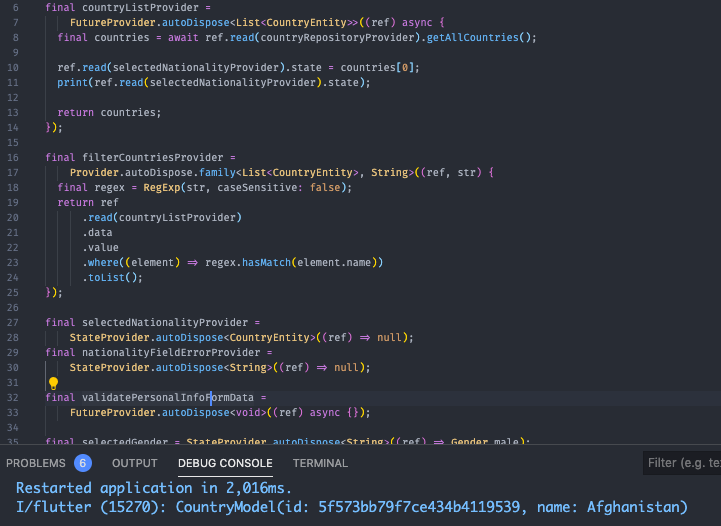
I also tried to log to see if the state changed, it does.
final countryListProvider =
    FutureProvider.autoDispose<List<CountryEntity>>((ref) async {
  final countries = await ref.read(countryRepositoryProvider).getAllCountries();

  ref.read(selectedNationalityProvider).state = countries[0];
  print(ref.read(selectedNationalityProvider).state);

  return countries;
});
campanagerald
on 17 Sep 2020
the exception may be the await instead
Maybe your getAllCountries failed
rrousselGit
on 17 Sep 2020
But in general I would suggest moving that logic to the StateProvider instead:
- have the
FutureProviderdo nothing but the fetching - have the
StateProviderlisten to theFutureProvider:
final countryListProvider =
    FutureProvider.autoDispose<List<CountryEntity>>((ref) async {
  final countries = await ref.read(countryRepositoryProvider).getAllCountries();


  return countries;
});

final selectedNationalityProvider = StateProvider.autoDispose<CountryEntity>((ref) {
  final countries = ref.watch(countryListProvider);

  if (countries.data == null) return null;

  return countries.data.first;
});
the exception may be the
awaitinsteadMaybe your
getAllCountriesfailed
not failed because I was able to get the List
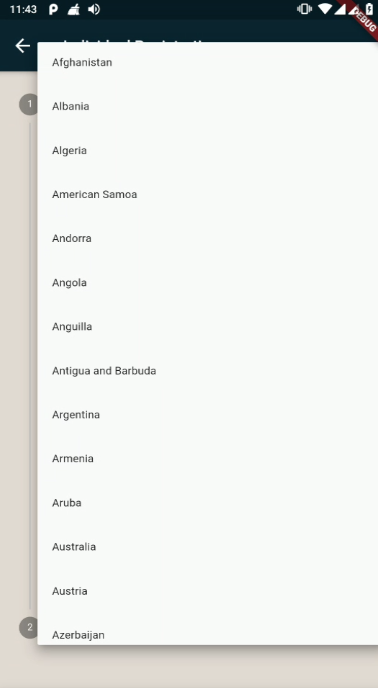
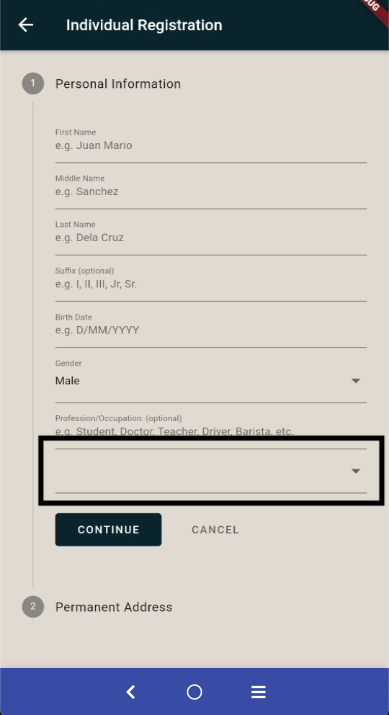
the problem is it was not able to pre populate the dropdown value
campanagerald
on 17 Sep 2020
Have you tried my second message about moving the logic to the
StateNotifier?
On Thu, Sep 17, 2020, 17:49 Gerald notifications@github.com wrote:
the exception may be the await instead
Maybe your getAllCountries failed
not failed because I was able to get the List
[image: image]
https://user-images.githubusercontent.com/19565694/93494950-2c9e0c80-f940-11ea-9c01-a715040e0ea4.pngthe problem is it was not able to pre populate the dropdown value
[image: image]
https://user-images.githubusercontent.com/19565694/93495042-46d7ea80-f940-11ea-9d18-30cdf9bbe268.png—
You are receiving this because you commented.
Reply to this email directly, view it on GitHub
https://github.com/rrousselGit/river_pod/issues/136#issuecomment-694325076,
or unsubscribe
https://github.com/notifications/unsubscribe-auth/AEZ3I3P5Q7G3LBSKOA2RO2DSGIVW7ANCNFSM4RQS6QTA
.
rrousselGit
on 17 Sep 2020
It worked! Thanks! :-) I hope riverpod will get stable soon.
campanagerald
on 17 Sep 2020
I see
My guess is that your previous code didn't work because of "autoDispose"
The StateProvider wasn't listened by any widget at the time of the ref.read(...).state =, so it was created and immediately disposed.
Then when the UI connects, the StateProvider is re-created, starting from null again (since the future already completed)
By moving the logic to the StateNotifier, this removes the issue as it is initialized with the correct value directly.
rrousselGit
on 17 Sep 2020
But in general I would suggest moving that logic to the
StateProviderinstead:
- have the
FutureProviderdo nothing but the fetching- have the
StateProviderlisten to theFutureProvider:final countryListProvider = FutureProvider.autoDispose<List<CountryEntity>>((ref) async { final countries = await ref.read(countryRepositoryProvider).getAllCountries(); return countries; }); final selectedNationalityProvider = StateProvider.autoDispose<CountryEntity>((ref) { final countries = ref.watch(countryListProvider); if (countries.data == null) return null; return countries.data.first; });
but i notice if I do this the dropdown is slow when showing the items.
campanagerald
on 17 Sep 2020
I see
My guess is that your previous code didn't work because of "autoDispose"
The StateProvider wasn't listened by any widget at the time of the
ref.read(...).state =, so it was created and immediately disposed.
Then when the UI connects, the StateProvider is re-created, starting fromnullagain (since the future already completed)By moving the logic to the StateNotifier, this removes the issue as it is initialized with the correct value directly.
I hope there is a way to dispose a provider explicitly.
campanagerald
on 17 Sep 2020
What do you mean by "it's slow"?
rrousselGit
on 17 Sep 2020
@rrousselGit
I'm guessing that it is because it is lazily loaded when the dropdown button gets clicked, so the future provider doesn't run until the button is clicked.
 TimWhiting
on 17 Sep 2020
TimWhiting
on 17 Sep 2020
What do you mean by "it's slow"?
@rrousselGit I mean it takes time before the dropdown show
campanagerald
on 18 Sep 2020
@rrousselGit
I'm guessing that it is because it is lazily loaded when the dropdown button gets clicked, so the future provider doesn't run until the button is clicked.
@TimWhiting I am calling the future before showing the form. I am expecting that time, that the future is already loaded.
class StepperForm extends StatelessWidget {
  @override
  Widget build(BuildContext context) {
    return Consumer(builder: (_, watch, __) {
      final countryList = watch(countryListProvider);

      if (countryList is AsyncLoading) {
        return Center(child: CircularProgressIndicator());
      } else {
        return Stepper(
          currentStep: _currentStep,
          onStepContinue: () => _onStepContinue(),
          onStepCancel: () => _onStepCancel(),
          steps: _steps(),
        );
      }
    });
  }
Related issues
campanagerald
·
4Comments
 MarcinusX
·
5Comments
MarcinusX
·
5Comments
 smiLLe
·
3Comments
smiLLe
·
3Comments
 venkatd
·
6Comments
venkatd
·
6Comments
 fabiancrx
·
3Comments
fabiancrx
·
3Comments