Thank you very much for another great package. Is it possible to use Riverpod as a complete replacement for Provider to use in combination with MobX? Can it solve store-to-store communication problem? Any example or documentation?
 deadsoul44
All 13 comments
Hi
yes, it is a complete replacement to provider
Could to define store-to-store communication problem?
 rrousselGit
on 29 Jul 2020
rrousselGit
on 29 Jul 2020
Let's say I have a FavoritesStore and another Store depends on FavoritesStore. If a user adds a favorite, the other store and UI should be updated automatically.
deadsoul44
on 29 Jul 2020
Mobx has its own mechanism for this: reactions/autorun
rrousselGit
on 29 Jul 2020
It may cause a lot of boilerplate.
Currently, I am using the following approach:
https://github.com/mobxjs/mobx.dart/issues/139#issuecomment-477594964
deadsoul44
on 29 Jul 2020
What are your expectations from Riverpod on that aspect?
rrousselGit
on 29 Jul 2020
I am not sure what I should expect but if I can use something like ProxyProvider under MultiProvider, it can solve a lot of problems. Moreover, it would be more nice in terms of app architecture because I will clearly see which store depends on other stores or which store is provided to other stores. For example, I will use ProxyProvider(FavoritesStore, TheOtherStore), ProxyProvider(FavoritesStore, AnotherStore), etc etc...
deadsoul44
on 29 Jul 2020
I'll think about it, but it's a fairly low priority for me.
rrousselGit
on 2 Aug 2020
Some documentation in general about how Riverpod relates to and can be used with mobx would be helpful. It's not entirely clear to me from the docs how the two might be complementary or conflicting.
 AndrewMorsillo
on 12 Sep 2020
AndrewMorsillo
on 12 Sep 2020
I made this example to demonstrate how to use riverpod with Mobx and to answer @deadsoul44 on how to do store to store communication using riverpod :
class UserStore = _UserStore with _$UserStore;
class SomethingSotre = _SomethingStore with _$SomethingSotre;

abstract class _UserStore with Store {
  @observable
  String role = 'not admin';

  @action
  void elevateRole() => role = 'admin';

  @action
  void demoteRole() => role = 'not admin';
}

abstract class _SomethingStore with Store {
  final Reader _reader;
  _SomethingStore(this._reader);

  @observable
  String data;

  @action
  void fetchSensibleData() {
    // check if the user is admin ??
    final String role = _reader(userStoreProiver).role;
    if (role == 'admin')
      data = 'sensible data';
    else
      data = 'not sensible data';
  }
}

final userStoreProiver = Provider((_) => UserStore());

final somethingStoreProvier = Provider((ref) => SomethingSotre(ref.read));
The trick here is to pass the Reader function as a parameter to the store from which you want to access other store's data from in the example I made it's SomethingStore.
main(List<String> args) {
  runApp(ProviderScope(child: MobxRiverpodApp()));
}

class MobxRiverpodApp extends StatelessWidget {
  const MobxRiverpodApp({Key key}) : super(key: key);

  @override
  Widget build(BuildContext context) {
    final userStore = context.read(userStoreProiver);
    final somethingStore = context.read(somethingStoreProvier);
    return MaterialApp(
      home: Scaffold(
        appBar: AppBar(),
        body: Column(
          children: [
            Observer(
              builder: (context) {
                if (userStore.role != null)
                  return Text(userStore.role);
                else
                  return Container();
              },
            ),
            Observer(
              builder: (context) {
                if (somethingStore.data != null)
                  return Text(somethingStore.data);
                else
                  return Container();
              },
            ),
            Row(
              children: [
                MaterialButton(
                    color: Colors.orange,
                    onPressed: () {
                      userStore.elevateRole();
                    },
                    child: Text('Make Admin')),
                MaterialButton(
                    color: Colors.orange,
                    onPressed: () {
                      userStore.demoteRole();
                    },
                    child: Text('Make Not Admin')),
                MaterialButton(
                    color: Colors.orange,
                    onPressed: () {
                      somethingStore.fetchSensibleData();
                    },
                    child: Text('Fetch Data'))
              ],
            )
          ],
        ),
      ),
    );
  }
}
I mean for me using riverpod with mobx seems a bit of an overkill because most of what mobx can do riverpod can do as well. I also don't think that store to store communication is good idea stores. In my opinion stores should be independent form one another. If you find your self doing a lot of store to store communication you might want to reconsider your architecture.
Let me know if this answers your question. Hope this helps
 yiss
on 21 Sep 2020
yiss
on 21 Sep 2020
I think mix mobx with riverpod is redundant.
 tbm98
on 22 Sep 2020
tbm98
on 22 Sep 2020
First of all, thank you very much for the effort and the feedback.
But, using MobX with Provider or Riverpod is neither overkill nor redundant. We should somehow provide stores to the widget tree. Riverpod or Provider is only some kind of dependency injection. Almost all of the people who use MobX also use Provider. They use MultiProvider at the top of widget tree to provide stores.
As for the example, it works when all the code is in a single file. Try to create separate two stores and a separate widget file and provide stores to the widget tree using MultiProvider or MultiRiverpod (if there is any such thing?). Will it still work?
deadsoul44
on 22 Sep 2020
That's how I used to use Mobx with Provider to make stores available down the widget the tree using MultiProvider (I made an article awhile ago explaining this https://itnext.io/flutter-state-management-with-mobx-and-providers-change-app-theme-dynamically-ba3b60619050). However as I said using Mobx with Riverpod might be an overkill, because you can also manage state with StateNotifier and StateNotifierProvider, but of course you can still do it if you prefer Mobx for state management.
As for the example yeah it still works I just rewrote as follows :
user_store.dart
import 'package:mobx/mobx.dart';

part 'user_store.g.dart';

class UserStore = _UserStore with _$UserStore;

abstract class _UserStore with Store {
  @observable
  String role = 'not admin';

  @action
  void elevateRole() => role = 'admin';

  @action
  void demoteRole() => role = 'not admin';
}
something_store.dart
import 'package:flutter_riverpod/flutter_riverpod.dart';
import 'package:mobx/mobx.dart';
import 'package:riverpod_musicplayer_example/mobx_example/providers.dart';

part 'something_store.g.dart';

class SomethingSotre = _SomethingStore with _$SomethingSotre;

abstract class _SomethingStore with Store {
  final Reader _reader;
  _SomethingStore(this._reader);

  @observable
  String data;

  @action
  void fetchSensibleData() {
    // check if the user is admin ??
    final String role = _reader(userStoreProiver).role;
    if (role == 'admin')
      data = 'sensible data';
    else
      data = 'not sensible data';
  }
}
providers.dart
import 'package:flutter_riverpod/flutter_riverpod.dart';
import 'package:riverpod_musicplayer_example/mobx_example/something_store.dart';
import 'package:riverpod_musicplayer_example/mobx_example/user_store.dart';

final userStoreProiver = Provider((_) => UserStore());

final somethingStoreProvier = Provider((ref) => SomethingSotre(ref.read));
main.dart
import 'package:flutter/material.dart';
import 'package:flutter_mobx/flutter_mobx.dart';
import 'package:flutter_riverpod/all.dart';
import 'package:riverpod_musicplayer_example/store.dart';

main(List<String> args) {
  runApp(ProviderScope(child: MobxRiverpodApp()));
}

class MobxRiverpodApp extends StatelessWidget {
  const MobxRiverpodApp({Key key}) : super(key: key);

  @override
  Widget build(BuildContext context) {
    final userStore = context.read(userStoreProiver);
    final somethingStore = context.read(somethingStoreProvier);
    return MaterialApp(
      home: Scaffold(
        appBar: AppBar(),
        body: Column(
          children: [
            Observer(
              builder: (context) {
                if (userStore.role != null)
                  return Text(userStore.role);
                else
                  return Container();
              },
            ),
            Observer(
              builder: (context) {
                if (somethingStore.data != null)
                  return Text(somethingStore.data);
                else
                  return Container();
              },
            ),
            Row(
              children: [
                MaterialButton(
                    color: Colors.orange,
                    onPressed: () {
                      userStore.elevateRole();
                    },
                    child: Text('Make Admin')),
                MaterialButton(
                    color: Colors.orange,
                    onPressed: () {
                      userStore.demoteRole();
                    },
                    child: Text('Make Not Admin')),
                MaterialButton(
                    color: Colors.orange,
                    onPressed: () {
                      somethingStore.fetchSensibleData();
                    },
                    child: Text('Fetch Data'))
              ],
            )
          ],
        ),
      ),
    );
  }
}
An it works fine :
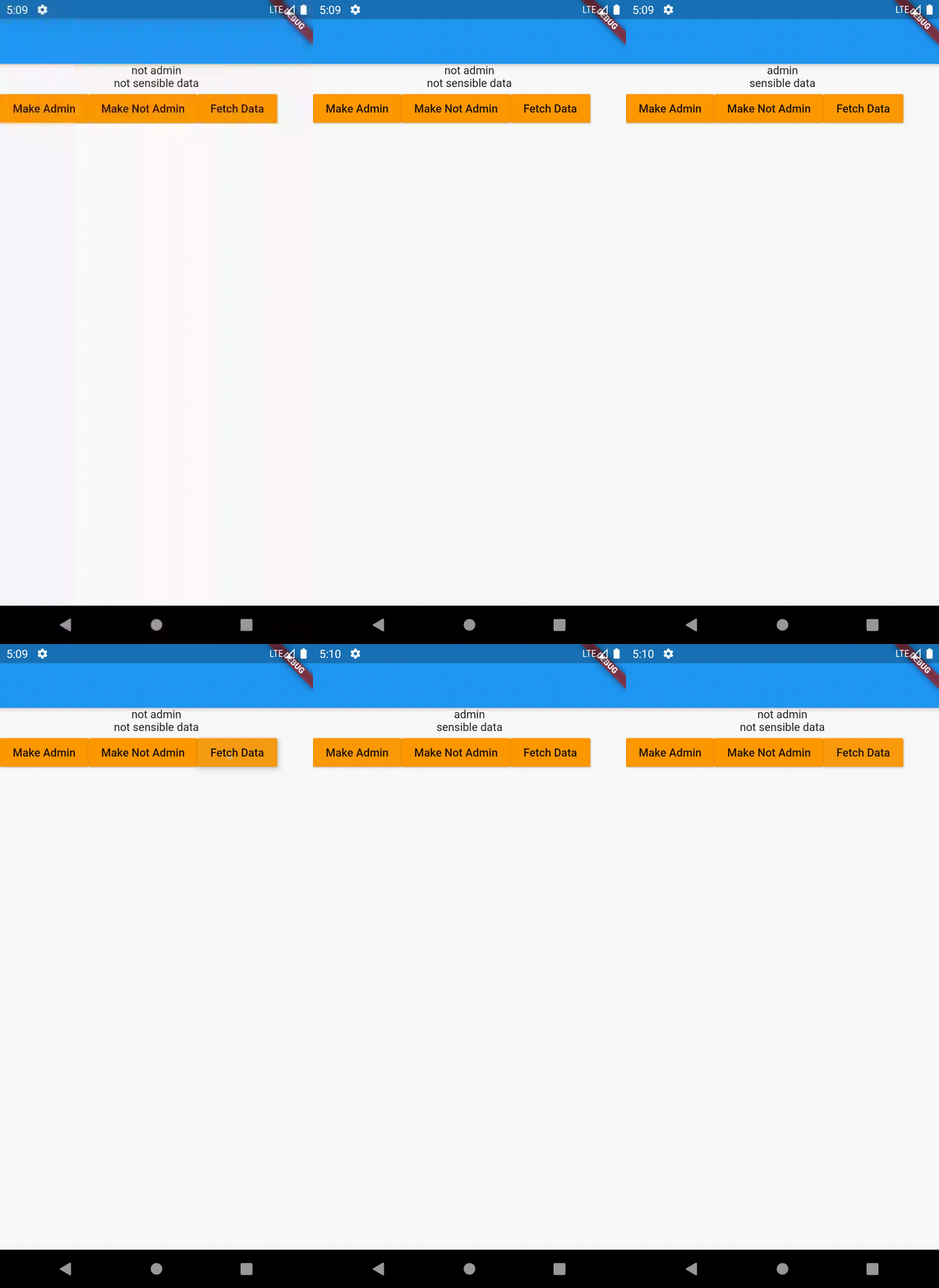
yiss
on 22 Sep 2020
Riverpod or Provider is only some kind of dependency injection
Riverpod has a scope different from Provider. It's not DI but a complete solution
rrousselGit
on 22 Sep 2020
Related issues
 mono0926
·
9Comments
mono0926
·
9Comments
 MahdiPishguy
·
3Comments
MahdiPishguy
·
3Comments
 MarcinusX
·
5Comments
MarcinusX
·
5Comments
 campanagerald
·
5Comments
campanagerald
·
5Comments
 smiLLe
·
3Comments
smiLLe
·
3Comments
Most helpful comment
I'll think about it, but it's a fairly low priority for me.