When I use certain themes, only some elements of the theme are actually being used.
For example, if I use the sky theme, all colors and fonts seem to work as expected. But if I switch to moon, the background color is white rather than the color specified in moon.
In presentation mode, when I use the Chrome inspection tool, the styles pane shows:
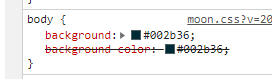
And at the top it shows:

Not sure if I'm interpreting this correctly, but it looks like the background color in moon.css is being overwritten by main.css. Am I doing something wrong? I'm just specifying the theme in a rise.json file in .jupyternbconfig that says:
{
  "theme": "moon"
  "transition": "concave",
  "start_slideshow_at": "selected",
}
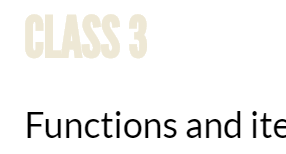
Other font colors are not being overwritten, as can be seen by the heading color below, which does come from moon.css.
 stoffprof
All 21 comments
IIRC moon is one of the dark themes. Regrettably, dark themes need some further customization to be able to work correctly. I did not find time yet to push this forward but I would love to see new people involved in this.
 damianavila
on 24 Dec 2018
damianavila
on 24 Dec 2018
If you can share a little more about what the issue is, I can try to spend some time on it. At this point I don't really see where to start.
stoffprof
on 2 Jan 2019
Essentially you need to explore the reveal CSS and how it is conflicting with the notebook CSS.
For instance, knowing how the moon theme should look like, you can see which reveal CSS rules are conflicting with the notebook ones and modify them on the fly to see if you can recover the look you pretend. I would start playing with these CSS rules in the browser JS console.
damianavila
on 12 Jan 2019
Hi, I got here since I am trying to use RISE and I would need it in a dark mode for my presentation.
I am actually trying to use a dark theme but I cannot find any specific easy documentation where it shows how to get to use a different theme. Can you please link me to any aspects where a tutorial like page can drive me thought the process?
 albz
on 18 Jun 2019
albz
on 18 Jun 2019
You can use different themes as instructed here: https://rise.readthedocs.io/en/stable/customize.html#choosing-a-theme
I should mention, we are currently working into improving themes support: https://github.com/damianavila/RISE/pull/475
But I should also mention that currently, most likely, dark-ish themes are not going to work well unless you made several css hacks.
damianavila
on 19 Jun 2019
Thanks for the immediate feedback. I was aware of that page, but since I started from a Jupiter notebook, I only have a *.ipynb only file. So I am not sure where to add those lines.
albz
on 19 Jun 2019
but since I started from a Jupiter notebook, I only have a *.ipynb only file. So I am not sure where to add those lines.
Oh... check this section: https://rise.readthedocs.io/en/stable/customize.html#notebook-metadata
damianavila
on 19 Jun 2019
Ok, thx, I hope it is just the late hours for not noting the section... let's say that I am more use to visual studio jupyter and got me tricked.
Awesome, got it working and with little exploration I got the point where dark modes become a little messy. I will give it a try with some css and if anything smart comes up I'll try to share somehow in a neat way. But I'd like to keep it simple since the goal is just to give an overview of some data exploration
albz
on 19 Jun 2019
dark modes should now work much better with release 5.6.0.dev2
people interested can give it a try with pip install --pre rise
feedback would be much appreciated
tables should also work better in dark modes but I fixed them after I released 5.6.2 and was too lazy to do 5.6.3 just yet, so please be patient
EDIT 2019/11: release 5.6 is now officially published, the --pre option is no longer required
 parmentelat
on 20 Jun 2019
parmentelat
on 20 Jun 2019
tables should also work better in dark modes but I fixed them after I released 5.6.2 and was too lazy to do 5.6.3 just yet, so please be patient
5.6.0.dev2 and 5.6.0.dev3, I think...
damianavila
on 27 Jun 2019
On 27 Jun 2019, at 15:10, Damian Avila notifications@github.com wrote:
5.6.0.dev2 and 5.6.0.dev3, I think…
right, of course :)
parmentelat
on 27 Jun 2019
Changing theme option in metadata does not change anything. Do I need to provide the path to reveal.js themes somewhere in order to have the theme take effect?
Installed rise on windows with conda.
 DemirTonchev
on 21 Jul 2019
DemirTonchev
on 21 Jul 2019
No you simply need to set theme to be one of the supported reveal ones, like ”sky“
What does the javascript console say ?
parmentelat
on 21 Jul 2019
Also, what version of rise are you using ?
parmentelat
on 21 Jul 2019
rise version = 5.5.1
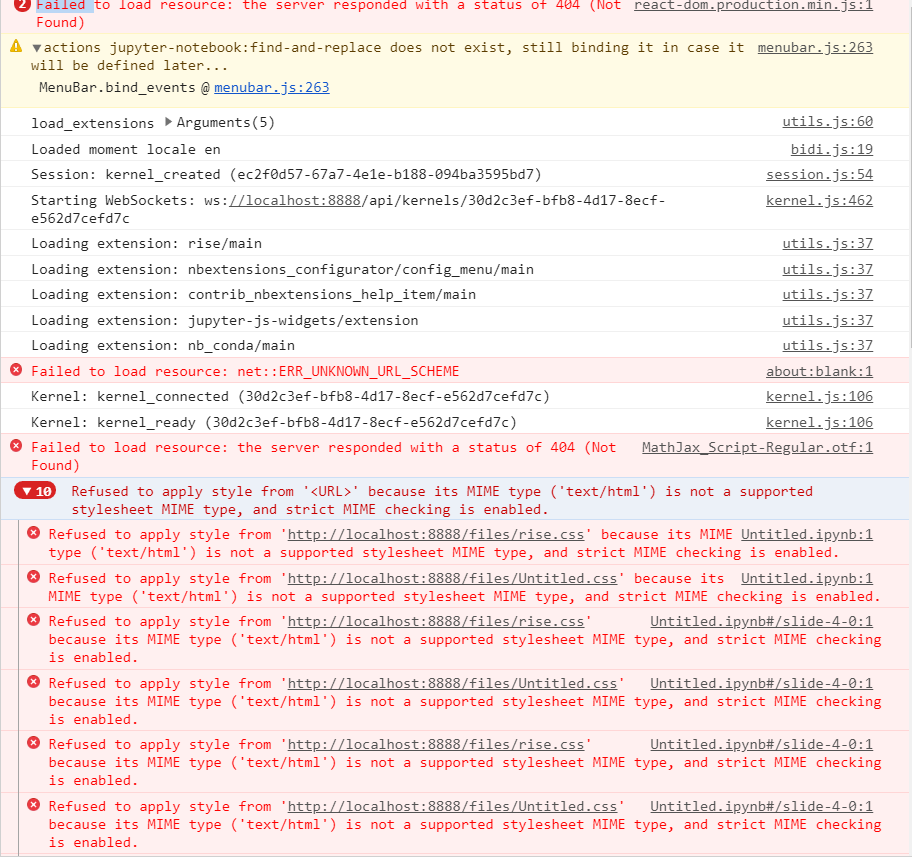
I am using the metadata method to change themes - sky, simple, white etc.. no effect at all. I do not have much understanding of css so I hope this is correct screen shot.
DemirTonchev
on 21 Jul 2019
The screenshot is correct but it does not explain your issue.
Can you post your notebook metadata ?
parmentelat
on 21 Jul 2019
Sure
{
  "kernelspec": {
    "name": "python3",
    "display_name": "Python 3",
    "language": "python"
  },
  "language_info": {
    "name": "python",
    "version": "3.7.3",
    "mimetype": "text/x-python",
    "codemirror_mode": {
      "name": "ipython",
      "version": 3
    },
    "pygments_lexer": "ipython3",
    "nbconvert_exporter": "python",
    "file_extension": ".py"
  },
  "rise": {
    "enable_chalkboard": true,
    "theme": "sky"
  },
  "celltoolbar": "Slideshow"
}
That sounds right; I have poor connection from here on the beach ;) so I am not going to be more helpful right now I’m afraid. One possibility would be that somehow your configuration gets overridden; it would make sense to hide your .jupyter temporarily; and/or to set a breakpoint in main.js to check where the theme setting actually comes from, but that requires some practice.
I can also suggest for you to try out the dev release:
pip install -U —pre rise
But honestly it’s more a stab in the dark
parmentelat
on 21 Jul 2019
:) enjoy your time off. I will see if I can do something about it and give feedback if I succeed.
DemirTonchev
on 21 Jul 2019
Reinstalled Jupyterlab and everything works as expected now.
DemirTonchev
on 22 Jul 2019
This is working nice on 5.6.0

closing here!
damianavila
on 14 Nov 2019
Related issues
 rinnert
·
3Comments
rinnert
·
3Comments
 jbednar
·
6Comments
jbednar
·
6Comments
 ChrisRackauckas
·
6Comments
ChrisRackauckas
·
6Comments
 AlJohri
·
3Comments
AlJohri
·
3Comments
 srcoulombe
·
4Comments
srcoulombe
·
4Comments