Rise: nbtutor button are not displayed
Hi again,
Now I'm trying to use the extension nbtutor (https://github.com/lgpage/nbtutor) in slide mode, however the buttons on the right do not appear (it works well in notebook view).
Any idea..?
Thanks !
Aurélie
 reberac
All 7 comments
I've taken a very quick look
First off, thanks for the pointer as I was not aware of nbtutor actually, and have been using for quite some time my own iframe-based solution to piggyback pythontutor; quite interesting
now to come back to your issue, what I could see is that nbtutor inserts its buttons outside of the output area, in a zone that usually contains the cell toolbar - and in this particular instance I found myself with the slide toolbar replaced with the nbtutor toolbar
but the point is, that area is not exposed to reveal in slideshow mode, so it's no wonder that the buttons are gone. I'm not quite sure if/how we can go about that in some sane way, and I agree it's a pity because showing tutor-based examples during a course is not an atypical use case
as a work around I can direct you to my iframe-based thing at https://github.com/parmentelat/ipythontutor which is less cool because less nicely integrated in the notebook, but more robust - especially on the spectrum of things that pythontutor can display nicely, as opposed to nbtutor that at first sight is more limited; but I might be wrong on that one... Plus, it will play more nicely with RISE ;)
 parmentelat
on 13 Mar 2018
parmentelat
on 13 Mar 2018
Thank you so much for having suggested your iframe-based solution, it works perfectly !
It is not link to RISE but I have a question for you regarding pythontutor.
I've tried a very simple code a = 3 and I do not understand why the object 3 is in the global frame and not in "objects"
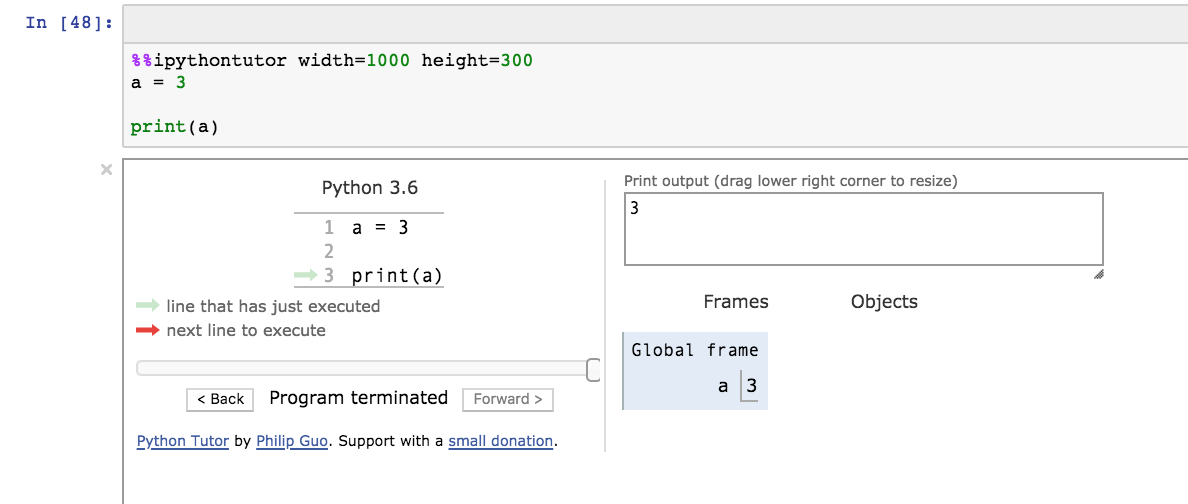
I miss something..?
Thank you
reberac
on 13 Mar 2018
good to hear :)
IIRC pythontutor used to use a presentation more like you seem to expect; it's only my interpretation but I feel like they have evolved to this layout in order to optimize the space used, and to become able to illustrate more everyday code in a given amount of space. The point being that atomic values like ints and floats and the like being not mutable, displaying them one way or the other doesn't change the semantics of your program :)
There are ways to customize pythontutor's output, and ther might be a setting to show stuff as you expect it te be.
Again all this is just a guess from my part, and of course the author of pythontutor would be the person to talk to about that if that's an issue
parmentelat
on 14 Mar 2018
oh and there's this FAQ where your question is answered
https://github.com/pgbovine/OnlinePythonTutor/blob/master/v3/docs/user-FAQ.md
parmentelat
on 14 Mar 2018
Hi, thank you again !
I found the option heapPrimitives that has to be set to true on the magic line.
But I agree that nbtutor play more nicely in RISE ;-)
reberac
on 14 Mar 2018
HI,
can you please help this error message -UsageError: Line magic function %%nbtutor not found.
i tried a few options as below, but no luck
! jupyter nbextension install --overwrite --symlink --sys-prefix --py nbtutor
#! jupyter nbextension enable --sys-prefix --py nbtutor
#!jupyter nbextension enable nbtutor --py --sys-prefix
%reload_ext nbtutor
%%nbtutor -r -f
a= 1
a
 samm-github
on 21 Aug 2019
samm-github
on 21 Aug 2019
this question seems to rather belong 100% in the nbtutor project, no ?
parmentelat
on 21 Aug 2019
Related issues
 bladwig1
·
3Comments
bladwig1
·
3Comments
 engyasin
·
4Comments
engyasin
·
4Comments
 rinnert
·
3Comments
rinnert
·
3Comments
 IanSudbery
·
5Comments
IanSudbery
·
5Comments
 rzuritamilla
·
4Comments
rzuritamilla
·
4Comments
Most helpful comment
I've taken a very quick look
First off, thanks for the pointer as I was not aware of nbtutor actually, and have been using for quite some time my own iframe-based solution to piggyback pythontutor; quite interesting
now to come back to your issue, what I could see is that
nbtutorinserts its buttons outside of the output area, in a zone that usually contains the cell toolbar - and in this particular instance I found myself with the slide toolbar replaced with the nbtutor toolbarbut the point is, that area is not exposed to reveal in slideshow mode, so it's no wonder that the buttons are gone. I'm not quite sure if/how we can go about that in some sane way, and I agree it's a pity because showing tutor-based examples during a course is not an atypical use case
as a work around I can direct you to my iframe-based thing at https://github.com/parmentelat/ipythontutor which is less cool because less nicely integrated in the notebook, but more robust - especially on the spectrum of things that pythontutor can display nicely, as opposed to nbtutor that at first sight is more limited; but I might be wrong on that one... Plus, it will play more nicely with RISE ;)