Hi, I just updated to the latest version the alarm switch has gone (Home, Away,Night) etc.... I Don't have a ring alarm, but used the switch for setting my modes? is this meant to have gone, or do I need to change a setting?
 adavison007
All 14 comments
Duplicate of https://github.com/dgreif/ring/issues/509. Sounds like a reboot made it show up again
 dgreif
on 3 Dec 2020
dgreif
on 3 Dec 2020
@dgreif Thanks, so I rebooted hoops and still not showing, are you saying downgrade code to 9.12.5 then upgrade again? if so please can you remind me of the code to use in CLI within Hoobs to downgrade? and which hither name to use i.e.is it Homebridge-ring if it's hoobs?
thanks in advance
adavison007
on 3 Dec 2020
You shouldn't need to downgrade. It's possible the switch got moved to the default room in your Home app as well. Can you check for that?
dgreif
on 3 Dec 2020
@dgreif It's definitely not there, also checked in hoops devices, no alarm showing.. remind me what setting you do to turn it on and off, think it was location? remember I don't have an alarm
adavison007
on 3 Dec 2020
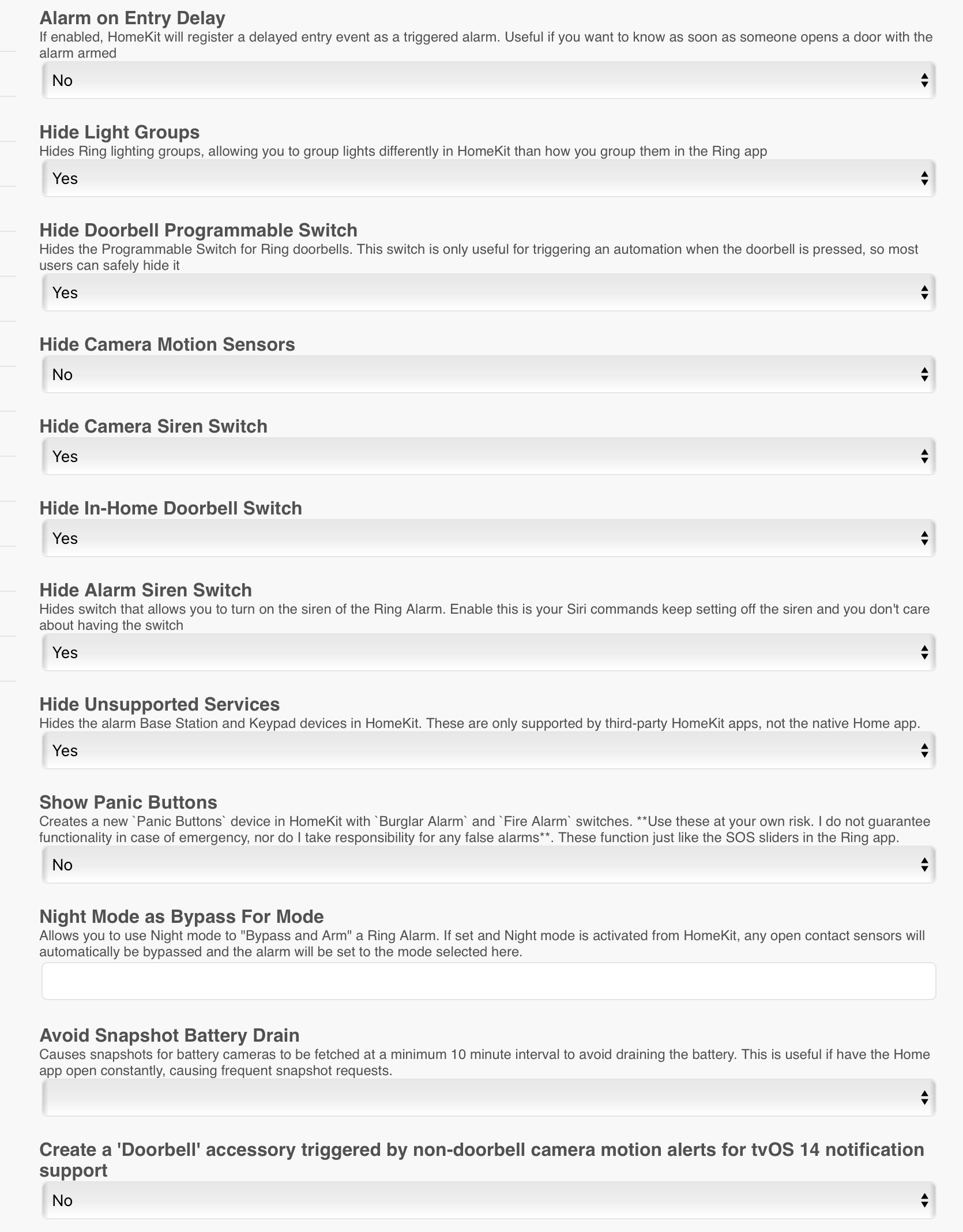
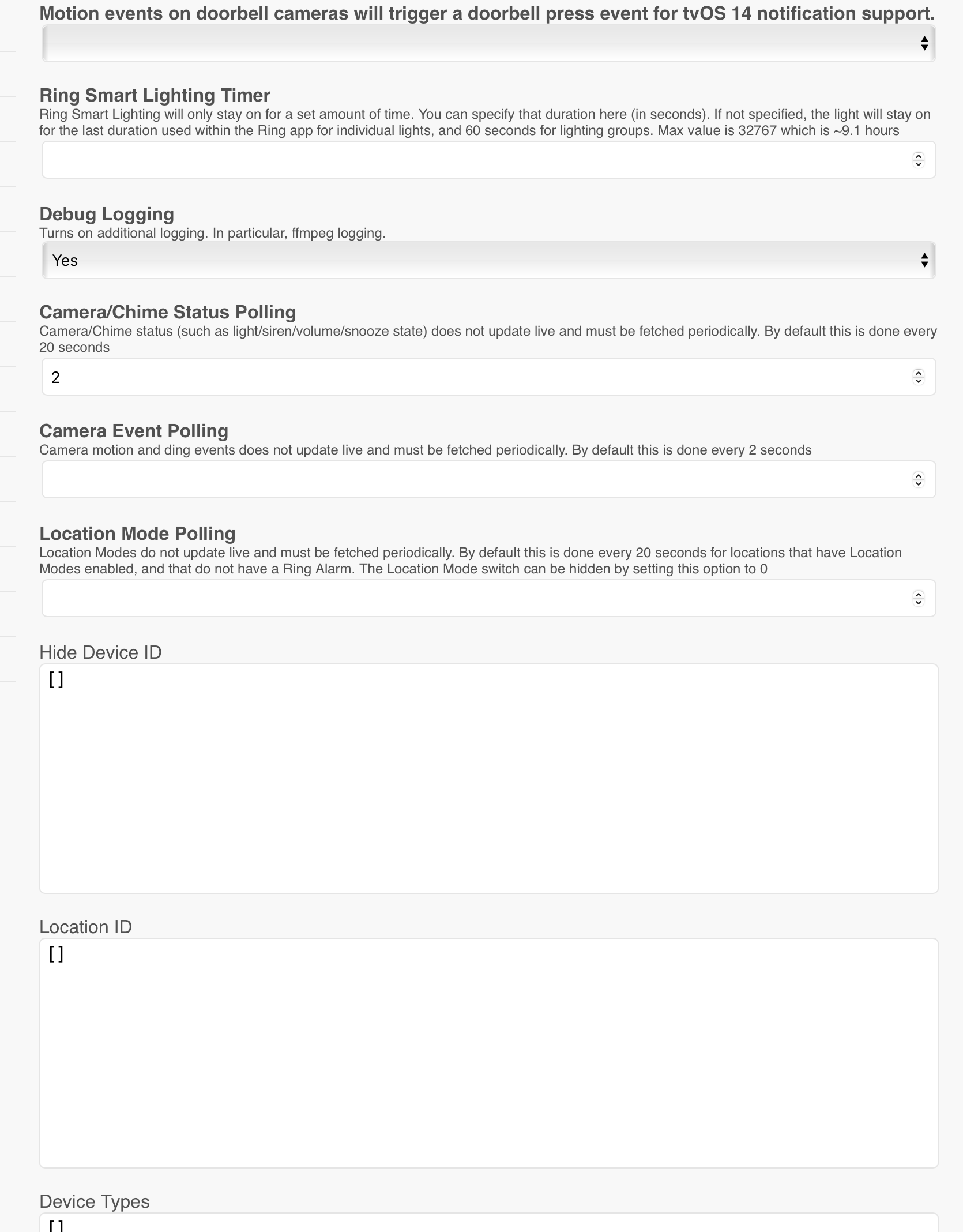
adavison007
on 3 Dec 2020
You can set Location Mode Polling to 0 to remove the mode switch and then clear it again to get it back
dgreif
on 3 Dec 2020
You can set Location Mode Polling to 0 to remove the mode switch and then clear it again to get it back
@dgreif Just did that, sorry, but it's not come back?
adavison007
on 3 Dec 2020
@dgreif Thanks for the help, I downgraded to 9.12.6 and also then 9.12.5 and the modes "Alarm" button has not returned? I checked the settings in polling to 0, rebooted and then cleared and rebooted and still no button. Thoughts ideas? I did add a new doorbell today, but it was only after the update to 9.12.7 that the button disappeared
Thanks in advance.
adavison007
on 3 Dec 2020
@dgreif Found a fix.... if you have a number greater than zero in the polling field when doing an update or downgrade the button appears..... if you have a zero or the field is empty the button does not appear...
adavison007
on 3 Dec 2020
From @adavison007 in https://github.com/dgreif/ring/issues/516#issuecomment-738286291:
if you have a zero or the field is empty the button does not appear
Reviewing the screenshot you shared above, the description under “Location Mode Polling” explains “The Location Mode switch can be hidden by setting this option to 0.” It sounds like the is the behavior you observed.
Do you have a suggestion for improving this description to be more clear? Perhaps something like “The Location Mode switch can be hidden by clearing this option or setting it to 0” to account for the empty field behavior?
 smockle
on 5 Dec 2020
smockle
on 5 Dec 2020
"clearing" the field should actually set the value to undefined or remove it from the config. I believe that's how the homebridge-config-ui-x form handles it, but HOOBS _might_ be keeping the value as 0. @adavison007 if you clear the field and then look at the raw config.json, does it still have a locationModePollingSeconds value?
dgreif
on 5 Dec 2020
From @adavison007 in #516 (comment):
if you have a zero or the field is empty the button does not appear
Reviewing the screenshot you shared above, the description under “Location Mode Polling” explains “The Location Mode switch can be hidden by setting this option to 0.” It sounds like the is the behavior you observed.
Do you have a suggestion for improving this description to be more clear? Perhaps something like “The Location Mode switch can be hidden by clearing this option or setting it to 0” to account for the empty field behavior?
@smockle once @dgreif pointed it out the explanation made sense, so I'm ok, What I would suggest is a drop down for turning it on or off in the UI and a separate box for the polling.
adavison007
on 6 Dec 2020
"clearing" the field should actually set the value to
undefinedor remove it from the config. I believe that's how the homebridge-config-ui-x form handles it, but HOOBS _might_ be keeping the value as0. @adavison007 if you clear the field and then look at the raw config.json, does it still have alocationModePollingSecondsvalue?
@dgreif I would live to test this for you, but after doing all the work to get it back and then having to make 6 automations that disappeared after the button went I daren't risk it. I will test next time I need to make a big edit. Currently I use the modes switch to keep my smart things alarm in sink with the modes settings and then I automate the setting from smart things to homekit to bring the alarm via your switch and virtual switches in smart things together..... hence me being stressed when the button vanished. I will be updating my old alarm to ring alarm soon, so I can test then.
adavison007
on 6 Dec 2020
@dgreif I just did the latest update and all is fine with the alarm button :)
adavison007
on 5 Jan 2021
Related issues
 divemasterjm
·
7Comments
divemasterjm
·
7Comments
 ryanleesmith
·
4Comments
ryanleesmith
·
4Comments
 bachdinhnhan
·
3Comments
bachdinhnhan
·
3Comments
 jchristianj
·
4Comments
dgreif
·
6Comments
jchristianj
·
4Comments
dgreif
·
6Comments
Most helpful comment
@dgreif I would live to test this for you, but after doing all the work to get it back and then having to make 6 automations that disappeared after the button went I daren't risk it. I will test next time I need to make a big edit. Currently I use the modes switch to keep my smart things alarm in sink with the modes settings and then I automate the setting from smart things to homekit to bring the alarm via your switch and virtual switches in smart things together..... hence me being stressed when the button vanished. I will be updating my old alarm to ring alarm soon, so I can test then.