Would be great if there was an option similar to the camera-ffmpeg plugin that would allow periodic saving of a snapshot image. Trying to create a time-lapse from my floodlight camera is providing more difficult than I imagined.
 mattfusf
All 29 comments
Saving to Google Drive was previously requested in #130, but it was just a single request for the feature. You mentioned you want to create a time-lapse, but that is a feature that Ring has been rolling out within their app. Have you seen the built-in time lapse, and is there a reason it doesn't meet your needs?
 dgreif
on 15 Apr 2020
dgreif
on 15 Apr 2020
Sorry I missed the prior request. Use case is really around having it done "on prem" and not needing the Ring paid service which I think is a pre-req for their time-lapse feature.
mattfusf
on 16 Apr 2020
The ability to save a snapshot on ring or motion would be awesome. I could send the image to Fully Kiosk Browser and see who is at the front door w/o opening an app or getting up.
 sidjohn1
on 2 Jun 2020
sidjohn1
on 2 Jun 2020
Have you tested NorthernMan54's awesome node-red plugin for homebridge? I am using it extensively. It's extremely powerful and probably a better way to integrate this type of thing since one could imagine a variety of possible upload mechanisms.
I don't think Cameras are exposed, but maybe that would be a cool feature instead (if it's even possible)?
Check out this flow, for example:
 dxdc
on 17 Jun 2020
dxdc
on 17 Jun 2020
@dxdc I really appreciate all the help on issues today, it's been a huge relief!! If this is possible with Node-red, I would love to get this issue closed out because I really don't want to implement this feature (for a number of reasons). When you say the camera needs to be exposed, do you mean they need to be external accessories that are separate from the bridge like they were pre v8? If so, it's actually an easy change that I already have the code written for, I just hadn't decided if I want to release it or not. Getting rid of this issue would definitely be enough incentive for me to do so 😂
dgreif
on 17 Jun 2020
When you say the camera needs to be exposed, do you mean they need to be external accessories that are separate from the bridge like they were pre v8?
I'm not really sure, but I don't think so. As far as I can tell, the node-red-contrib plugin is able to read these accessories. For example, I can read the chime switch, etc.
I think it may be an issue of pulling the video feed using the plugin. I'm looking into it and will contact the author if needed also. I'm not sure if there is support for that type of accessory, and definitely not sure how to read it.
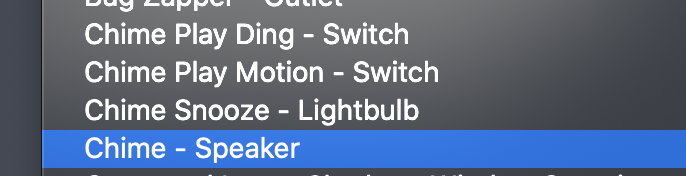
** also, you see lightbulb there because of my PR 😆
dxdc
on 17 Jun 2020
@dgreif well, that part wasn't too bad :)
https://github.com/NorthernMan54/node-red-contrib-homebridge-automation/pull/53
So, two questions then.
- It seems like there are 2 camera accessories per Ring device. Does that make sense? I'm not familiar enough with the code. What is the difference between them?
Btw, from analysis of the accessory, the only difference I can see is this parameter:
Selected RTP Stream Configuration
All other aspects are identical.
- The output I get looks like this:
SupportedVideoStreamConfiguration: "xx"
SupportedAudioStreamConfiguration: "xx"
SupportedRTPConfiguration: "xx"
SelectedRTPStreamConfiguration: "xx"
StreamingStatus: "xx"
SetupEndpoints: "xx"
Active: 1
Can I pass this somehow to ffmpeg? All of the xx values seem to be base64 encoded but not really sure.
dxdc
on 17 Jun 2020
Another idea here from NorthernMan54:
I'm using Wyze Cameras and they are sluggish to start a feed or take a snapshot so I ended up having the camera cache 60 seconds of video on a RAM drive on my RPI. Then I modified Homebridge-camera-ffmpeg to use that as the snapshot source. And have node-red grab 60 seconds of video starting 20 seconds before the motion sensor is triggered. ( A time machine ).
Is such an idea possible in conjunction with this plugin? If so, that could be really perfect.
dxdc
on 19 Jun 2020
@dxdc I have not worked with NodeRed at all so I can't give advice on why there would be duplicates of the cameras, or what to do with those properties you listed. I'm not sure you want to use the live stream to capture snapshots as it causes a lot of overhead with the streams going out to the Ring servers and then back to your network. Ideally, it should just tie into the snapshot functionality built into the homekit camera, which in this plugin uses the ring api to get snapshots.
dgreif
on 19 Jun 2020
@dgreif to see a list of accessories, you don't need NodeRED. (BTW... I highly encourage you to try NodeRED, it brings another crazy level of power to hb automations.)
curl -X PUT http://127.0.0.1:51826/accessories --header "Content-Type:Application/json" --header "authorization: 031-45-154"
Just replace the 51826 with your hb port# and the authorization code with your pin#. You MAY have to be in insecure mode for this, but not sure. You'll get a JSON list of all your accessories. This is the raw output of hapJS I believe.
I see two different camera accessories exposed for each Ring doorbell (that's what I meant by 2 different devices). I'm just not sure why there are 2.
Ideally, it should just tie into the snapshot functionality built into the homekit camera, which in this plugin uses the ring api to get snapshots.
Agree, just not sure how to do it. What do you think of the RAM drive idea, and having the snapshots saved there?
dxdc
on 19 Jun 2020
Thanks to a discussion here: https://github.com/homebridge/HAP-NodeJS/issues/830 there is a definite path forward for this (at least for snapshots)!
- Get the
aidof your Ring device here (note, replace Homebridge pin/port as appropriate):
curl -X PUT http://127.0.0.1:51826/accessories --header "Content-Type:Application/json" --header "authorization: 031-45-154"
(This is a long JSON output, you may want to search for the aid using jq)
- Save a snapshot from the camera here:
curl --request POST http://127.0.0.1:51826/resource --header "Content-Type:Application/json" --header "authorization: 031-45-154" --data '{ "aid": 115, "resource-type": "image" }' --output "snapshot.jpg"
It grabs the latest snapshot into a JPG file! So, this can easily be paired with NodeRED to generate a snapshot file. I think there may be a cleaner solution using a native solution like this though: https://github.com/NorthernMan54/node-red-contrib-homebridge-automation/pull/56
Working with NorthernMan on it. I think this is probably a viable path forward, at least for the snapshots (not sure about video/audio).
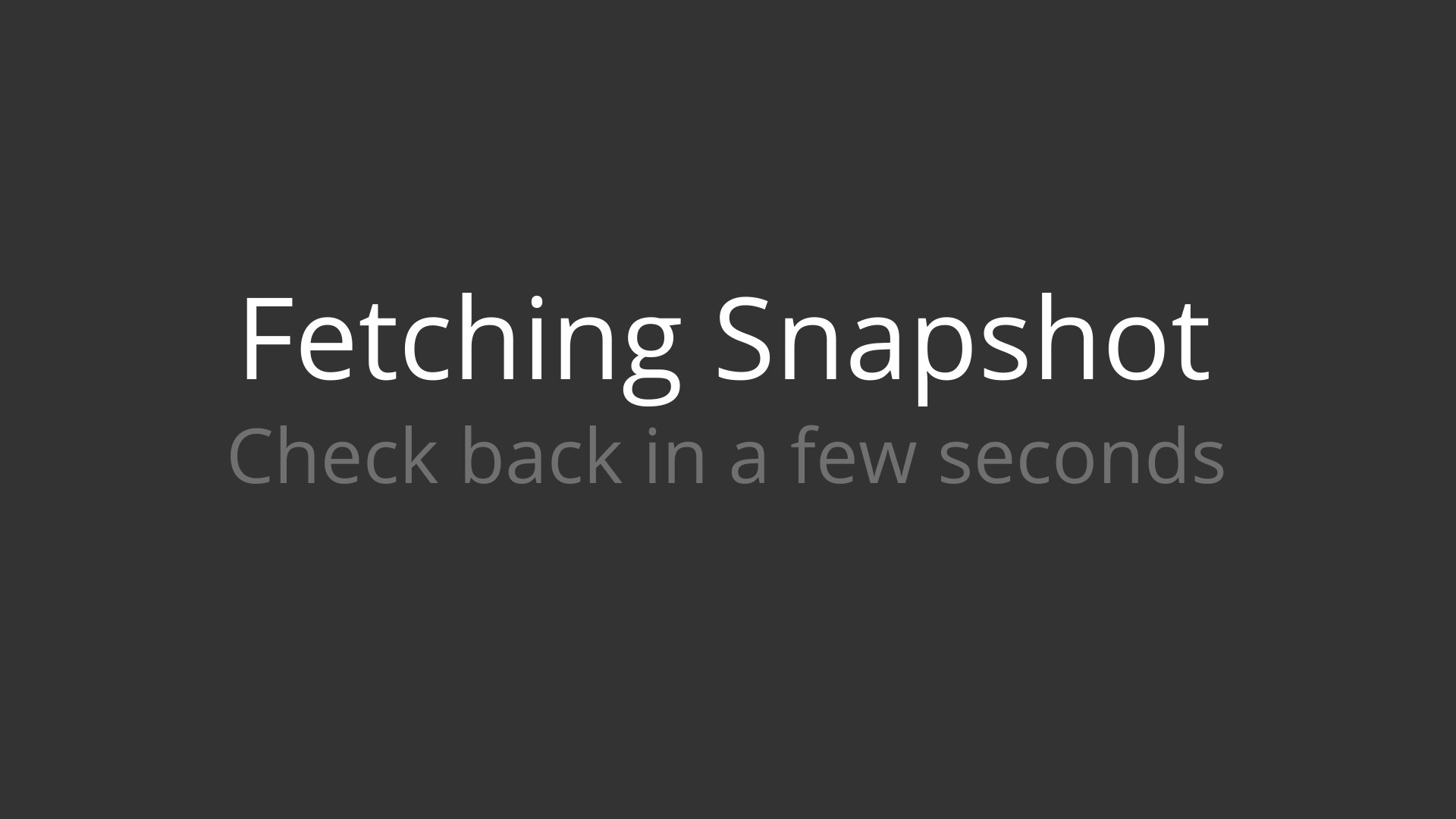
So, the only snag is is -- if there isn't a recent snapshot I get this one :) I'm not sure how current it has to be, maybe 1 minute?
So either, two snapshots would need to be requested (e.g., 10 sec apart) to ensure there is a current one loaded, it should pull the snapshot in a more synchronous way? But if this is solvable within the Ring code, I think we can probably do the rest via NodeRED.
dxdc
on 23 Jun 2020
@dxdc thank you for continuing to dig into this!! I'm still planning to do some work on snapshots in the next week or so to get rid of the Fetching Snapshot placeholder. It will be set up so that wired cameras should be able to fetch a snapshot and will actually wait for the new one to come back, while battery cams will try to wait for a few seconds but return an empty value if they are unable to pull an updated snapshot. I'll post back here when I have an update ready. This seems like a fantastic solution for users who really want to handle snapshots in their own special way.
As for live audio/video, that's probably going to be a whole separate beast that probably isn't worth tackling at this point.
dgreif
on 23 Jun 2020
For anyone who wants to give this a try, here is an example NodeRED flow. There are several ways to route these images to Google Vision (and others).
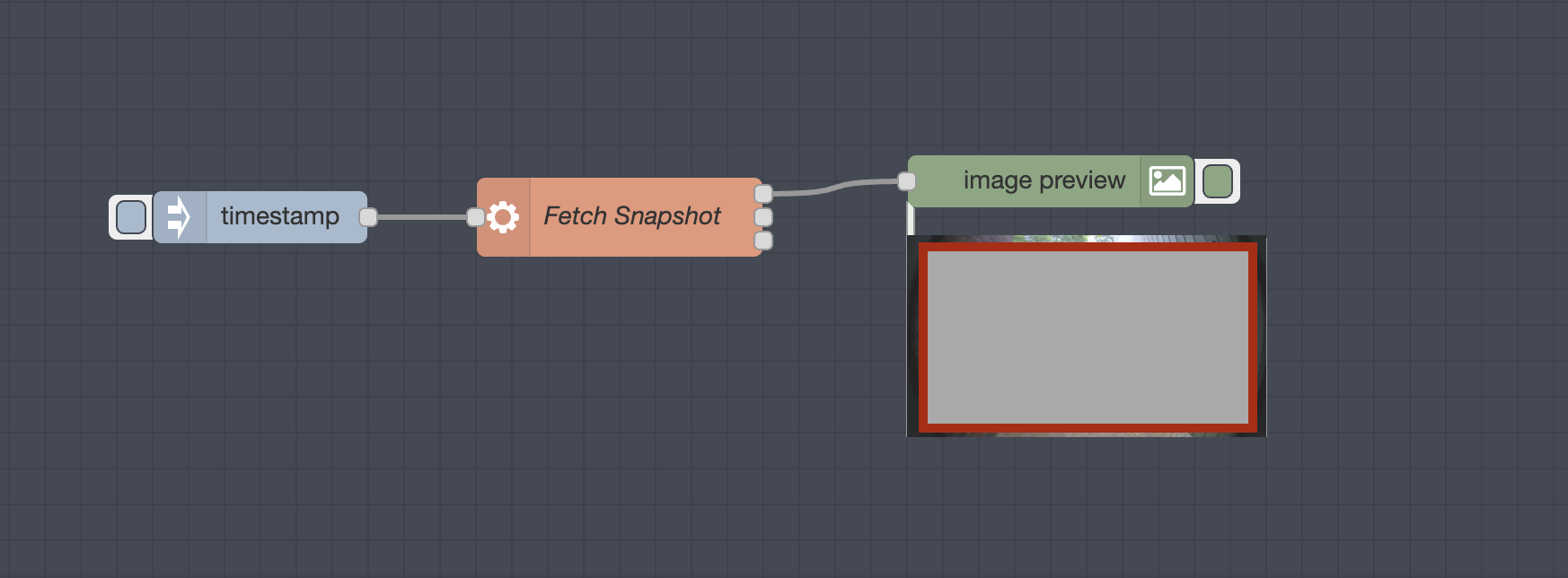
[{"id":"d952b898.1c3128","type":"inject","z":"431a0dd9.b9eea4","name":"","topic":"","
payload":"","payloadType":"date","repeat":"","crontab":"","once":false,"onceDelay":0.1,"x":200,"y":2280,"wires":[["e69e253.b83d5d8"]]},{"id":"e69e253.b83d5d8","type":"exec","z":"431a0dd9.b9eea4","command":"curl -s --request POST http://127.0.0.1:51826/resource --header \"Content-Type:Application/json\" --header \"authorization: 031-45-154\" --data '{ \"aid\": 115, \"resource-type\": \"image\" }' | base64","addpay":false,"append":"","useSpawn":"","timer":"","name":"Fetch Snapshot","x":400,"y":2280,"wires":[["57288798.a10488"],[],[]]},{"id":"57288798.a10488","type":"image","z":"431a0dd9.b9eea4","name":"","width":160,"data":"payload","dataType":"msg","thumbnail":false,"active":true,"pass":false,"outputs":0,"x":640,"y":2260,"wires":[]}]
I'm still planning to do some work on snapshots in the next week or so to get rid of the Fetching Snapshot placeholder.
Great news @dgreif !
dxdc
on 23 Jun 2020
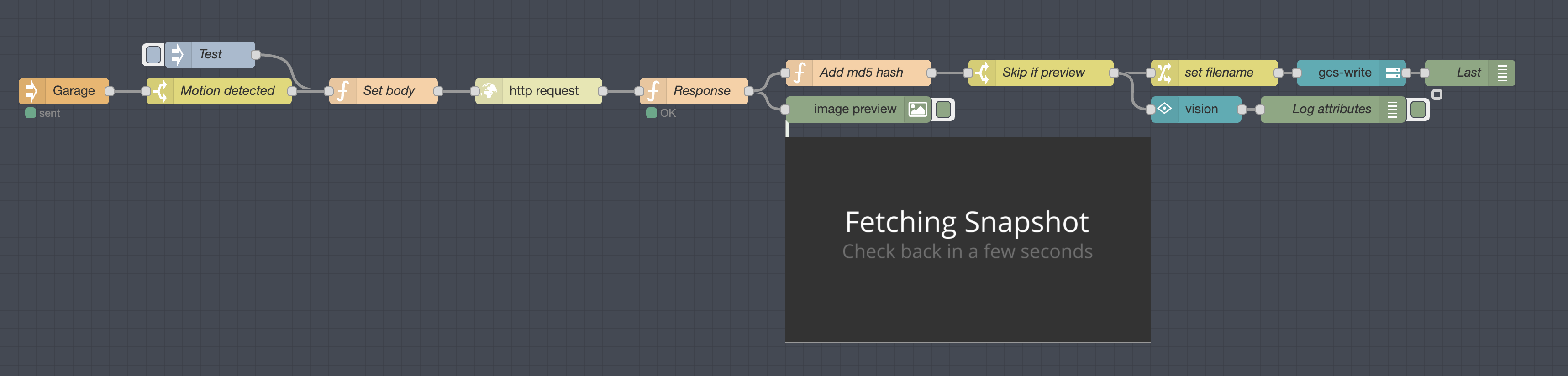
Reworked this entirely, and I have it uploading to Google Cloud Storage as well as Google Vision analysis. A bit cumbersome to set up the Google credentials and access. For anyone preferring to send these to Google Drive, https://flows.nodered.org/node/node-red-contrib-google-storage for example could be useful.
I also added a feature in my flow to prevent upload/analysis if the MD5 hash of the image was the default "Fetching Snapshot" image. I'll omit that later once you rework the code, but it seems helpful for now. Also, it's simple enough to set a trigger to delay & re-poll for a new snapshot if this image comes up.
@dgreif one other point. The image preview being returned is 640x360. Per the discussion on HAP-NodeJS:
image-widthandimage-heightare required. Though some plugins don't bother to check those and some plugins don't event respect those and will just return the snapshot in a predefined size.
Do you know if that's the case here? Some rough checking via Ring.com footage directly downloaded from Ring also shows 640x360 resolution. So, not sure if there's anything to be done here. For reference, I'm requesting much larger values, i.e. 'image-width': 1920, 'image-height': 1080.
Here's a screenshot of the full flow:
dxdc
on 24 Jun 2020
This is looking awesome! I’ll need to install node red soon and try it out. Hopefully I will have snapshots fixed up by this weekend. Regarding image sizing, I can’t ask Ring for specific height and width, it’s just fixed dimensions that the camera uploads and I download. I don’t resize it because HomeKit has never seemed to mind receiving the wrong size and resizing takes extra time
dgreif
on 24 Jun 2020
@dxdc THX! That was exactly what i needed. Doorbell presses now show who is at my door on my android tablets running fully browser. I used nodered to CURL the snapshot to a local web server on doorbell press then CURL fully kiosk browser to display the new page. It’s all super fast too!
sidjohn1
on 24 Jun 2020
Hey @dgreif ,
Thanks for all of your work !
I have Another idea that could push the snapshot functionality, But die doubt its Performance.
What about getting the ffmpeg stream automatically on Each ding Event and Grab the First Frame of it? This way you Could replace the snapshot With the probably 10 Minute old one from doorbell :)
WhT do you think?
 DerGute
on 24 Jun 2020
DerGute
on 24 Jun 2020
@DerGute that idea has been thrown around a bit. While it is definitely _possible_, it would have a lot of overhead because every stream has to be routed through the Ring servers, then back to your network and through your homebridge setup. I think the video streams are pretty taxing on batteries as well, compared to uploading a single snapshot. At this point I don't think it's worth the extra network and battery usage.
dgreif
on 25 Jun 2020
I think the solution from @dxdc is by far the best option here. I have no desire to add google drive uploading directly into the project, and it looks like node-red gives you unlimited flexibility with how you want to configure it and automations you want to trigger.
dgreif
on 8 Jul 2020
hey, @dxdc could you provide the code or whatever it is called for the second flow you posted so I could import it into node-red. Thanks in advance!
 KattyMan06
on 26 Jul 2020
KattyMan06
on 26 Jul 2020
@KattyMan06 I already posted an example flow above: https://github.com/dgreif/ring/issues/290#issuecomment-648318375
For the second flow though, here is something to get you started. You still need to provide / edit:
- Homebridge PIN
- Homebridge port number
- AID for your Ring device

[{"id":"81807a54.212ae8","type":"image","z":"431a0dd9.b9eea4","name":"","width":"400","data":"payload","dataType":"msg","thumbnail":false,"active":true,"pass":false,"outputs":0,"x":1620,"y":1900,"wires":[]},{"id":"d9425ea0.3bfb7","type":"http request","z":"431a0dd9.b9eea4","name":"","method":"POST","ret":"bin","paytoqs":"ignore","url":"http://127.0.0.1:51000/resource","tls":"","persist":false,"proxy":"","authType":"","x":1280,"y":1900,"wires":[["13afa0ab.cd93ff"]]},{"id":"d3426117.2d91","type":"function","z":"431a0dd9.b9eea4","name":"Set body","func":"msg.headers = {};\nmsg.headers.Authorization = '000-00-000'; // ### fill in your homebridge pin here\nmsg.payload = {\n 'aid': 100, // ### change this to your correct AID\n 'resource-type': 'image',\n 'image-width': 1920,\n 'image-height': 1080\n};\n\nreturn msg;\n","outputs":1,"noerr":0,"initialize":"","finalize":"","x":1120,"y":1900,"wires":[["d9425ea0.3bfb7"]]},{"id":"8ca7610d.c20fb","type":"inject","z":"431a0dd9.b9eea4","name":"Test","repeat":"","crontab":"","once":false,"onceDelay":0.1,"topic":"","payload":"","payloadType":"str","x":970,"y":1900,"wires":[["d3426117.2d91"]],"info":"Start the test."},{"id":"13afa0ab.cd93ff","type":"function","z":"431a0dd9.b9eea4","name":"Response","func":"if (msg.statusCode === 200) {\n node.status({\n fill: 'green',\n shape: 'dot',\n text: 'OK'\n });\n return msg;\n}\n\nnode.status({\n fill: 'red',\n shape: 'ring',\n text: msg.statusCode + 'Error'\n});\nreturn null;\n","outputs":1,"noerr":0,"x":1440,"y":1900,"wires":[["81807a54.212ae8"]]}]
But from my understanding grabbing Screenshots from Homebridge Ring Plugin is all limited to how often the Ring API provides screenshots, right?
So the information, that on Batterydevices it can take up to 10 Minutes is still up to date?
best regards
DerGute
on 29 Jul 2020
@DerGute I actually found a work-around for that 10 minute restriction, which released in v9.4.0. Battery cams still cannot grab a snapshot while video is recording, but otherwise behave the same as wired cameras now.
dgreif
on 29 Jul 2020
@dgreif wow, sounds pretty well.I will try it! Thanks so far :)
DerGute
on 29 Jul 2020
Hey, first @dgreif many thanks for all the good stuff on this plugin. This is great to see the community supporting a feature that Ring is not able to provide... Despite keep repeating the Homekit integration promise since years..
Just sharing the Node-ref flow I've created based on what @dxdc created.
I wanted to save the snapshots locally on my NAS when a motion/event was triggered by my Ring doorbell so I created the following flow.
I added a check and retry if the snapshot provided by Homekit is not correct. Also added a loop so that several (to be configured) screenshots are taken after a motion is detected. Something which is not working perfectly, the several screenshots retrieved from HomeKit are the same. Maybe a limitation from HomeKit not allowing to refresh screenshot after a period of time.
I'm not an IT guy and discovered java/JSON with this by digging around the internet and using wiki/work from others... Credits to them :)
Here is the flow:
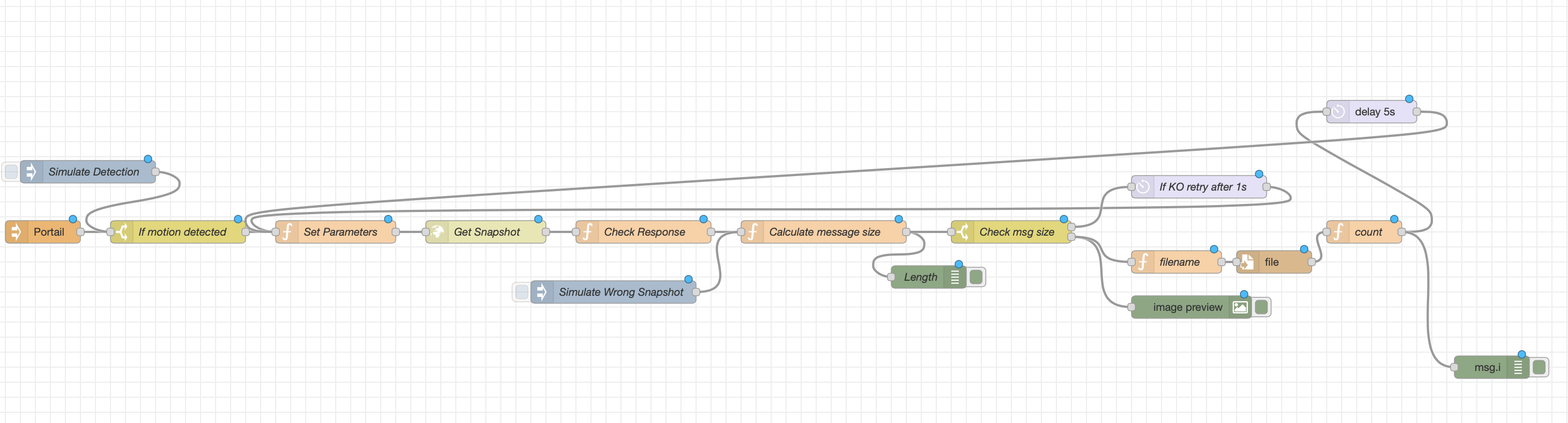
And the code if others want to use it. It needs to be configured (PIN, Homekit URL, AID, target location for files, filename...)
[{"id":"71292ef4.2a2ee8","type":"tab","label":"Flow 1","disabled":false,"info":""},{"id":"b82751b6.f18658","type":"image","z":"71292ef4.2a2ee8","name":"","width":"400","data":"payload","dataType":"msg","thumbnail":false,"active":true,"pass":false,"outputs":0,"x":1600,"y":340,"wires":[]},{"id":"3b09ca9c.582f76","type":"http request","z":"71292ef4.2a2ee8","name":"Get Snapshot","method":"POST","ret":"bin","paytoqs":"ignore","url":"http://000.000.000.000:0000/resource","tls":"","persist":false,"proxy":"","authType":"","x":660,"y":240,"wires":[["bc67be3.8e66e4"]]},{"id":"998e211a.14fa88","type":"function","z":"71292ef4.2a2ee8","name":"Set Parameters","func":"msg.headers = {};\nmsg.headers.Authorization = '000-00-000'; // ### fill in your homebridge pin here\nmsg.payload = {\n 'aid': O, // ### change this to your correct AID\n 'resource-type': 'image',\n 'image-width': 1920,\n 'image-height': 1080\n};\n\nreturn msg;\n","outputs":1,"noerr":0,"initialize":"","finalize":"","libs":[],"x":460,"y":240,"wires":[["3b09ca9c.582f76"]]},{"id":"bc67be3.8e66e4","type":"function","z":"71292ef4.2a2ee8","name":"Check Response","func":"if (msg.statusCode === 200) {\n node.status({\n fill: 'green',\n shape: 'dot',\n text: 'OK'\n });\n return msg;\n}\n\nnode.status({\n fill: 'red',\n shape: 'ring',\n text: msg.statusCode + 'Error'\n});\nreturn null;\n","outputs":1,"noerr":0,"initialize":"","finalize":"","libs":[],"x":870,"y":240,"wires":[["7f2dc694.f26648"]]},{"id":"514edccd.ec3a1c","type":"switch","z":"71292ef4.2a2ee8","name":"If motion detected","property":"payload.MotionDetected","propertyType":"msg","rules":[{"t":"eq","v":"1","vt":"str"}],"checkall":"true","repair":false,"outputs":1,"x":250,"y":240,"wires":[["998e211a.14fa88"]]},{"id":"53892d6f.56ccf4","type":"file","z":"71292ef4.2a2ee8","name":"","filename":"","appendNewline":true,"createDir":true,"overwriteFile":"false","encoding":"none","x":1710,"y":280,"wires":[["f582143f.1d0248"]]},{"id":"b29eaf39.a95c4","type":"function","z":"71292ef4.2a2ee8","name":"filename","func":"var d = new Date();\nvar t = d.getTime();\nvar year = d.getFullYear();\nvar month = d.getMonth()+1; \nif(month.toString().length == 1) {\nvar month = '0'+month;\n}\nvar day = d.getDate();\nif(day.toString().length == 1) {\nvar day = '0'+day;\n}\nvar hour = d.getHours();\nif(hour.toString().length == 1) {\nvar hour = '0'+hour;\n}\nvar min = d.getMinutes();\nif(min.toString().length == 1) {\nvar min = '0'+min;\n}\nvar sec = d.getSeconds();\nif(sec.toString().length == 1) {\nvar sec = '0'+sec;\n}\nmsg.date = t;\nmsg.filename = \"/mnt/SynoSnaps/\"+year+\"/\"+month+\"/\"+day+\"/ringSnap\"+year+month+day+\"_\"+hour+min+sec+\".jpg\";\nreturn msg;","outputs":1,"noerr":0,"initialize":"","finalize":"","libs":[],"x":1580,"y":280,"wires":[["53892d6f.56ccf4"]]},{"id":"147c1cba.ce7ffb","type":"hb-event","z":"71292ef4.2a2ee8","name":"Portail","Homebridge":"homebridge","Manufacturer":"Ring","Service":"Motion Sensor","device":"homebridge0E:E3:8D:67:31:54RingPortail00000085","conf":"935a8827.6a5ee8","sendInitialState":true,"x":70,"y":240,"wires":[["514edccd.ec3a1c"]]},{"id":"1840f1f8.007926","type":"inject","z":"71292ef4.2a2ee8","name":"Simulate Detection","props":[{"p":"payload"},{"p":"topic","vt":"str"}],"repeat":"","crontab":"","once":false,"onceDelay":0.1,"topic":"","payload":"{\"MotionDetected\":1}","payloadType":"json","x":90,"y":160,"wires":[["514edccd.ec3a1c"]]},{"id":"7afbdbea.95a774","type":"debug","z":"71292ef4.2a2ee8","name":"Length","active":true,"tosidebar":true,"console":false,"tostatus":false,"complete":"JSON.stringify(msg.payload).length","targetType":"jsonata","statusVal":"","statusType":"auto","x":1250,"y":300,"wires":[]},{"id":"7f2dc694.f26648","type":"function","z":"71292ef4.2a2ee8","name":"Calculate message size","func":"var msgsize = JSON.stringify(msg.payload).length;\nif (msgsize >= 20000) {\n node.status({\n fill: 'green',\n shape: 'dot',\n text: 'OK'\n });\n flow.set('msgsize', msgsize);\n return msg;\n}\n\nnode.status({\n fill: 'red',\n shape: 'ring',\n text: msg.statusCode + 'Error'\n});\nflow.set('msgsize', msgsize);\nreturn msg;","outputs":1,"noerr":0,"initialize":"","finalize":"","libs":[],"x":1110,"y":240,"wires":[["7afbdbea.95a774","d2d484e8.a797d"]]},{"id":"f7eab6c3.269948","type":"delay","z":"71292ef4.2a2ee8","name":"If KO retry after 1s","pauseType":"delay","timeout":"1","timeoutUnits":"seconds","rate":"1","nbRateUnits":"1","rateUnits":"second","randomFirst":"1","randomLast":"5","randomUnits":"seconds","drop":false,"x":1610,"y":180,"wires":[["998e211a.14fa88"]]},{"id":"d2d484e8.a797d","type":"switch","z":"71292ef4.2a2ee8","name":"Check msg size","property":"msgsize","propertyType":"flow","rules":[{"t":"lt","v":"20000","vt":"num"},{"t":"gte","v":"20000","vt":"num"}],"checkall":"true","repair":false,"outputs":2,"x":1360,"y":240,"wires":[["f7eab6c3.269948"],["b82751b6.f18658","b29eaf39.a95c4"]]},{"id":"75adc46d.b5451c","type":"inject","z":"71292ef4.2a2ee8","name":"Simulate Wrong Snapshot","props":[{"p":"payload"},{"p":"topic","vt":"str"}],"repeat":"","crontab":"","once":false,"onceDelay":0.1,"topic":"","payload":"{\"MotionDetected\":1}","payloadType":"json","x":830,"y":320,"wires":[["7f2dc694.f26648"]]},{"id":"f582143f.1d0248","type":"function","z":"71292ef4.2a2ee8","name":"count","func":"if( msg.i == undefined ) msg.i = 0;\n\nif (msg.i < 5) {\n node.status({\n fill: 'green',\n shape: 'dot',\n text: msg.i\n });\n msg.i = msg.i + 1;\n return msg;\n}\n\nnode.status({\n fill: 'red',\n shape: 'ring',\n text: 'Exit'\n});\nreturn null;\n\n","outputs":1,"noerr":0,"initialize":"","finalize":"","libs":[],"x":1870,"y":160,"wires":[["46c041d2.e616c8","8304ccf7.da3d98"]]},{"id":"46c041d2.e616c8","type":"delay","z":"71292ef4.2a2ee8","name":"","pauseType":"delay","timeout":"5","timeoutUnits":"seconds","rate":"1","nbRateUnits":"1","rateUnits":"second","randomFirst":"1","randomLast":"5","randomUnits":"seconds","drop":false,"x":1880,"y":80,"wires":[["998e211a.14fa88"]]},{"id":"8304ccf7.da3d98","type":"debug","z":"71292ef4.2a2ee8","name":"","active":true,"tosidebar":true,"console":false,"tostatus":false,"complete":"i","targetType":"msg","statusVal":"","statusType":"auto","x":2000,"y":420,"wires":[]},{"id":"935a8827.6a5ee8","type":"hb-conf","username":"260-41-485"}]
 Kaiserben
on 13 Apr 2021
Kaiserben
on 13 Apr 2021
@Kaiserben
You can probably use the rbe node to prevent the same image being sent multiple times with analysis of the image data.
Also, you may find this interesting... after some discussions with NorthernMan54, he developed a way of continuing this with labeling/boxes and AWS Rekognition.
dxdc
on 13 Apr 2021
Interesting, will give a try. I was thinking of storing the payload in a variable and compare that variable to the new payload.
Kaiserben
on 13 Apr 2021
I was thinking of storing the payload in a variable and compare that variable to the new payload
This is what rbe node does. "The node doesn't send any output until the msg.payload is different to the previous one."
dxdc
on 13 Apr 2021
Related issues
 zilnik1234
·
3Comments
zilnik1234
·
3Comments
 david-olshefski
·
3Comments
david-olshefski
·
3Comments
 DustinBryant
·
6Comments
DustinBryant
·
6Comments
 parchmaf
·
3Comments
parchmaf
·
3Comments
 divemasterjm
·
7Comments
divemasterjm
·
7Comments