I've updated, but no sound? do I need to change anything else?
 adavison007
All 33 comments
https://github.com/dgreif/ring/wiki/FFmpeg#homebridge-audio-support
 dgreif
on 24 Aug 2019
dgreif
on 24 Aug 2019
@adavison007 are you willing to test something out for me? I have ffmpeg built already and I'm thinking about shipping it with the node module. Are you running on a raspberry pi? If so, hold off on running those install commands I linked you to.
dgreif
on 24 Aug 2019
@dgreif happy to try beta :) I'm running RPI and Hoobs.org
adavison007
on 25 Aug 2019
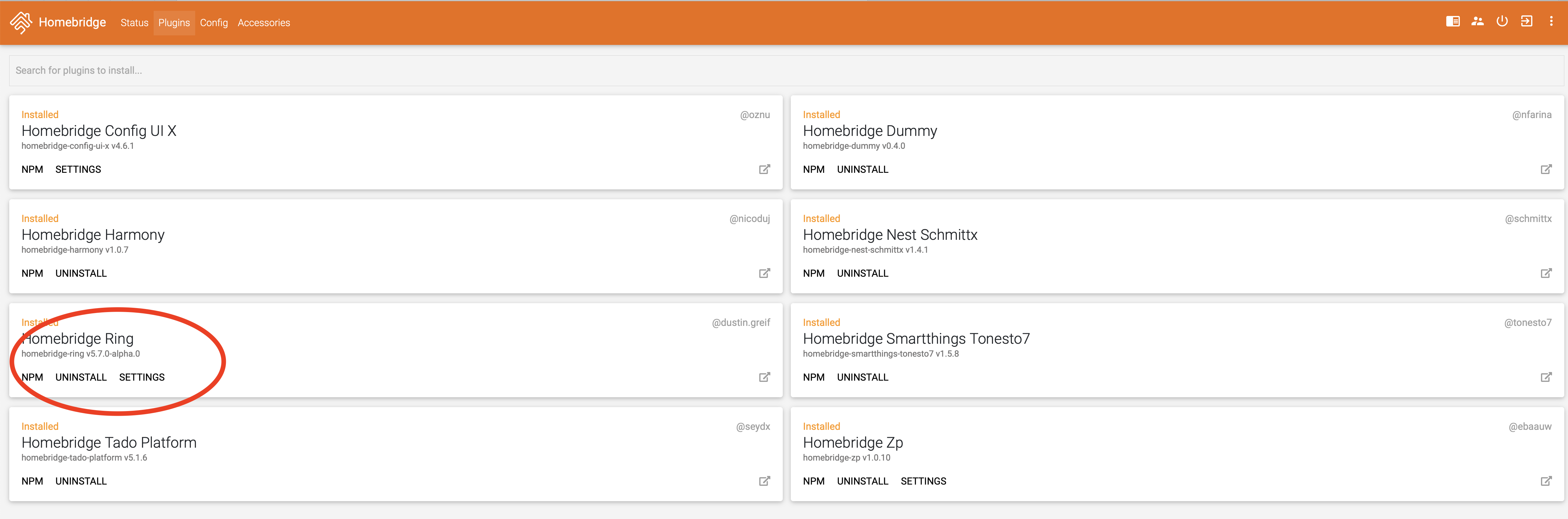
@adavison007 I released an alpha version that has the ffmpeg binary included. You should be able to install it with npm i -g [email protected] (maybe with a sudo at the beginning). If everything is good, you should have sound with not additional changes or installs. Let me know how it works!
dgreif
on 25 Aug 2019
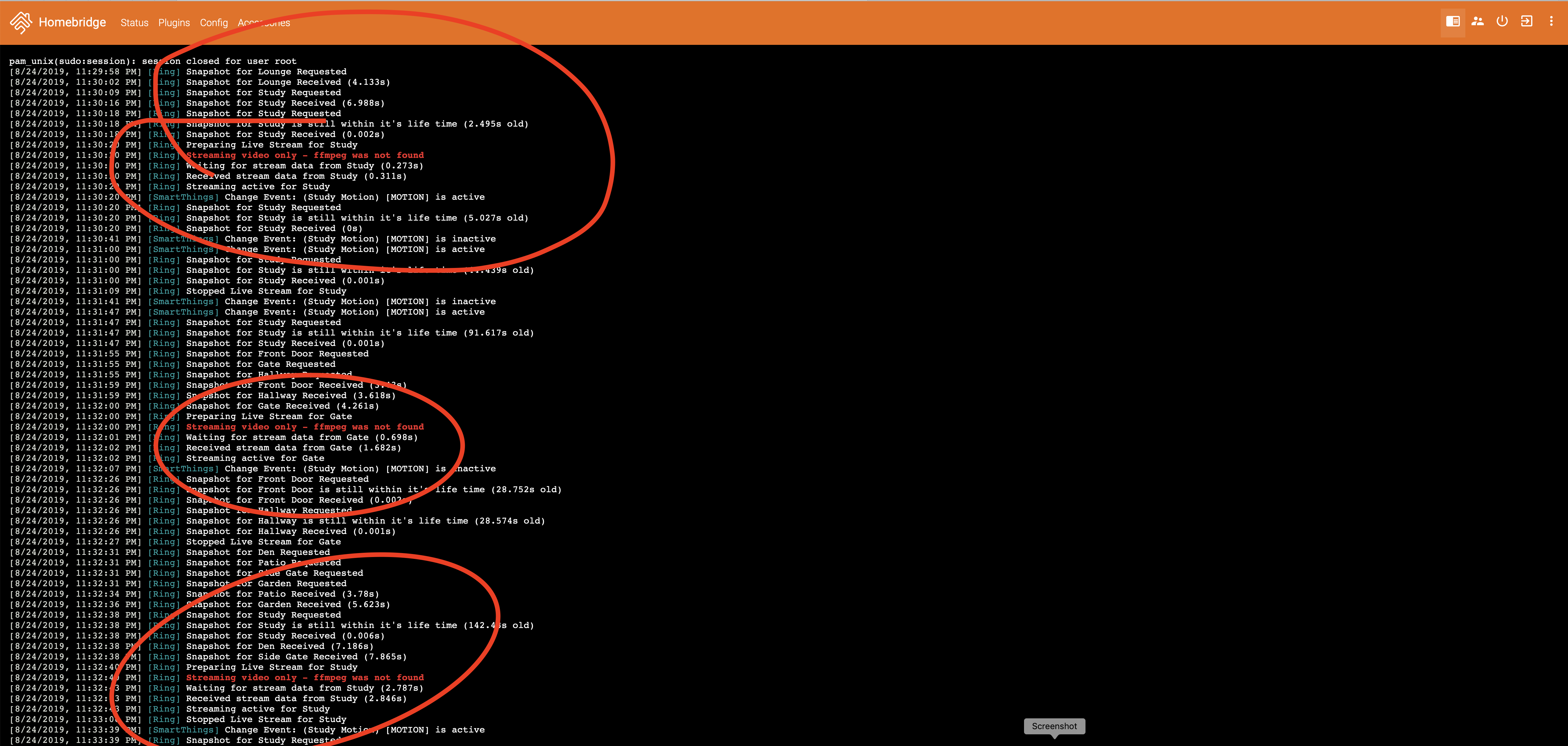
@dgreif Thats for the Alpha, installed successfully (used Sudo), but no sound still...
adavison007
on 25 Aug 2019
@dgreif
adavison007
on 25 Aug 2019
I appreciate the screenshots! Did you restart homebridge after updating the plugin? If so...not sure this approach will work. I'm out of time for the day so I'll follow up tomorrow or Monday based on your response. Thanks for testing it out!
dgreif
on 25 Aug 2019
@dgreif yes I did restart
adavison007
on 25 Aug 2019
I have no sound on my iMac install.
 black01gt
on 25 Aug 2019
black01gt
on 25 Aug 2019
Having same problem running on a pi after completing the install commands and rebooting - log shows same error of "streaming video only - ffmpeg was not found"
 Venger2005
on 25 Aug 2019
Venger2005
on 25 Aug 2019
Hi, i have ffmpeg installed on my mac mini long time ago for other cameras, updated plugin and is working like a charm, no issues, only waiting for recording switch!!!!, if you need some test just tell me.
 divemasterjm
on 25 Aug 2019
divemasterjm
on 25 Aug 2019
https://github.com/dgreif/ring/wiki/FFmpeg#homebridge-audio-support
@dgreif did you want me to install FFMPEG, or wait for next Alpha?
adavison007
on 25 Aug 2019
@adavison007 I’m not sure i will be able to get a pre bundled ffmpeg to work. I think it needs other libraries from the install process that I didn’t include. If you want audio quickly, just go ahead with the install steps. Sorry for the extra work, not sure if there is a way around it at this point. I talked to the HOOBS team and they are considering having it preinstalled in their v3 image, but until then I think it’s going to be manual install for anyone who wants it. Thanks for testing the alpha!
dgreif
on 25 Aug 2019
Anyone have any suggestions how to build ffmpeg with enable-libfdk-aac for a Synology docker Homebridge installation?
 mikesalz
on 25 Aug 2019
mikesalz
on 25 Aug 2019
@adavison007 I’m not sure i will be able to get a pre bundled ffmpeg to work. I think it needs other libraries from the install process that I didn’t include. If you want audio quickly, just go ahead with the install steps. Sorry for the extra work, not sure if there is a way around it at this point. I talked to the HOOBS team and they are considering having it preinstalled in their v3 image, but until then I think it’s going to be manual install for anyone who wants it. Thanks for testing the alpha!
@dgreif your instructions to install FFMPEG were perfect! thanks, installed, using current version again and HAVE SOUND! well done, nice work!
adavison007
on 25 Aug 2019
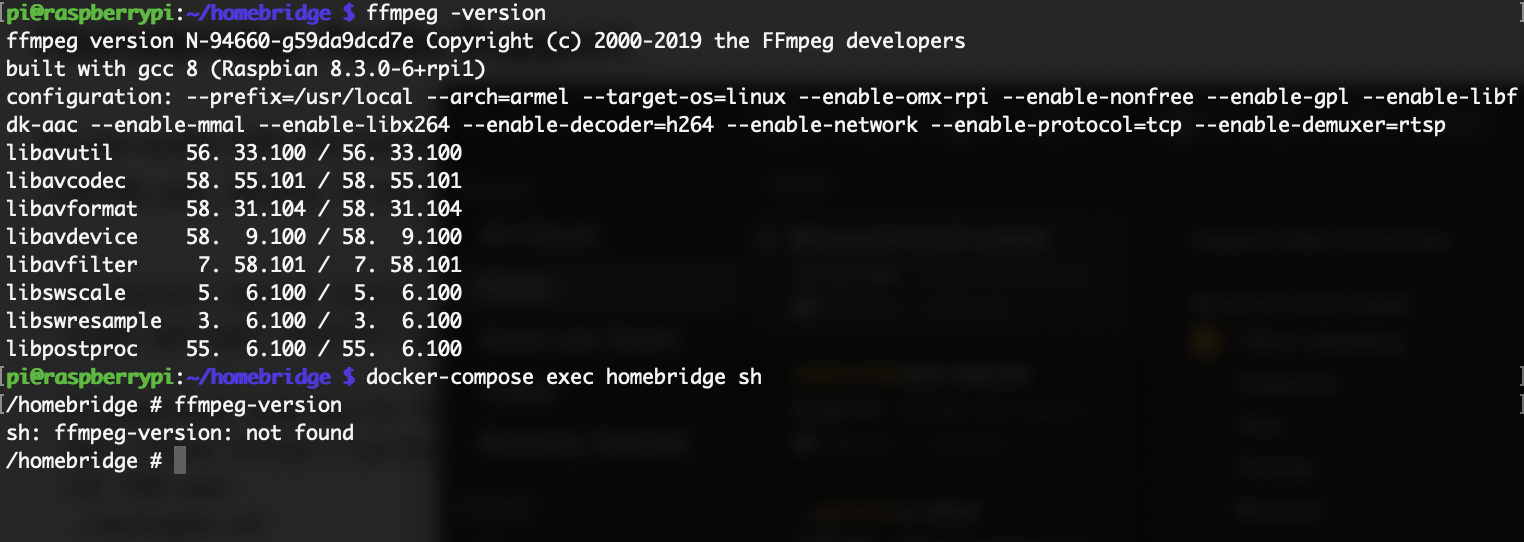
I too get the no ffmpeg error. Could it be because I run Homebridge in docker? I installed ffmpeg via SSH, but the dockerized Homebridge has its own shell, should I be installing it there instead? I'm confused
 ifeign
on 26 Aug 2019
ifeign
on 26 Aug 2019
I too get the no ffmpeg error. Could it be because I run Homebridge in docker? I installed ffmpeg via SSH, but the dockerized Homebridge has its own terminal via the config UI, should I be installing it there instead? I'm confused
@ifeign I use Hoobs, I went to the hoops cli and used these instructions (hoobs is docker too) and it worked fine, took about 45 minutes.. https://github.com/dgreif/ring/wiki/FFmpeg#homebridge-audio-support
adavison007
on 26 Aug 2019
I followed along with the wiki too, no luck.
ifeign
on 26 Aug 2019
@ifeign ffmpeg does need to be available _inside_ the docker image as it can't reach outside of it's shell (intentionally). Which docker image are you using?
dgreif
on 26 Aug 2019
@ifeign ffmpeg does need to be available _inside_ the docker image as it can't reach outside of it's shell (intentionally). Which docker image are you using?
https://github.com/oznu/docker-homebridge how do I go about doing that?
ifeign
on 26 Aug 2019
@ifeign ffmpeg does need to be available _inside_ the docker image as it can't reach outside of it's shell (intentionally). Which docker image are you using?
No idea, but you commands don't look like the ones from the instructions... the first one should be sudo apt-get install git pkg-config autoconf automake libtool libx264-dev
adavison007
on 26 Aug 2019
@ifeign ffmpeg does need to be available _inside_ the docker image as it can't reach outside of it's shell (intentionally). Which docker image are you using?
No idea, but you commands don't look like the ones from the instructions... the first one should be sudo apt-get install git pkg-config autoconf automake libtool libx264-dev
my commands are simply to demonstrate that ffmpeg is installed.
ifeign
on 26 Aug 2019
@ifeign ffmpeg does need to be available _inside_ the docker image as it can't reach outside of it's shell (intentionally). Which docker image are you using?
No idea, but you commands don't look like the ones from the instructions... the first one should be sudo apt-get install git pkg-config autoconf automake libtool libx264-dev
my commands are simply to demonstrate that ffmpeg is installed.
Sorry, no idea, I just cut and paste each of the 15 or so commands one by one and it worked fine, sorry
adavison007
on 26 Aug 2019
Getting closer.. I followed this https://github.com/oznu/docker-homebridge/issues/85#issuecomment-373961455
But now I get this

ifeign
on 26 Aug 2019
Unfortunately that version of ffmpeg does not include libfdk_aac which is the one piece that is essential for getting audio to work. I really wanted to avoid using ffmpeg, and libfdk_aac in particular, to avoid having these exact issues. Unfortunately this is the only setup that actually works so far. I can’t personally give instructions for getting it installed in every type of environment on every platform. If you manage to get it working, please add a new section to the wiki page in this project so that others can avoid the same struggles. Sorry for the headaches!
dgreif
on 26 Aug 2019
https://github.com/oznu/docker-homebridge/issues/82#issuecomment-478172482 I'm gonna try this and report back.
Edit: seems like I'm missing a step, can't get these commands to run due to a missing directory.
ifeign
on 26 Aug 2019
I got it working! Though it seems like I had to make a bunch of compromises. The docker container I use runs Alpine Linux, and I just couldn't figure out how to enable OMX and MMAL. I'm probably going to switch to a native install of Homebridge soon, due to a few other things I want to do... however, for the curious, this is what I did:
# access docker container shell (I recommend this vs the web UI, as the web UI may time out)
cd /home/pi/homebridge
docker-compose exec homebridge sh

# install build tools
apk add git pkgconfig autoconf automake libtool x264-dev

# download and build fdk-aac
git clone https://github.com/mstorsjo/fdk-aac.git
cd fdk-aac
./autogen.sh
./configure --prefix=/usr/local --enable-shared --enable-static
make -j4
sudo make install
sudo ldconfig
cd ..

# download and build ffmpeg
git clone https://github.com/FFmpeg/FFmpeg.git
cd FFmpeg
./configure --prefix=/usr/local --arch=armel --target-os=linux --enable-nonfree --enable-gpl --enable-libfdk-aac --enable-libx264 --enable-decoder=h264 --enable-network --enable-protocol=tcp --enable-demuxer=rtsp
make -j4
sudo make install
@dgreif with the compromises I made, is this worth adding to the wiki?
ifeign
on 29 Aug 2019
@ifeign glad you got it working! Technically I don't think we have to have OMX or MMAL. I lifted that install script from https://github.com/KhaosT/homebridge-camera-ffmpeg/wiki/Raspberry-PI and didn't change it at all. My hope was that I would save people the headache of rebuilding everything with OMX if they needed it for another camera plugin...plus I didn't take the time to figure out _exactly_ which options we need.
As far as adding it to the wiki, I think it could be useful. Looks like you are missing a couple steps like ./autogen.sh and the make steps under ffmpeg. Did you get it to work without those?
dgreif
on 29 Aug 2019
@dgreif whoops, I forgot to paste those in. It's essentially the same commands but modified a little to work with Alpine's apk instead of apt and removing a few packages it couldn't find. Updated my previous comment to be correct. I can add it to the wiki, might as well.
After doing all this, I did find a potentially simpler method, but I don't want to undo everything just to test it (maybe later). Any other docker users out there want to give this a try? https://github.com/oznu/docker-homebridge/issues/82#issuecomment-374497842
Edit: Wiki page isn't publicly editable.
ifeign
on 29 Aug 2019
Wiki updated ✅. I added MacOS, and opened up the wiki for public editing. If anyone is able to successfully run the abbreviated alpine commands or the MacOS commands, please let me know. I think the instructions are good enough at this point that we can close this issue. I appreciate any help I can get from the community to improve that wiki and make it easier for others. Big thanks @ifeign and @adavison007 for your help!
dgreif
on 29 Aug 2019
Wiki updated ✅. I added MacOS, and opened up the wiki for public editing. If anyone is able to successfully run the abbreviated alpine commands or the MacOS commands, please let me know. I think the instructions are good enough at this point that we can close this issue. I appreciate any help I can get from the community to improve that wiki and make it easier for others. Big thanks @ifeign and @adavison007 for your help!
I can confirm your MacOS commands work. I actually used those directions yesterday
 krazyflipj
on 29 Aug 2019
krazyflipj
on 29 Aug 2019
Anyone have any suggestions how to build ffmpeg with enable-libfdk-aac for a Synology docker Homebridge installation?
I was encountering this issue myself, running an alpine docker-homebridge based image on Synology. To resolve the issue I built a new docker image based on oznu/docker-homebridge with FFmpeg copied from alfg/ffmpeg.
See https://hub.docker.com/r/nicholasrobinson/ffmpeg-homebridge or https://www.github.com/nicholasrobinson/ffmpeg-homebridge for more details. To get the fix on Synology, just stop your existing homebridge container and replace it with nicholasrobinson/ffmpeg-homebridge.
 nicholasrobinson
on 1 Sep 2019
nicholasrobinson
on 1 Sep 2019
@ifeign glad you got it working! Technically I don't think we have to have OMX or MMAL. I lifted that install script from https://github.com/KhaosT/homebridge-camera-ffmpeg/wiki/Raspberry-PI and didn't change it at all. My hope was that I would save people the headache of rebuilding everything with OMX if they needed it for another camera plugin...plus I didn't take the time to figure out _exactly_ which options we need.
For anyone else in a similar situation, I'm running a RPi 3B with DietPi. Got to the following step:
./configure --prefix=/usr/local --arch=armel --target-os=linux --enable-omx-rpi --enable-nonfree --enable-gpl --enable-libfdk-aac --enable-mmal --enable-libx264 --enable-decoder=h264 --enable-network --enable-protocol=tcp --enable-demuxer=rtsp
But was receiving an error that mmal and OMX was not found. It wasn't until I found this thread I realized I could remove --enable-omx-rpi and --enable-mmal. Everything compiles fine now and I have working audio! :)
 shred86
on 25 Nov 2019
shred86
on 25 Nov 2019
Related issues
 benfysh
·
6Comments
benfysh
·
6Comments
 LordZork
·
5Comments
LordZork
·
5Comments
 steets250
·
5Comments
steets250
·
5Comments
 malmentm
·
4Comments
divemasterjm
·
7Comments
malmentm
·
4Comments
divemasterjm
·
7Comments
Most helpful comment
I was encountering this issue myself, running an alpine docker-homebridge based image on Synology. To resolve the issue I built a new docker image based on oznu/docker-homebridge with FFmpeg copied from alfg/ffmpeg.
See https://hub.docker.com/r/nicholasrobinson/ffmpeg-homebridge or https://www.github.com/nicholasrobinson/ffmpeg-homebridge for more details. To get the fix on Synology, just stop your existing homebridge container and replace it with
nicholasrobinson/ffmpeg-homebridge.