Figured if anyone is having issues in iOS 13 beta we could log them all in the same issue till iOS 13 comes out.
 donavanbecker
All 37 comments
Motion notifications do not work on ring doorbell. It’s not even an option under home settings > sensors
 krazyflipj
on 16 Jul 2019
krazyflipj
on 16 Jul 2019
Happening for me too. Was working till I removed it (screwed up switching to V4) and added it back in.
 itsgabraf
on 16 Jul 2019
itsgabraf
on 16 Jul 2019
Happening for me too. Was working till I removed it (screwed up switching to V4) and added it back in.
@itsgabraf @krazyflipj I thought I was having these issues too, but that’s all iOS 13 not this plugin. I changed those settings on my Mac, and it started working on my iPhone.
Sent with GitHawk
donavanbecker
on 16 Jul 2019
What do you mean “changed those settings on my Mac”?
I tried the following:
Removed plugin. Reinstalled plugin. Added camera back to HomeKit (on iOS 13 device)
Removed plugin. Reinstalled plugin. Added camera back to HomeKit (on iOS 12 device)
Reformatted Raspberry Pi SD card into a brand new system. Started from scratch. Added plugin/homebridge etc. Added camera again.
Basically all gave me a result of no motion notifications. I just figured it was iOS fault and the next beta update will fix it.
itsgabraf
on 16 Jul 2019
What do you mean “changed those settings on my Mac”? ...
@itsgabraf it is iOS 13s fault. I changed the settings on the Home App on my Mac, to have snapshots and motion notifications and it is all working now.
Sent with GitHawk
donavanbecker
on 16 Jul 2019
Yea, mine just magically fixed itself this morning. Didn’t change a thing. Must have been on the Apple side. Still don’t have it appear under “sensors” though but I assume that because under “cameras” that it asks for snapshots, that they’ve just grouped the settings all under the camera.
itsgabraf
on 17 Jul 2019
Interesting mine still doesn’t work.
krazyflipj
on 17 Jul 2019
Has anyone else’s “allow snapshots” disappeared from their Camera settings?
itsgabraf
on 19 Jul 2019
Has anyone else’s “allow snapshots” disappeared from their Camera settings?
Yeah mine disappeared as well.
krazyflipj
on 23 Jul 2019
I am on iOS 13 and experiencing this issue as well. Motion alerts work perfectly for my Floodlight Cam but not the doorbells.
 EarthRise626
on 24 Jul 2019
EarthRise626
on 24 Jul 2019
I am on iOS 13 and experiencing this issue as well. Motion alerts work perfectly for my Floodlight Cam but not the doorbells.
Have you guys tried turning notifications off and then back on for each camera?
My Ring Pro and Floodlight both work awesome!!
donavanbecker
on 24 Jul 2019
Not working for me.
«Allow snapshots» is not showing...
 jahnkenneth
on 24 Jul 2019
jahnkenneth
on 24 Jul 2019
https://homekitnews.com/2019/07/03/changes-and-additions-to-the-home-app-in-ios13-beta-1/
currently, in iOS12, you get a snapshot from the camera with a notification. Now in iOS13, you get a notification AND a live stream from the camera – even on the lock screen
Looks like they are moving to live stream _instead_ of snapshots 😮. Still working on live streaming but getting _close_. I just updated to iOS 13 beta so I will check it out too.
 dgreif
on 24 Jul 2019
dgreif
on 24 Jul 2019
Just tried motion and ding on my Ring Pro, and motion on my Floodlight cam (same setup as @d0n4v4nb3ck3r). Everything worked perfectly, including the snapshots in the notifications. I'd suggest trying his approach of turning notifications off and back on for each camera..
dgreif
on 24 Jul 2019
Sometimes I get motion notifications and sometimes I don’t. As mentioned snapshots aren’t showing and the option is missing. I have a Ring 2
krazyflipj
on 24 Jul 2019
Odd! I’ve captured my current settings here:
I turned the notifications off and back on again in both areas of the Home app.
One thing of note is that these are both battery powered Doorbells, but I wouldn’t think that would be of consequence for the motion alerts!
Interesting to see the change from snapshots to streams. You deserve much praise if your are able to pull the SIP functionality off!
EarthRise626
on 25 Jul 2019
@EarthRise626 @krazyflipj it's interesting that you both are having issues with battery cameras. I think I broke the timing for slow snapshots when i messed with it last week. If it has been longer than 10 minutes since the last snapshot, it will now wait 30 seconds for a new one to come in. I made the assumption that the new one would come in just as fast as wired cameras, but that could be entirely wrong. The previous logic would only wait 5 seconds for a new snapshot on battery cameras, regardless of when the last snapshot was. I think what it happening is HomeKit is requesting a snapshot and waiting around for it to come in before showing the notification. On iOS 12 it would wait for ~15 seconds and then show the notification without a snapshot if it hadn't received one yet. iOS 13 must be waiting longer, and for some reason not even showing the notification if it waits too long 😞. I'll circle back to snapshots once I get live streams working. I'm at that critical "90%" mark where I feel like I have everything in place, but it's going to take me forever to get it to function correctly. Haven't had a successful stream into HomeKit yet, but I have SIP communication in place and am receiving audio RTP packets. For some reason it's not giving me video RTP which is what I'm trying to figure out right now. Wish me luck 🤞
dgreif
on 25 Jul 2019
Your description of the issue makes a lot of sense. I’m guessing with the improvements to camera feeds they have implemented in iOS 13, they may have changed a lot under the hood to prefer constant, live feeds rather than snapshots.
I’m still very much an amateur when it comes to scripting, but do work with API’s enough to ride along!
On Jul 24, 2019, at 7:08 PM, Dusty Greif notifications@github.com wrote:
@EarthRise626 https://github.com/EarthRise626 @krazyflipj https://github.com/krazyflipj it's interesting that you both are having issues with battery cameras. I think I broke the timing for slow snapshots when i messed with it last week. If it has been longer than 10 minutes since the last snapshot, it will now wait 30 seconds for a new one to come in. I made the assumption that the new one would come in just as fast as wired cameras, but that could be entirely wrong. The previous logic would only wait 5 seconds for a new snapshot on battery cameras, regardless of when the last snapshot was. I think what it happening is HomeKit is requesting a snapshot and waiting around for it to come in before showing the notification. On iOS 12 it would wait for ~15 seconds and then show the notification without a snapshot if it hadn't received one yet. iOS 13 must be waiting longer, and for some reason not even showing the notification if it waits too long 😞. I'll circle back to snapshots once I get live streams working. I'm at that critical "90%" mark where I feel like I have everything in place, but it's going to take me forever to get it to function correctly. Haven't had a successful stream into HomeKit yet, but I have SIP communication in place and am receiving audio RTP packets. For some reason it's not giving me video RTP which is what I'm trying to figure out right now. Wish me luck 🤞
—
You are receiving this because you were mentioned.
Reply to this email directly, view it on GitHub https://github.com/dgreif/ring/issues/68?email_source=notifications&email_token=AMTPLOUWCR2BAJGFUNII5OLQBDOIBA5CNFSM4ID424Y2YY3PNVWWK3TUL52HS4DFVREXG43VMVBW63LNMVXHJKTDN5WW2ZLOORPWSZGOD2X3L6I#issuecomment-514831865, or mute the thread https://github.com/notifications/unsubscribe-auth/AMTPLOWCFY25Q7NID7ZPZP3QBDOIBANCNFSM4ID424YQ.
EarthRise626
on 25 Jul 2019
Mine is a Ring Pro, not battery powered...
jahnkenneth
on 25 Jul 2019
I upgraded to iOS 13 beta last week so I could join you all in the fun. I noticed right away that I was having a lot of trouble with snapshots even on wired cameras (only receiving snapshots ~10% of the time). I found this tread on reddit which confirmed others are having issues, mainly with the ffmpeg plugin. The last comment recommended upgrading your Apple TV to the beta version, which fixed the problem for me 🎉
dgreif
on 28 Jul 2019
Ring Pro working flawlessly for doorbell alerts and live streaming, but I have not been able to receive any notifications for motion alerts. If I look at the motion sensor accessory, I can see it being triggered, but there is no option anywhere to manage notifications for it.
Hopefully an iOS 13 bug, that might be resolved with this week’s beta 5.
 tronny87
on 29 Jul 2019
tronny87
on 29 Jul 2019
Updated iOS 13 to latest beta that was released yesterday. Still not getting motion alerts. Live streaming works fine
krazyflipj
on 30 Jul 2019
Same here, though it’s not 100% either way. Sometimes they appear sometimes they don’t.
 jamesg311
on 30 Jul 2019
jamesg311
on 30 Jul 2019
Mine appear to be working on Beta 5, but I did notice it has trouble saving the notification settings. For example if I go into the camera and change the "People" option, then back out and go back into the settings, it does not save the changes that I just made. Definitely some bugs to be worked out still, this is why they do betas :joy:
dgreif
on 30 Jul 2019
Motion notifications now work on iOS 13 beta 5. My one issue is that the motion snapshots are very small in the initial notification on the lock screen, and 3D touch/tapping the notification just brings up the live stream. Would be nice to see each respective snapshot, as it was in iOS 12!
tronny87
on 31 Jul 2019
@tronny87 weird mine still doesn’t work. I’ll try re-adding camera again
krazyflipj
on 31 Jul 2019
Beta 6 and I still don’t get motion notifications. Option to turn it on is still missing.
krazyflipj
on 9 Aug 2019
Motion notifications work when they want to. They come and they go. They weren't working when I first set up this plug-in, then they started working out of nowhere 3 days later, then they stopped for 2 days, and recently started up again.
As dgreif has mentioned to myself and others many times, this is a HomeKit problem and we will have to hope Apple gets things stabilized before the final release of iOS 13.
tronny87
on 9 Aug 2019
Motion notifications work when they want to. They come and they go. They weren't working when I first set up this plug-in, then they started working out of nowhere 3 days later, then they stopped for 2 days, and recently started up again.
As dgreif has mentioned to myself and others many times, this is a HomeKit problem and we will have to hope Apple gets things stabilized before the final release of iOS 13.
Yes, but I found that the motionsensor only trips when the ring button is pressed on the doorbell itself. Jumping up and down in front of the cam won't.
 paqpaqpaq
on 10 Aug 2019
paqpaqpaq
on 10 Aug 2019
On Ring 2 live feed is hit or miss sometimes it works and sometimes I get no response
krazyflipj
on 29 Aug 2019
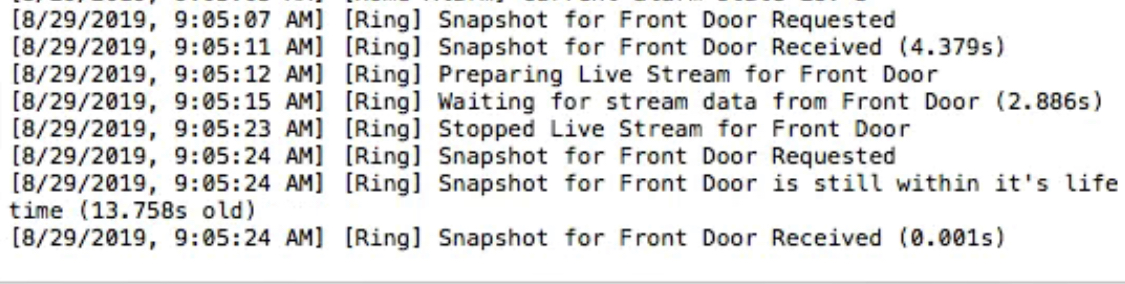
@krazyflipj anything odd in your logs when it fails? like 480 sip response?
dgreif
on 29 Aug 2019
@krazyflipj anything odd in your logs when it fails? like 480 sip response?
Nothing odd. See below.
krazyflipj
on 29 Aug 2019
@krazyflipj looks like your network isn't letting the packets in for some reason. It's odd that it works sometimes, but there isn't anything else I know of to make it work better, sorry!
dgreif
on 29 Aug 2019
@krazyflipj looks like your network isn't letting the packets in for some reason. It's odd that it works sometimes, but there isn't anything else I know of to make it work better, sorry!
It never works when I first try to load it but it works the second time. Really strange
krazyflipj
on 29 Aug 2019
It might be my VPN that’s causing the issue.
krazyflipj
on 1 Sep 2019
iOS 13 tomorrow!!
donavanbecker
on 19 Sep 2019
Thanks for all the feedback everyone! With iOS 13 out, I think it's a good time to close this one out.
dgreif
on 19 Sep 2019
Related issues
 Lui5Jacint0
·
3Comments
donavanbecker
·
7Comments
Lui5Jacint0
·
3Comments
donavanbecker
·
7Comments
 zilnik1234
·
3Comments
zilnik1234
·
3Comments
 Bullet55NL
·
6Comments
Bullet55NL
·
6Comments
 LordZork
·
5Comments
LordZork
·
5Comments