Richtextfx: How to change the text color of code area?
I want to implement a dracula theme for the code area, I was able to change the CSS provided for keywords, strings, etc... But the main text in the code area still black. How can I define my own color for it? Thank you.
 AleKrabbe
All 7 comments
Have you seen the CSS Ref Guide?
 JordanMartinez
on 27 Apr 2018
JordanMartinez
on 27 Apr 2018
Thank you for the reply, I just read it and added
.styled-text-area .text {
    -fx-fill: #A9B7C6;
}
to my css file, but now all the text has changed colors, and I don't have the java keywords highlight anymore. I would like to change the color of just the regular text, not keywords. Here is my whole CSS:
`.styled-text-area .text {
-fx-fill: #A9B7C6;
}
.keyword {
-fx-fill: #CC7832;
-fx-font-weight: bold;
}
.semicolon {
-fx-fill: #A9B7C6;
-fx-font-weight: bold;
}
.paren {
-fx-fill: #A9B7C6;
-fx-font-weight: bold;
}
.bracket {
-fx-fill: #A9B7C6;
-fx-font-weight: bold;
}
.brace {
-fx-fill: #A9B7C6;
-fx-font-weight: bold;
}
.string {
-fx-fill: #6A8759;
}
.comment {
-fx-fill: #2B2B2B;
}
.paragraph-box:has-caret {
-fx-background-color: #323232;
}`
AleKrabbe
on 2 May 2018
Could you provide a reproducible demo?
Also, I think when you need to remove the text style class from a text when you are styling it to another style class (e.g. keyword).
JordanMartinez
on 2 May 2018
How would I do that? I followed the guide provided here: JavaKeywordsDemo.java
Here is my code:
@Override
    public void start(Stage stage) throws Exception {
        Parent root = FXMLLoader.load(getClass().getResource("/fxml/Scene.fxml"));

        Scene scene = new Scene(root);
        scene.getStylesheets().addAll("/styles/Styles.css", "/styles/java-keywords.css");

        stage.setTitle("Control Flow Grapher - CFG (UFMS)");
        stage.setScene(scene);
        stage.show();
    }
@Override
    public void initialize(URL url, ResourceBundle rb) {
        CodeArea codeArea = new CodeArea();

        // add line numbers to the left of area
        codeArea.setParagraphGraphicFactory(LineNumberFactory.get(codeArea));

        // recompute the syntax highlighting 500 ms after user stops editing area
        Subscription cleanupWhenNoLongerNeedIt = codeArea

                // plain changes = ignore style changes that are emitted when syntax highlighting is reapplied
                // multi plain changes = save computation by not rerunning the code multiple times
                //   when making multiple changes (e.g. renaming a method at multiple parts in file)
                .multiPlainChanges()

                // do not emit an event until 500 ms have passed since the last emission of previous stream
                .successionEnds(Duration.ofMillis(500))

                // run the following code block when previous stream emits an event
                .subscribe(ignore -> codeArea.setStyleSpans(0, computeHighlighting(codeArea.getText())));

        // when no longer need syntax highlighting and wish to clean up memory leaks
        // run: `cleanupWhenNoLongerNeedIt.unsubscribe();`

        codeArea.replaceText(0, 0, sampleCode);

        stackPane.getChildren().add(new VirtualizedScrollPane<>(codeArea));
        codeArea.setBackground(new Background(new BackgroundFill(Paint.valueOf("#2B2B2B"), CornerRadii.EMPTY, Insets.EMPTY)));

    }
The CSS is the one I posted above.
Here is the output, as you can see the keyword highlighting does work, but the regular text stays black and can't be seen, I would like to change the text color from black to white or some other color.
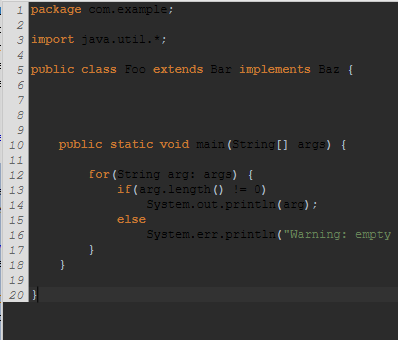
Thank you.
AleKrabbe
on 2 May 2018
I ended up just adding the !important tag after setting the text color:
.paragraph-text .text{
    -fx-fill: #A9B7C6;
}

.keyword {
    -fx-fill: #CC7832 !important;
    -fx-font-weight: bold;
}
.semicolon {
    -fx-fill: #A9B7C6 !important;
    -fx-font-weight: bold;
}
.paren {
    -fx-fill: #A9B7C6 !important;
    -fx-font-weight: bold;
}
.bracket {
    -fx-fill: #A9B7C6 !important;
    -fx-font-weight: bold;
}
.brace {
    -fx-fill: #A9B7C6 !important;
    -fx-font-weight: bold;
}
.string {
    -fx-fill: #6A8759 !important;
}

.comment {
    -fx-fill: #2B2B2B !important;
}

.paragraph-box:has-caret {
    -fx-background-color: #323232 !important;
}
I ended up just adding the !important tag after setting the text color
I didn't even know about that tag... Thanks for posting!
Also, I think when you need to remove the text style class from a text when you are styling it to another style class (e.g. keyword).
I believe the Text (or perhaps TextExt?) class adds the text style class to itself. So, even though a portion of the text in the document isn't styled with a text style class, it still gets applied.
JordanMartinez
on 3 May 2018
Found it! This line adds the text style class to a text.
JordanMartinez
on 3 May 2018
Related issues
 RobertBColton
·
5Comments
RobertBColton
·
5Comments
 emersoneber
·
4Comments
JordanMartinez
·
11Comments
emersoneber
·
4Comments
JordanMartinez
·
11Comments
 saifalmutory
·
7Comments
saifalmutory
·
7Comments
 liz3
·
11Comments
liz3
·
11Comments