Rh-che: Need to create bayesian plugin for Che 7
Issue problem:
Red Hat Che version:
version: (help/about menu)
- [ ] I can reproduce it on latest official image
Reproduction Steps:
Describe how to reproduce the problem
Runtime:
runtime used:
- [ ] minishift (include output of
minishift version) - [ ] OpenShift.io
- [ ] Openshift Container Platform (include output of
oc version) - [ ] k8s (include output of
kubectl version)
 ibuziuk
All 29 comments
@ibuziuk @invincibleJai Can we use existing vscode extension for this?
 gorkem
on 5 Nov 2018
gorkem
on 5 Nov 2018
@benoitf confirmed that it should be possible to reuse the vscode extension in che 7 / Theia the only thing that not all vscode API is currently implemented on Theia side. @invincibleJai could you please provide some info about what vscode API is used in the bayesian vscode extention [1] ?
[1] https://github.com/fabric8-analytics/fabric8-analytics-vscode-extension
ibuziuk
on 9 Nov 2018
you may give a try (here is an example to try a vscode extension)
https://www.youtube.com/watch?v=HbTKDlOL1eo&feature=youtu.be
 benoitf
on 9 Nov 2018
benoitf
on 9 Nov 2018
@invincibleJai : Have you gave it a try?
 slemeur
on 6 Dec 2018
slemeur
on 6 Dec 2018
@slemeur @gorkem Sorry, I missed the thread. Am yet to give it a try, thanks @ibuziuk @benoitf for the inputs. VSCode APIs we are using are below :
vscode.windowvscode.workspacevscode.WebviewPanel(https://code.visualstudio.com/api/extension-guides/webview)vscode.commands
Had the discussion with @sivaavkd regarding it. I'll update the thread based on my findings as we proceed.
 invincibleJai
on 30 Jan 2019
invincibleJai
on 30 Jan 2019
ok so based on API used it should work
benoitf
on 30 Jan 2019
@benoitf yes actually the current version of extension in marketplace make use of vscode.previewHtml and we are in process of migrating it to vscode.WebviewPanel as previewHtml is depreciated and I can see there is an open task to support previewHtml so current release won't work [1]. Is there a way I can test with vsix which we can create locally?
Even we are making use of context.globalState to get and set some info.
invincibleJai
on 31 Jan 2019
i posted my query here as well https://github.com/eclipse/che/issues/12142#issuecomment-459690438
invincibleJai
on 1 Feb 2019
context APIs and webview APIs are working as expected. However, am stuck with :
findFilesAPI
https://github.com/theia-ide/theia/issues/4323- QuickFixes via LS not being applied
https://github.com/theia-ide/theia/issues/4424 - https://github.com/theia-ide/theia/issues/4499
- https://github.com/theia-ide/theia/issues/4822
invincibleJai
on 13 Feb 2019
@benoitf one help, as the same vsix is used in VSCode and CHE7 so once we install VSCode extension in theia/CHE7 and it gets activated is it possible to know the extension is running in CHE7/theia ?
I was looking into context it doesn't look reliable for this?
{"extensionPath":"/tmp/vscode-unpacked/vscode_extension_redhat_fabric8_analytics.vsix/extension/","globalState":{"pluginId":"redhat.fabric8-analytics","isPluginGlobalData":true,"storage":{"storageDataChangedEmitter":{"_disposed":false,"_callbacks":{"_callbacks":[null],"_contexts":[null]}},"proxy":{},"workspaceState":{"pluginId":"redhat.fabric8-analytics","isPluginGlobalData":false,"storage":{"storageDataChangedEmitter":{"_disposed":false,"_callbacks":{"_callbacks":[null],"_contexts":[null]}},"proxy":{},
....

"logPath":"/home/theia/.theia/logs/20190307T091724/host/redhat.fabric8-analytics","storagePath":"/home/theia/.theia/workspace-storage/9c491c7c323deca0a9a4af50687fc724/redhat.fabric8-analytics"}
I was trying the latest release of dependency-analytics 0.0.12 in https://che.openshift.io/, selecting CHE7 as stack.
Dependency Analytics expects mvn and npm binaries on your PATH or need to add path in settings .json as below
{
    "maven.executable.path": "/opt/rh/rh-maven35/root/usr/bin/mvn",
}
but when extension is trying to access mvn , it saying mvn not found
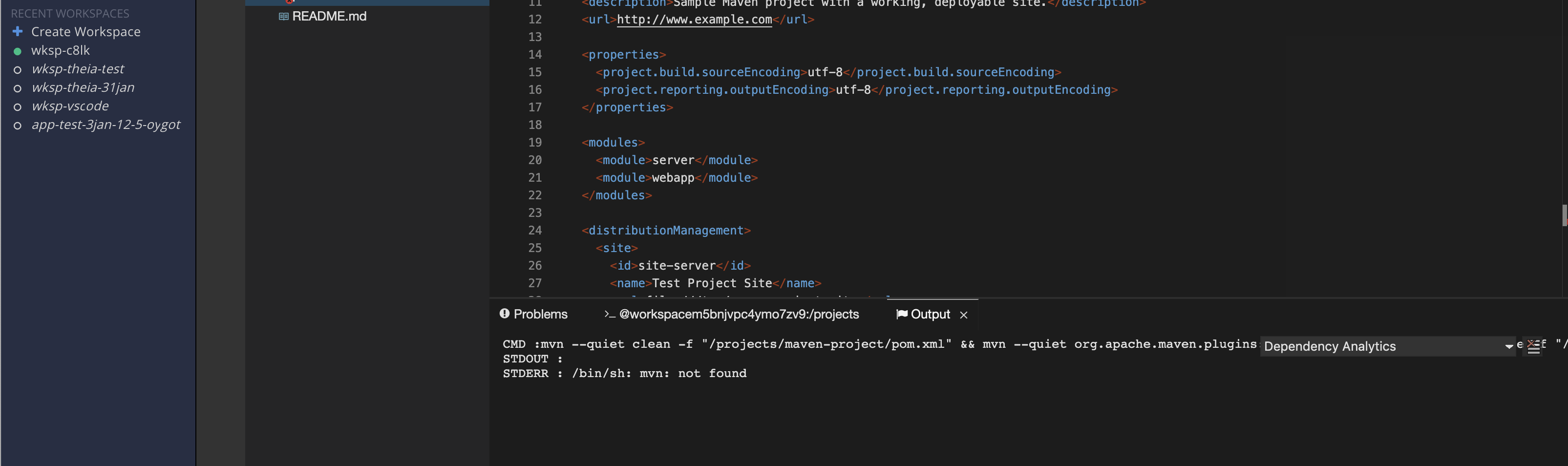
However, in terminal i can see mvn is there
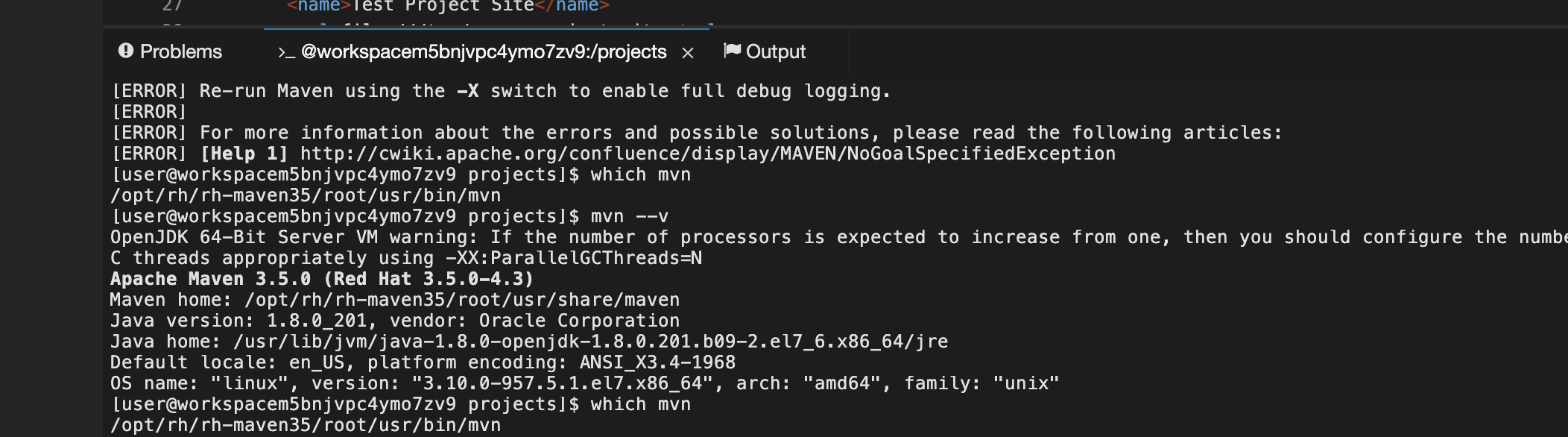
Even when added path in settings.json , no effect
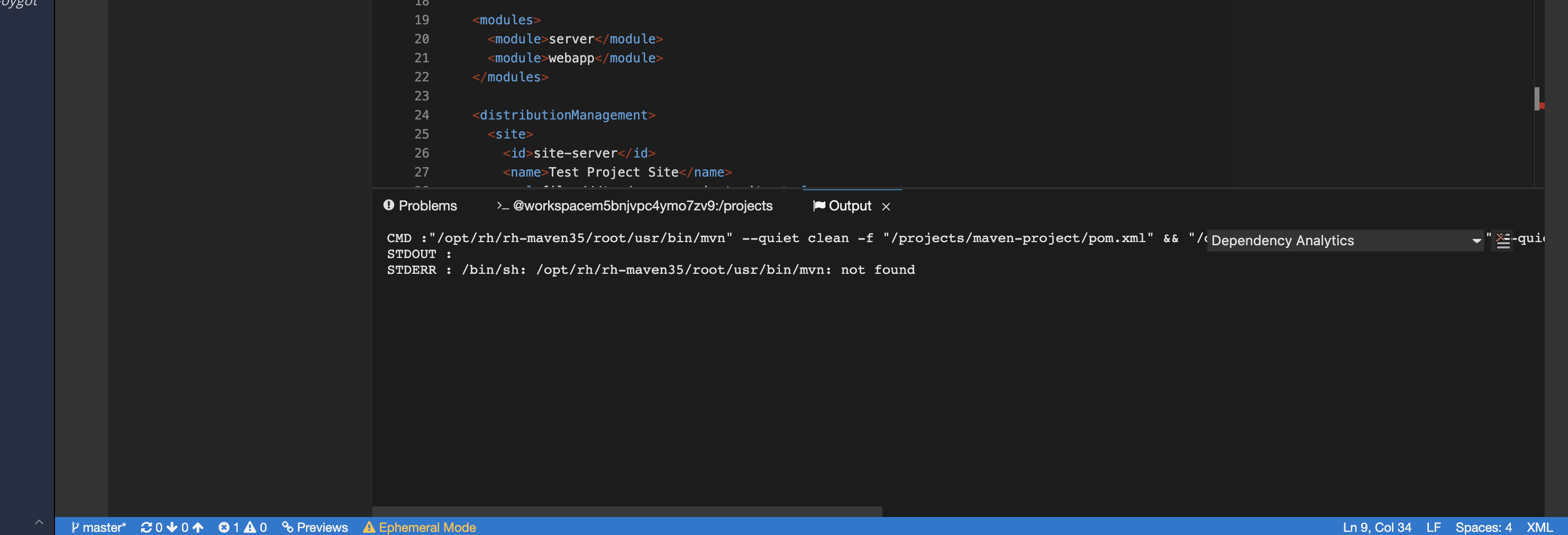
Any help/input with it?
@ibuziuk @benoitf
invincibleJai
on 25 Apr 2019
@invincibleJai Are you specifying your own image to run the extension, if not it is run inside the Theia IDE container which does not have npm or mvn.
gorkem
on 13 May 2019
@invincibleJai Are you specifying your own image to run the extension, if not it is run inside the Theia IDE container which does not have npm or mvn.
@gorkem I tried on https://che.openshift.io/ , selecting CHE7 as stack and installed the plugin (dependency-analytics 0.0.12) via plugin by ID command provided by theia/CHE7 to install any plugin from VSCode marketplace.
npmwas available to the extension when I selected a node projectmvnwas not available with the above issue ( i selected maven project )
Is the way am trying out extension is not correct?
and being an extension for VSCode which is supported by theia, shouldn't it run inside Theia IDE conatainer?
invincibleJai
on 13 May 2019
PR sent but merging is postponed till 7.1.0 release - https://github.com/eclipse/che-plugin-registry/pull/154
ibuziuk
on 1 Aug 2019
@invincibleJai could you verify and close the issue if the analytics plugins worksps as expected on che.openshift.io?
ibuziuk
on 25 Sep 2019
Thanks @ibuziuk , @arajkumar Pls verify and mark it close
invincibleJai
on 25 Sep 2019
@invincibleJai it looks like analytics plugin require quite much RAM:
Starting Init Plugin Broker
Cleaning /plugins dir
Unified Che Plugin Broker
List of plugins and editors to install
- redhat/java/latest - Java Linting, Intellisense, formatting, refactoring, Maven/Gradle support and more...
- redhat/dependency-analytics/latest - Insights about your application dependencies, Security, License compatibility and AI based guidance to choose appropriate dependencies for your application.
- eclipse/che-machine-exec-plugin/7.1.0 - Che Plug-in with che-machine-exec service to provide creation terminal or tasks for Eclipse CHE workspace containers.
- eclipse/che-theia/7.1.0 - Eclipse Theia, get the latest release each day.
Starting Che plugins and editor processing
Downloading VS Code extension for plugin 'redhat/java/latest'
Starting VS Code and Theia plugins processing
Downloading VS Code extension for plugin 'redhat/java/latest'
Downloading VS Code extension for plugin 'redhat/dependency-analytics/latest'
All plugins have been successfully processed
pulling image "eclipse/che-jwtproxy:latest"
Successfully pulled image "eclipse/che-jwtproxy:latest"
Created container
Started container
Error: Failed to run the workspace: "Unrecoverable event occurred: 'FailedCreate', 'Error creating: pods "workspaced3tf6ztbswqewmkm.maven-6c4679746-hs9bg" is forbidden: [maximum cpu usage per Pod is 6, but limit is 6174m., maximum memory usage per Pod is 3Gi, but limit is 3315892224.]', 'workspaced3tf6ztbswqewmkm.maven-6c4679746'"
I hit quota issue when tried to start the java-maven + analitics enabled is 512 absolute minimum - https://github.com/eclipse/che-plugin-registry/blob/master/v3/plugins/redhat/dependency-analytics/latest/meta.yaml#L16
ibuziuk
on 25 Sep 2019
@ibuziuk @invincibleJai I tried on che.openshift.io, I could create workspace, but it keeps on loading with the message Loading a runtime token.... Results are same with & without dependency analytics extension.
 arajkumar
on 26 Sep 2019
arajkumar
on 26 Sep 2019
@arajkumar thanks, verify and see if analytics really need 512 as absolute min https://github.com/eclipse/che-plugin-registry/blob/master/v3/plugins/redhat/dependency-analytics/latest/meta.yaml#L16
invincibleJai
on 26 Sep 2019
@invincibleJai , I'm trying with various stacks with various limits(128,256,512). I see that maven stacks needs quite a big amount a memory. I will do few more rounds of testing before doing any conclusion.
arajkumar
on 26 Sep 2019
@ibuziuk @invincibleJai
Memory consumption is based on the stack which we scan. Stacks like che consumes ~500MB(figured it from cgroup's memory.usage_in_bytes) while doing the scan. Anyways, memoryLimit can be overridden from the devfile(refer the attached image)., which gives more control to the users to reduce/increase the value based on the stack they scan.
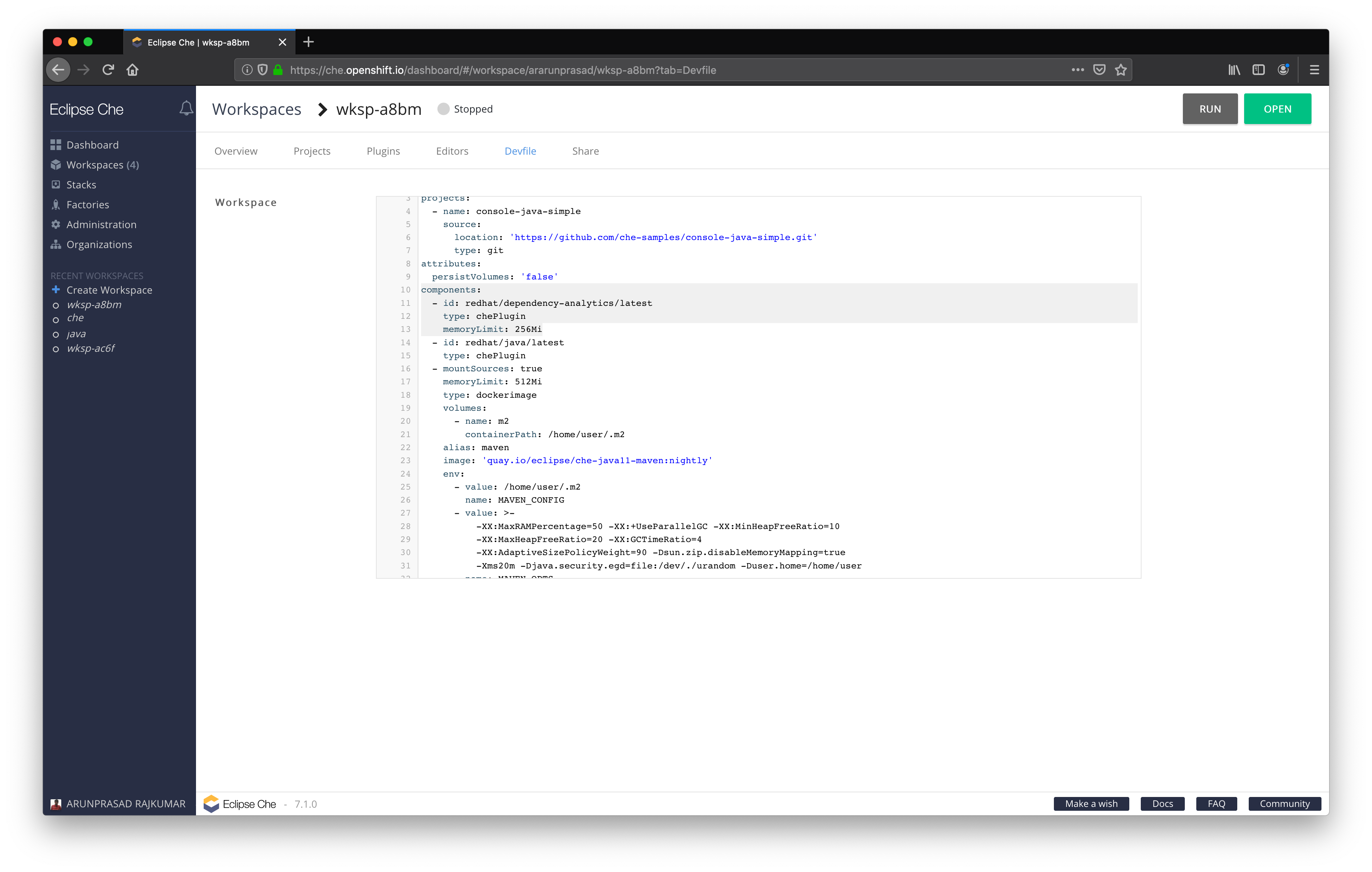
@ibuziuk , you can override the value from the devfile and try it on hosted che.
arajkumar
on 10 Oct 2019
@arajkumar could you provide a PR with fixes to the RAM consumption? https://github.com/eclipse/che-plugin-registry/tree/master/v3/plugins/redhat/dependency-analytics
if 256MB is enough?
@invincibleJai @arajkumar also could you please take a look at https://github.com/eclipse/che/issues/14942
ibuziuk
on 21 Oct 2019
@ibuziuk , as mentioned, 512MiB is necessary for maven stacks.
arajkumar
on 22 Oct 2019
@arajkumar do we know why the 512 is required for maven, this is quite a lot for the extension, which means it can not be enabled by default.
Anyways, memoryLimit can be overridden from the devfile(refer the attached image)., which gives more control to the users to reduce/increase the value based on the stack they scan.
Sure, but you are saying that is an absolute minimum, no?
ibuziuk
on 22 Oct 2019
It is not absolute minimum. For e.g, stack analysis doesn't work on che when we reduce the limit less than 512MiB.
arajkumar
on 23 Oct 2019
@arajkumar Sorry, I'm not following. if it is not an absolute minimum why 512Mb is used - https://github.com/eclipse/che-plugin-registry/blob/master/v3/plugins/redhat/dependency-analytics/latest/meta.yaml#L17
ibuziuk
on 23 Oct 2019
One can't run Dependency Analytics for a big maven stacks like Che without 512MiB memory request. It works fine for small maven stacks.
arajkumar
on 23 Oct 2019
sure, but Hosted Che does not support projects like Che atm, what is the RAM requirement for petclinic sample e.g. https://github.com/eclipse/che-devfile-registry/blob/master/devfiles/java-web-spring/devfile.yaml#L10
ibuziuk
on 23 Oct 2019
Going to close this issue since the plugin is the part of the plugin registry.
@arajkumar @invincibleJai if you plan to optimize the memory usage feel free to open issues in upstream - https://github.com/eclipse/che/issues
ibuziuk
on 8 Nov 2019
Related issues
 AndrienkoAleksandr
·
8Comments
ibuziuk
·
3Comments
ibuziuk
·
4Comments
AndrienkoAleksandr
·
8Comments
ibuziuk
·
3Comments
ibuziuk
·
4Comments
 bryantson
·
7Comments
bryantson
·
7Comments
 l0rd
·
4Comments
l0rd
·
4Comments
Most helpful comment
ok so based on API used it should work