Rg.plugins.popup: The type or namespace name 'Popup' does not exist in the namespace 'Rg.Plugins.Popup'
I installed the plugin in all projects but I'm receiving this compile error when trying to call Rg.Plugins.Popup.Popup.Init(this, bundle) for Android (and for iOS). I tried versions 1.0.4. 1.0.3, 1.0.2 with the same results. The other namespaces are found.
 cabauman
All 14 comments
Found Rg.Plugins.Popup.IOS.Popup.Init() seems like the docs need to be updated to show the platform specific namespaces now.
 thejakeofink
on 2 Jun 2018
thejakeofink
on 2 Jun 2018
On my side I get : 
 Mrgove10
on 8 Jun 2018
Mrgove10
on 8 Jun 2018
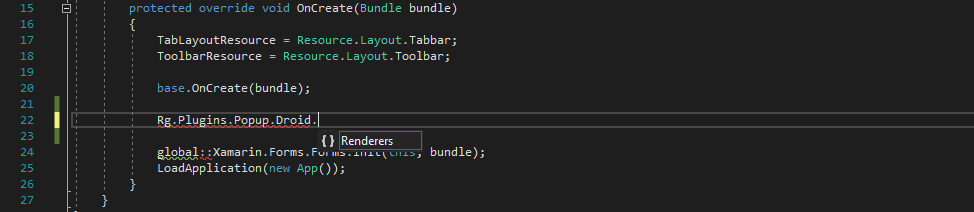
I didn't find the Rg.Plugins.Popup.Droid.Popup.Init().
Popup is not available in Droid namespace.
Using Rg.Plugins.Popup version 1.0.4 (Current) release.
 mahapatraprabhanjan
on 13 Jun 2018
mahapatraprabhanjan
on 13 Jun 2018
I think you have to install last PRE and delete all bin and obj directories
 acaliaro
on 13 Jun 2018
acaliaro
on 13 Jun 2018
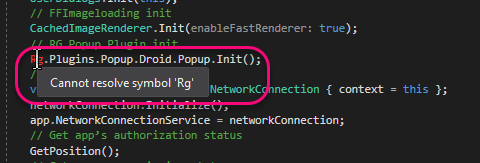
Same for me I can work around the iOS (and suppres warning by pragma), but Rg is not found for Droid even with the assemblies referenced. Any ideas?
 michaelrbrown
on 14 Jun 2018
michaelrbrown
on 14 Jun 2018
Update to latest pre-release version and you'll find Rg.Plugins.Popup.Popup.Init() taking a context and a bundle:
c#
Rg.Plugins.Popup.Popup.Init(this, bundle);
In my case, it is version 1.1.4.158-pre
 epsitec
on 16 Jun 2018
epsitec
on 16 Jun 2018
hi. did this issue come back in the latest 2.0 version? i get the same errors as above. in android. ios works fine.
 bo3po
on 9 Apr 2020
bo3po
on 9 Apr 2020
@bo3po update your android target to 10
 martijn00
on 9 Apr 2020
martijn00
on 9 Apr 2020
It work change target to 10 for Android, but still cant make it work for UWP (App.xaml.cs)
 ortegaeu
on 9 Apr 2020
ortegaeu
on 9 Apr 2020
On uwp you need to use the newer version as well. See the readme.
martijn00
on 9 Apr 2020
On uwp you need to use the newer version as well. See the readme.
I done exactly as in the README and I just upgraded to the newest UWP version 2.0.0.2 from April 9 and started getting "The type or namespace name 'Popup' does not exist in the namespace 'Rg.Plugins.Popup' (are you missing an assembly reference?"
If I try to press "Go to the implementation" on the namespace, it gives me option to browse to the Mac or Android version. This is very weird. For iOS and Android it compiles fine.
Edit:
Found the problem. Looking in the nuget/packages folder I noticed the UWP version was located in folder uap10.0.17763. My target version was higher, but changing my minimum build version to 10.0.17763 fixed it. I suggest you document this better in your docs.
 njale
on 13 Apr 2020
njale
on 13 Apr 2020
Thanks @njale I had the same problem after I upgraded to version 2.0.0.2. And now it works with your suggestion.
 SteCa15
on 16 Apr 2020
SteCa15
on 16 Apr 2020
the same on UWP
 JTOne123
on 24 Apr 2020
JTOne123
on 24 Apr 2020
Still not working, even with the latest version set on UWP
 AdrianoBinhara
on 17 Aug 2020
AdrianoBinhara
on 17 Aug 2020
Related issues
 luis-barreira
·
5Comments
luis-barreira
·
5Comments
 cetso
·
7Comments
cetso
·
7Comments
 masiri201
·
3Comments
luis-barreira
·
5Comments
masiri201
·
3Comments
luis-barreira
·
5Comments
 juanmalm
·
4Comments
juanmalm
·
4Comments
Most helpful comment
I done exactly as in the README and I just upgraded to the newest UWP version 2.0.0.2 from April 9 and started getting "The type or namespace name 'Popup' does not exist in the namespace 'Rg.Plugins.Popup' (are you missing an assembly reference?"
If I try to press "Go to the implementation" on the namespace, it gives me option to browse to the Mac or Android version. This is very weird. For iOS and Android it compiles fine.
Edit:
Found the problem. Looking in the nuget/packages folder I noticed the UWP version was located in folder uap10.0.17763. My target version was higher, but changing my minimum build version to 10.0.17763 fixed it. I suggest you document this better in your docs.