Rg.plugins.popup: Crashing on Android (Soft Keyboard open while closing)
When opening a Rg pop up with an input field. If you tap the input field to open the soft keyboard, then tap close on the modal (PopupNavigation.Instance.PopAsync(false)), the library crashes the app.
 nitrouscutter
All 12 comments
Version 1.1.4.145-pre
nitrouscutter
on 21 May 2018
@nitrouscutter Can you give me the stack trace of the exception?
 rotorgames
on 14 Jun 2018
rotorgames
on 14 Jun 2018
Hi, i'm also facing this issue, here's my stacktrace:
Version 1.1.4.145-pre
Xamarin Exception Stack:
System.ObjectDisposedException: Cannot access a disposed object.
Object name: 'Rg.Plugins.Popup.Droid.Renderers.PopupPageRenderer'.
  at Java.Interop.JniPeerMembers.AssertSelf (Java.Interop.IJavaPeerable self) [0x00029] in <db2018083aad4fe8b75b4ca130adc94b>:0
  at Java.Interop.JniPeerMembers+JniInstanceMethods.InvokeNonvirtualObjectMethod (System.String encodedMember, Java.Interop.IJavaPeerable self, Java.Interop.JniArgumentValue* parameters) [0x00000] in <db2018083aad4fe8b75b4ca130adc94b>:0
  at Android.Views.View.get_Context () [0x0000a] in <da77256d21d540ab98586180f7387bd6>:0
  at Rg.Plugins.Popup.Droid.Renderers.PopupPageRenderer.DispatchTouchEvent (Android.Views.MotionEvent e) [0x00055] in <182db72c19df4b0082953f04c7e0f2a0>:0
  at Android.Views.View.n_DispatchTouchEvent_Landroid_view_MotionEvent_ (System.IntPtr jnienv, System.IntPtr native__this, System.IntPtr native_e) [0x0000f] in <da77256d21d540ab98586180f7387bd6>:0
  at (wrapper dynamic-method) System.Object.645aceb3-7e9e-4d23-a42c-2b297ffa81c9(intptr,intptr,intptr)
 MDemetrio
on 22 Jun 2018
MDemetrio
on 22 Jun 2018
Same thing happening on iOS 11.x
When you open a popup, click on an input field, the keyboard opens. If you then close the popup, the app crashes
 fedec93
on 25 Jun 2018
fedec93
on 25 Jun 2018
I was getting same issue in same scenario and i resolved with below code, wrapping in main thread
          Device.BeginInvokeOnMainThread(async () =>
            {
                await PopupNavigation.Instance.PopAsync(false);
            });
 aalice072
on 23 Jul 2018
aalice072
on 23 Jul 2018
looks like same issue as https://github.com/rotorgames/Rg.Plugins.Popup/issues/157
 JKennedy24
on 31 Aug 2018
JKennedy24
on 31 Aug 2018
Same thing happening for us on Samsung Android devices.
We were able to get around this by wrapping all of our calls to PopupNavigation.Instance in Device.BeginInvokeOnMainThread() calls.
Also, for any popup that has an edit box visible, we also had to set CloseWhenBackgroundIsClicked = false; because that call to pop from the PopupNavigation instance is internal to Rg.Plugins.Popup, so we just have to disable that feature on Android devices.
I suspect that a "real" fix might involve something with PopupNavigationImpl.cs and wrapping the guts of AddAsync, RemoveAsync, and RemovePopupFromStack with a Device.BeginInvokeOnMainThread() check.
This might also require the addition of a TaskCompletionSource so that instead of having random Task.Delay(50) calls in that file, it's able to wait until the main thread is able to modify the display stack and complete the task for everyone awaiting on it.
 ClintTCG
on 11 Sep 2018
ClintTCG
on 11 Sep 2018
@ClintTCG I tested this plugin on a lot of android devices and emulators and it was ok. Can you tell me android version and device name that I will be able to reproduce it?
rotorgames
on 23 Nov 2018
I have the same issue with versions 1.1.4.168 & 1.1.5.180.
Xamarin Forms version is: 3.4.0.1008975
I'm testing with a Samsung Galaxy S8+, Android 8.0.0.
In my case I have picker & entry controls in the popup page. If the soft keyboard is displayed because having inserted some text in the entry control, upon closure, the picker's selection window is displayed (it is the first element in the popup). If the user selects any item then the app crashes because the element exists no more.
This solution did not fix it for me:
        Device.BeginInvokeOnMainThread(async () =>
        {
            await PopupNavigation.Instance.PopAsync(false);
        });
If you need any more information regarding the code I'm using or versions please let me know.
In the meanwhile I'll try to workaround setting up some code to force closure of soft keyboard on Android right before calling to Popup Close. Hope it'll do the trick.
btw, thanks for your work!
P.S.: It is not close: I though it was because I display a list inside the popup and upon selecting an element or dismissing I called close. Testing with one instance which has many elements and therefor paginates, I get the same behaviour when I click to display the next page.
This event is fired by an image with a GestureRecognizer:
            Next.GestureRecognizers.Add(new TapGestureRecognizer()
            {
                Command = new Xamarin.Forms.Command(() =>
                {
                    Next_Clicked();
                })
            });
I've run a test commenting out the code inside the command (Next_Clicked(); -> //Next_Clicked();), to ensure nothing there caussed the issue and the behaviour persists.
 ibonsanvicente
on 17 Dec 2018
ibonsanvicente
on 17 Dec 2018
I've created a very simple quick repro project.
Main page displays a button to launch a popup page.
As in my example above there is a picker as first element, an entry as second and 2 buttons. One of those does absolutely nothing and the other closes the popup.
If the soft keyboard is displayed, upon clicking any of the buttons the picker window will be displayed.
P.S.: I've replicated this using your own Demo project:
Add picker in LoginPopupPage after the Stack Layout:
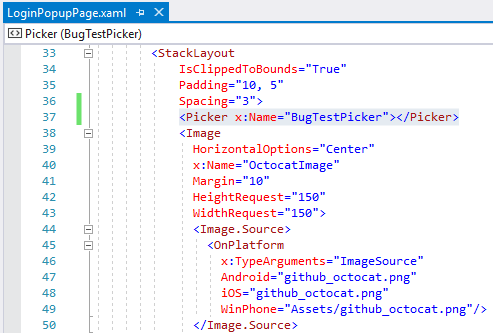
Enter text in username entry and click login with keyboard open::

Commenting out RequestFocus() line in Android PopupPageRenderer fixes this issue:
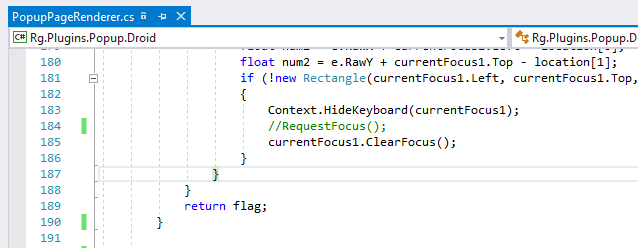
ibonsanvicente
on 17 Dec 2018
@ibonsanvicente the Picker issue is a regression bug in Xamarin.Forms. That's the PR that will fix Picker -> https://github.com/xamarin/Xamarin.Forms/pull/4344
 HeikkiDev
on 21 Dec 2018
HeikkiDev
on 21 Dec 2018
About Cannot access a disposed object:
I hope that I fixed it in the last version of the plugin which is available in the development nuget right now. All navigation is invoked in the main thread in the last release whatever how navigation has been invoked in the user's code.
I will be happy if someone can test it with the last version of the plugin >= 1.1.5.184.
Thanks.
About picker:
I fixed it also. I removed RequestFocus but it is not problem of the plugin.
rotorgames
on 25 Jan 2019
Related issues
 mshenoy83
·
4Comments
mshenoy83
·
4Comments
 Phenek
·
6Comments
Phenek
·
6Comments
 juanmalm
·
4Comments
juanmalm
·
4Comments
 Himanshuvc
·
5Comments
Himanshuvc
·
5Comments
 ShahmanTeh
·
6Comments
ShahmanTeh
·
6Comments
Most helpful comment
About
Cannot access a disposed object:I hope that I fixed it in the last version of the plugin which is available in the development nuget right now. All navigation is invoked in the main thread in the last release whatever how navigation has been invoked in the user's code.
I will be happy if someone can test it with the last version of the plugin >= 1.1.5.184.
Thanks.
About picker:
I fixed it also. I removed
RequestFocusbut it is not problem of the plugin.