Rg.plugins.popup: Initialising doesn't work any longer
Hi, I've followed all the instructions as much as possible. I see your initialization instructions might be out of date. Now I don't know how to initialize the Plugin for iOS and Android, because the moment I try to launch and test the app, Visual Studio tells me "The type or namespace name 'Popup' does not exist in the namespace 'Rg.Plugins.Popup' (Are you missing an assembly reference?)"
Yes, I have added the latest NuGet package (stable build 1.0.4), and I managed to get UWP working fine by using
Xamarin.Forms.Forms.Init(e, Rg.Plugins.Popup.Windows.Popup.GetExtraAssemblies());
The above code I had to find on StackExchange. So I would like to find out what the Init methods are now for these mobile platforms, seeing as
Rg.Plugins.Popup.Popup.Init(this, bundle);
and
Rg.Plugins.Popup.Popup.Init();
no longer works?
 CyferZ
All 12 comments
@CyferZ I'm also experiencing the same issue.. if you happen to find a solution could you let me know
 Modem56k
on 17 Jan 2018
Modem56k
on 17 Jan 2018
@Modem56k I will do! Hopefully our friendly developer here will give us a helping hand as well.
CyferZ
on 17 Jan 2018
Hi guys, the initialization does not seem to be necessary for at least iOS and Android. I am only using it in a basic capacity though but I have had no issues.
 adamrobert
on 18 Jan 2018
adamrobert
on 18 Jan 2018
@adamrobert If you're saying we don't need to add
Rg.Plugins.Popup.Popup.Init(this, bundle);
and
Rg.Plugins.Popup.Popup.Init();
then unfortunately that doesn't work for me. I've run the app on my Android phone and whenever I pressed the View to navigate to the Popup, I'm given this...
Unhandled Exception:
System.InvalidOperationException: You MUST call Rg.Plugins.Popup.Popup.Init(); prior to using it.
Could you specify how you used the code?
And also, which release of the Plugin are you using?
CyferZ
on 18 Jan 2018
Hi,
adding this code on Android MainActivity
Rg.Plugins.Popup.Popup.Init(this, bundle);
gives me this error :
The type or namespace name 'Popup' does not exist
in the namespace 'Rg.Plugins.Popup' (are you missing an assembly reference?)
As above mentioned, i remove the init and then ran the app.
Popup is opening up. but Background click doesn't work.
I wonder, is that because of this init problem.
(PS : iOS background click works. my Xamarin forms version : 2.4.0.280 and
Rg.Plugins.Popup version is 1.0.4)
Please help...
 PabodhaWimalasuriya123
on 18 Jan 2018
PabodhaWimalasuriya123
on 18 Jan 2018
It would seem that running the code
Rg.Plugins.Popup.Popup.Init(this, bundle);
as well as the one for iOS, while using the latest Pre-release build works, however the code for UWP doesn't. I'd rather use the latest Stable build anyway. @rotorgames what advice can you give us? All we're needing is to be able to initialize this awesome Plugin properly so that we can navigate to our Popup pages.
CyferZ
on 18 Jan 2018
I may had the same problem before. Following these steps resolved the issue for me (trial & error):
this MAY work for you:
if your solution happens to contains other xamarin forms projects with different forms plugin
-unify forms plugin to one latest version (rg.plugin as well)
-clean solution
-close vs
-delete all bin/obj folders from your solution
-delete packages folder in solution
-delete .nuget folder in C:\Users\User\ .nuget
-restart your pc
-open solution again
-restore nuget packages (w8 for it)
-rebuild
some or all of these steps may not be necessary but the latest Rg.Plugins.Popup WORKS LIKE A CHARM for me;
don't forget to add init methods in your specific plateform apps i.e Popup.Init(this, bundle);
 Nessitro
on 19 Jan 2018
Nessitro
on 19 Jan 2018
Hi every one. You should use Init methods only for version more than v1.1.x-pre. I advise to use the last pre release.
 rotorgames
on 20 Jan 2018
rotorgames
on 20 Jan 2018
As @rotorgames has mentioned. Use the latest pre-release and it works
 libin85
on 16 Mar 2018
libin85
on 16 Mar 2018
All right then, @libin85 and @rotorgames ... I'm curious then why, when I put the Init() method into my UWP project, it freaks out and throws an error with the latest "pre-release"??
CyferZ
on 16 Mar 2018
@CyferZ in first see https://github.com/rotorgames/Rg.Plugins.Popup/wiki/Troubleshooting
rotorgames
on 17 Apr 2018
@rotorgames Hi, do we still need to Init(). Im current using v1.0.4 and everything seem to be working fine without it. And if i try to add Rg.Plugins.Popup.Popup.Init(this, bundle); im getting the same error as described above,
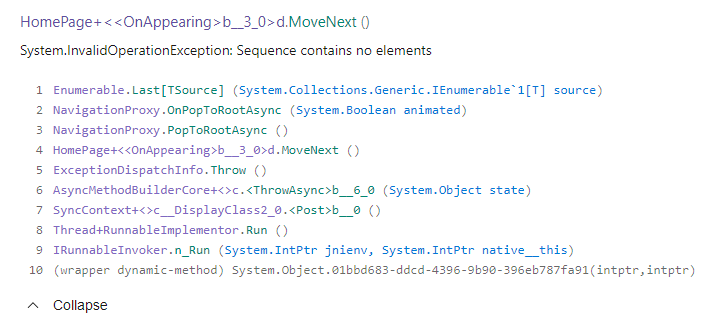
We have released the app to the store (play and apple store) and we are getting the rare error of System.InvalidOperationException: Sequence contains no elements
Here is the crash report im getting from App Center -
 IeuanWalker
on 29 Jun 2018
IeuanWalker
on 29 Jun 2018
Related issues
Nessitro
·
5Comments
 Himanshuvc
·
5Comments
Himanshuvc
·
5Comments
 widiarifki
·
5Comments
widiarifki
·
5Comments
 luis-barreira
·
5Comments
luis-barreira
·
5Comments
 YZahringer
·
4Comments
YZahringer
·
4Comments
Most helpful comment
Hi every one. You should use Init methods only for version more than v1.1.x-pre. I advise to use the last pre release.