Rg.plugins.popup: Close Button Behind Frame
I seem to be having this issue in the Android version of Rg.Plugins.Popup.

My Design Code:
<?xml version="1.0" encoding="utf-8" ?>
<pages:PopupPage xmlns="http://xamarin.com/schemas/2014/forms"
             xmlns:x="http://schemas.microsoft.com/winfx/2009/xaml"
             xmlns:pages="clr-namespace:Rg.Plugins.Popup.Pages;assembly=Rg.Plugins.Popup"
             xmlns:animations="clr-namespace:Rg.Plugins.Popup.Animations;assembly=Rg.Plugins.Popup"
             x:Class="Proj.MessagePopupPage"
             CloseWhenBackgroundIsClicked="True">
  <pages:PopupPage.Resources>
    <ResourceDictionary>
      <Style x:Key="EntryStyle" TargetType="Entry">
        <Setter Property="PlaceholderColor" Value="#9cdaf1" />
        <Setter Property="TextColor" Value="#7dbbe6" />
      </Style>
    </ResourceDictionary>
  </pages:PopupPage.Resources>
  <pages:PopupPage.Animation>
    <animations:ScaleAnimation
      PositionIn="Bottom"
      PositionOut="Center"
      ScaleIn="1"
      ScaleOut="0.7"
      DurationIn="700"
      EasingIn="BounceOut"/>
  </pages:PopupPage.Animation>
  <ScrollView
    HorizontalOptions="Center"
    VerticalOptions="Center">
    <AbsoluteLayout>
      <Frame x:Name="FrameContainer" Margin="5"  HorizontalOptions="Center" BackgroundColor="White">
        <StackLayout IsClippedToBounds="True" Padding="10, 5" Spacing="3">
          <Label Text="To:" x:Name="ToLabel" />
          <Entry />
          <Label Text="Message:" x:Name="MessageLabel" />
          <Editor
            HorizontalOptions="Center"
            WidthRequest="200"
            HeightRequest="100"
            x:Name="MessageEntry"
            Style="{StaticResource EntryStyle}" />
          <Button
            BackgroundColor="#227FC8"
            HorizontalOptions="Fill"
            TextColor="White"
            WidthRequest="200"
            Clicked="OnSend"
            x:Name="SendButton"
            Text="Send">
            <Button.HeightRequest>
              <OnPlatform x:TypeArguments="x:Double" Android="50" iOS="30" WinPhone="30" />
            </Button.HeightRequest>
          </Button>
        </StackLayout>
      </Frame>
      <ContentView
          AbsoluteLayout.LayoutFlags="PositionProportional"
          AbsoluteLayout.LayoutBounds="1, 0, -1, -1">
        <ContentView.GestureRecognizers>
          <TapGestureRecognizer Tapped="OnCloseButtonTapped"/>
        </ContentView.GestureRecognizers>
        <Image
          x:Name="CloseImage"
          HeightRequest="30"
          WidthRequest="30">
          <Image.Source>
            <OnPlatform
              x:TypeArguments="ImageSource"
              Android="close_circle_button.png"
              iOS="close_circle_button.png"
              WinPhone="Assets/close_circle_button.png"/>
          </Image.Source>
        </Image>
      </ContentView>
    </AbsoluteLayout>
  </ScrollView>
</pages:PopupPage>
Which is based around the pop up login page.
I have tried 1.1.0-pre3 but that didn't work.
 JoshDiDuca
All 9 comments
It has to do with Android and frames. I figured out that if you put the content of a frame in a Grid, it will adjust the z-index of the elements. Try maybe the following code and see what it looks like:
<StackLayout VerticalOptions="Center" HorizontalOptions="Center">
        <Frame
            x:Name="FrameContainer"
            Margin="15"
            HorizontalOptions="Center"
            BackgroundColor="White"
            IsClippedToBounds="False">
            <Grid>
                <Grid.ColumnDefinitions>
                    <ColumnDefinition Width="10*" />
                    <ColumnDefinition Width="*" />
                </Grid.ColumnDefinitions>
                <StackLayout
                    Padding="10, 5"
                    Spacing="3"
                    Grid.Row="0"
                    Grid.Column="0">

                    <!-- Your Elements here -->

                <ContentView Grid.Row="0"
                             Grid.Column="1">
                    <AbsoluteLayout>
                        <!--<ContentView.GestureRecognizers>
                    <TapGestureRecognizer Tapped="OnCloseButtonTapped"/>
                </ContentView.GestureRecognizers>-->
                        <Image x:Name="CloseImage"
                               HeightRequest="30"
                               WidthRequest="30"
                               AbsoluteLayout.LayoutFlags="PositionProportional"
                               AbsoluteLayout.LayoutBounds="1.1, 0, -1, -1">
                            <Image.Source>
                                <OnPlatform
                                    x:TypeArguments="ImageSource"
                                    Android="close_circle_button.png"
                                    iOS="close_circle_button.png"/>
                            </Image.Source>
                        </Image>
                    </AbsoluteLayout>
                </ContentView>
            </Grid>
        </Frame>
</StackLayout>
 GyllionVanElderen
on 7 Nov 2017
GyllionVanElderen
on 7 Nov 2017
I also have this issue ,I tried raiseChild and lowerchild in code behind but nothing change ,
is anybody has the solution?
 yannick-tchegho
on 29 Nov 2017
yannick-tchegho
on 29 Nov 2017
I am also facing same issue. Any updates here?
 higher-faster-better
on 12 Dec 2017
higher-faster-better
on 12 Dec 2017
@JoshDiDuca Hi. It there this bug only in PopupPage? Does Xamarin forms pages have this problem?
 rotorgames
on 16 Dec 2017
rotorgames
on 16 Dec 2017
@rotorgames Hi, Xamarin forms pages do not have this problem, only PopupPage.
JoshDiDuca
on 19 Dec 2017
I'm experiencing a similar issue on normal pages. I dont think it's PopupPage specific.
I've laid out a label and a frame in the same grid, and in the xaml the label is written after the frame, yet, the frame still shows above the labels.
See this examnple (each table entry is a ViewCell)
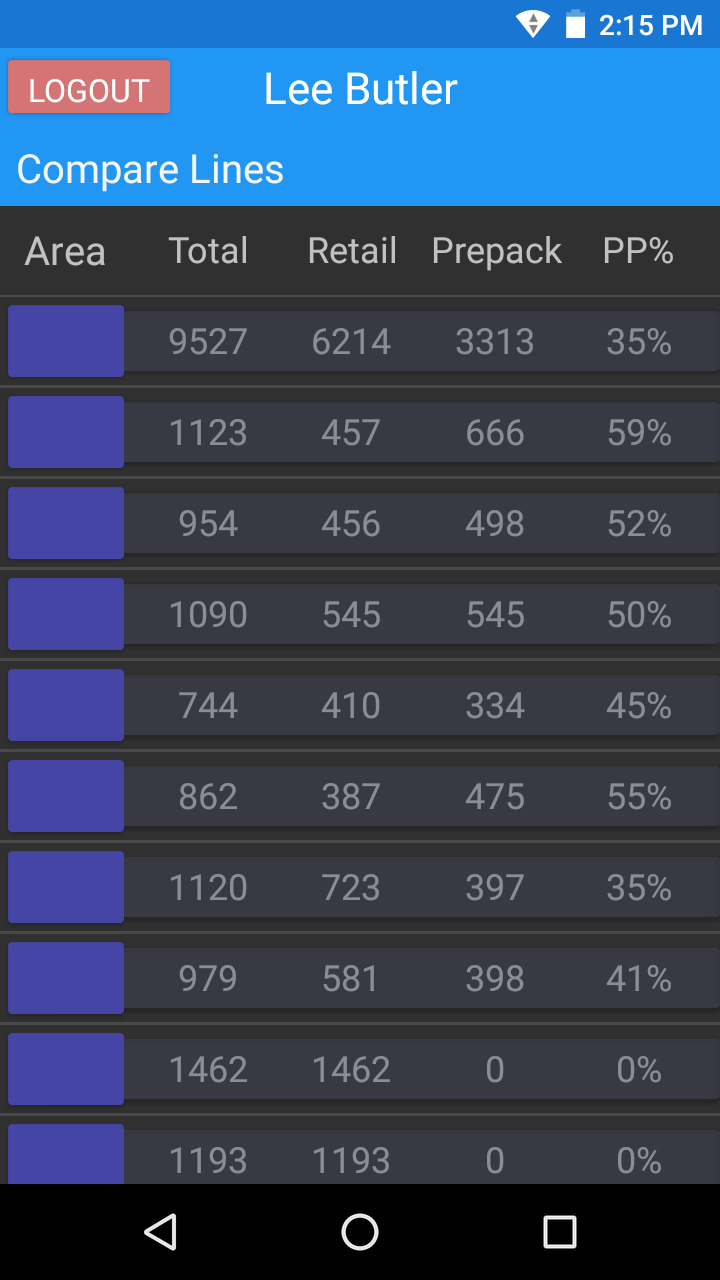
And here's the xaml for the viewcells contents. Are other people having this issue?
<Grid>
    <Grid.ColumnDefinitions>
        <ColumnDefinition Width="1*"/>
        <ColumnDefinition Width="1*"/>
        <ColumnDefinition Width="1*"/>
        <ColumnDefinition Width="1*"/>
        <ColumnDefinition Width="1*"/>
        <!-- This is the special one. -->
        <ColumnDefinition Width="1*" x:Name="FinalColumn"/>
    </Grid.ColumnDefinitions>

    <!-- The pretty band and box for the zone label.-->
    <Frame VerticalOptions="Center" HorizontalOptions="Fill" Grid.Column="0" BackgroundColor="#99404050"  Margin="25,7,0,7" Grid.ColumnSpan="6"/>
    <Frame VerticalOptions="Fill" HorizontalOptions="Fill" Grid.Column="0" BackgroundColor="#4545A6" Margin="4"/>

    <!-- The actual tyexctboxes-->
    <Label HorizontalOptions="Center" VerticalOptions="Center" Grid.Column="0" x:Name="ZoneLabel" FontSize="20" Text="1" TextColor="White"/>
    <Label HorizontalOptions="Center" VerticalOptions="Center" Grid.Column="1" x:Name="TotalLabel"  FontSize="18" Text="1" TextColor="White"/>
    <Label HorizontalOptions="Center" VerticalOptions="Center" Grid.Column="2" x:Name="RetailLabel" FontSize="18"  Text="1" TextColor="White"/>
    <Label HorizontalOptions="Center" VerticalOptions="Center" Grid.Column="3" x:Name="PrepackLabel" FontSize="18" Text="1" TextColor="White"/>
    <Label HorizontalOptions="Center" VerticalOptions="Center" Grid.Column="4" x:Name="PrepackPercLabel" FontSize="18" Text="1" TextColor="White"/>
    <Label HorizontalOptions="Center" VerticalOptions="Center" Grid.Column="5" x:Name="PicksPerLabel" FontSize="18" Text="1" TextColor="White"/>

</Grid>
 butler1233
on 19 Dec 2017
butler1233
on 19 Dec 2017
(It was edited so many times because the code tag was not being friendly for me.)
butler1233
on 19 Dec 2017
Xamarin forms pages have this issue. I'v tested so many time in several ways but I couldn't fix it.
higher-faster-better
on 20 Dec 2017
see this question and answer on stackoverflow. it is problem of xamarin.forms
 EmilAlipiev
on 27 Dec 2017
EmilAlipiev
on 27 Dec 2017
Related issues
 ShahmanTeh
·
6Comments
ShahmanTeh
·
6Comments
 genilsonmm
·
3Comments
genilsonmm
·
3Comments
 Phenek
·
6Comments
Phenek
·
6Comments
 widiarifki
·
5Comments
widiarifki
·
5Comments
 YZahringer
·
4Comments
YZahringer
·
4Comments
Most helpful comment
It has to do with Android and frames. I figured out that if you put the content of a frame in a Grid, it will adjust the z-index of the elements. Try maybe the following code and see what it looks like: