Revolution: There is no Deactivate plugin item in the context menu
Bug report
Summary
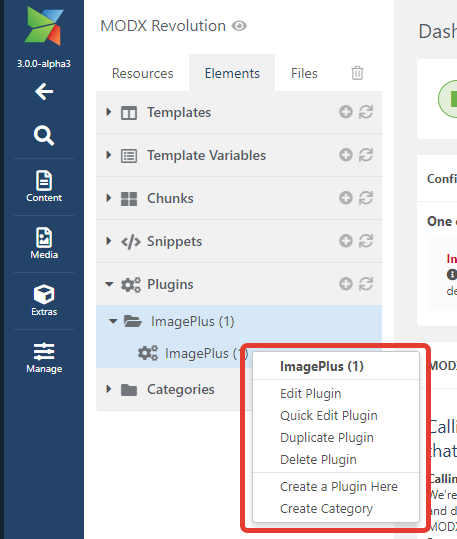
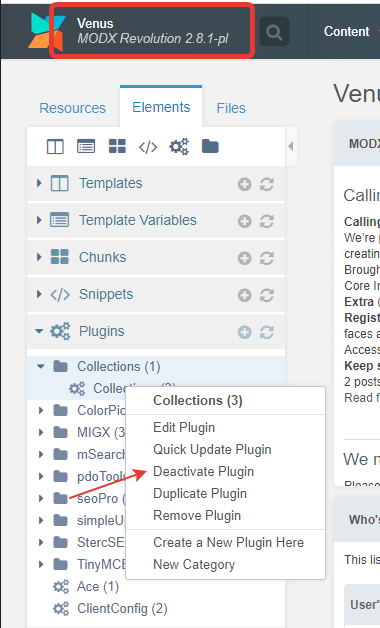
There is no Deactivate plugin item in the context menu
Step to reproduce
Go to the Elements tab, the Plugins section and right-click on any plugin
Observed behavior
Expected behavior
In modx 2.8.1:
Related issue(s)/PR(s)
NA
Environment
MODX 3 (git), PHP Version 7.4.12
 Ibochkarev
All 8 comments
Ah you just beat me to this one! Well done
I can confirm this issue.
Edit: While the deactivate plugin option is missing from the context menu, you can still deactivate the plugin using the checkbox on the edit plugin screen.
 muzzwood
on 5 Mar 2021
muzzwood
on 5 Mar 2021
Is the activate option there (in the context menu) if a plugin is deactivated or is that also missing?
 Mark-H
on 5 Mar 2021
Mark-H
on 5 Mar 2021
activate plugin is also missing @Mark-H
muzzwood
on 5 Mar 2021
Is the activate option there if a plugin is deactivated or is that also missing?
When editing a plugin is open, you can disable the plugin, but in quick edit the menu item is skipped
Ibochkarev
on 5 Mar 2021
Added a €10 bounty to this. Small issue, but nice to have fixed. ;)
Mark-H
on 5 Mar 2021
I'm going to work on this
muzzwood
on 5 Mar 2021
Should be fixed now
muzzwood
on 5 Mar 2021
Fixed in PR #15449
 JoshuaLuckers
on 5 Mar 2021
JoshuaLuckers
on 5 Mar 2021
Related issues
 sottwell
·
3Comments
sottwell
·
3Comments
 Ruslan-Aleev
·
3Comments
Ruslan-Aleev
·
3Comments
 winformatic
·
4Comments
winformatic
·
4Comments
 travisbotello
·
3Comments
Ruslan-Aleev
·
3Comments
travisbotello
·
3Comments
Ruslan-Aleev
·
3Comments
Most helpful comment
Added a €10 bounty to this. Small issue, but nice to have fixed. ;)