Revolution: Too many parameters in TVs that can create possible bugs
Bug report
Summary
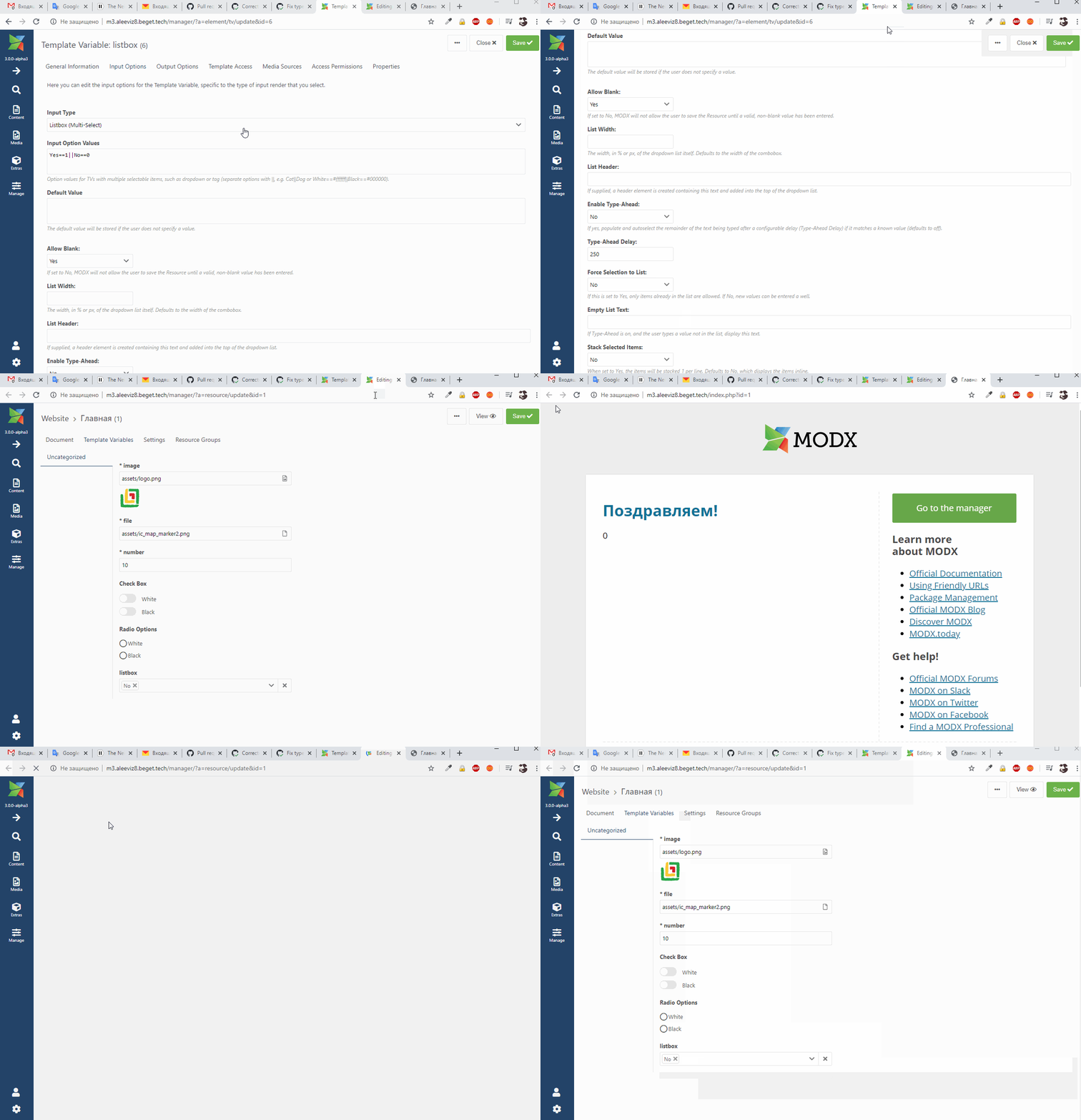
In TVs with Listbox (Single-Select) or Listbox (Multi-Select) type there are parameters that work weirdly.
Comments:
typeAheadandtypeAheadDelay:
1) Why do we need parameterstypeAheadandtypeAheadDelayif, in fact, parametertypeAheadswitches theediatbleparameter (does not work without it)? https://github.com/modxcms/revolution/pull/15069/files#diff-f398fbbe2e479ec1e91d444a55b5620dR40
2) With theediatbleparameter, you can filter by typing and select the one you need from the list.
typeAheadautoselects the first result in the select box. But this is not convenient, because the user may not need the first one in the list.
3)typeAheadDelaya completely useless parameter. Sets the delay time.forceSelection:
1) Why let the user enter values other than specified in the "Input Option Values"? It is easier to use a TV with a text type.
2) For Listbox (Multi-Select) user-defined values does not appear in the resource form, although it is displayed on the site (bug https://github.com/modxcms/revolution/issues/15136).
What I suggest:
- Delete parameters
typeAheadandtypeAheadDelay, and instead display onlyediatbleparameter. - Delete parameter
forceSelection. If you need values not from the list ("Input Option Values"), just use a TV with a text type.
Explanation of the parameters:
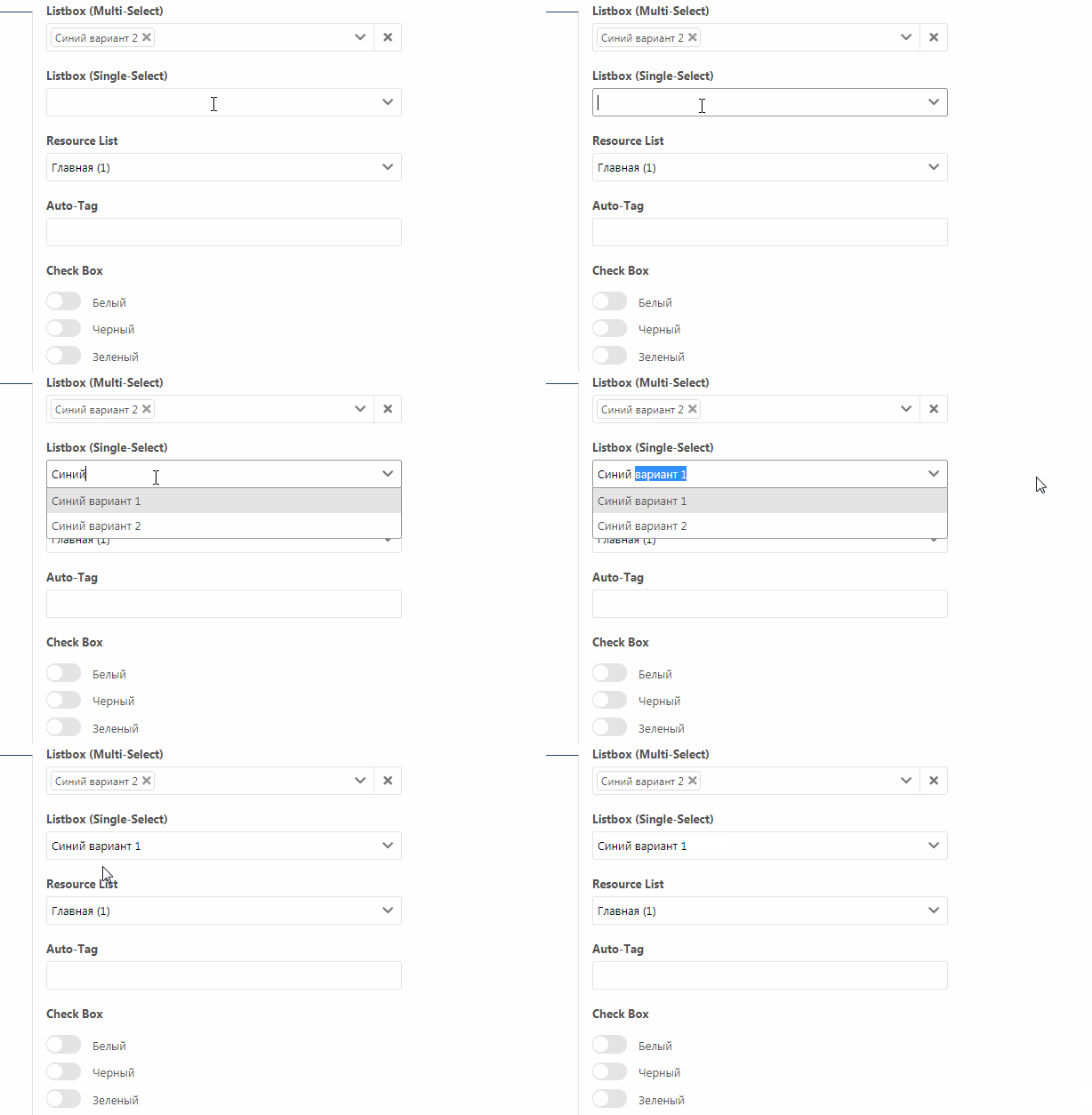
typeHead
If you set typeHead: true (provided that editable: true), the list will "print the rest text of the list item". Here's what it looks like with typeAheadDelay: 2000 (becomes more noticeable):
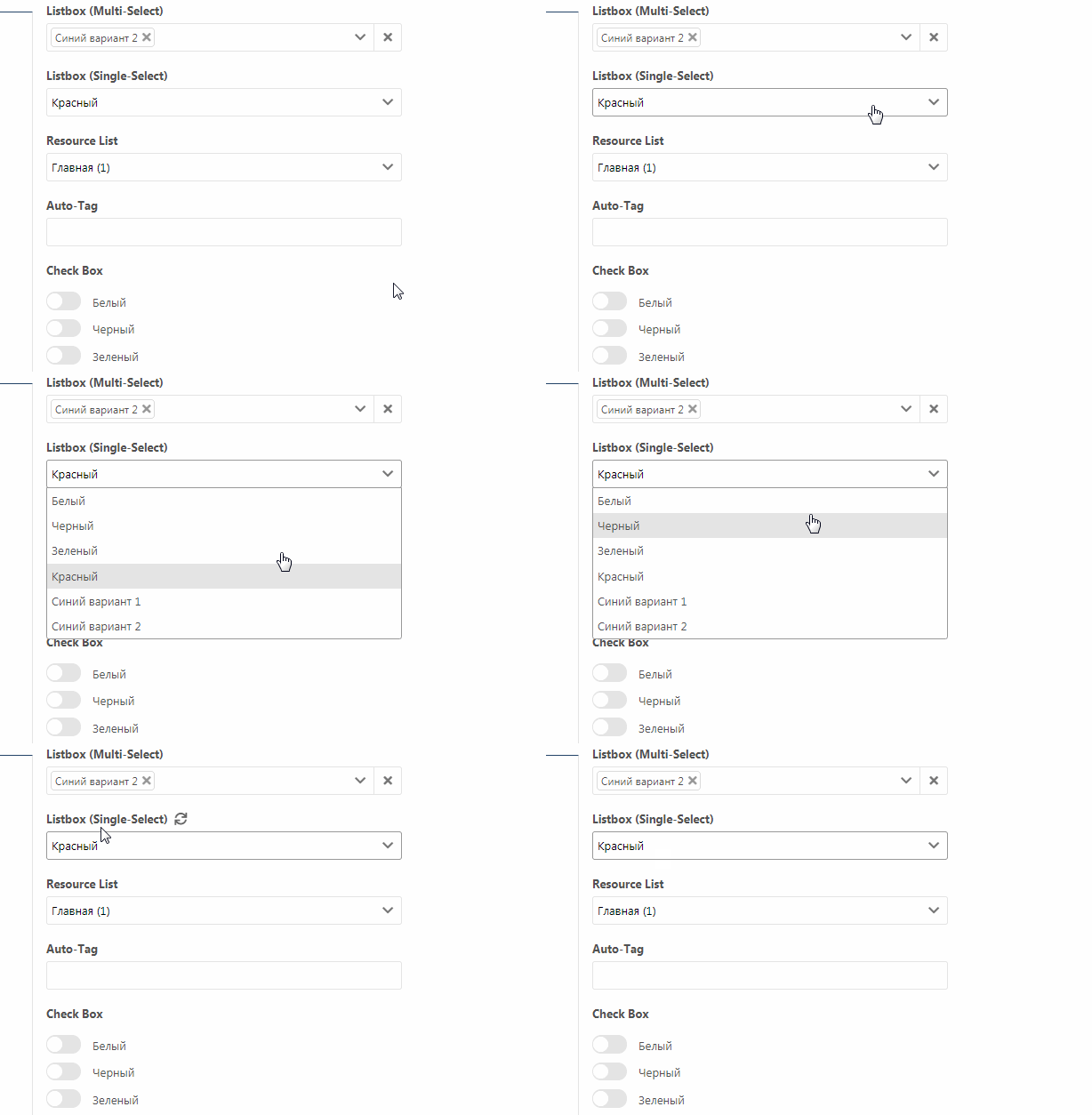
If you set editable: false, then the cursor does not appear at all, i.e. it is the editable parameter that is responsible for the cursor:
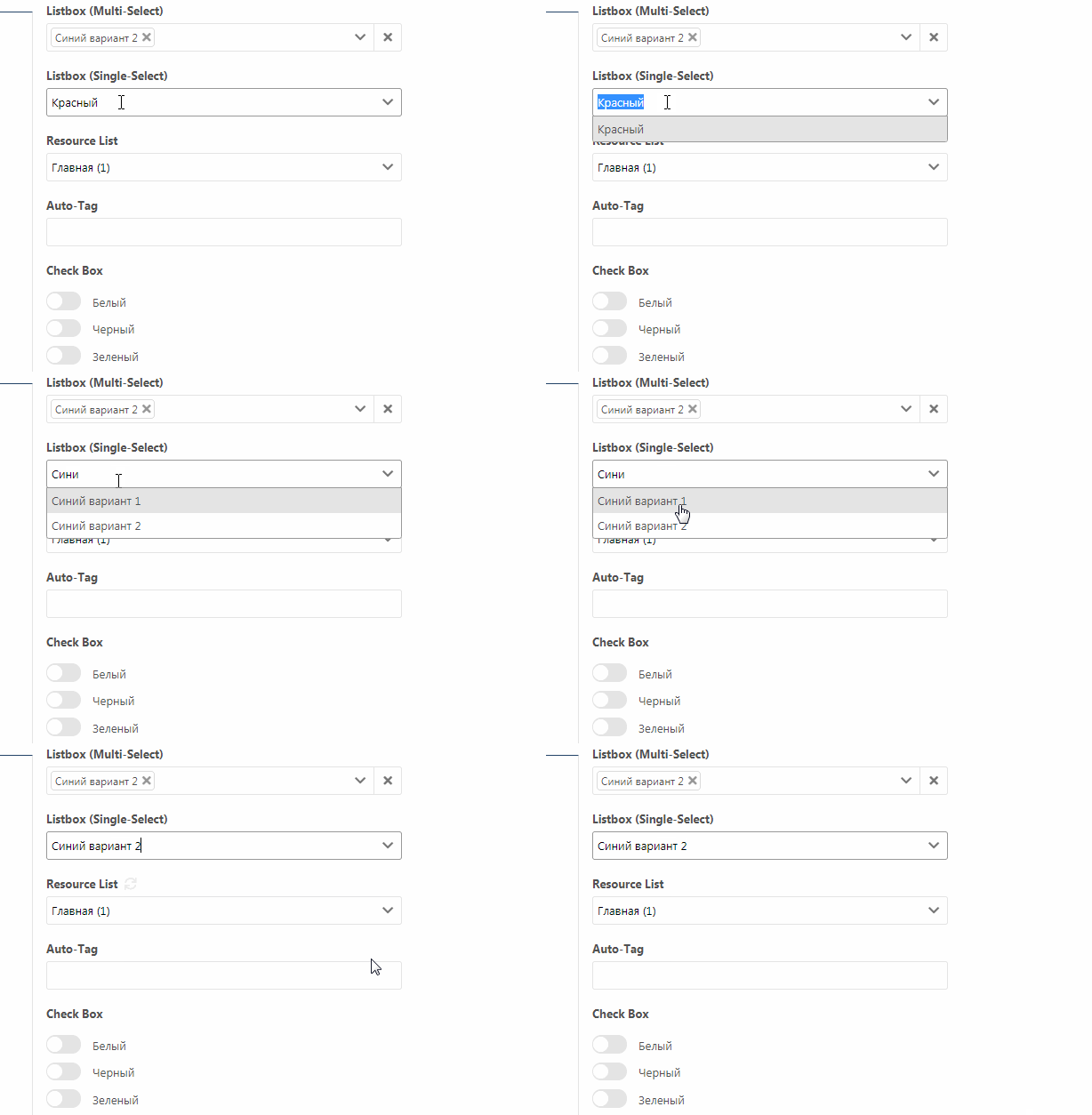
If you set editable: true, cursor will appear:
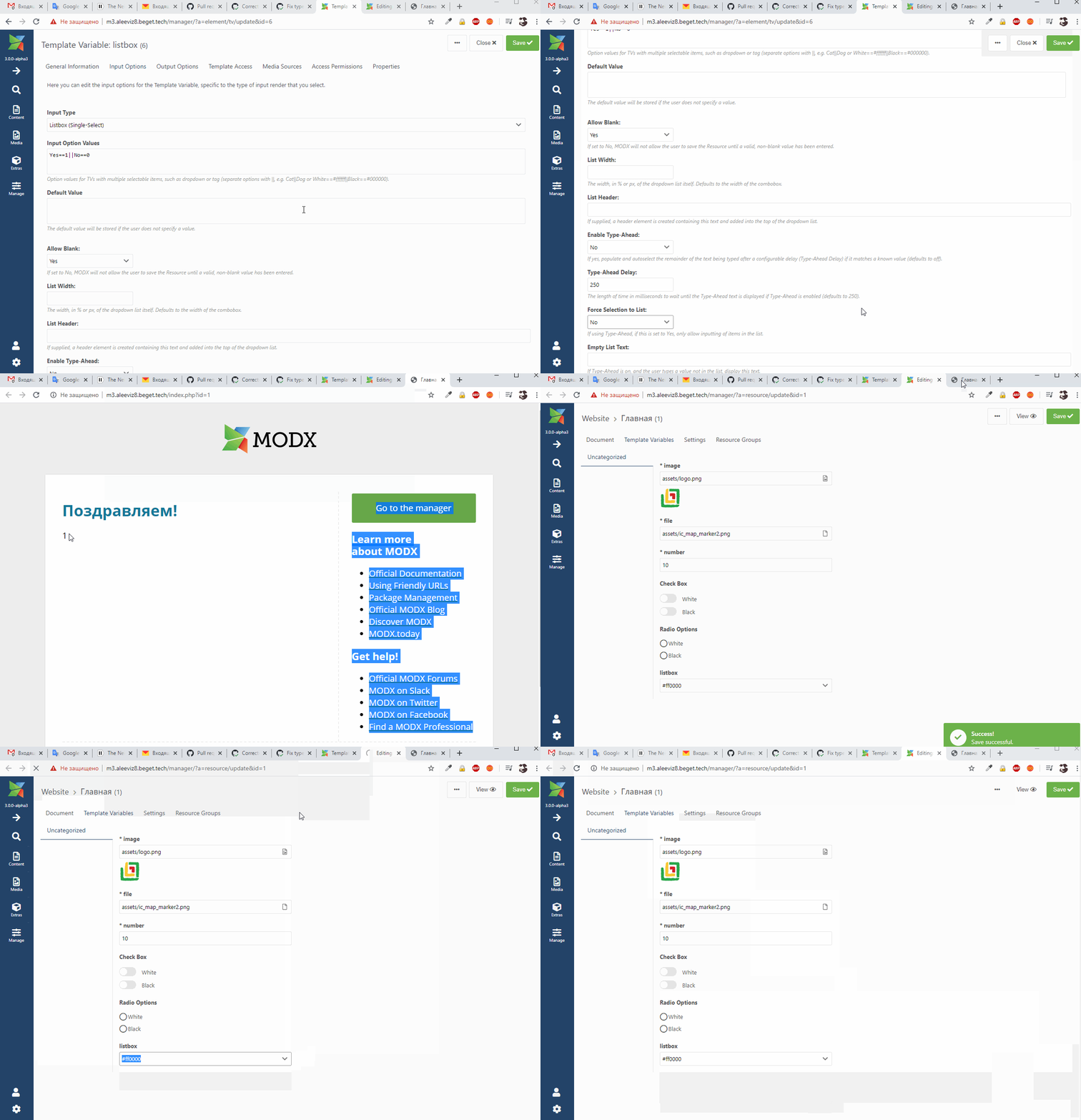
forceSelection
It allows you to enter your values not from the list.
Listbox (Single-Select):
Listbox (Multi-Select):
For a multiple list, user values does not appear in the resource, although values is displayed on the site.
Related issue(s)/PR(s)
https://github.com/modxcms/revolution/issues/15136
https://github.com/modxcms/revolution/pull/14957
Environment
MODX 2.x>
 Ruslan-Aleev
All 7 comments
By the way, the typeAhead and forceSelection parameters may logically contradict.
For example, if I turn off typeAhead, then forceSelection should not work either. Because typeAhead is responsible for 'If yes, populate and autoselect the remainder of the text being typed after a configurable delay...'
Ruslan-Aleev
on 4 Jul 2020
About Listbox TV's
We use the SuperBoxSelect component to render the input fields for the listbox TV's.
SuperBoxSelect is an extension of the ExtJS ComboBox component that displays selected items as labelled boxes within the form field.
A ComboBox works in a similar manner to a traditional HTML
<select>field. The difference is that to submit the valueField, you must specify a hiddenName to create a hidden input field to hold the value of the valueField. The displayField is shown in the text field which is named according to the name.
Parameters
typeAhead
To populate and _autoselect_ the remainder of the text being typed after a configurable delay (typeAheadDelay) if it matches a known value.
https://docs.sencha.com/extjs/3.4.0/#!/api/Ext.form.ComboBox-cfg-typeAhead
typeAheadDelay
The length of time in milliseconds to wait until the typeahead text is displayed if
typeAhead = true.
https://docs.sencha.com/extjs/3.4.0/#!/api/Ext.form.ComboBox-cfg-typeAheadDelay
editable
If set to
false: to prevent the user from typing text directly into the field, the field will only respond to a click on the trigger to set the value.
https://docs.sencha.com/extjs/3.4.0/#!/api/Ext.form.TriggerField-cfg-editable
forceSelection
To restrict the selected value to one of the values in the list,
falseto allow the user to set arbitrary text into the field.
https://docs.sencha.com/extjs/3.4.0/#!/api/Ext.form.ComboBox-cfg-forceSelection
Q/A
Why do we need parameters
typeAheadandtypeAheadDelayif, in fact, parametertypeAheadswitches theediatbleparameter (does not work without it)?
If editable is set to false a user needs to click to select the "value". With typeAhead enabled we autoselect the value but don't trigger a "click".
With the
ediatbleparameter, you can filter by typing and select the one you need from the list.
typeAheadautoselects the first result in the select box. But this is not convenient, because the user may not need the first one in the list.
It selects the first result but still allows you to continue typing and/or select another result in the list. I find it very convienent to have a autosuggest, especially when there are many items to select from.
forceSelection: Why let the user enter values other than specified in the "Input Option Values"?
It is easier to use a TV with a text type.
You force a user to select a value from the list when there are no other options available. E.g:
a listbox TV where you can select a icon (there are only 10 icons available).
You don't want to force a use to select a value from the list when it's almost impossible to list all available options. E.g: a listbox TV to select which animal(s) you like. The "Input Option Values" are then used as suggestions (cat, dog, fish) but still allows you to "select" a "lion".
With a text TV you can't show suggestions and/or select multiple values (without forcing a user to remember a value seperator).
For Listbox (Multi-Select) user-defined values does not appear in the resource form, although it is displayed on the site (bug #15136).
To clarify: https://github.com/modxcms/revolution/issues/15136#issuecomment-650111730
I expect it to only show the manually entered values for that particular resource only, not from other resources!
 JoshuaLuckers
on 7 Jul 2020
JoshuaLuckers
on 7 Jul 2020
I understand your arguments, but they, like mine too, are subjective :)
In principle, we can leave everything as it is, but add the ediatble parameter, because for some TVs, the ediatble parameter is disabled along with typeAhead, and for some, not. Or just wrap the editable parameter inside the typeAhead parameter condition.
Also, the editable/ typeAhead parameter is also useful for a TV resource list.
I expect it to only show the manually entered values for that particular resource only, not from other resources!
For a TV with a multiple list, the entered values are not shown in the resource (this is clearly a bug).
For TV with a single list - shows the entered values of the current resource.
For TV with tags - the entered values from all resources are shown.
It is necessary to think how it is more correct.
Ruslan-Aleev
on 7 Jul 2020
Can we agree that both our arguments reveal the real problem here: inconsistency, unclear options and buggy behavior?
Personally I think:
- Consistency is more important than unclarity.
- Bugs are more annoying than unclear options.
- Unclear options are great when they are not buggy and consistent!
What do you think?
JoshuaLuckers
on 7 Jul 2020
Yes, I agree 100%.
But the questions have not been resolved, what exactly should we do with all the parameters?
Need a community discussion.
Ruslan-Aleev
on 7 Jul 2020
As far as I can see we have two issues being discussed in this thread:
- This: User-entered data in a TV with a Listbox (Multi-Select) type is not displayed in the resource form #15136
- Cursor showing up in Multi-Select field when there's nothing to type
1. User-entered data in a TV with a Listbox (Multi-Select) type is not displayed in the resource form #15136
Probably it'd be best discussed in that thread, but since most things I'd like to react to is in this one I'll type it here:
As explained here https://github.com/modxcms/revolution/pull/15069#issuecomment-650100226 already I'm strongly against the removal of the forceSelection option.
Let me address the related parts in this thread:
https://github.com/modxcms/revolution/issues/15144#issue-647610849:
forceSelection:- Why let the user enter values other than specified in the "Input Option Values"? It is easier to use a TV with a text type.
It is not easier. It creates vastly inferior user experience. It is almost next to trivial in 2020 to expect auto-completion based on my previous inputs.
- On one hand it helps to keep user input consistent. When I start to type in a free text box I won't remember if 2 months before I've used capital or all lowercase values, did I use plural or singular, have I put any punctuation, did I use a formal language or informal, should I use UK or US spelling etc. If the list shows all my previous inputs in the same field done over other Resources I know the answers straight away.
- Also it helps to notice typos or spelling mistakes which become obvious when looking at the list I can see "lenght" and "length" beside each other for example.
- I can easily spot if a value is already present with the same meaning and I can choose that one instead of typing the same or maybe typing a slightly different version of the same input, e.g. "clear" vs. "transparent" or so.
- Plus, should those inputs be long, maybe not just few words, but sentences, it can save significant amount of redundant typing.
These benefits all suggest that using a list-box instead of a free text input has many valid and reasonable use-cases. The only possible problem if the list-box only allows to select from predefined values. This is exactly what forceSelection solves. Removing it seems to be destructive to functionality and against valid use cases. And what we get in return? What is the benefit? I cannot see any demonstrated so far.
- For Listbox (Multi-Select) user-defined values does not appear in the resource form, although it is displayed on the site (bug #15136).
If that is a reason to remove this option, than you should also consider removing the whole Auto-Tag TV type, which has the same behaviour. But the question again is what is the benefit of removing useful features?
https://github.com/modxcms/revolution/issues/15144#issuecomment-654778948:
For a TV with a multiple list, the entered values are not shown in the resource (this is clearly a bug).
This is not a clear, established fact.
I doubt it is a bug at all, as the current behaviour has benefits too and there is an easy workaround to achieve your suggested behaviour. Explained in https://github.com/modxcms/revolution/pull/15069#issuecomment-650100226.
As said above Auto-Tag has the same behaviour and also user input should not change TV definition. Content and configuration should be separate. The user input is content. The TV definition is configuration. Users are not Administrators. Their input should never change configuration.
2. Cursor showing up in Multi-Select field when there's nothing to type
https://github.com/modxcms/revolution/issues/15144#issuecomment-653797611:
By the way, the typeAhead and forceSelection parameters may logically contradict.
For example, if I turn off typeAhead, then forceSelection should not work either. Because typeAhead is responsible for 'If yes, populate and autoselect the remainder of the text being typed after a configurable delay...'
typeAhead: controls the behaviour during the input, the way the input is being madeforceSelectionrestricts what is selectable, it controls the result of the input
Now the only unfortunate configuration is really when forceSelection is ON and typeAhead is OFF, as in that case the user can type random string, but if that does not match any of the predefined values it just disappears. That can cause some user frustration, I agree, but I'd suggest it is an issue with the TV configuration rather than ModX itself. ModX could help Administrators avoid unreasonable configuration, but at the end of the day it is ultimately the responsibility of the Administrator to put in place a configuration that makes sense.
IMO the best solution would be to prevent the typing cursor from appearing when clicking on a Listbox with typeAhead OFF and forceSelection ON, because in this case typing anything in that box is useless. In that case clicking on the box should open the dropdown making in clear that typing is not an option for that TV, a selection must be made.
As it has been pointed out above the editable property is responsible for exactly this: the cursor. So the solution is simply make sure editable is OFF if forceSelection is ON and typeAhead is OFF. Since editable cannot be directly controlled from the Admin UI this can be done without interfering with any existing configuration.
https://github.com/modxcms/revolution/issues/15144#issue-647610849:
Delete parameters typeAhead and typeAheadDelay, and instead display only ediatble parameter.
The problem with that I'm afraid is that it breaks existing configuration, so anyone upgrading their site may end up with broken TVs. Even though probably that can be addressed by a script updating affected TVs during migration - I'm not sure about that.
But what will happen to the typeAheadDelay? If someone is using that with a customised value, would the update script keep the custom value, effectively locking in the TV in a state that cannot ever be modified from the UI, or would reset to e.g. 250ms throwing away existing configuration and again removing a feature someone may be using? And what is the benefit?
https://github.com/modxcms/revolution/issues/15144#issuecomment-654778948:
Or just wrap the editable parameter inside the typeAhead parameter condition.
This seems to be much better approach to me.
Long story short, I don't see why ModX would be better with less flexibility instead of applying some small fixes to otherwise non-critical and perfectly manageable issues with known and simple workarounds?
UPDATE: I've restructured this comment after first posting to make it easier to read. Not planing on modifying it any more thought.
 BenceSzalai
on 13 Jul 2020
BenceSzalai
on 13 Jul 2020
Thanks for the great and detailed comment @BenceSzalai.
Rest assured that we are not removing the forceSelection option.
JoshuaLuckers
on 14 Jul 2020
Related issues
 freelancewebdev
·
3Comments
freelancewebdev
·
3Comments
 alexsoin
·
3Comments
alexsoin
·
3Comments
 travisbotello
·
3Comments
travisbotello
·
3Comments
 sdrenth
·
3Comments
sdrenth
·
3Comments
 SnowCreative
·
4Comments
SnowCreative
·
4Comments
Most helpful comment
As far as I can see we have two issues being discussed in this thread:
1. User-entered data in a TV with a Listbox (Multi-Select) type is not displayed in the resource form #15136
Probably it'd be best discussed in that thread, but since most things I'd like to react to is in this one I'll type it here:
As explained here https://github.com/modxcms/revolution/pull/15069#issuecomment-650100226 already I'm strongly against the removal of the
forceSelectionoption.Let me address the related parts in this thread:
https://github.com/modxcms/revolution/issues/15144#issue-647610849:
It is not easier. It creates vastly inferior user experience. It is almost next to trivial in 2020 to expect auto-completion based on my previous inputs.
These benefits all suggest that using a list-box instead of a free text input has many valid and reasonable use-cases. The only possible problem if the list-box only allows to select from predefined values. This is exactly what
forceSelectionsolves. Removing it seems to be destructive to functionality and against valid use cases. And what we get in return? What is the benefit? I cannot see any demonstrated so far.If that is a reason to remove this option, than you should also consider removing the whole Auto-Tag TV type, which has the same behaviour. But the question again is what is the benefit of removing useful features?
https://github.com/modxcms/revolution/issues/15144#issuecomment-654778948:
This is not a clear, established fact.
I doubt it is a bug at all, as the current behaviour has benefits too and there is an easy workaround to achieve your suggested behaviour. Explained in https://github.com/modxcms/revolution/pull/15069#issuecomment-650100226.
As said above Auto-Tag has the same behaviour and also user input should not change TV definition. Content and configuration should be separate. The user input is content. The TV definition is configuration. Users are not Administrators. Their input should never change configuration.
2. Cursor showing up in Multi-Select field when there's nothing to type
https://github.com/modxcms/revolution/issues/15144#issuecomment-653797611:
typeAhead: controls the behaviour during the input, the way the input is being madeforceSelectionrestricts what is selectable, it controls the result of the inputNow the only unfortunate configuration is really when
forceSelectionis ON andtypeAheadis OFF, as in that case the user can type random string, but if that does not match any of the predefined values it just disappears. That can cause some user frustration, I agree, but I'd suggest it is an issue with the TV configuration rather than ModX itself. ModX could help Administrators avoid unreasonable configuration, but at the end of the day it is ultimately the responsibility of the Administrator to put in place a configuration that makes sense.IMO the best solution would be to prevent the typing cursor from appearing when clicking on a Listbox with
typeAheadOFF andforceSelectionON, because in this case typing anything in that box is useless. In that case clicking on the box should open the dropdown making in clear that typing is not an option for that TV, a selection must be made.As it has been pointed out above the
editableproperty is responsible for exactly this: the cursor. So the solution is simply make sureeditableis OFF ifforceSelectionis ON andtypeAheadis OFF. Sinceeditablecannot be directly controlled from the Admin UI this can be done without interfering with any existing configuration.https://github.com/modxcms/revolution/issues/15144#issue-647610849:
The problem with that I'm afraid is that it breaks existing configuration, so anyone upgrading their site may end up with broken TVs. Even though probably that can be addressed by a script updating affected TVs during migration - I'm not sure about that.
But what will happen to the
typeAheadDelay? If someone is using that with a customised value, would the update script keep the custom value, effectively locking in the TV in a state that cannot ever be modified from the UI, or would reset to e.g. 250ms throwing away existing configuration and again removing a feature someone may be using? And what is the benefit?https://github.com/modxcms/revolution/issues/15144#issuecomment-654778948:
This seems to be much better approach to me.
Long story short, I don't see why ModX would be better with less flexibility instead of applying some small fixes to otherwise non-critical and perfectly manageable issues with known and simple workarounds?
UPDATE: I've restructured this comment after first posting to make it easier to read. Not planing on modifying it any more thought.