Revolution: 2.7.0 Thumbnail Generation Broken
Summary
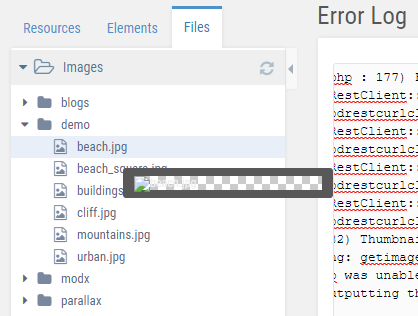
Upgraded to 2.7.0, hover over any image in the file menu. I have tested this with new files and files that previously existed in this MODX build. The file types I have tested with are .jpg and .png.
I receive this error that logs for every file I hover over in the file browser:
[2018-11-30 09:40:52] (ERROR in modProcessor::run @ /home/***/***/core/model/modx/modprocessor.class.php : 177) Flat file processor support is deprecated since version 2.7.0.
I did read up Mark Hamstra's 2.7.0 post, however this seems to be modxProcessor and not an installed extra causing the issue. I could be totally incorrect here...
Screenshot for reference
 kolbykruger
All 10 comments
Thanks for taking time to report this issue to make MODX better.
The errror in the log is actually only a warning.
Do thumbnails work if you delete the MODX and/or browser cache?
 JoshuaLuckers
on 30 Nov 2018
JoshuaLuckers
on 30 Nov 2018
Oddly enough, deleting the core/cache folder fixed thumbnails for the default filesystem, but not the media sources I created.
I should clarify however that in the media browser cmp, the thumbnails work properly. This only happens in the left sidebar files tab for media sources I created.
kolbykruger
on 30 Nov 2018
Thanks for the extra information. I can confirm that the thumbnails are not working when using a custom media source. It looks like the basePath set for the Media Source is not including in the URL for the thumbnail.
JoshuaLuckers
on 30 Nov 2018
Good find. Thanks for investigating!
kolbykruger
on 30 Nov 2018
Actually, that's only the case if it's an SVG file.. other files are going trough the phpthumb processor and that does include the media source.
JoshuaLuckers
on 30 Nov 2018
Strange - I can't reproduce this issue locally or in a production environment running 2.7.0.
- I created a custom media source
- I hovered over the images (jpg format) in the file tab
Images displayed fine on hover, and did not generated the flat file error message (when I access the media manager in the top manager, this generated the error message). Personally, i'd forget about the error messages for the time being.
Could you post any more info about your environment? Or media source settings?
 jonleverrier
on 3 Dec 2018
jonleverrier
on 3 Dec 2018
I was able to reproduce it.
When I hovered the images the thumbnail was not generated. If I call the URL for the thumbnail manually it did generate the thumbnail and refreshing the page showed the image on hover.
JoshuaLuckers
on 3 Dec 2018
Turns out it may have been a cache thing with the update... I am not entirely sure though. It is magically working today, without me changing anything. Could have been hanging onto something from before the update?
kolbykruger
on 3 Dec 2018
@kolbykruger Hi! Still relevant?
 Ibochkarev
on 17 Mar 2019
Ibochkarev
on 17 Mar 2019
I believe it was resolved as of 2.7.0, after deleting the site cache, and giving it a few days.
kolbykruger
on 18 Mar 2019
Related issues
 muzzwood
·
4Comments
muzzwood
·
4Comments
 dsuppiger
·
3Comments
dsuppiger
·
3Comments
 sottwell
·
3Comments
sottwell
·
3Comments
 sdrenth
·
3Comments
sdrenth
·
3Comments
 winformatic
·
4Comments
winformatic
·
4Comments