Revolution: System Setting grid filter boxes are not labeled
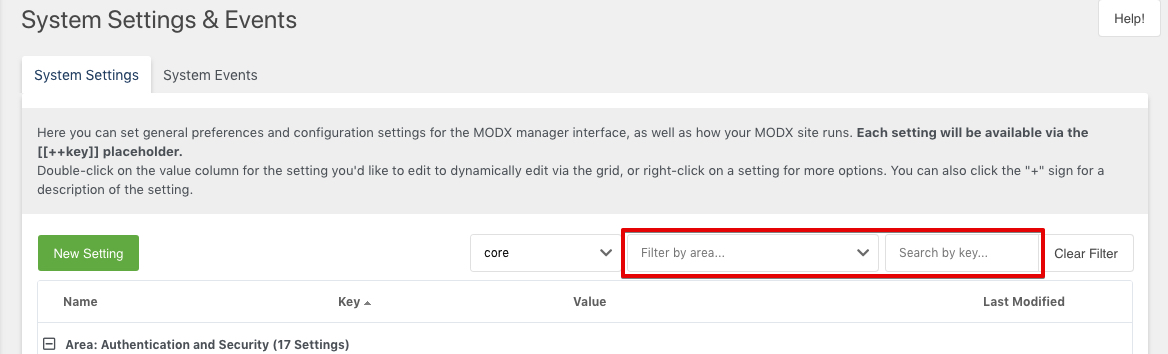
Except for the "Search by Key" box, there's no way to tell what the other boxes contain.
Hoverhelp is probably the best solution.
"Filter by Namespace"
"Filter by Area"
 BobRay
All 5 comments
Let us try to avoid adding more stuff that does not work on mobile devices. Put a label on top is the best option imo.
 OptimusCrime
on 19 Apr 2018
OptimusCrime
on 19 Apr 2018
Both boxes have a not 'valid' initial selection. 'core' means all namespaces and 'None (?)' means all areas. So it would be better to show a placeholder value instead of the wrong selection.
 Jako
on 17 Nov 2018
Jako
on 17 Nov 2018
@BobRay In the current state there are descriptions inside the boxes.
 Ibochkarev
on 17 Mar 2019
Ibochkarev
on 17 Mar 2019
@Ibochkarev, They only say that some of the time. I just fired up 2.7.1 and they look like this:

Even in your photo, there's no way to know that the first box is for selecting a namespace.
BobRay
on 18 Mar 2019
The whole ExtJS code of those dropdowns could be refactored in combination with the processors. Default values are not used as default etc. It looks like someone tried to bypass something in a wrong way at the first sight.
Jako
on 18 Mar 2019
Related issues
 Ruslan-Aleev
·
3Comments
Ruslan-Aleev
·
3Comments
 sottwell
·
3Comments
Ruslan-Aleev
·
3Comments
Ruslan-Aleev
·
3Comments
sottwell
·
3Comments
Ruslan-Aleev
·
3Comments
Ruslan-Aleev
·
3Comments
 gadgetto
·
4Comments
gadgetto
·
4Comments
Most helpful comment
@Ibochkarev, They only say that some of the time. I just fired up 2.7.1 and they look like this:

Even in your photo, there's no way to know that the first box is for selecting a namespace.