Revolution: Media Browser - add Copy Url
Summary
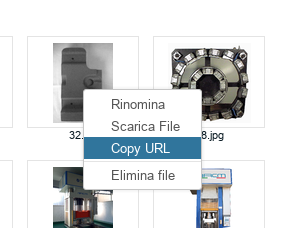
In Media Browser, menu right click of file, add the option to copy absolute url of file.
Environment
MODX 2.5.8
Related
11666
14078
 FerX
FerX
All 6 comments
Do you mean full file path? Or the URL? If the latter, how should we differentiate between contexts?
 OptimusCrime
on 27 Sep 2017
OptimusCrime
on 27 Sep 2017
you could choose with a submenu which context,
or take that of the current resource (in case of using it via TV)
FerX
on 27 Sep 2017
Yes, please! URL would be great. I have clients ask me all the time for the URLs of images and PDFs, and there is no simple way I can give them to find this out for themselves. I don't think contexts matter for this purpose, all files have an absolute URL on the server regardless of context used for the web pages themselves.
 SnowCreative
on 14 Dec 2017
SnowCreative
on 14 Dec 2017
Exactly what @rainbowtiger said!
This just hit me (again), as my client also doesn't know how to deduce the URL of a file..
There is already the option "Copy path", so "Copy URL" would be extremely good here.
Also, this need the base-path from the media-source and has nothing to do with contexts.
 sebastian-marinescu
on 23 Jan 2019
sebastian-marinescu
on 23 Jan 2019
@JoshuaLuckers I guess it solved by https://github.com/modxcms/revolution/pull/14078, isn't it?
 alroniks
on 23 Mar 2021
alroniks
on 23 Mar 2021
@JoshuaLuckers I guess it solved by https://github.com/modxcms/revolution/pull/14078, isn't it?
This is about copying the URL, not the path
 JoshuaLuckers
on 23 Mar 2021
JoshuaLuckers
on 23 Mar 2021
Related issues
 sdrenth
·
3Comments
sdrenth
·
3Comments
 pepebe
·
3Comments
sdrenth
·
3Comments
pepebe
·
3Comments
sdrenth
·
3Comments
 dsuppiger
·
3Comments
dsuppiger
·
3Comments
 travisbotello
·
3Comments
travisbotello
·
3Comments
Most helpful comment
Yes, please! URL would be great. I have clients ask me all the time for the URLs of images and PDFs, and there is no simple way I can give them to find this out for themselves. I don't think contexts matter for this purpose, all files have an absolute URL on the server regardless of context used for the web pages themselves.