Revolution: Inconsistent terminology in MODX
Summary
A number of new clients have had issue with inconsistent action button labels, confirmation + warning dialog, different labels for the same thing etc. Has caused confusion and annoyance with some of them.
Referring to things like:
- Delete action labelled Delete and Remove in different menus/buttons
- Edit action labelled Edit and Update in different menus/buttons
- Create action labelled Create and New in different menus/buttons
- Folders referred to as Directory and Folder in different places
- Warning/Confirmation dialogs not helpful and totally inconstant across resources, elements, file/folder, grids etc (especially delete)
- Warning dialog terminology doesn't match action label
(There is more but you get the idea)
I'm happy to look at this but can I get some feedback first:
- Do people think this is worth looking at?
- Is this the right place or should it go through the MAB manager group?
- Are there any guidelines for making changes to lexicon files?
Related
13065, #4834, #1188, #764, #13448, #13497
Environment
MODX all versions
 davidpede
All 16 comments
- Yes
- While the MAB could take a role in this, don't let that stop you. Perhaps you'll end up draft a set of guidelines on what type of terminology to use. If you then find a member of the MAB that is on board with that to turn, they can act as editor for a recommendation and put it up for a MAB vote to make it "official".
- English lexicons are managed through this repo. Translations via CrowdIn.
To propose changes you'd use the same process as other contributions. Create a git branch, make and commit your changes, send a pull request. I'd recommend branching of 2.x and also sending your changes to 2.x, so these updates could be incorporated into 2.6/2.7.
The lexicon files are in https://github.com/modxcms/revolution/tree/2.x/core/lexicon/en. Having a search tool will help find where each entry is. ;)
Keep in mind lexicons are cached by default. Set cache_lexicon_topics to no so you wont have to clear the cache after each change.
 Mark-H
on 17 Jul 2017
Mark-H
on 17 Jul 2017
The 'Delete' and 'Remove' labels are tricky; resources that are 'deleted' are just flagged in the database for deletion, while 'remove' actually refers to permanently deleting something from the database.
 sottwell
on 24 Jul 2017
sottwell
on 24 Jul 2017
Not a simple task but I think it will come down to writing style and striking the balance between simple, consistent UX and technical accuracy.
Were in process of getting more formalised feedback from the clients that have raised these issues which will help a lot and material design will also influence the strategy. Some good reading:
https://material.io/guidelines/style/writing.html#writing-language
https://material.io/guidelines/components/dialogs.html#dialogs-alerts
davidpede
on 25 Jul 2017
@sottwell regarding remove and delete there is additionally the word "purge" being used...
 wuuti
on 10 Feb 2018
wuuti
on 10 Feb 2018
What about we use something like this:
- "Move to Trash" for soft-delete actions
- "Delete Immediatley" for hard-delete actions
 JoshuaLuckers
on 14 Mar 2018
JoshuaLuckers
on 14 Mar 2018
Another unnecessary terminology:
"Extras, add-ons, packages, components".
As I understand it, packages - is an installation archive for components.
The rest (extras, add-ons) is not clear to what applies.
 Ruslan-Aleev
on 11 Dec 2018
Ruslan-Aleev
on 11 Dec 2018
Also sometimes referred to as "plugins", which is somewhat confusing since in MODX "plugins" refers to a specific type of extra, add-on, component.
sottwell
on 11 Dec 2018
Template Variable or TV.
It makes sense, when creating a TV, in the description above, to write both form of the TV title: full and the abbreviation. And then use only the abbreviated form of TV title in manager.
Ruslan-Aleev
on 11 Dec 2018
Settings
- In MODX there are a lot of settings, descriptions or name of which are built from the negative, such as, "If the setting ... , set this to No.", but more correctly - "If the setting ... , set this to Yes."
- Different format for describing settings, for example, somewhere "If the setting ... , set this to Yes.", and somewhere "Set this to Yes, if the setting ...". All the names / description of the settings should be remade according to the pattern: "Description of the setting, then select the status".
Ruslan-Aleev
on 6 Jan 2019
In the "Package Management" section, each package has the "Uninstall" and "Remove" buttons. But their names and actions are not entirely correct.
"Uninstall" sometimes means deleting, although in MODX it works like a downgrade to the previous version, it is better to call it "Downgrade".
"Remove" does not remove the package from the files unless the "Force Package Removal" checkbox is checked, although it should always remove.
It seems that the checkbox "Force Package Removal" is needed for emergency removal, as if the removal is not correct, and it confuses users.
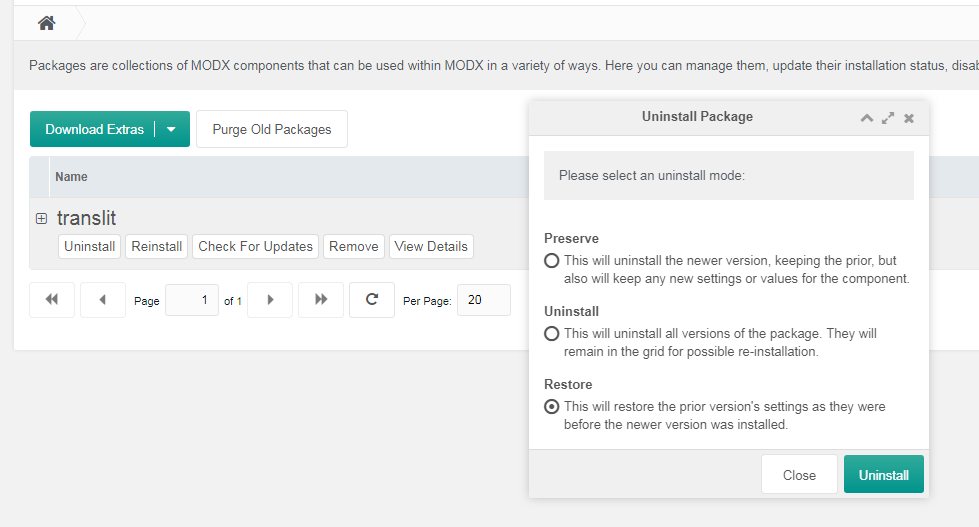
Related with https://github.com/modxcms/revolution/issues/13554#issuecomment-446167913
Ruslan-Aleev
on 30 Jan 2019
Related with - https://github.com/modxcms/revolution/issues/14313
Ruslan-Aleev
on 14 Feb 2019
It happens that the concepts of "Document" and "Resource" are used as one and the same, but this is not correct.
A "Document" is a resource with an HTML content type, and a "Resource" is a broader concept (link, static resource, etc.). It will be necessary to fix this in the lexicons.
Ruslan-Aleev
on 14 Feb 2019
I believe @rthrash isn't to keen about changing the "Document" and "Resource" terminology.
JoshuaLuckers
on 15 Feb 2019
@JoshuaLuckers No, I do not mean that changes are necessary, but about the fact that in the lexicons these concepts are sometimes used incorrectly (text about resources, but the term documents is used).
By the way, the name "Resources" (tab in the tree) has the key "documents" in the lexicons, which also does not bring understanding.
Ruslan-Aleev
on 15 Feb 2019
In the topics files there are unnecessary entries, for example, "Edit TV", "Edit chunk" ("create_", "delete_" etc), but it is easier to use one "Edit" entrie for both TV, chunk and other element. Why such specific entries for the elements? There are not only extra lines in the topics, but errors in the code, i.e. used, for example, and "create" and "create_ELEMENT" at the same time, etc.
Ruslan-Aleev
on 23 May 2019
Related with https://github.com/modxcms/revolution/issues/7484
Ruslan-Aleev
on 12 May 2020
Related issues
 gadgetto
·
4Comments
gadgetto
·
4Comments
 travisbotello
·
3Comments
Ruslan-Aleev
·
3Comments
travisbotello
·
3Comments
Ruslan-Aleev
·
3Comments
 winformatic
·
4Comments
winformatic
·
4Comments
 pepebe
·
3Comments
pepebe
·
3Comments