Revolution: [ ENHANCEMENT ] Manager Welcome Message (solved)
Summary
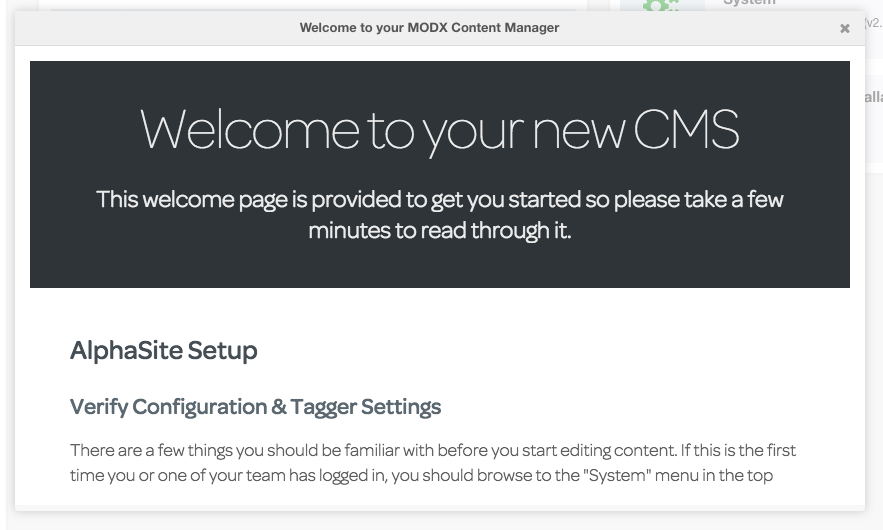
When you install MODX for the first time, and login to the manager, a welcome screen is displayed.
This message can be customised and is very useful for displaying initial setup information to manager users such as finishing setup details in ClientConfig, setting up Tags in Tagger, how to use design patterns and style guides, basic MODX tips and tricks, and ways on how to report bugs to me.
For example:
Step to reproduce
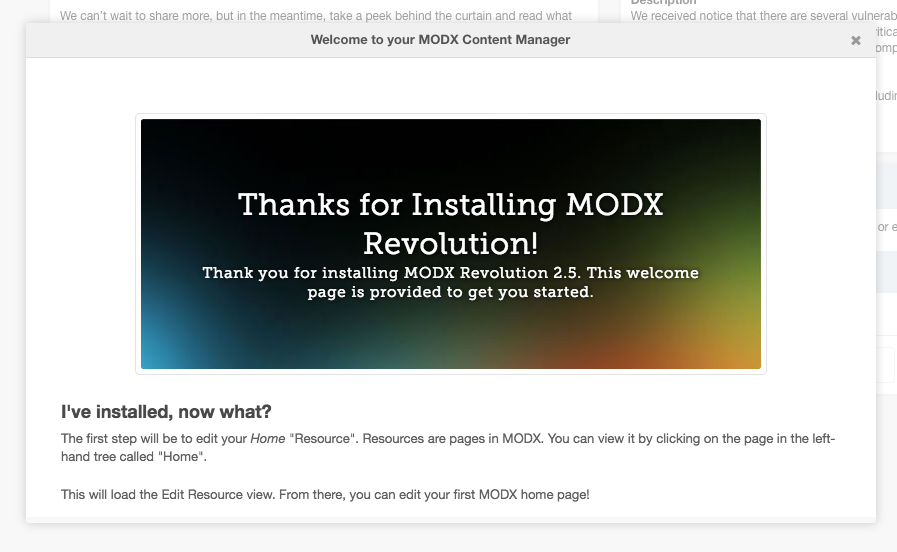
Install a fresh version of MODX and login to the manager where you'll see this welcome message:
Observed behavior
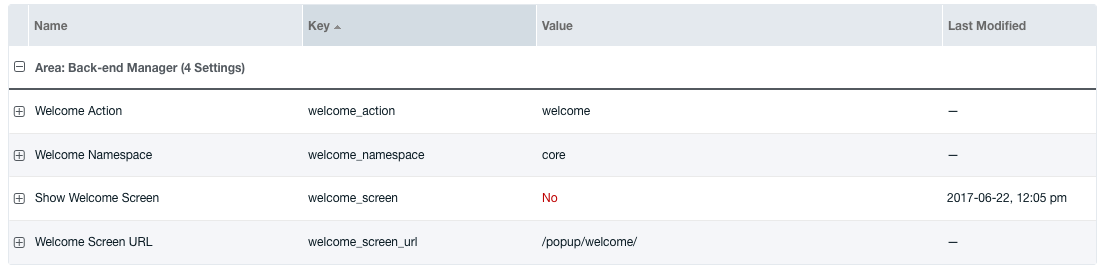
When any user logs in to the manager for the first time, this sets the system setting "welcome_screen" from "Yes" to "No".
Expected behavior
Similar behaviour to the above, but on a per manager user basis. So every user that logs in for the first time will see the welcome message, rather than just the first manager user who logs in.
For example, at the moment User A logs in, triggers the welcome message, but because of this behaviour, User B, User C, User D can no longer view the welcome message, therefore missing useful information.
Environment
Any version of MODX, specifically, 2.5.7
 jonleverrier
All 14 comments
I like it. Didn't know that Welcome popup was configurable. Always looking for ways to inform and interact with client users.
 sottwell
on 22 Jun 2017
sottwell
on 22 Jun 2017
Could this potentially be a system setting to toggle the "display welcome message to all new users"? We dont use this feature and for our users I think this would just confuse them as we have individual training for our clients. Other than that, if people train their clients like this I am all for this feature.
 OptimusCrime
on 22 Jun 2017
OptimusCrime
on 22 Jun 2017
@OptimusCrime The system setting route sounds great.
I wouldn't say I use the welcome message specifically for training, but it is certainly useful for summarising points from a training session that a client is likely to forget. As the welcome message can be customised, it could be used in many different ways to interact with manager users. For example, it might even contain links to a training guide so they have something to reference once the training is finished.
I appreciate this varies from client to client but, manager users come and go, not everybody gets trained up.
If you would like to see my welcome message, so you can see where i'm coming from, I'd be happy to send it to you
jonleverrier
on 22 Jun 2017
Of course, I see the benefit of this feature, no doubt. I just want to have the option to steer clear of this, and hopefully have it disabled by default, so it is an opt-in feature.
OptimusCrime
on 22 Jun 2017
Sounds like something where the setting would be on the user accounts themselves. A flag or checkbox of sorts.
On default install, the flag for all new users could be on. And then a system setting could change the default for new users to be off if desired.
 guyinpv
on 22 Jun 2017
guyinpv
on 22 Jun 2017
nice idea @guyinpv - would certainly give more granular control. Although perhaps it would over complicate things compared to a simple system setting?
jonleverrier
on 22 Jun 2017
It would have to be toggled somewhere if the current behavior (first visit = display welcome screen), because this is simply stored as a boolean value in the settings table. This approach is not expandable to individual users directly.
OptimusCrime
on 22 Jun 2017
From reading the involved code source, the feature should already be almost possible.
What you need to do is create a user setting for each user, with welcome_screen key and a true value (boolean setting) (this can be automated with a plugin when a user is created using OnUserFormSave i guess).
The difficult part is that the global (system) setting welcome_screen is set to false anytime the message is displayed. You would need to create a plugin to change that setting value back to true anytime someone visits the "welcome page".
 rtripault
on 22 Jun 2017
rtripault
on 22 Jun 2017
Yeah, the global system setting was what I ment to address.
OptimusCrime
on 23 Jun 2017
@rtripault this makes sense.
Out of curiosity, I created a user setting with welcome_screen key set to true and deleted the global setting from my test installation, hoping that the user setting would be inherited.
It is inherited, after a user views the welcome message welcome_screen is set to false. Problem is, the welcome message keeps on displaying regardless, because I deleted the global setting :)
jonleverrier
on 23 Jun 2017
Since i was interested in the feature (had that in mind since quite some times but never took the time to give it a try), here a sample plugin that should get you started : https://gist.github.com/rtripault/f948caecd98d01ea59ab9cfe4e729725
rtripault
on 23 Jun 2017
Good job @rtripault ! Your plugin works perfectly.
As this enhancement can be achieved through a plugin without touching the core - shall I close this issue?
jonleverrier
on 23 Jun 2017
As almost everything in Revo : you can do almost anything without touching the core. So i'd say it's up to you, if you want this shipped within the core.
On a personal preference, i'd like to remove features from the core rather than adding more ;)
rtripault
on 23 Jun 2017
I agree with you. I'm going to close this issue - feel free to re-open if you feel like the default welcome_screen code needs some refactoring.
jonleverrier
on 23 Jun 2017
Related issues
 lemon666
·
4Comments
lemon666
·
4Comments
 alexsoin
·
3Comments
alexsoin
·
3Comments
 Ruslan-Aleev
·
3Comments
Ruslan-Aleev
·
3Comments
 SnowCreative
·
4Comments
SnowCreative
·
4Comments
 travisbotello
·
3Comments
travisbotello
·
3Comments