Revive: WMR + Revive Dashboard launch = Fatal Error crash
Hello,
I am on Revive 1.5.1.1 with all the latest SteamVR Beta and WMR for SteamVR Beta updates and while I can get to the applications through Steam, the performance isn't as good as going through the Revive Dashboard directly. When I try to launch apps from the Revive Dashboard I get a Fatal Error.
This used to work, my favorite app is Aircar but the performance is bad through Steam.
Setup:
Samsung HMD Odyssey
Windows 10 64bit 1809
Lenovo Legion Y720 (i7, 16GB Ram, Nvidia GTX 1060 6GB)
Latest NVidia Drivers
Thanks and amazing work!
 Arpeggio72
All 14 comments
Same problem here with the latest release. I should try to downgrade and see if my results change.
 FrameSkip
on 18 Nov 2018
FrameSkip
on 18 Nov 2018
Yeah - I tried going back a version or 2 as well....same issue.
What Windows build are you on FrameSkip?
Arpeggio72
on 18 Nov 2018
Thanks for letting me know it probably won't help. I am on 1809, and I suspect that may be causing the problem.
FrameSkip
on 18 Nov 2018
Same problem with 1.6.0
Arpeggio72
on 26 Nov 2018
I'd just like to add that I am also finding this crash. I wanted to try and use the "remix", but everytime I launch a game from the revive dashboard, the game crashes. Let me know if I can help somehow.
 Porcelainfog
on 28 Nov 2018
Porcelainfog
on 28 Nov 2018
I just tried the 1.6.1 Revive Dashboard (Remixed) and same thing, Aircar crashed with Fatal Error.
Also, now launching it through SteamVR is unplayable. With 1.6.0.x versions it was at least semi-playable with some stuttering. Now the view jerks all around at about 5 to 10 frames per second.
Setup:
Samsung HMD Odyssey
Windows 10 64bit 1809
Lenovo Legion Y720 (i7, 16GB Ram, Nvidia GTX 1060 6GB)
Latest NVidia Drivers (12-3-2018)
Arpeggio72
on 4 Dec 2018
Same here. Remixed has never worked for me. A few games may load but they are warped and unplayable. Most games just crash.
Specs:
Dell Visor
i5 8400
GTX 1060 3gb (416.81 drivers)
Win10 x64 1809
16gb ram
 jonnypanic
on 8 Dec 2018
jonnypanic
on 8 Dec 2018
With latest updates, please try again and let me know what happens.
Are you trying with one particular game or multiple @Arpeggio72
Also you say i7, but which i7?
How about you @jonnypanic
Please list me which ones work and which one don't.
 Dragoboss
on 13 Dec 2018
Dragoboss
on 13 Dec 2018
@Dragoboss - I tried the latest updates (Oculus, SteamVR Beta and Non-Beta, WMR for SteamVR Beta and Non-Beta, Revive 1.6.1) with the same results for launching Aircar, Dreamdeck etc. when launching from the Revive Dashboard.
My CPU is Intel Core i7 7700HQ @ 2.80Ghz
On a side note - it looks like a new update for SteamVR Beta 1.2.1 came out today which completely breaks WMR through Steam for me now as well (I know it's not your issue but thought I would mention it). Says no Compositor found.
Thanks!
Arpeggio72
on 13 Dec 2018
I am aware of the issues with 1.2.1.
For 1.1.4, check if you have Motion Smoothing disabled in SteamVR settings. Or any form of SteamVR reprojection/asw.
Furthermore, does Aircar provide crash dumps or anything the like I could look at?
Can you give me as many details about the error code as possible (or screenshot).
Does it say anything more besides Fatal Error?
Dragoboss
on 13 Dec 2018
@Dragoboss
I verified Motion Smoothing was disable in SteamVR (1.1.4 and 1.2.1) and still no joy. I don't see anywhere to disable Reprojection other than in the Advanced Overlay (which they are unchecked there).
Aircar doesn't provide any crash dumps that I could find. It just says Fatal Error!
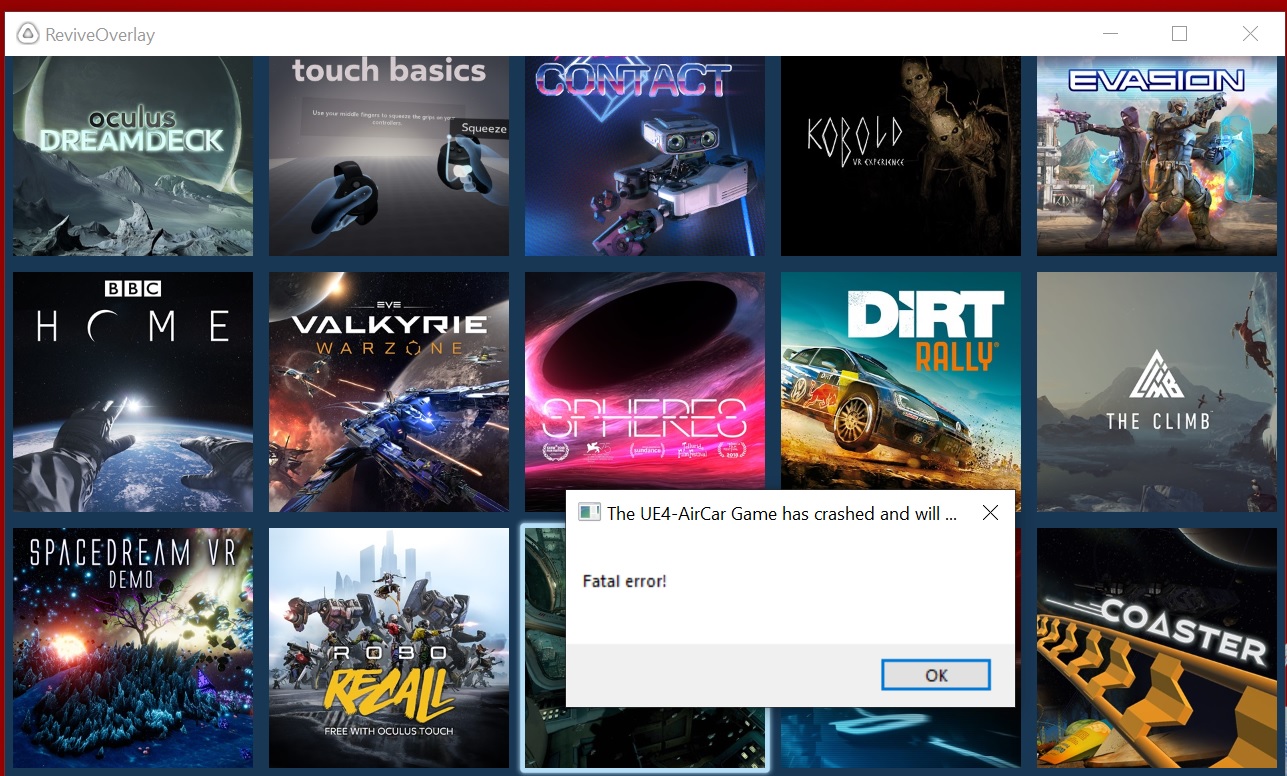
Arpeggio72
on 14 Dec 2018
I have tried running this on my own set-up with the Dell Visor and have zero issues.
This leads me to believe it is either something with your Oculus set-up or another software package interfering....
I'd like to ask you a whole load of questions but it is easier to direct-message, so if you want you can add me to discord: [redacted]
AirCar does actually provide crash dumps, located at:
Users(youruser)AppDataLocalAirCarSavedCrashes
Please provide me with the crash report. It might contain a little bit of sensitive data so again, Discord is possible. I am on the Revive server or the username given above ^.
EDIT:
When trying to run this through Remixed I do indeed also get Fatal Error. That is mainly because UE4 and WMR don't work together nicely. I have the same with for example From Other Suns. Known issue.
I am investigating the cause of that as we speak.
Dragoboss
on 14 Dec 2018
@Dragoboss - cool - glad you can replicate it - when I get home from work I'll try and get the Crashes for you as well as sign up for Discord. (I would also be open to letting you remote into my machine to poke around if that would help)
This used to work prior to about 2 months ago - before I upgraded to Windows 10 1809, not sure if that had anything to do with it.
Arpeggio72
on 15 Dec 2018
@Dragoboss
I haven't signed up for Discord yet but here are some links to some zipped DMP files from the follwoing apps that exhibit this behavior:
---- Link removed, files received ----
These were all launched from the Revive Overlay (without SteamVR)
Let me know once you have the files and I'll delete them from my Google Drive.
Thanks and let me know if you need anything else!
-Arpeggio72
Arpeggio72
on 17 Dec 2018
Related issues
 momower1
·
5Comments
momower1
·
5Comments
 GAMEDRIX
·
4Comments
GAMEDRIX
·
4Comments
 kblood
·
7Comments
kblood
·
7Comments
 coderanger
·
13Comments
coderanger
·
13Comments
 newend
·
5Comments
newend
·
5Comments