Revive: Using Windows Mixed Reality to play Rift games via Revive
Very new VR enthusiast and trying to learn how the Revive system works. So far, I have been able to play Rift games via SteamVR, but when I load Chronos which I purchased off the Oculus Store, The game will load but before it starts I get a message to verify the controllers. I do not see the controller in the headset, but I am able to get the OK button to highlight when I press the thumb pad, but it will not proceed any further. Is there anything I can do, or are there just some Rift games that will not play on Mixed Reality via Revive? Thanks!
 ghost
ghost
All 31 comments
some games give me a messages about missing sensor so i can't play :'(
ghost
on 29 Nov 2017
First, dont use Beta versions of SteamVR & Mixed Reality Steam Software, they are bugged.
Then, when you dont see your controllers in Cliffhouse its a bug from Mixed Reality Portal.
If you see your controllers in Cliffhouse, you have to press windows button, go back to Cliffhouse and then click on Steam VR windows. Now you should see your controllers in Games.
 MoxFr
on 29 Nov 2017
MoxFr
on 29 Nov 2017
@MoxFr are you implying this will skirt around the sensor detection issue in Chronos for WMR users?
 Iamblichos
on 29 Nov 2017
Iamblichos
on 29 Nov 2017
Windows Mixed Reality is not yet officially supported, so you may run into random issues. I will add official support in the next version.
 CrossVR
on 29 Nov 2017
CrossVR
on 29 Nov 2017
when will be available lone echo for windows mixed reality trough revive, I purchased the game from oculus store but I can't click on any button, the motion controllers are not working
 sbalaciu
on 2 Dec 2017
sbalaciu
on 2 Dec 2017
Please test this version: https://github.com/LibreVR/Revive/releases/tag/1.2.0-beta3
No official support yet, but this version does include a hack to spoof the number of sensors.
CrossVR
on 3 Dec 2017
I will do so later today and let you know if it works! Thanks! :)
ghost
on 3 Dec 2017
Working good on my end with Samsung Odyssey and beta 3. Played an hour of Chronos.
Iamblichos
on 3 Dec 2017
Thanks! lone echo is working now
On Mon, Dec 4, 2017 at 12:00 AM, Iamblichos notifications@github.com
wrote:
Working good on my end with Samsung Odyssey and beta 3. Played an hour of
Chronos.—
You are receiving this because you commented.
Reply to this email directly, view it on GitHub
https://github.com/LibreVR/Revive/issues/834#issuecomment-348817921, or mute
the thread
https://github.com/notifications/unsubscribe-auth/AOU2-xiZPrvdwfVCvPrZFofd5XSweTzbks5s8xh6gaJpZM4QuJsW
.
sbalaciu
on 3 Dec 2017
Good to hear. Currently I'm looking into ways to support the Mixed Reality API natively without going through SteamVR. However getting the next stable version ready for release has priority.
CrossVR
on 3 Dec 2017
Native API would be great, but having functionality now really gets the job done. I appreciate it.
Iamblichos
on 4 Dec 2017
Echo Arena is messy right now with my Lenovo Mixed Reality headset, but it does work, which is very impressive in the first place :)
Thanks for your work on this. Right now I'm having issues with my hands swapping randomly, and the sensitivity of the arcing throws and whatnot seems a little off from what it should be, so I think I'll wait another couple releases to try to play in earnest. I don't have any other Oculus games to test (I can try to isolate issues in other free apps if it'd be helpful), this was just a first run today.
 axfelix
on 4 Dec 2017
axfelix
on 4 Dec 2017
yes it's great that it's working, to move right-left use the touch pad of
the right controller, don't press just swipe left/right
On Mon, Dec 4, 2017 at 3:49 AM, axfelix notifications@github.com wrote:
Echo Arena is messy right now with my Lenovo Mixed Reality headset, but
it does work, which is very impressive in the first place :)Thanks for your work on this. Right now I'm having issues with my hands
swapping randomly, and the sensitivity of the arcing throws and whatnot
seems a little off from what it should be, so I think I'll wait another
couple releases to try to play in earnest.—
You are receiving this because you commented.
Reply to this email directly, view it on GitHub
https://github.com/LibreVR/Revive/issues/834#issuecomment-348840326, or mute
the thread
https://github.com/notifications/unsubscribe-auth/AOU2-92idjIxehZifbvfyN82EjBg8pTaks5s80-zgaJpZM4QuJsW
.
sbalaciu
on 4 Dec 2017
Working so good !! Thanks you @Armada651 !!
The mage's Tale is working fine and so as Lone Echo !!
I just see a litlle appearance and disappearance of my chaperone that doesn't happen already... a little weird but not so annoying !!
 roblaplante
on 4 Dec 2017
roblaplante
on 4 Dec 2017

it's totally normal that hands switch if you press the button dedicated to it, check the guide
 ImBehindSevenProxies
on 4 Dec 2017
ImBehindSevenProxies
on 4 Dec 2017
Apparently not, thanks :)
axfelix
on 4 Dec 2017
Thank you Jules! I was able to play Echo Area with my WMR (Samsung Odyssey). The experience was great. I also have a Vive and I'm confident that the experience is better with the Odyssey except you have to deal with the tracking limitations, which can be annoying at best. I do like the WMR controller in this game.
 cornfzd
on 10 Dec 2017
cornfzd
on 10 Dec 2017
Is there any way to have all the games use the thumbsticks instead of the trackpads? Not sure if simply using revive in steam for all the games including the ones playable without using revive would fix this issue or not? Almost every game thats playable in steam vr with a wmr headset uses the trackpad and it pretty much sucks ass. If revive wont fix this do you know of any other solutions or workarounds? I know myself and many others would be willing to pay or donate for a solid fix for this issue, its the number one complaint i see on the steam forums regarding wmr. The second biggest complaint is the cliff house...why do we need it? Isnt it just sitting in the background sucking up resources while your playing a game? Keep up the good work, your a cyber hero in my book.
 bkrafty
on 14 Dec 2017
bkrafty
on 14 Dec 2017
@bkrafty Revive already uses the thumbstick. Though it can't use it yet for thumbstick presses, that will be part of a future release with native Windows MR support.
CrossVR
on 14 Dec 2017
Big, big thanks for the latest Revive release (1.2.0). Lone Echo plays great on WMR (Samsung Odyssey) now with the default settings. Your work is appreciated! Will keep an eye out for the native WMR version.
P.S. As soon as they make a wireless kit for WMR, my Vive's for sale.
 ChuckBevitt
on 4 Jan 2018
ChuckBevitt
on 4 Jan 2018
I guess my question wasn’t worded very well, what I meant was is there any way to use revive to play the games in steam that it normally wouldn’t be required for? Like for example let’s use Raw Data, a game that supports the vive and the rift natively. When playing with WMR these types of games almost always default to wmr with the controls for the vive, which means trackpads. Can you use revive to make it think your playing on a Rift so the controls default to thumb sticks?
bkrafty
on 4 Jan 2018
@bkrafty That is possible, but it would be a mapping in between the Vive and the Rift, because some WMR controls are not accessible from SteamVR. It's better to wait on a native version of Revive for WMR; I'm working on that right now, but it's difficult as the WMR API is not intended to be used outside of the Windows Store.
CrossVR
on 4 Jan 2018
Using Revive with WMR to play Mage's Tale. Actually works fine, except.... I keep getting these bright white "artifacts" - in the shape of the Oculus Sensor / stand. I assume its looking for the sensor? It's so bright on the dark background of the game, it sort of "blinds" you... however you can move and look around it. However it keeps re-appearing right in front of me every few seconds. I don't have any other Oculus games to try at this point, so I can't say if its unique to this game, or across all of them. Anyone else see this? (or have a solution?)
 ConorKnoxx
on 7 Jan 2018
ConorKnoxx
on 7 Jan 2018
In case anyone has the same "problem" - there was an option right in Mage's Tale to see (or not see) the lighthouses - which I simply unchecked and never saw again.
ConorKnoxx
on 26 Jan 2018
No success here with samsung. I am trying Onward and Avatar Editor. I get audio and some video on the monitor but the headset just shows the white arena with circle grid.
 fpga-brad
on 27 Jan 2018
fpga-brad
on 27 Jan 2018
Building on Brady's question, what about games like Dirt Rally that only support Oculus and that were bought in steam? Oculus home launches with it, but there is no output to wmr. It's not in the revive list because it was purchased in steam. Is there a way to manually add this game to revive?
 falchulk
on 8 Feb 2018
falchulk
on 8 Feb 2018
@falchulk https://github.com/LibreVR/Revive/wiki#steam-games
CrossVR
on 8 Feb 2018
@Armada651 dear, which version of revive will run the oculus medium? I use lenovo explorer
 Smollett76
on 20 Mar 2018
Smollett76
on 20 Mar 2018
Hello,
I can't initialize Onward using Samsung Odyssey HMD and latest Revive version
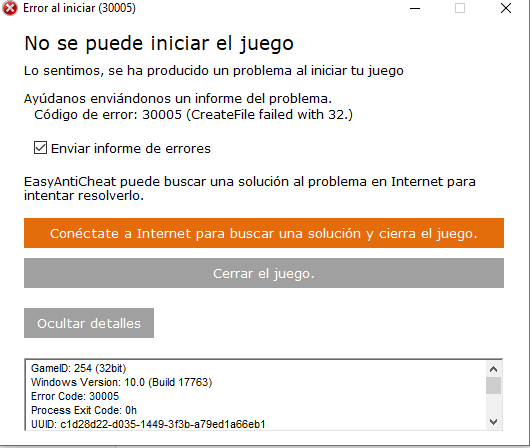
 javmonisu
on 28 Oct 2018
javmonisu
on 28 Oct 2018
Just wanted to say thank you for this! Looking to get VR headset for the first time but it's hard to pick as they all have compromises. Thinking about the Samsung Odyssey as it has an OLED screen and higher resolution than the Vive. But this only makes sense if I can play my Steam games with it!
 PolarisTLX
on 6 Nov 2018
PolarisTLX
on 6 Nov 2018
@PolarisTLX SteamVR support for the Samsung Odyssey is not developed by Revive. Microsoft itself provided a driver for SteamVR here: https://store.steampowered.com/app/719950/Windows_Mixed_Reality_for_SteamVR/
Closing this issue since Revive has had experimental native WMR support for a while now.
CrossVR
on 7 Nov 2018
Related issues
 Dragoboss
·
10Comments
Dragoboss
·
10Comments
 KrisSchier
·
4Comments
roblaplante
·
4Comments
KrisSchier
·
4Comments
roblaplante
·
4Comments
 kblood
·
7Comments
kblood
·
7Comments
 GAMEDRIX
·
4Comments
GAMEDRIX
·
4Comments
Most helpful comment
Windows Mixed Reality is not yet officially supported, so you may run into random issues. I will add official support in the next version.