Has anyone tried to create scrollable slides with this? I'd like to create something magazine-ish, that should work responsively, but I don't want to be limited by the screen size. Is there an option or a far better solution for this all?
I would like to use reveal.js for the great controls, transitions and mobile devices support. I'm trying to override some of the main.css and make it work through that. Is there an existing solution maybe?
 JonathanMH
All 16 comments
Huh? reveal.js already has mousewheel support. Simply scroll thru the slides.
Don't want to be limited by the screen size? What does that mean?
Sorry, I'm a bit confused about what you mean.
 owenversteeg
on 15 Aug 2012
owenversteeg
on 15 Aug 2012
I think I see what you're saying. It would be possible to modify the presentation to use only horizontal (not nested) slides and make each of those scrollable. Would take a good amount of CSS rewrite. For example, you'd probably want to make the sides full page width/height to avoid having to scroll within the smaller slide area. Not something for the core library unfortunately.
 hakimel
on 15 Aug 2012
hakimel
on 15 Aug 2012
Oh, sorry, I was being unclear.
I would like the slides > sections to be scrollable, like, to have a scrollbar. Not to scroll through them. Maybe I'm trying to abuse this for something it's not meant for, it just caught my eye.
JonathanMH
on 15 Aug 2012
Aha. So - if I catch your meaning - which I potentially don't - you'd like the slides to be able to be larger than the screen size - so that users could scroll down to read more content?
Another idea that I picked up from your comment previously was to let the slides be scrollable with the bar at the bottom of the screen - turning that into a scrollbar as well as an indicator. If @hakimel approves, I could make that fairly easily.
owenversteeg
on 15 Aug 2012
I think I'll stick to treesaver.js for now, it seems more fitted for this purpose. It's meant for magazines anyways. Thank you guys for the super quick responses, it's awesome to be able to talk to devs so rapidly.
JonathanMH
on 15 Aug 2012
Is it possible now in reveal.js to scroll down screen when a slide happen to be longer(or to say higher) than the screen height?
 huashan
on 5 Jan 2015
huashan
on 5 Jan 2015
Same question here, could we scroll down through a slide if its content happens to have a height larger than the screen size?
 raducoravu
on 19 Jan 2015
raducoravu
on 19 Jan 2015
I guess as a hack it should be sufficient to the following to your .slides class?
overflow-y: auto;
overflow-x: hidden;
But this will add this behavior to all slides
 RafiKueng
on 3 Feb 2015
RafiKueng
on 3 Feb 2015
or even better:
add a class to the section, where you want scrollbars, like:
<section class="scrollable">
and use the following css:
.scrollable {
    bottom: 0px;
    overflow-y: auto  !important;
    overflow-x: hidden !important;
}
It worked for me, but I havent tested much..
RafiKueng
on 3 Feb 2015
Thanks for the suggestion, it seems that in order to make this work on my side I also had to specify a fixed height for the slide, otherwise the slide content was collapsed in a small vertical height with a scroll bar to the left. I'll keep looking into this when I have the time.
Ideally the library would add two up/down javascript buttons when the slide overflows the available vertical screen width.
raducoravu
on 5 Feb 2015
There is currently reveal.js is being integrated into IPython's nbviewer site and a question has come up about mobile behaviour with scrolling (issue here and PR here). It is desirable to have both swipe action and the use of scrolling with large slides. Is it possible to do both? Perhaps scroll on slow gestures and move to the next slide on fast ones?
 damontallen
on 31 Mar 2015
damontallen
on 31 Mar 2015
(I don't really know what you are trying to achieve, I'm not dev of either project (but a user), nor mobile.. Just some ideas)
I thinks it's not the best idea to have two separate actions on the same gesture, only dependent on movement speed.. Maybe it's possible to have something like 1 finger swipe (resp. arrow-down key) vs 2 finger swipe (pgdn key), one does scoll, the other swipe?
If it has to be the same gesture, then I'd say make it dependent on the duration of the initial press down, (press - hold - swipe/drag) and give some visual feedback maybe? really a ordinary swipe swipes (hold ~ 0ms), and a press down/ hold some time (> x ms) / then drag switches to scroll mode? (not sure whether it's technically possible, no experience with mobiles)
RafiKueng
on 31 Mar 2015
Unfortunately my js experience is nearly non-existent as well. I was just hoping for some clarification in response to issues brought up in the PR. Since I have a preference on the outcome but lack the expertise to provide a js solution I came here for advice.
damontallen
on 31 Mar 2015
I solved this with
.scrollable {
overflow-y: auto !important;
overflow-x: hidden !important;
height: 700px;
}
add the upper class to any any slide tag (section) to make it scrollable.
On a particular slide where you want to scroll, you should update the configuration to disable the touch event.
Reveal.configure({ touch: false });
 amitmutrezas
on 30 Dec 2015
amitmutrezas
on 30 Dec 2015
@raducoravu @JonathanMH @owenversteeg @hakimel @huashan @RafiKueng @amitmutrezas @damontallen @JonathanMH
`
and use the following css:
.scrollable {
bottom: 0px;
overflow-y: auto !important;
overflow-x: hidden !important;
}THIS CODE WORKS FINE ONE SLIDE(page) ONLY.
but how can enable mouse scrolling feature as UP/DOWN arrow keys between sub-slides?
example:
 G1305
on 12 Dec 2017
G1305
on 12 Dec 2017
I would also like this functionality.
My use case is something like this, but some of my slides have 2 paragraphs of text.
When I try the css mentioned above, the scroll bar is visible, and scrolling only works on 50% of the screen (not the left and right).
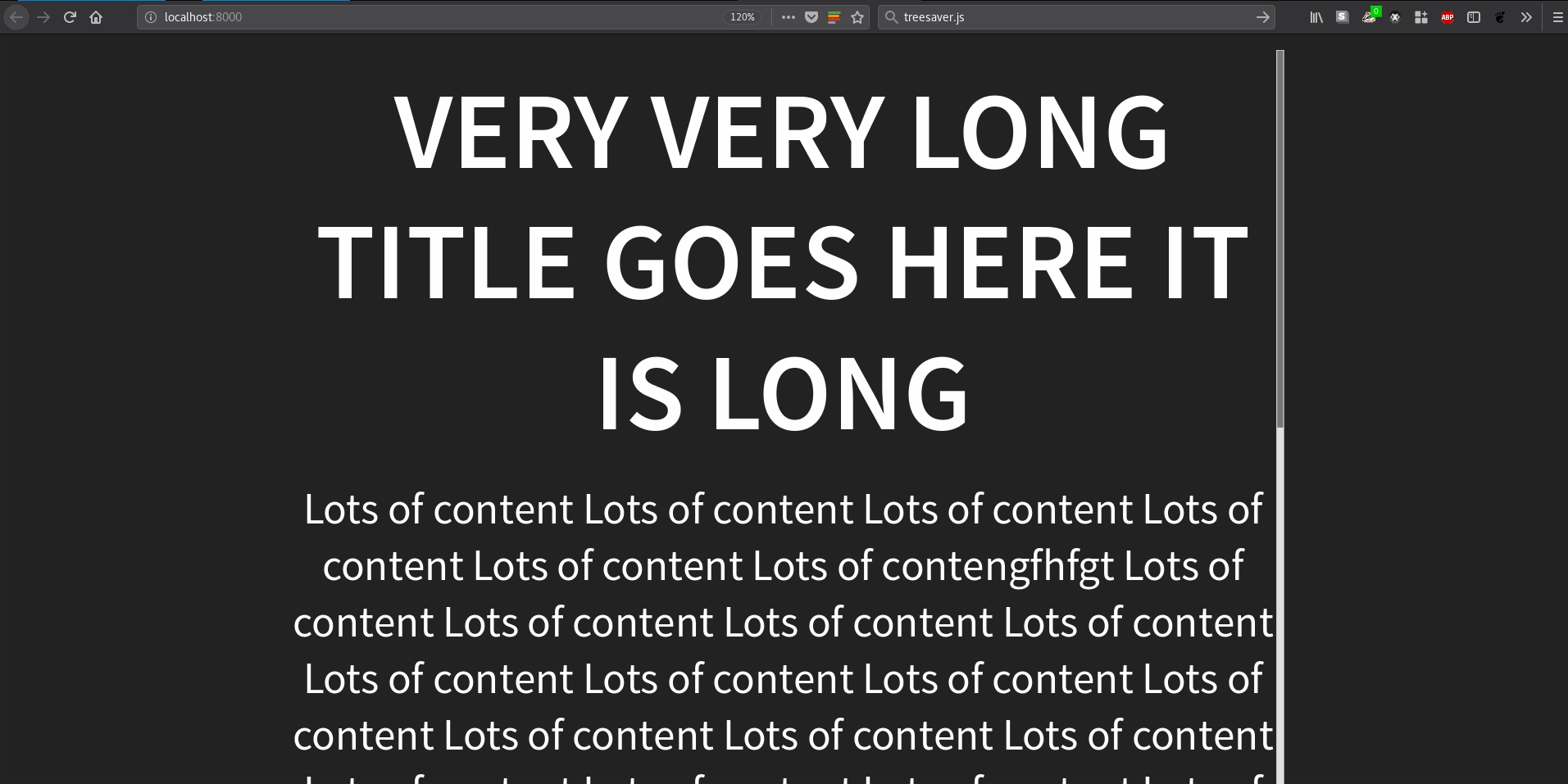
I've tried some css to remove the scroll bar. But I can't figure out how to do it.
 mdavis-xyz
on 10 Jul 2018
mdavis-xyz
on 10 Jul 2018
Related issues
 justmytwospence
·
4Comments
justmytwospence
·
4Comments
 berteh
·
5Comments
berteh
·
5Comments
 alesarrett
·
5Comments
alesarrett
·
5Comments
 deisi
·
4Comments
deisi
·
4Comments
 Enosinger
·
4Comments
Enosinger
·
4Comments
Most helpful comment
I solved this with
.scrollable {
overflow-y: auto !important;
overflow-x: hidden !important;
height: 700px;
}
add the upper class to any any slide tag (section) to make it scrollable.
On a particular slide where you want to scroll, you should update the configuration to disable the touch event.
Reveal.configure({ touch: false });