Retroarch: [Menu] Remap Menu Suggestion, easier to use
This is a sketch about something we discussed several times with Radius to make the remap menu easier to use, in line with other solutions (like Snes9x or MAME).
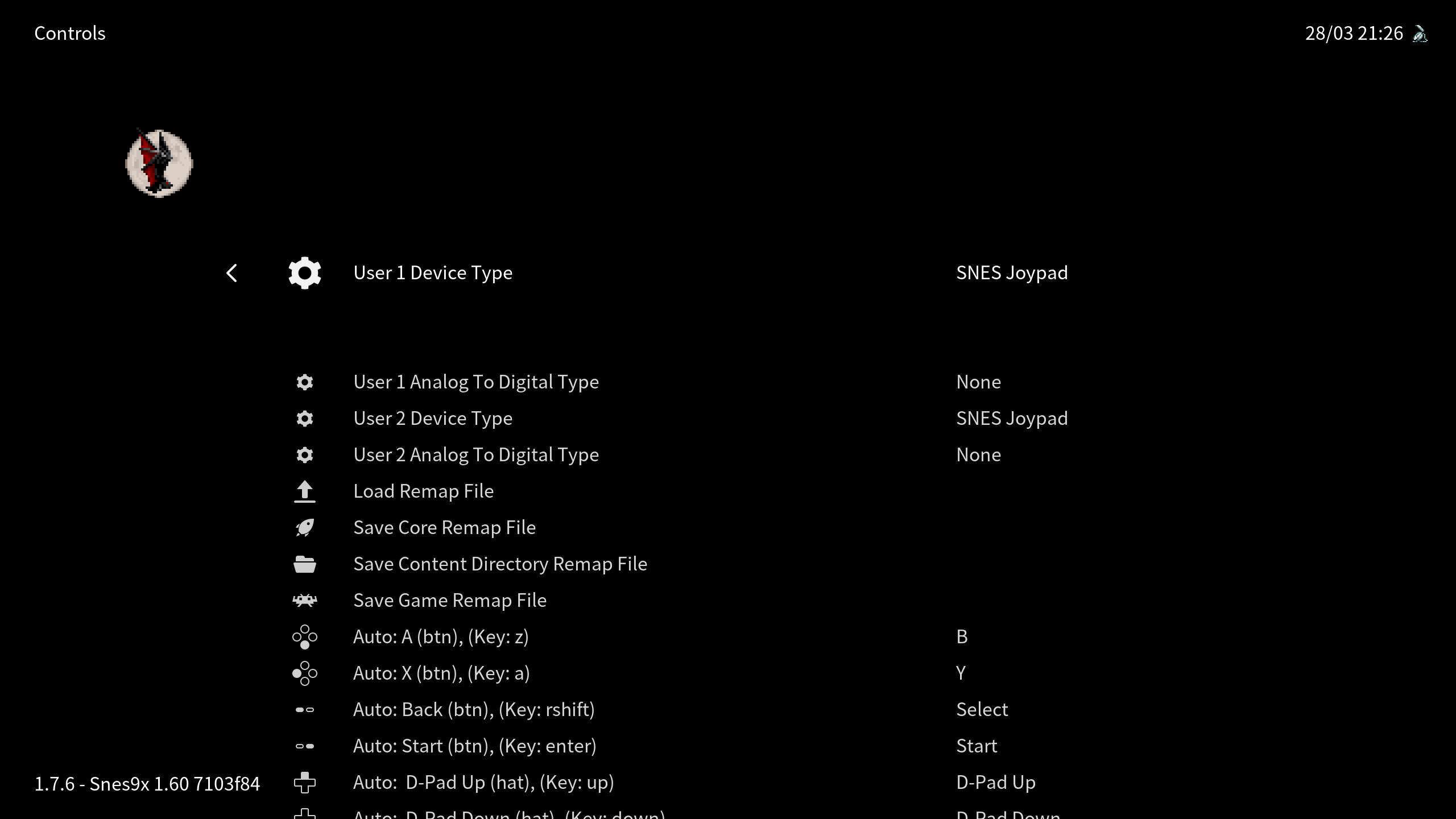
This is the current remap menu in XMB:
This is the goal to attain:
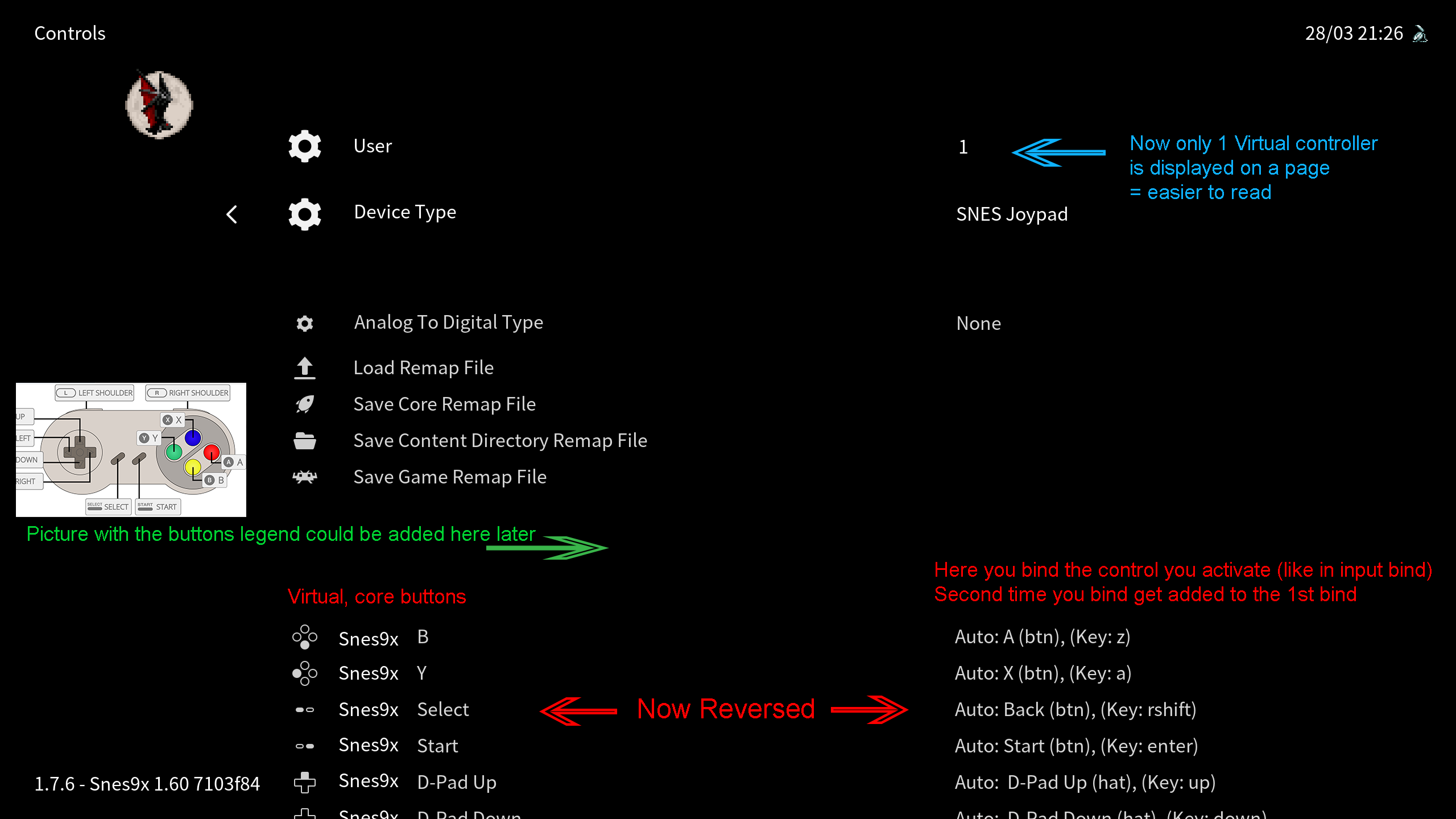
So the main points are:
-only show 1 virtual controller at once
-the reference on the left column is the core virtual buttons/directions now
-right column are real gamepad/controllers bind you actually push, like in the main input menu
(you can use any controller here, 2nd bind get added
"start/space" for default bind, long "start/space" push to clear all or something like that)
(-adding an asset picture, named after each core + each controller type, showing the virtual controller with the buttons legend)
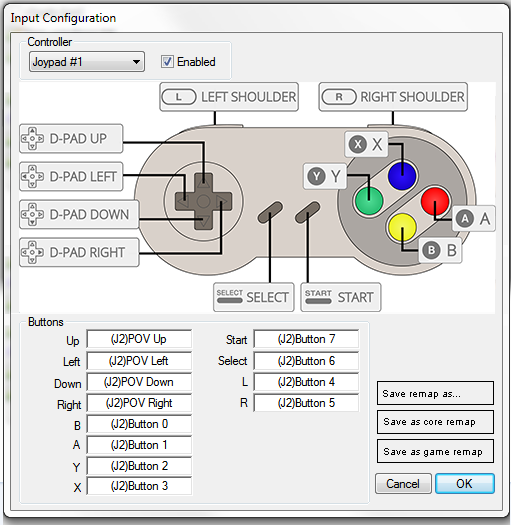
This could then lead to something like this in QT: (done quickly, not thought out completely)
Radius comments:
well let's outline the steps to make this happen:
1. new controls menu so the old functionality can remain till finished
2. I need to know how to refresh a menu on option change,
 I still don't know how to do that
3. add the left column entries (easy)
4. add the right column entries using the remap files
 (this is menu_cbs_get_value I think or get string representation)
 (kinda hard, it involves figuring out all the translation stuff again)
5. add the input binding dialog using the transtaltion stuff figured in 4
good thing about this is that it wouldn't need left/right callbacks at all
which were a huge headache last time

I would prefer if someone kickstarted the effort in a branch
then I could try to help with 4/5
 Tatsuya79
All 8 comments
-right column are real gamepad/controllers bind you actually push, like in the main input menu
(you can use any controller here, 2nd bind get added
This part wasn't including on my outline, that would complicate things a lot.
Other than that it's all feasible, if only very time consuming
 fr500
on 28 Mar 2019
fr500
on 28 Mar 2019
Reversing the retropad binds and the core actions would also cause compatibility-breaking problems since it changes the functionality.
As it is right now you can have more than one retropad buttons associated to the same core button, which would not be possible if the core button was in the left column.
 Ferk
on 29 Mar 2019
Ferk
on 29 Mar 2019
Personally, the thing I find a bit annoying is that you have to cycle through the core buttons/actions one by one without really knowing when the control you want will show up.
It would be more comfortable if it opened in a selection/drop down list, like what was introduced in 1.7.5 for other options.
Ferk
on 29 Mar 2019
Nope, the remap files can stay the same, that's just redirection (for the basic changes, could be different later on).
You can still do multiple binds as you push a button and it gets added on top of the previous one.
Tatsuya79
on 29 Mar 2019
You can still do multiple binds as you push a button and it gets added on top of the previous one.
You mean like in Quake?
I think that this should be mentioned in your design, because it would affect the implementation. How do you define if you want to replace a binding instead of adding it on top?
The thing is that if you want the remap files to stay the same, then support for this kind of thing should be there from the start, otherwise those who have already remaps where 2 buttons (or more?) do the same would have messed up remap menus when they load their old remap files in the redesigned menu.
Also, I'm not sure if Retroarch supports using the same button for different core actions, that's not possible in current menu design, but if the fields switch side you could in theory press the same button when setting different core actions, which might have to be prevented by explicitly checking for that case.
Personally, I think it would be best if instead of changing the order of the fields, just have an option to "Remap all actions" or something like this, which acts as a sort of Wizard, cycling through each action of the core and telling the user to press the corresponding gamepad button he wants to use (maybe with a core-specific graphic like you mentioned), but which all it does is assign to the pressed button the selected action remap for each core action without really changing the way it's structured in the menu. And after the wizard is done, you can see the result in the menu in the same order "button --> coreButton" as it's actually stored internally by Retroarch and by the remap files.
It'd be sort of how the already existing "Bind all" works in the Retropad bindings. It wouldn't introduce too much friction with old remaps, and since it's done in a separate dialog overlaid on top you have more space to display a pretty core-specific image like the one you suggested, rather than cramming it in the side or inserting it among the menu options interrupting their flow and getting lost in long action lists.
Ferk
on 17 Apr 2019
Like in MAME: when you enter a 2nd bind and it gets added on top of the previous one, that's what I tried to say in the 1st message.
This whole thing is what I already discussed with Radius and is there to have it written down and reviewed as I don't know the exact limit of what's possible to implement atm.
It wouldn't break old remaps if I got it right, it's just redirections.
The bind all thing would be great, sure.
But I really think virtual keys as reference on the left side is more intuitive (and it's been requested multiple times / criticized as what we have is the opposite of every other programs around).
Tatsuya79
on 17 Apr 2019
@Ferk what @Tatsuya79 is proposing is just a GUI change (a complex one).
The functional component would remain the same. The only thing that changes is how these settings are represented.
Assuming a NES core and a user using a Dual Shock for maximum discomfort
The representation on defaults would be:
left col ----------------------------------------- right col
NES B  ----------------------------------------- Dual Shock 3 Cross
NES A  ----------------------------------------- Dual Shock 3 Circle
Once the user remaps this to something saner it would be
left col ----------------------------------------- right col
NES B  ----------------------------------------- Dual Shock 3 Square
NES A  ----------------------------------------- Dual Shock 3 Cross
And assuming he maps triangle and circle to the same it would be
left col ----------------------------------------- right col
NES B  ----------------------------------------- Dual Shock 3 Square / Triangle
NES A  ----------------------------------------- Dual Shock 3 Cross / Circle
I think actually this wouldn't really work because the value part of the key/value pair in the menu is quite restrictive spacewise
So maybe a better solution would be to have no value part at all and just have an action to present a bind button.
Then the representation would use sublabels
NES B
   Dual Shock 3 Square
   Dual Shock 3 Triangle
NES A
   Dual Shock 3 Cross
   Dual Shock 3 Circle
Still, this poses an interesting question, because in case of a keyboard core device there would be 101 entries vertically.
Also another point is that the whole thing should go through a LUT because as it is button ordering is weird AF (B Y SEL STA U D L R A X L R), a more sensible ordering would be imho (U D L R B A Y X L R)
fr500
on 18 Apr 2019
Edit: I just saw @fr500 last paragraph, so I kind of duplicate his request, sorry).
Also another point is that the whole thing should go through a LUT because as it is button ordering is weird AF (B Y SEL STA U D L R A X L R), a more sensible ordering would be imho (U D L R B A Y X L R) <
A humble suggestion: Maybe current remap menu could also be improved a bit if instead of showing the name of the button you are supposedly binding, it could show a gamepad photo showing the button (lit) that you are about to bind, like attached photo:

I also hate when the button "order" that you are following to bind is changed in the middle of the assignement.
In example, currently when you bind the Dpad, RA does it in this order (Up, down, left, right) but left & right stick use a different order (right, left, down, up).
This shortcircuits my brain and I always set them the opposite, particularly left and right.
Also I didn't found a reason to seperate binding of B/Y buttons from A/X by making me bind "select" and "start" buttons in the middle.
My personal mind works better in this order: Up, down, left, right applied the same to all buttons.
So perfect bind order in my opinion would be:
All buttons first (note the patter always up down, left right, although I'm a bit lenient here
because I find easier to set up main buttons first and secondaries later):
X (up)
B(down)
Y(left)
A(right)
L1
L2
L3
R1
R2
R3
Select
Start
Dpad then
D-Pad (up)
D-Pad (down)
D-Pad (left)
D-Pad (right)
Sticks being the latest.
Left Stick Y- (up)
Left Stick Y- (down)
Left Stick X+ (left)
Left Stick X- (right)
Righ Stick Y- (up)
Righ Stick Y- (down)
Righ Stick X+ (left)
Righ Stick X- (right)
Just my two cents.... sorry for the intermission.
 Zephyr-Battiassi
on 25 Mar 2020
Zephyr-Battiassi
on 25 Mar 2020
Related issues
 danabnormal9000
·
3Comments
danabnormal9000
·
3Comments
 bslenul
·
3Comments
bslenul
·
3Comments
 charlydelta
·
3Comments
charlydelta
·
3Comments
 blackman91
·
3Comments
blackman91
·
3Comments
 wrldwzrd89
·
3Comments
wrldwzrd89
·
3Comments