Reticulate: Reticulate: Error: unexpected symbol in “import pandas”
Running into problems using reticulate on the latest version of RStudio 1.2
I run the following lines of code:
> library(reticulate)
> Sys.which("python")
                             python
"/data/users/USER/env/bin/python"
>
> setwd("/data/users/USER/")
>
> reticulate::py_discover_config()
python:         /data/users/USER/env/bin/python3.6
libpython:      /usr/lib64/libpython3.6m.so.1.0
pythonhome:     /usr:/usr
version:        3.6.8 (default, Apr 25 2019, 21:02:35)  [GCC 4.8.5 20150623 (Red Hat 4.8.5-36)]
numpy:          /data/users/USER/env/lib64/python3.6/site-packages/numpy
numpy_version:  1.16.4

NOTE: Python version was forced by use_python function
> use_python("/data/users/USER/env/bin/python3.6", required = TRUE)
> use_virtualenv("env")
>
> data_py <- r_to_py(data)
>
> repl_python()
Python 3.6.8 (/data/users/USER/env/bin/python3.6)
Reticulate 1.12.0.9005 REPL -- A Python interpreter in R.
>>> quit
> import pandas
Error: unexpected symbol in "import pandas"
Thats what happens when I run the code on my RStudio server "notepad".
Another example:
> repl_python()
Python 3.6.8 (/data/users/USER/env/bin/python3.6)
Reticulate 1.12.0.9005 REPL -- A Python interpreter in R.
>>> quit
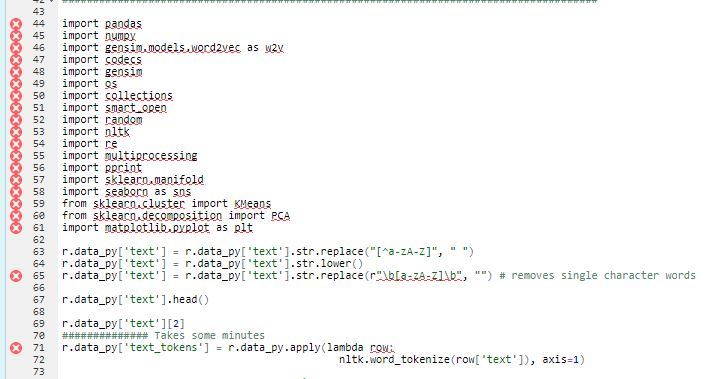
> r.data_py['text'] = r.data_py['text'].str.replace("[^a-zA-Z]", " ")
Error: unexpected symbol in "r.data_py['text'] = r.data_py['text'].str.replace"
It seems to be using the quit command as soon as I run any Python commands and therefore "logs" me out of the Python mode and forcing the error.
I am able to run the code when I get to repl_python() and then I can execute the commands in the RStudio console, it only fails when I am in the RStudio script editor. I also have a bunch of X`s next to the code in my RStudio text editor...
This code was working on RStudio 1.1.xxx but I recently updated to RStudio rstudio-server-1.2.1335-1.x86_64
My session info on my RStudio Server account:
R version 3.5.2 (2018-12-20)
Platform: x86_64-redhat-linux-gnu (64-bit)
Running under: Red Hat Enterprise Linux

Matrix products: default
BLAS/LAPACK: /usr/lib64/R/lib/libRblas.so

locale:
 [1] LC_CTYPE=en_US.UTF-8       LC_NUMERIC=C               LC_TIME=en_US.UTF-8        LC_COLLATE=en_US.UTF-8
 [5] LC_MONETARY=en_US.UTF-8    LC_MESSAGES=en_US.UTF-8    LC_PAPER=en_US.UTF-8       LC_NAME=C
 [9] LC_ADDRESS=C               LC_TELEPHONE=C             LC_MEASUREMENT=en_US.UTF-8 LC_IDENTIFICATION=C

attached base packages:
[1] stats     graphics  grDevices utils     datasets  methods   base

other attached packages:
[1] tidyr_0.8.3            dplyr_0.8.3            reticulate_1.12.0-9005

loaded via a namespace (and not attached):
 [1] Rcpp_1.0.1        pillar_1.4.2      compiler_3.5.2    remotes_2.1.0     prettyunits_1.0.2 tools_3.5.2
 [7] digest_0.6.19     pkgbuild_1.0.3    pkgload_1.0.2     jsonlite_1.6      memoise_1.1.0     tibble_2.1.3
[13] gtable_0.3.0      lattice_0.20-38   pkgconfig_2.0.2   png_0.1-7         rlang_0.4.0       Matrix_1.2-15
[19] cli_1.1.0         rstudioapi_0.10   curl_3.3          withr_2.1.2       fs_1.3.1          desc_1.2.0
[25] devtools_2.0.2    rprojroot_1.3-2   grid_3.5.2        tidyselect_0.2.5  glue_1.3.1        R6_2.4.0
[31] processx_3.4.0    sessioninfo_1.1.1 ggplot2_3.2.0     purrr_0.3.2       callr_3.3.0       magrittr_1.5
[37] usethis_1.5.1     backports_1.1.4   scales_1.0.0      ps_1.3.0          assertthat_0.2.1  colorspace_1.4-1
[43] lazyeval_0.2.2    munsell_0.5.0     crayon_1.3.4
I have also tried the following on my home RStudio 1.2.xxx account.
Session Info:
R version 3.5.3 (2019-03-11)
Platform: x86_64-w64-mingw32/x64 (64-bit)
Running under: Windows 10 x64 (build 18362)

Matrix products: default

locale:
[1] LC_COLLATE=Spanish_Spain.1252  LC_CTYPE=Spanish_Spain.1252    LC_MONETARY=Spanish_Spain.1252
[4] LC_NUMERIC=C                   LC_TIME=Spanish_Spain.1252

attached base packages:
[1] grid      parallel  stats     graphics  grDevices utils     datasets  methods   base

other attached packages:
 [1] reticulate_1.10            Hmisc_4.1-1                Formula_1.2-3              lattice_0.20-38
 [5] foreign_0.8-71             downloader_0.4             survey_3.35                survival_2.43-3
 [9] Matrix_1.2-15              mitools_2.3                tidyquant_0.5.5            forcats_0.3.0
[13] purrr_0.2.5                readr_1.3.1                tibble_2.0.1               tidyverse_1.2.1
[17] quantmod_0.4-13.1          TTR_0.23-4                 PerformanceAnalytics_1.5.2 xts_0.11-2
[21] zoo_1.8-4                  lubridate_1.7.4            ggplot2_3.0.0              tidyr_0.8.2
[25] stringr_1.3.1              dplyr_0.8.0.1              readxl_1.2.0               RStata_1.1.1
[29] lodown_0.1.0               data.table_1.12.0          psidR_1.9                  rugarch_1.4-0

loaded via a namespace (and not attached):
 [1] colorspace_1.4-0            selectr_0.4-1               mclust_5.4.2
 [4] rprojroot_1.3-2             htmlTable_1.13.1            futile.logger_1.4.3
 [7] base64enc_0.1-3             fs_1.2.6                    rstudioapi_0.9.0
[10] remotes_2.0.2               spd_2.0-1                   mvtnorm_1.0-8
[13] xml2_1.2.0                  splines_3.5.3               knitr_1.21
[16] pkgload_1.0.2               jsonlite_1.6                nloptr_1.2.1
[19] broom_0.5.1                 cluster_2.0.7-1             png_0.1-7
[22] compiler_3.5.3              httr_1.4.0                  backports_1.1.3
[25] assertthat_0.2.0            lazyeval_0.2.1              cli_1.0.1
[28] formatR_1.5                 htmltools_0.3.6             acepack_1.4.1
[31] prettyunits_1.0.2           tools_3.5.3                 gtable_0.2.0
[34] glue_1.3.0                  Rcpp_1.0.0                  cellranger_1.1.0
[37] nlme_3.1-137                xfun_0.4                    GeneralizedHyperbolic_0.8-4
[40] ps_1.3.0                    openxlsx_4.1.0              testthat_2.0.1
[43] rvest_0.3.2                 devtools_2.0.1.9000         MASS_7.3-51.1
[46] scales_1.0.0                DistributionUtils_0.6-0     hms_0.4.2
[49] expm_0.999-3                RColorBrewer_1.1-2          lambda.r_1.2.3
[52] curl_3.3                    gridExtra_2.3               memoise_1.1.0
[55] SAScii_1.0                  SkewHyperbolic_0.4-0        rpart_4.1-13
[58] latticeExtra_0.6-28         stringi_1.2.4               desc_1.2.0
[61] checkmate_1.8.5             pkgbuild_1.0.2              zip_1.0.0
[64] truncnorm_1.0-8             rlang_0.3.1                 pkgconfig_2.0.2
[67] bitops_1.0-6                Rsolnp_1.16                 htmlwidgets_1.3
[70] ks_1.11.3                   processx_3.2.1              tidyselect_0.2.5
[73] plyr_1.8.4                  magrittr_1.5                R6_2.4.0
[76] generics_0.0.2              pillar_1.3.1                haven_2.0.0
[79] withr_2.1.2                 nnet_7.3-12                 RCurl_1.95-4.11
[82] modelr_0.1.2                crayon_1.3.4                futile.options_1.0.1
[85] Quandl_2.9.1                KernSmooth_2.23-15          usethis_1.4.0
[88] callr_3.1.1                 digest_0.6.18               numDeriv_2016.8-1
[91] munsell_0.5.0               sessioninfo_1.1.1           quadprog_1.5-7
Again the problem is the same. I can execute the lines in the RStudio console but I cannot execute the lines in my RStudio script. I suspect it has something to do with the RStudio 1.2 update since this was working before the update.
Here is some simple test data in which I get an error with:
text <- c("Because I could not stop for Death -",
          "He kindly stopped for me -",
          "The Carriage held but just Ourselves -",
          "and Immortality")
ID <- c(1,2,3,4)
df <- data.frame(ID, text)

library(reticulate)
df_py <- r_to_py(df)
repl_python()

r.df_py['text'] = r.df_py['text'].str.replace("[^a-zA-Z]", " ")
r.df_py['text'] = r.df_py['text'].str.lower()
 msmith01
All 2 comments
The issue here is that you're trying to embed Python code into an R script. RStudio sees that you're trying to execute what it believes to be R code, and so switches the Python interpreter off.
You can move your Python code to a separate file and run that file with reticulate::source_python().
 kevinushey
on 16 Jul 2019
kevinushey
on 16 Jul 2019
Thanks for the resolution. I can get the Python script working the way you suggested. How can I run the Python code straight from my RStudio? I have no problem connecting to an additional script but I was able to run the Python codes straight from RStudio previously and I think I am missing an important line of code like source_python().
msmith01
on 17 Jul 2019
Related issues
 danielfrg
·
5Comments
danielfrg
·
5Comments
 cderv
·
8Comments
cderv
·
8Comments
 athammad
·
4Comments
athammad
·
4Comments
 lbocken
·
3Comments
lbocken
·
3Comments
 jjallaire
·
9Comments
jjallaire
·
9Comments
Most helpful comment
The issue here is that you're trying to embed Python code into an R script. RStudio sees that you're trying to execute what it believes to be R code, and so switches the Python interpreter off.
You can move your Python code to a separate file and run that file with
reticulate::source_python().