reticulate & shared libraries from conda
Hey, getting excited about the prospects of using this inside of an RMarkdown focused workflow, but struggling to get this working with geospatial libraries in python using conda.
Say, for instance, we'd want to use geopandas, like pandas for spatial data. I'd make a test environment & install geopandas
conda create -n reticulate_test
conda activate reticulate_test
conda install geopandas
Verifying this works in python, the following works fine:
python -c 'import geopandas; geopandas.read_file(geopandas.datasets.get_path("nybb"))'
but, when I try to get this from reticulate:
library(reticulate)
use_condaenv('reticulate_test')
gpd = import('geopandas')
This fails with:
Error in py_module_import(module, convert = convert) :
  ImportError: /lib/x86_64-linux-gnu/libz.so.1: version `ZLIB_1.2.9' not found (required by /home/lw17329/anaconda/envs/reticulate_test/lib/python3.6/site-packages/fiona/../../.././libpng16.so.16)

Detailed traceback:
  File "/home/lw17329/anaconda/envs/reticulate_test/lib/python3.6/site-packages/geopandas/__init__.py", line 4, in <module>
    from geopandas.io.file import read_file
  File "/home/lw17329/anaconda/envs/reticulate_test/lib/python3.6/site-packages/geopandas/io/file.py", line 3, in <module>
    import fiona
  File "/home/lw17329/anaconda/envs/reticulate_test/lib/python3.6/site-packages/fiona/__init__.py", line 69, in <module>
    from fiona.collection import Collection, BytesCollection, vsi_path
  File "/home/lw17329/anaconda/envs/reticulate_test/lib/python3.6/site-packages/fiona/collection.py", line 9, in <module>
    from fiona.ogrext import Iterator, ItemsIterator, KeysIterator
not sure why my local R installation is superseding the conda environment for libz (which does exist in anaconda/envs/reticulate_test/lib.
Is there a known workaround?
 ljwolf
All 17 comments
Hi,
tried executing your code blocks (the install in a new environment followed by the test from R) and that works fine for me!
Assuming
use_condaenv('ana')
is a typo / copy-paste error, and you're really sourcing the reticulate-test env there ... ? ... I could only suggest updating to the newest reticulate from github (but don't really have an idea)
 skeydan
on 15 Aug 2018
skeydan
on 15 Aug 2018
Yeah, copy paste error, sorry;
I'll continue to troubleshoot, then, & try the github head for reticulate
ljwolf
on 15 Aug 2018
I tried this on another computer (Arch Linux, not Ubuntu), and no problems occurred. I'm still at a loss as to why that libpng lookup looks into /lib/x86_64-linux-gnu/libz.so.1 and not the anaconda install.
I'll try cleaning out my Ubuntu's R installation and poke around.
ljwolf
on 16 Aug 2018
Still experiencing issues with conda & system library incompatibilities on Ubuntu computers, despite quite a few cleaning & upgrading passes. Despite ensuring Ubuntu 16.04 is fully upgraded, I still get the error above.
Second, trying on Ubuntu 18.04 with this Rmarkdown file and starting RStudio with export QT_DEBUG_PLUGINS=1, I'm am able to load geopandas in a reticulate block, but am still getting confusion between system and conda libraries
Synthesizing my understanding of that debug output, all of the plugins are available (correctly) inside of the anaconda environment (called ana) plugins/platforms/ directory.
But, then, only when executed from within knitr using the reticulate engine, my system libQt5XcbQpa.so.5 is being used by QFactoryLoader::QFactoryLoader(), rather than preferring to load the things within the anaconda environment.
ljwolf
on 23 Aug 2018
My best guess is you'll need to set LD_LIBRARY_PATH or something similar to enforce the use of Anaconda libraries.
If I understand correctly, you're trying to use a local build of R with an Anaconda installation. Your local build of R likely wants to load some system libraries; e.g. on my Ubuntu 18.04 VM I see:
$ ldd /usr/lib/R/lib/libR.so
    linux-vdso.so.1 (0x00007ffe4ed98000)
    libblas.so.3 => /usr/lib/x86_64-linux-gnu/libblas.so.3 (0x00007fc61fbe4000)
    libm.so.6 => /lib/x86_64-linux-gnu/libm.so.6 (0x00007fc61f846000)
    libreadline.so.7 => /lib/x86_64-linux-gnu/libreadline.so.7 (0x00007fc61f5fd000)
    libpcre.so.3 => /lib/x86_64-linux-gnu/libpcre.so.3 (0x00007fc61f38b000)
    liblzma.so.5 => /lib/x86_64-linux-gnu/liblzma.so.5 (0x00007fc61f165000)
    libbz2.so.1.0 => /lib/x86_64-linux-gnu/libbz2.so.1.0 (0x00007fc61ef55000)
    libz.so.1 => /lib/x86_64-linux-gnu/libz.so.1 (0x00007fc61ed38000)
    librt.so.1 => /lib/x86_64-linux-gnu/librt.so.1 (0x00007fc61eb30000)
    libdl.so.2 => /lib/x86_64-linux-gnu/libdl.so.2 (0x00007fc61e92c000)
    libicuuc.so.60 => /usr/lib/x86_64-linux-gnu/libicuuc.so.60 (0x00007fc61e575000)
    libicui18n.so.60 => /usr/lib/x86_64-linux-gnu/libicui18n.so.60 (0x00007fc61e0d4000)
    libgomp.so.1 => /usr/lib/x86_64-linux-gnu/libgomp.so.1 (0x00007fc61dea4000)
    libpthread.so.0 => /lib/x86_64-linux-gnu/libpthread.so.0 (0x00007fc61dc85000)
    libc.so.6 => /lib/x86_64-linux-gnu/libc.so.6 (0x00007fc61d894000)
    /lib64/ld-linux-x86-64.so.2 (0x00007fc62047a000)
    libtinfo.so.5 => /lib/x86_64-linux-gnu/libtinfo.so.5 (0x00007fc61d66a000)
    libicudata.so.60 => /usr/lib/x86_64-linux-gnu/libicudata.so.60 (0x00007fc61bac1000)
    libstdc++.so.6 => /usr/lib/x86_64-linux-gnu/libstdc++.so.6 (0x00007fc61b733000)
    libgcc_s.so.1 => /lib/x86_64-linux-gnu/libgcc_s.so.1 (0x00007fc61b51b000)
So, when R is opened, it will by default attempt to load all of these system libraries, which won't necessarily be compatible with the versions shipped by Anaconda.
The alternate solution is to use a version of R distributed by Anaconda, as (I expect) it will be compiled and set up in such a way that it will prefer using the Anaconda libraries over the system ones.
 kevinushey
on 23 Aug 2018
kevinushey
on 23 Aug 2018
Thanks for the excellent suggestions .
I agree: it's probably not going to be possible to totally re-configure the linked libraries correctly to the anaconda versions for the reason you suggest. Plus, it'd likely be fragile at best going forward, so I'm not going to go down that road.
So, I tried installing everything using the anaconda r channel in the same environment where the conda packages I needed were installed. This still fails to knit the document, though....
But, I think this is closer.... there's no hopping out to /usr/lib/R in this log. But, I do note that libqxcb.so is found correctly in platforms, unloaded, and then fails to be found once QFactoryLoader starts looking into the R part of the conda environment.
But, I can do something like:
library(reticulate)
geopandas = import('geopandas', convert=F)
df = geopandas$read_file(geopandas$datasets$get_path('nybb'))
df$plot()
and this gives back the matplotlib axis object. Maybe I'm not understanding how the knitr engine is supposed to work, but I thought something like this Rmarkdown would compile?
I tried setting the backend through matplotlib to something that does not use Qt (like pdf, agg, or eps), and this still happens.
The exact conda specification is here fwiw.
ljwolf
on 23 Aug 2018
This is similar to https://github.com/r-spatial/sf/issues/968, where I'm looking at moving a geopandas geometry list column to an sfc (list column) as defined in sf. I can do this using WKT, but am currently stuck on WKB, as I can't see how to coerce a geometry seen as c("python.builtin.bytes", "python.builtin.object") to raw in order to use sf:::as_wkb() and st_as_sfc.WKB(). @ljwolf any ideas? In reticulate, the geopandas object is seen as a pandas object and rendered as data.frame, losing the geometry attribute (apparently).
 rsbivand
on 6 Feb 2019
rsbivand
on 6 Feb 2019
Hmm, good question. This is a trick/problem we've run into before elsewhere with geopandas interoperation with new tabular formats or sql stuff (e.g. serialization to feather, paging @darribas @jorisvandenbossche)
I don't have this experimental reticulate setup running on my laptop anymore, but I'll try to spin it back up if we can solve this library/environment collision. I'd really love to author in Rmarkdown on python stuff, so reticulate between sf/geopandas is critical.
I note in the linked issue, you're using shapely's shapely.wkb.dumps directly to drop the geometry column to wkb. This is what I'd do, and I'd try using the geopandas-specific apply, instead of the R apply. So, maybe you can get correctly-typed wkb strings as: df$geometry$apply(shapely$wkb$dumps)? That should have type bytes in Python, alone. If you need that in hex, you could apply function hexdump(obj){shapely$wkb$dumps(obj, hex=TRUE)}, I think...
This would be a pretty subtle difference between df$geometry$apply and lapply(df$geom, shapely$wkb$dumps) since we're using the geodataframe's own apply method rather than the R apply, and I'm not sure if that'll change the output expected type.
ljwolf
on 6 Feb 2019
Oh, also as above, I've had better luck using import('geopandas', convert=F) for this stuff.
ljwolf
on 6 Feb 2019
Thanks. I'm using released reticulate 1.10, but can move to master or some branch if need be. That WKT worked was quite a surprise, so exploring the semantics looks quite demanding (or exciting). I'll keep on trying, maybe wait for possible responses from the people you paged.
rsbivand
on 6 Feb 2019
Could you provide a reproducible example for how you're setting up your environment? I can get the wkb out of geopandas objects using a conda environment with everything installed through the r channel on conda:
conda install -c r rstudio r-reticulate
I can't get geopandas and sf to co-exist in the same reticulate session due to the library-level linking issues mentioned above.
Using geopandas from one working environment, I can get an array of characters from wkb using:
library(reticulate)
geopandas = import('geopandas', convert=F)
shapely = import('shapely')
df = geopandas$read_file(geopandas$datasets$get_path('nybb'))

wkb = df$geometry$apply(function(geom) shapely$wkb$dumps(geom, hex=T))
processed = reticulate::py_to_r(wkb)
Thanks again, this now works for me (probably both Python 2 and 3):
library(reticulate)
use_python(python='/usr/bin/python3')
gpd <- import("geopandas", convert=FALSE)
shapely = import('shapely')
df = gpd$read_file(gpd$datasets$get_path('nybb'))
wkb = df$geometry$apply(function(geom) shapely$wkb$dumps(geom, hex=TRUE))
# Yes, the anonymous function works nicely!
processed = reticulate::py_to_r(wkb)
library(sf)
out <- st_as_sfc(sf:::as_wkb(processed), EWKB=TRUE)
# sf:::as_wkb() just gives its argument the S3 class "WKB"
plot(out)
fl <- substr(gpd$datasets$get_path('nybb'), 7, 100)
fls <- unzip(fl, exdir=tempdir())
sf_nybb <- st_read(fls[3])
all.equal(st_geometry(sf_nybb), out, check.attributes=FALSE)
# TRUE, attribute differences are from not yet importing the SRID/CRS.
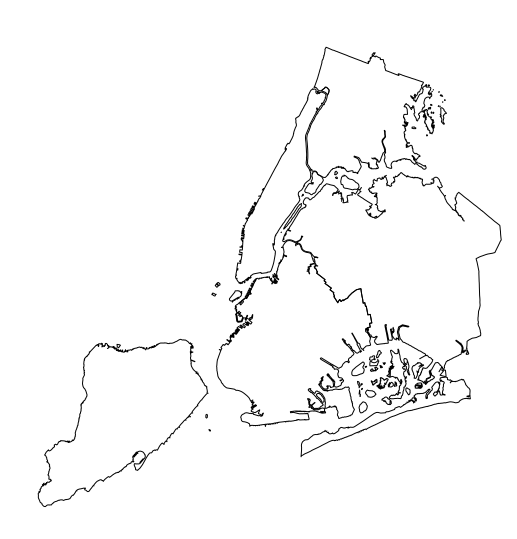
My platform is Fedora 29, R 3.5.2 built from source, sf and reticulate installed from source from CRAN (current versions), Python3 and pip3 Fedora rpms, Python packages numpy rpm, others through pip3, libpysal (not used here) with --pre (before 2.0.0 release).
rsbivand
on 7 Feb 2019
And:
crs <- py_to_r(df$crs)
prj4 <- paste("+", names(crs), crs, sep="", collapse=" ")
st_crs(out) <- prj4
which may cover most cases(?). There is a tiny difference in the +x_0 term given in the prj file in m and converted to us-ft in the proj4 string.
rsbivand
on 7 Feb 2019
Rad, glad to help! Now that you've pinged this here, I've gotten the itch to try to get the installations of reticulate + geopandas & sf working through conda again. I'll see if I can't get a conda install of reticulate & rstudio working with sf & geopandas.
This is drifting off topic, but...
I'm not sure if there's a clear existing way for us to standardize the serialization of an entire geometry collection (so that something like crs comes with), but this problem will be something more generally as things like feather or these in-memory object passing libraries proliferate. Folks tend to use @sgillies' geointerface to keep geometric objects interoperable in python. Casting each object to wkb & porting over the crs afterwards is fine, but it'd probably better if we mapped geopandas.GeoSeries directly to a geometry column in sf, and contributed that to reticulate.
ljwolf
on 7 Feb 2019
Sounds interesting - @edzer, @etiennebr, ideas? And going the other way to round-trip?
rsbivand
on 7 Feb 2019
We do something similar for postgis:we map postgis's geometry type to sfc. Other types are handled by the driver e.g. RPostgres. If we can specify a geopandas.GeoSeries converter to reticulate, then we can use a similar recipe.
 etiennebr
on 9 Feb 2019
etiennebr
on 9 Feb 2019
The original issue behind this is resolved. For some reason, even though pip was installed to the right location:
$ which pip
/home/lw17329/anaconda/envs/reticulate_test/bin/pip
using pip to install fiona appears to cause libgdal & libgeos to install to the "global" conda installation (to anaconda/lib), not to the conda environment (to anaconda/envs/reticulate_test/lib). This is strange, since this seems to be in conflict with the behavior of other packages that install correctly to the sub-environment when using pip. I'll chase this up elsewhere.
Still would be interesting/good to figure out that conversion from geopandas.GeoSeries to sf, but maybe that goes to another issue?
ljwolf
on 28 Feb 2019
Related issues
 dshelldhillon
·
6Comments
dshelldhillon
·
6Comments
 blairj09
·
8Comments
blairj09
·
8Comments
 GreenGrassBlueOcean
·
7Comments
GreenGrassBlueOcean
·
7Comments
 athammad
·
4Comments
kevinushey
·
7Comments
athammad
·
4Comments
kevinushey
·
7Comments