ReSwift crashes on device (but not simulator)
Help! I have been chugging along using ReSwift (on 3.0, Swift3, XCode 8.3) and now for some reason upon initialization ReSwift is crashing (when I run it on my 10.3.1/iPhone7+ thru XCode). I hate these esoteric errors and am hoping beyond hope that someone has experienced anything remotely similar.
AppDelegate has the usual declaration
let store = Store<State>(reducer: AppReducer(), state: nil)
Then my first ViewController subscribes:
override func viewWillAppear(_ animated: Bool) {
        super.viewWillAppear(animated)

        store.subscribe(self) { state in
            state.authenticationState
        }
 }
ReSwift goes through the initialization process until it gets to my AppReducer, and BAM !

Thanks everyone,
--Bill
 snydersaurus
All 44 comments
I am noticing this device crash happens in Debug, but not Release. Are there optimizations or other build/compiler settings that would cause problems with ReSwift?
snydersaurus
on 22 Apr 2017
Well for posterity -- I am further noticing that in Debug with No Optimization I crash. Flipped the Swift/LLVM optimization levels to -O and no crash.
snydersaurus
on 22 Apr 2017
I'm also seeing this. I think it's related to this compiler bug:
https://bugs.swift.org/browse/SR-4432
Seems to happen when assigning or passing big structs as arguments. This is a big problem for ReSwift based applications, because with this architecture it's unavoidable having a big state. We have this issue in one of our apps (but not on others). This app is the biggest where we have used this architecture, so probably that's why we are hitting it.
Please reopen this issue. I think it's important that people that use ReSwift are aware of this problem. For now the bug is still open in Apple's Jira; let's hope it gets fixed for Swift 4 release.
 buscarini
on 5 Jul 2017
buscarini
on 5 Jul 2017
Reopened.
Also still an issue for me on the latest stable tooling (Swift 3.1, XCode 8.3.3).
Note @buscarini that while my initial AuthenticationState struct is small, it does have a few simple child structs. Nesting is not deeper than that though.
It's a bad issue, but I have worked around it by switching optimization levels when running on the device.
snydersaurus
on 5 Jul 2017
I thought that optimization wasn't fixing it for us, but it turned out that we didn't have optimization enabled. So this is not that terrible, but it's still bad if you need to debug something on the device.
Also, good news: the bug has been resolved (though it probably won't be available until Xcode 9 is officialy released)
buscarini
on 11 Jul 2017
@buscarini @snydersaurus Did it go away with Xcode 9?
 DivineDominion
on 2 Nov 2017
DivineDominion
on 2 Nov 2017
Hi, I got the same error. I noticed that it's was because one of my middleware's (so strange). Currently I solve it by wrapping the command with DispatchQueue.main.async {} but I don't think that this is the right solution...
@DivineDominion I got this error in the latest XCODE (v 9.2) so I guess Xcode 9 not really fix this bug.
 ranhsd
on 30 Jan 2018
ranhsd
on 30 Jan 2018
Seems to be resolved on iOS 9 for me
snydersaurus
on 31 Jan 2018
Hi @snydersaurus I am getting it on my middleware in one of the cases there... When I remove it or wrap it with DispachQueue.main.async{} it works... so strange..
ranhsd
on 31 Jan 2018
It's been working for me lately, but I'm not using it as heavily as before. Maybe it's solved, maybe it's just that I'm not hitting the issue.
buscarini
on 2 Feb 2018
Strange...
ranhsd
on 2 Feb 2018
Issue still there with xcode 10.1. In my project we have nested struct for state.
It is working fine with Release mode in device but not with Debug mode.
 gkmrakesh
on 11 Mar 2019
gkmrakesh
on 11 Mar 2019
DispatchQueue.main.async {}
Can you please elaborate, where exactly you used it.
We are facing the problem with bigger and nested struct even in xcode 10.1 when using the device.
gkmrakesh
on 11 Mar 2019
I am only working on macOS apps, and I wonder if that has anything to do with it, since my large-ish app states memory-wise (up to multiple 100 MB) don't cause any problems so far.
@gkmrakesh Can you try to isolate the problem e.g. by removing Middleware from the store?
DivineDominion
on 11 Mar 2019
@DivineDominion,
I am trying for almost 6 days on this. I have also tried removing middleware, nothing working in my case and app still crashing.
When I change my appstate from struct to class everything works fine.
gkmrakesh
on 12 Mar 2019
@DivineDominion ,
I am also encountered on this issue for 5 days, and have no clue :(
My app crashed immediately during ReSwift init.
Crashed on device iOS 10.3.3, and seems working fine on simulator & devices with newer iOS.
My appState have 11 substates. It already stable during 5 months of development, however the problem starting appears 5 days ago.
 ngeplurk
on 12 Mar 2019
ngeplurk
on 12 Mar 2019
Can you check if you do any store.state access in your middleware/reducers ? That what was triggering the problem for me at some point, as you should not do it anyway.
Also, passing big struct around have been fixed some release of Swift ago. I have an appState with 20+ substates (and very very heavy) in production with no issue at all.
 Dimillian
on 12 Mar 2019
Dimillian
on 12 Mar 2019
We are not doing store.state access in reducer/middleware.
We have appState with 80+ substates and considerably big. Working as expected till xcode 9+ versions, along with 800 plus test cases running.
Now, All of sudden it stopped working with xcode 10. We are in a very bad situation to go to production with class as appState.
gkmrakesh
on 12 Mar 2019
There are no store.state access in middlewares/reducers.
working fine until many new attributes added to substates.
ngeplurk
on 12 Mar 2019
@gkmrakesh, do you convert all states to class? Or only in single root appState?
ngeplurk
on 12 Mar 2019
Converted single root appState, and everything works fine.
gkmrakesh
on 12 Mar 2019
Now that it's a class, can you interact with the app up to the point where it previously crashed, then run the Xcode memory debugger and see who has a reference to the AppState object? Memory debugger sadly doesn't show struct instances, but it does show class objects. Maybe you can find a weird reference this way.
DivineDominion
on 12 Mar 2019
I've just changed to class.
However the app still crashed with exc_bad_access in a view controller when trying to access substate properties.
ngeplurk
on 12 Mar 2019
@ngeplurk @gkmrakesh Do you work on the same project? Send me an email so we can schedule a 30min or so Skype call some day. Maybe I have an idea when I see how you really use the framework.
DivineDominion
on 12 Mar 2019
@DivineDominion,
I work for a different project. I have sent you a mail, please propose time so that we can have a skype call.
@ngeplurk
You can also join this call to know more.
gkmrakesh
on 13 Mar 2019
@DivineDominion , no, it's a different project.
Basically, in my side, the problem seems occurs in old device iOS 10.3.3 only.
Is it related with 32 bit platform? Do you think there are Swift compiler bug in Xcode 10.1?
ngeplurk
on 13 Mar 2019
Hi Guys, finally I have a clue related with this issue.
The problem occurs after memory corrupted in 32 bit devices when the struct size (substate struct size) is > ~2100 bytes.
I've split my substates into smaller structs, so each structs byte size in main reducer < 2000 bytes.
i.e inspecting using this command in main reducer.
po MemoryLayout.size(ofValue: initialSubState)
So far with this approach, the app working fine.
ngeplurk
on 18 Mar 2019
I'm experiencing the same issue, EXC_BAD_ACCES, first line of the appReducer. Only happens on device in debug and works fine in simulator.
Xcode 10.2.1
ReSwift 4.1.1
iOS 12.3.1
iPhone 6
Swift 4.2
No debug optimization set for Clang or Swift code generation. Tried changing these to -O and did not make any difference.
Roughly 36 substates. If I remove a few substates then the problem goes away.
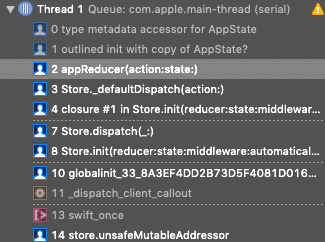
I was able to work around the issue by putting a guard in for the state, but it makes absolutely no sense to me.
guard let state = state else {
    return AppState(
        userState: userReducer(action: action, state: nil),
        profileState: profileReducer(action: action, state: nil),
        ...
    )
}

return AppState(
    userState: userReducer(action: action, state: state.userState),
    profileState: profileReducer(action: action, state: state.profileState),
    ...
)
I did not have the guard before and simply used the optional (ex: state?.userState). Again, no idea why this works. When ReSwift initializes the state is nil, which should just pass nil into the reducer.
If anyone can help me figure this out it would be greatly appreciated.
 brianmclachlin
on 4 Jul 2019
brianmclachlin
on 4 Jul 2019
This is a mystery to me. Please make sure to file a radar / send a Feedback ticket to Apple. This might all be a weird Swift memory thing in the end.
36 parallel substates, or are there 36 levels of object nesting?
On 4. Jul 2019, at 21:28, Brian notifications@github.com wrote:
I'm experiencing the same issue, EXC_BAD_ACCES, first line of the appReducer. Only happens on device in debug and works fine in simulator.
Xcode 10.2.1
ReSwift 4.1.1
iOS 12.3.1
iPhone 6
Swift 4.2No debug optimization set for Clang or Swift code generation. Tried changing these to -O and did not make any difference.
Roughly 36 substates. If I remove a few substates then the problem goes away.
I was able to work around the issue by putting a guard in for the state, but it makes absolutely no sense to me.
guard let state = state else {
return AppState(
userState: userReducer(action: action, state: nil),
profileState: profileReducer(action: action, state: nil),
...
)
}return AppState(
userState: userReducer(action: action, state: state.userState),
profileState: profileReducer(action: action, state: state.profileState),
...
)
I did not have the guard before and simply used the optional (ex: state?.userState). Again, no idea why this works. When ReSwift initializes the state is nil, which should just pass nil into the reducer.If anyone can help me figure this out it would be greatly appreciated.
—
You are receiving this because you were mentioned.
Reply to this email directly, view it on GitHub, or mute the thread.
DivineDominion
on 4 Jul 2019
Yes most of my models in the state have object nesting. I am using ObjectMapper for my models. Someone in a similar issue had an issue with EXC_BAD_ACCESS and was using ObjectMapper. Not sure if that has any relevance or not.
An example of nesting in state would be a User.
User -> Address -> StateProvince
brianmclachlin
on 5 Jul 2019
Gotcha, but is your deepest level of nesting 36?
Foo -> Bar -> 3 -> 4 -> .. -> 36 ?
If so, that and ObjectMapper might be a trail to follow.
DivineDominion
on 5 Jul 2019
I have some deep nesting, but not 36, unless you count some one-to-many relationships that I use in my models.
Ex:
Event -> [Category]
Category -> Event
Can't see why this would be an issue, since when ReSwift inits the state is nil, so every model in my state will be nil as well.
brianmclachlin
on 5 Jul 2019
I have created a project with 50 substates that replicates the issue on my device.
https://github.com/brianmclachlin/exc-bad-access
Does not use ObjectMapper.
brianmclachlin
on 5 Jul 2019
That's cool, thank you a lot! Did you send this to Apple already? We should be duping the report once you have!
DivineDominion
on 6 Jul 2019
Nope, I haven't posted in the swift bug JIRA yet. I wanted to make sure it wasn't a bug with ReSwift before submitting a bug report.
Store.swift
public var state: State!

public required init(
    reducer: @escaping Reducer<State>,
    state: State?,
    middleware: [Middleware<State>] = [],
    automaticallySkipsRepeats: Bool = true
) {
    ...

    if let state = state {
        self.state = state
    } else {
        dispatch(ReSwiftInit()) // This is called when it inits because I'm not providing state
    }
}

open func _defaultDispatch(action: Action) {
   ...

    isDispatching = true
    let newState = reducer(action, state) // state is nil with less substates, but EXC_BAD_ACCESS with lots of substates
    isDispatching = false

    state = newState
}
Tried replicating this without ReSwift and could not get the error. Wonder if it has something to do with generics or the dispatch function.
brianmclachlin
on 8 Jul 2019
I've created a bug in the swift JIRA. https://bugs.swift.org/browse/SR-11093
brianmclachlin
on 9 Jul 2019
They've commented on the issue saying that they've had problems with large structs, but they're fixed in swift 5.0. If you update to 5.0 I will see if I can still replicate the issue.
brianmclachlin
on 10 Jul 2019
@brianmclachlin Thanks for bringing up the project isn't set to Swift 5! I opened #414 for this. Check out the master branch once it's merged!
DivineDominion
on 10 Jul 2019
I'm not sure I understand. ReSwift is already written with Swift 5.0 compatibility, and the example project linked uses Swift 5.0.
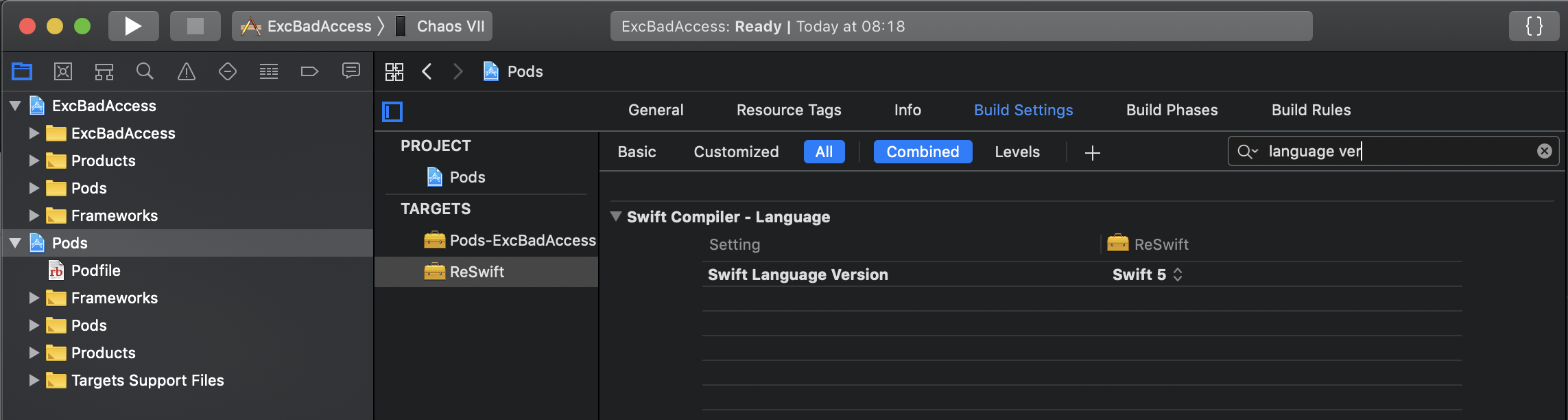
The version in ReSwift's pbxproj is irrelevant to a Cocoapods installation. You can confirm this by inspecting the Pods project in the example, and check swift language version on the ReSwift target.
It looks like they're saying they thought it was resolved with Swift 5.0 but that this appears to be a new issue.
 mjarvis
on 10 Jul 2019
mjarvis
on 10 Jul 2019
Thanks for clearing this up @mjarvis, it was a misunderstanding on my part.
brianmclachlin
on 10 Jul 2019
Erik left a comment on the swift ticket:
The crash is a stack overflow.
The AppState struct is 40KB large. That is not good, but would not cause a stack overflow by its own. But in the appReducer function, the compiler has to allocate a lot of such large temporary objects on the function stack frame for this large constructor call. This just exceeds the maximum available stack space.
Is it possible that you rewrite your code, e.g. use classes or copy-on-write data structures (implemented with classes) instead of plain structs?
brianmclachlin
on 16 Jul 2019
So if I understand correctly each time we do state?.oneState, state?.twoState etc. and state is nil this creates a temporary object. This makes sense why we only notice it when it initializes and the state is nil. Also, why when I put a guard to unwrap the state it no longer produced the issue.
Also makes sense that other people were not noticing the issue when they converted their AppState to a class.
brianmclachlin
on 16 Jul 2019
What should be the approach to deal with this in ReSwift? I'm currently using a guard, so that the appReducer does not create a ton of temporary AppState objects. However, every time I create a new substate I have to add it in two spots.
guard let state = state else {
    return AppState(
        userState: userReducer(action: action, state: nil),
        profileState: profileReducer(action: action, state: nil),
        ...
    )
}

return AppState(
    userState: userReducer(action: action, state: state.userState),
    profileState: profileReducer(action: action, state: state.profileState),
    ...
)
I can deal with this for now, but I think the documentation should be updated with an approach that is less gross. Instead of a struct could the AppState be a dictionary, so we gain that copy-on-write benefit?
brianmclachlin
on 16 Jul 2019
I wonder if it would help if you had a non-nil initial state. Like var state = state ?? AppState.initial and then call all reducers on that. But that only makes sense if it is, indeed, non-nil, right?
DivineDominion
on 2 Aug 2019
Related issues
 dolanmiu
·
3Comments
dolanmiu
·
3Comments
 eschan
·
3Comments
eschan
·
3Comments
 nodediggity
·
8Comments
nodediggity
·
8Comments
 patientplatypus
·
5Comments
patientplatypus
·
5Comments
 ambientlight
·
11Comments
ambientlight
·
11Comments
Most helpful comment
Hi Guys, finally I have a clue related with this issue.
The problem occurs after memory corrupted in 32 bit devices when the struct size (substate struct size) is > ~2100 bytes.
I've split my substates into smaller structs, so each structs byte size in main reducer < 2000 bytes.
i.e inspecting using this command in main reducer.
So far with this approach, the app working fine.