Responsively-app: Improve the App's crash page to have instructions on how to report the issue.
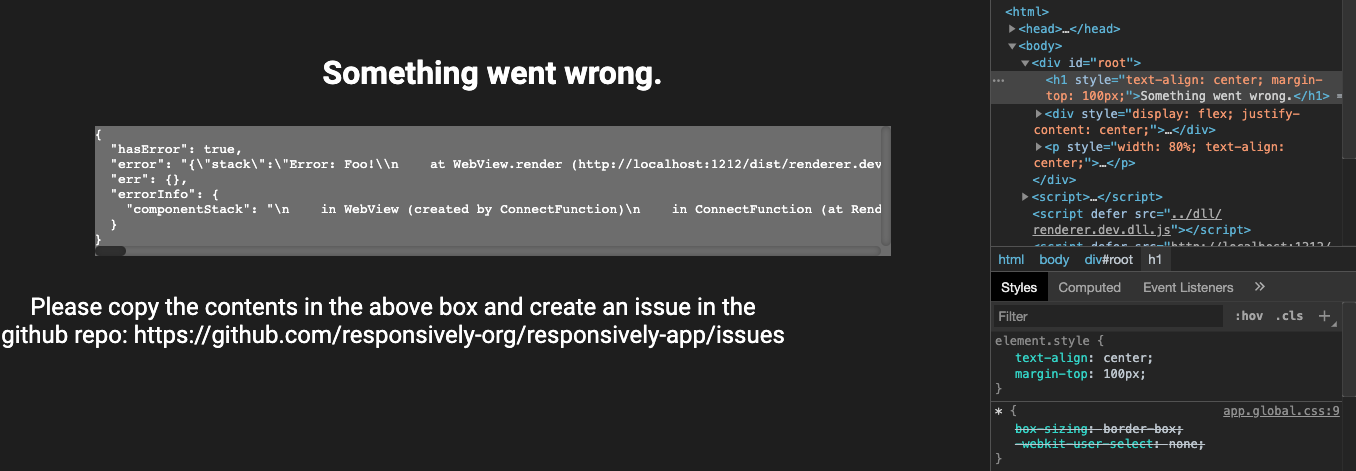
Right now the crash page just shows the error stacktrace as a string in a single line:

The improved version can have the following:
- Show a clear message that the app has crashed
- Add instruction stating a Github issue has to be raised with the stack trace.
- Add a
copy errorbutton that can copy the error information to the clipboard. And if possible add a link that can take the user to the GitHub create issue page with the content prefilled.
 manojVivek
All 11 comments
Hello, thanks for this awesome software!
I'm new to contribute and I have no idea about how to show this crash page.
Could you tell me about this?
 gorogoroumaru
on 20 Aug 2020
gorogoroumaru
on 20 Aug 2020
hi @gorogoroumaru and welcome
from the top of my head: just throw an Error inside any component in the renderer process
 jjavierdguezas
on 20 Aug 2020
jjavierdguezas
on 20 Aug 2020
Thank you!
I will try.
gorogoroumaru
on 20 Aug 2020
@gorogoroumaru awesome, should I assign you this issue?
jjavierdguezas
on 20 Aug 2020
Sorry, @jjavierdguezas.
I couldn't show the crash page.
Could you give me a code example to show this?
gorogoroumaru
on 20 Aug 2020
@gorogoroumaru Can you please try adding throw new Error('test'); on https://github.com/responsively-org/responsively-app/blob/master/desktop-app/app/components/Addressinput/index.js#L67
Also, please feel free to join your slack workspace for any questions: https://join.slack.com/t/responsively/shared_invite/zt-h0ouywhs-IIeHj39ymz5IOrgcOa_tRA (edited)
manojVivek
on 20 Aug 2020
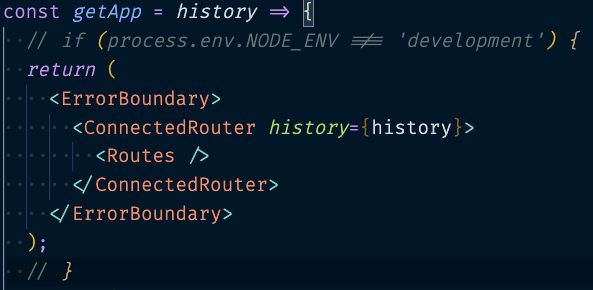
@gorogoroumaru the problem is that in development we don't show that page. Go to:
and comment the if statement. Now, you can throw an error (throw new Error('Foo')) from any component.
Let us know if you want to give this issue a try to assign it to you 🙂
 jzabala
on 20 Aug 2020
jzabala
on 20 Aug 2020
Thank you so much @manojVivek and @jzabala!
I tried your suggested approach, but the screen blacked out and I cannot see the crash page.
Could you help me?
I'm sorry for asking many times.
gorogoroumaru
on 20 Aug 2020
@gorogoroumaru sure, no worries.
Commenting the if in Root.js
Throwing error in WebView/index.js
I get the error screen:
jzabala
on 20 Aug 2020
Thank you!
I will make a pull request in a few days.
Could you assign me this issue?
gorogoroumaru
on 20 Aug 2020
great @gorogoroumaru assigned to you
jjavierdguezas
on 20 Aug 2020
Related issues
 sebastianlp
·
4Comments
sebastianlp
·
4Comments
 johndavemanuel
·
3Comments
johndavemanuel
·
3Comments
 tochoromero
·
5Comments
manojVivek
·
5Comments
tochoromero
·
5Comments
manojVivek
·
5Comments
 stevedesmond-ca
·
4Comments
stevedesmond-ca
·
4Comments