Responsively-app: When HTML file has an # in the name, it does not open with responsively
Version: 0.9.0
Electron: 9.1.1
Chrome: 83.0.4103.122
Node.js: 12.14.1
V8: 8.3.110.13-electron.0
OS: Windows_NT x64 10.0.18363
- How to reproduce
1- create a valid html file in your file system
2- open it with responsively, it should go OK
3- rename the file and put a#somewhere in the name
4- open it with responsively, anERROR: -6 ERR_FILE_NOT_FOUNDappears
I don't know if this happens with other characters
when you open the renamed file with Chrome, it replace # by %23 and when you replace it in Responsively address bar it works again
 jjavierdguezas
All 6 comments
it does not work from Open HTML file menu item nor from Open with Responsively OS menu
jjavierdguezas
on 30 Jul 2020
maybe we need to URL encode the filepath/filename
jjavierdguezas
on 30 Jul 2020
I can look into URL encoding and attempt this if there isn't anyone else working on it?
 aUsefulMethod
on 15 Aug 2020
aUsefulMethod
on 15 Aug 2020
@aUsefulMethod That would be awesome, please go ahead. 🙌
I'll assign this to you!
 manojVivek
on 15 Aug 2020
manojVivek
on 15 Aug 2020
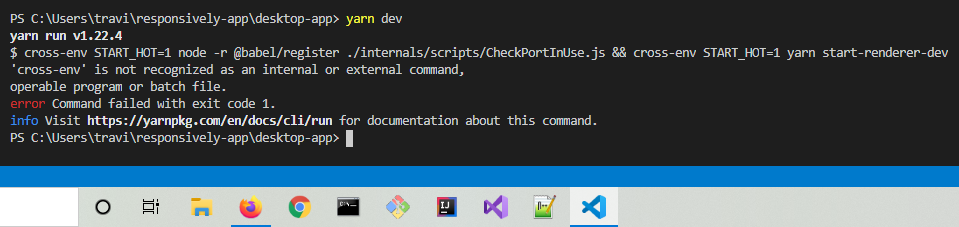
Getting this response when running yarn dev from desktop-app
aUsefulMethod
on 15 Aug 2020
I'm so sorry, I'm on my laptop and I hadn't run npm install :/. I use too many devices. 🤦♂️
aUsefulMethod
on 16 Aug 2020
Related issues
 geiras
·
5Comments
geiras
·
5Comments
 sebastianlp
·
4Comments
manojVivek
·
3Comments
sebastianlp
·
4Comments
manojVivek
·
3Comments
 amankkg
·
5Comments
jjavierdguezas
·
3Comments
amankkg
·
5Comments
jjavierdguezas
·
3Comments