Resharper-unity: Latest uploaded package for ReSharper is broken
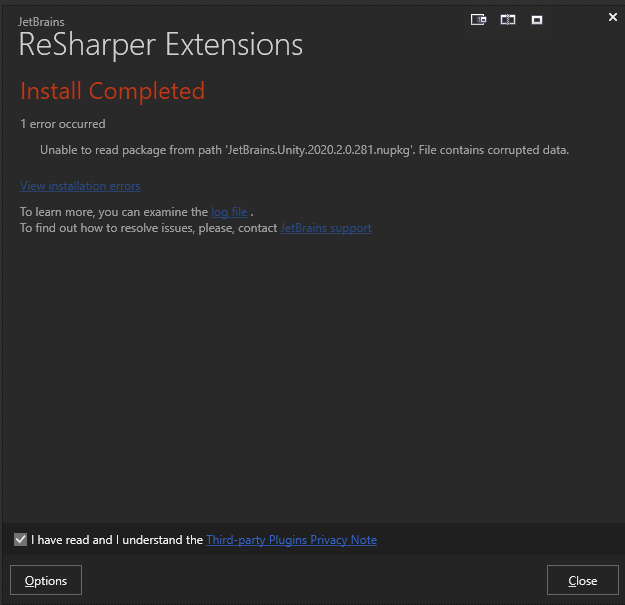
Error message when installing from extension manager : Unable to read package from path 'JetBrains.Unity.2020.2.0.281.nupkg'. File contains corrupted data.
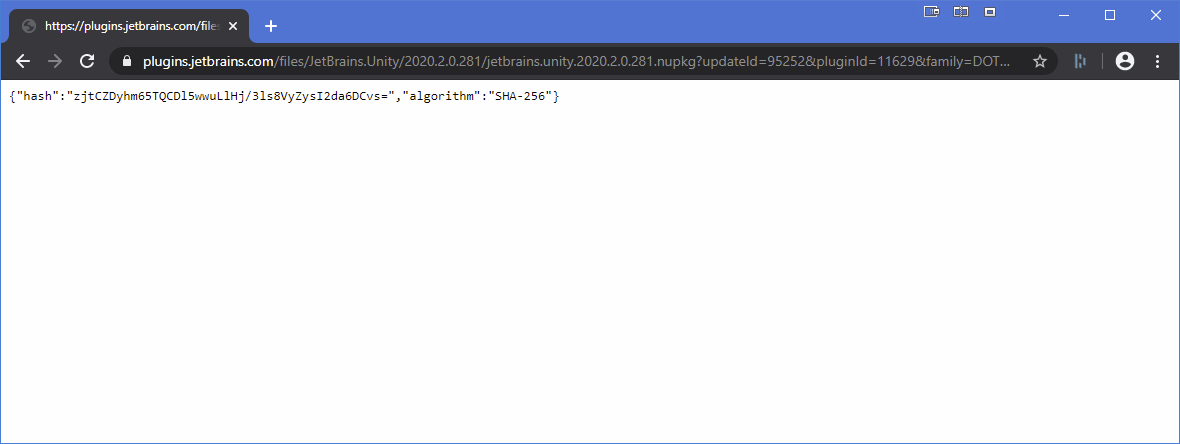
When you click on the download link of the plugin web page, no download, just a page with this : {"hash":"zjtCZDyhm65TQCDl5wwuLlHj/3ls8VyZysI2da6DCvs=","algorithm":"SHA-256"}
 OmiCron07
All 16 comments
Same problem. After last ReSharper update, I can't even install older Unity Support versions anymore...
 StepanMynarik
on 22 Aug 2020
StepanMynarik
on 22 Aug 2020
this sucks... has anyone found any workaround?
 djflan
on 23 Aug 2020
djflan
on 23 Aug 2020
Same problem. After last ReSharper update, I can't even install older Unity Support versions anymore...
I managed to install v2020.2.0.261 by manually downloading it from the Releases page, then setting in the Extension Manager options only the path to the downloads folder as the extension source.
 victor-kallai
on 24 Aug 2020
victor-kallai
on 24 Aug 2020
Sorry about this. Unfortunate that it happened over the weekend. Something went wrong with the marketplace upload for both the 2020.2 release and the 2020.2.1 release. I've just re-uploaded the 2020.2 release, so you should be able to download that from the Extension Manager, but I'm having some issues with the 2020.2.1 hotfix release.
If you want, you can download the 2020.2.1 release from the GitHub release page, and install manually. You'll need to add a new source in the Extension Manager options and point it to the folder on your machine that contains the update. Hopefully we'll have it properly updated on the marketplace by the end of the day.
 citizenmatt
on 24 Aug 2020
citizenmatt
on 24 Aug 2020
I will try that. Thanks
On Mon, Aug 24, 2020, 4:45 AM Matt Ellis notifications@github.com wrote:
Sorry about this. Unfortunate that it happened over the weekend. Something
went wrong with the marketplace upload for both the 2020.2 release and the
2020.2.1 release. I've just re-uploaded the 2020.2 release, so you should
be able to download that from the Extension Manager, but I'm having some
issues with the 2020.2.1 hotfix release.If you want, you can download the 2020.2.1 release from the GitHub release
https://github.com/JetBrains/resharper-unity/releases/tag/net202-rtm-2020.2.0-rtm-2020.2.1
page, and install manually. You'll need to add a new source in the
Extension Manager options and point it to the folder on your machine that
contains the update. Hopefully we'll have it properly updated on the
marketplace by the end of the day.—
You are receiving this because you commented.
Reply to this email directly, view it on GitHub
https://github.com/JetBrains/resharper-unity/issues/1812#issuecomment-679026129,
or unsubscribe
https://github.com/notifications/unsubscribe-auth/AB3GCTA3ZO65YAY36UWYO5TSCIZD7ANCNFSM4QHTNWMQ
.
djflan
on 24 Aug 2020
Sorry about this. Unfortunate that it happened over the weekend. Something went wrong with the marketplace upload for both the 2020.2 release and the 2020.2.1 release. I've just re-uploaded the 2020.2 release, so you should be able to download that from the Extension Manager, but I'm having some issues with the 2020.2.1 hotfix release.
If you want, you can download the 2020.2.1 release from the GitHub release page, and install manually. You'll need to add a new source in the Extension Manager options and point it to the folder on your machine that contains the update. Hopefully we'll have it properly updated on the marketplace by the end of the day.
I got this message:
Install completed with 6 errors.
  12:48:21.764 ReSharperPlatformVs16_4159e2ec: Error resolving type JetBrains.ReSharper.Psi.Cpp.Caches.CppFileLocation from assembly “JetBrains.ReSharper.Psi.Cpp, Version=777.0.0.0, Culture=neutral, PublicKeyToken=1010a0d8d6380325”, request originating from assembly “JetBrains.ReSharper.Plugins.Unity, Version=2020.2.0.281, Culture=neutral, PublicKeyToken=0f46ab053645825e”. Could not find a referenced assembly by the TT_ASSEMBLYREF token.
  12:48:21.834 ReSharperPlatformVs16_4159e2ec: Error resolving type JetBrains.ReSharper.Psi.Cpp.Caches.CppFileLocation from assembly “JetBrains.ReSharper.Psi.Cpp, Version=777.0.0.0, Culture=neutral, PublicKeyToken=1010a0d8d6380325”, request originating from assembly “JetBrains.ReSharper.Plugins.Unity, Version=2020.2.0.281, Culture=neutral, PublicKeyToken=0f46ab053645825e”. Could not find a referenced assembly by the TT_ASSEMBLYREF token.
  12:48:21.835 ReSharperPlatformVs16_4159e2ec: Error resolving type JetBrains.ReSharper.Psi.Cpp.Caches.CppFileLocation from assembly “JetBrains.ReSharper.Psi.Cpp, Version=777.0.0.0, Culture=neutral, PublicKeyToken=1010a0d8d6380325”, request originating from assembly “JetBrains.ReSharper.Plugins.Unity, Version=2020.2.0.281, Culture=neutral, PublicKeyToken=0f46ab053645825e”. Could not find a referenced assembly by the TT_ASSEMBLYREF token.
  12:48:21.957 ReSharperPlatformVs16_4159e2ec: Error resolving type JetBrains.ReSharper.Feature.Services.Cpp.CodeStyle.ICppCustomFormattingInfoProvider from assembly “JetBrains.ReSharper.Feature.Services.Cpp, Version=777.0.0.0, Culture=neutral, PublicKeyToken=1010a0d8d6380325”, request originating from assembly “JetBrains.ReSharper.Plugins.Unity, Version=2020.2.0.281, Culture=neutral, PublicKeyToken=0f46ab053645825e”. Could not find a referenced assembly by the TT_ASSEMBLYREF token.
  12:48:21.958 ReSharperPlatformVs16_4159e2ec: Error resolving type JetBrains.ReSharper.Feature.Services.Cpp.CodeStyle.ICppCodeFormatterExtension from assembly “JetBrains.ReSharper.Feature.Services.Cpp, Version=777.0.0.0, Culture=neutral, PublicKeyToken=1010a0d8d6380325”, request originating from assembly “JetBrains.ReSharper.Plugins.Unity, Version=2020.2.0.281, Culture=neutral, PublicKeyToken=0f46ab053645825e”. Could not find a referenced assembly by the TT_ASSEMBLYREF token.
  12:48:22.832 ReSharperPlatformVs16_4159e2ec: The type “JetBrains.ReSharper.Psi.ILanguageCppZone, JetBrains.ReSharper.Psi.Cpp, Version=777.0.0.0, Culture=neutral, PublicKeyToken=1010a0d8d6380325” is not a module zone because it does not derive from the JetBrains.Application.BuildScript.Application.Zones.IZone interface.
victor-kallai
on 24 Aug 2020
Version .281 is now uploaded to the marketplace.
@victor-kallai Did you successfully install .261 before this? Is this installing into ReSharper 2020.2.1 or 2020.2?
citizenmatt
on 24 Aug 2020
Version .281 is now uploaded to the marketplace.
@victor-kallai Did you successfully install .261 before this? Is this installing into ReSharper 2020.2.1 or 2020.2?
I've successfully installed .261 before this with the same 6 errors. I have ReSharper 2020.2 I will try to update to 2020.2.1 and test again.
victor-kallai
on 24 Aug 2020
I think there's a slightly more fundamental problem, unfortunately. The new shader support is based on ReSharper C++ (since HLSL is a dialect of C). It should work correctly if C++ is disabled or unlicensed, but you'll see these errors if C++ isn't installed.
I need to investigate further, but in the meantime, you should be able to install cleanly if you also install ReSharper C++
citizenmatt
on 24 Aug 2020
I think there's a slightly more fundamental problem, unfortunately. The new shader support is based on ReSharper C++ (since HLSL is a dialect of C). It should work correctly if C++ is disabled or unlicensed, but you'll see these errors if C++ isn't installed.
I need to investigate further, but in the meantime, you should be able to install cleanly if you also install ReSharper C++
This works as expected.
victor-kallai
on 24 Aug 2020
Great, thanks, @victor-kallai. I'm going to close this issue now, as the packages are available for ReSharper.
We need to look deeper into the C++ install dependency issue, and I've created a couple of issues to track this. We've got #1816 here for searchability, but the main issue is RSRP-480936, as initial thoughts indicate this requires a change in the platform.
citizenmatt
on 24 Aug 2020
Is the link of the package 2020.2.0.281 suppose to be fixed? Because it is not.
OmiCron07
on 24 Aug 2020
Yes, if I go to this page and click the download link, I get the proper file downloaded. How are you trying to download this, via the web or in the Extension Manager? It's possibly a caching issue. You can try downloading the file from the link above, or from the GitHub release and using the instructions a few comments up to add a local package source to the Extension Manager and install locally.
citizenmatt
on 24 Aug 2020
Changed my browser, so no cache :
OmiCron07
on 24 Aug 2020
Apologies, turns out I had re-uploaded before the fixed version of the marketplace was published. I've just re-uploaded again, so the files should be available now. There shouldn't be a problem with caching, but maybe give it a couple of minutes just in case.
Sorry for the inconvenience.
citizenmatt
on 24 Aug 2020
Fixed! Thank you!
OmiCron07
on 24 Aug 2020
Related issues
 oxysoft
·
5Comments
oxysoft
·
5Comments
 harryr0se
·
5Comments
harryr0se
·
5Comments
 FWCorey
·
4Comments
citizenmatt
·
4Comments
FWCorey
·
4Comments
citizenmatt
·
4Comments
 real-mikhail
·
5Comments
real-mikhail
·
5Comments
Most helpful comment
Sorry about this. Unfortunate that it happened over the weekend. Something went wrong with the marketplace upload for both the 2020.2 release and the 2020.2.1 release. I've just re-uploaded the 2020.2 release, so you should be able to download that from the Extension Manager, but I'm having some issues with the 2020.2.1 hotfix release.
If you want, you can download the 2020.2.1 release from the GitHub release page, and install manually. You'll need to add a new source in the Extension Manager options and point it to the folder on your machine that contains the update. Hopefully we'll have it properly updated on the marketplace by the end of the day.