Resharper-unity: Where to report issues for the com.unity.ide.rider package?
Where is the repository for this package?
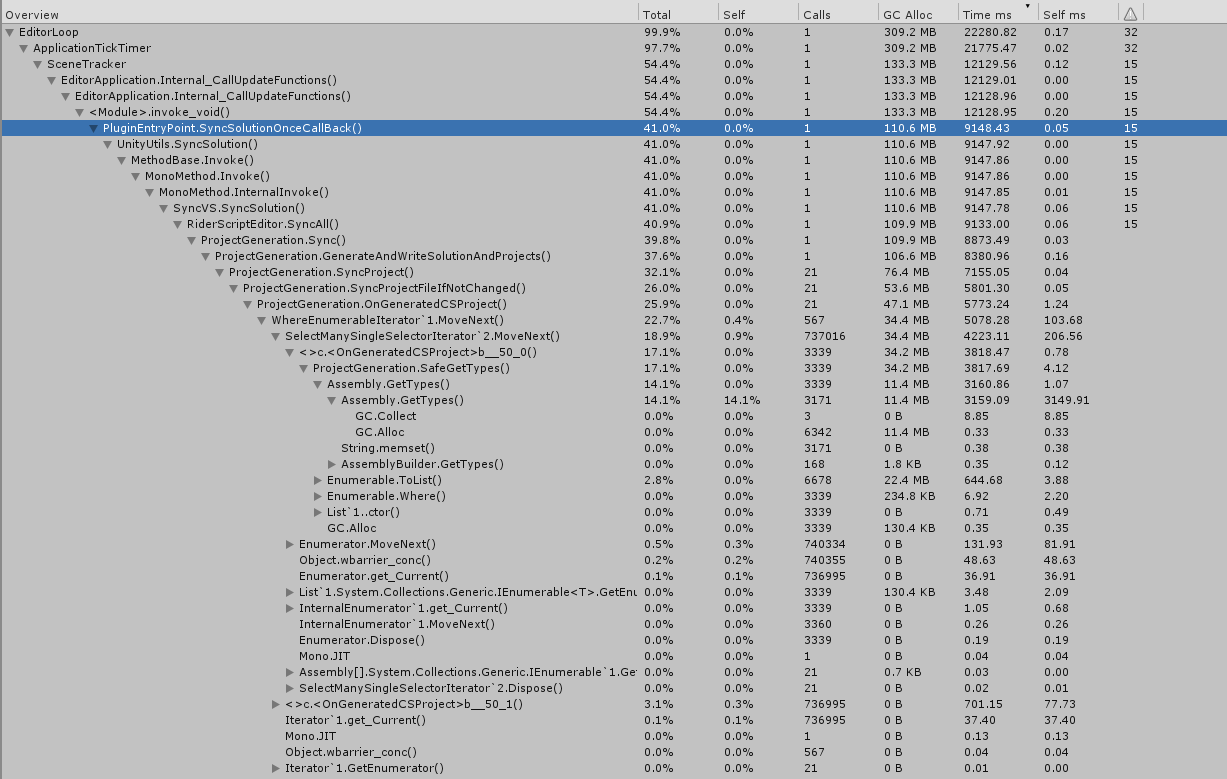
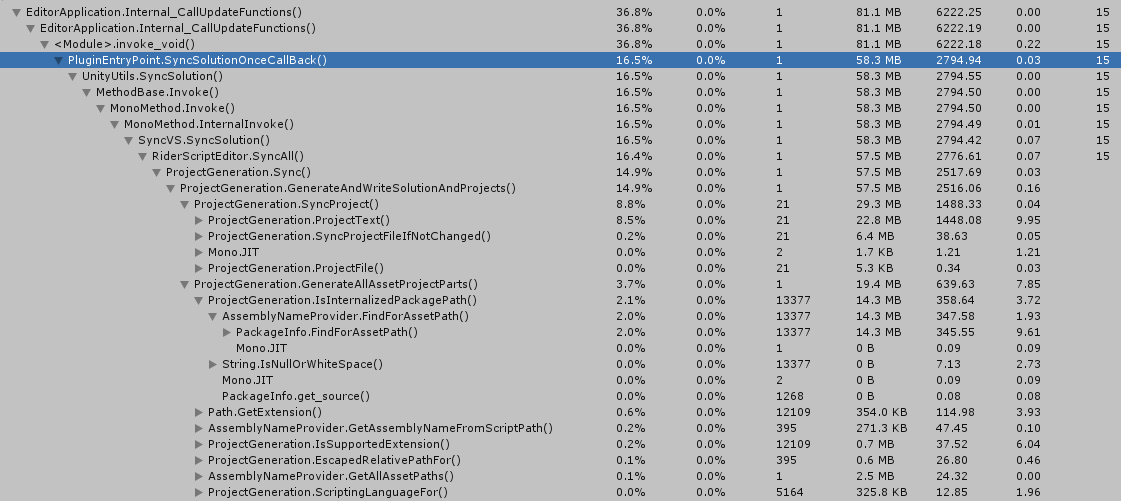
It is adding 9 seconds to my reloads on 2019.3.0a5 and it can be greatly reduced (to about 3s) by using UnityEditor.TypeCache instead of iterating all assemblies in the domain.
Before
After
 SugoiDev
All 24 comments
- Package is maintained by Unity team and I can also make PR-s. I will ask about third-party contributions and get back to you.
- SyncSolutionOnceCallBack is expected to be called once, but it gets called on every AppDomain.Reload. Investigating...
- I have also made a change, which should cut some extra call, but only targeting Rider 2019.2 https://github.com/JetBrains/resharper-unity/pull/1221 It may get backported to 2019.1.x. Workaround is to comment call to Packages.Rider.Editor.RiderInitializer.Initialize and ask Rider to copy EditorPlugin old way via Shift-Shift and type Install Unity Editor Plugin.
 van800
on 10 Jun 2019
van800
on 10 Jun 2019
If you can send PRs, maybe consider requesting they use the TypeCache on ProjectGeneration.cs
I replaced all 3 occurrences of this
IEnumerable<Type> types = AppDomain.CurrentDomain.GetAssemblies().SelectMany(x => SafeGetTypes(x))
        .Where(x => typeof(AssetPostprocessor).IsAssignableFrom(x) && !x.IsInterface && !x.IsAbstract);
with this
#if UNITY_2019_3_OR_NEWER
UnityEditor.TypeCache.TypeCollection types = UnityEditor.TypeCache.GetTypesDerivedFrom<AssetPostprocessor>();
#else
IEnumerable<Type> types = AppDomain.CurrentDomain.GetAssemblies().SelectMany(x => SafeGetTypes(x))
        .Where(x => typeof(AssetPostprocessor).IsAssignableFrom(x) && !x.IsInterface && !x.IsAbstract);
#endif
The gains are substantial.
About 3, I'm always using Rider nightly, but 2019.2 isn't available yet.
Would removing the com.unity.ide.rider package be advisable with Unity 2019.3? Unity tends not to be very responsive with issues, so I have much more trust in using something you guys are maintaining than a Unity-maintained package.
SugoiDev
on 10 Jun 2019
@SugoiDev
Thanks, I will send the PR.
Update: I checked what happens, when package is removed.
Unfortunately sln and csproj generation is not happening.
van800
on 10 Jun 2019
I tried that code TypeCache.GetTypesDerivedFrom, but there is a problem. It doesn't detect types using "AppDomain.CurrentDomain.Load". I am considering solutions.
van800
on 10 Jun 2019
Unfortunately sln and csproj generation is not happening.
Ah, shame!
I tried that code TypeCache.GetTypesDerivedFrom, but there is a problem. It doesn't detect types using "AppDomain.CurrentDomain.Load". I am considering solutions.
Maybe nudge Unity devs about that. TypeCache is pretty new and they are using it internally so they might have interest in improving it.
SugoiDev
on 10 Jun 2019
I managed to optimize it by just getting types once and passing them though calls hierarchy.
Here is a small demo of Rider Unity profiler, at least how I use it )
https://youtu.be/0_syi8cXAQM
van800
on 11 Jun 2019
That looks promising!
Here is a small demo of Rider Unity profiler, at least how I use it )
I never even used the Rider Unity profiler. I'll be sure to take a look at it now. It seems very fast. Thanks for the video!
SugoiDev
on 11 Jun 2019
There might be a problem, because profiler requires a different license. Just Rider is not enough. Please let me know, which one you have.
If I am not mistaken it can be Evaluation license or Rider+ReSharper Ultimate or All Products.
https://www.jetbrains.com/rider/buy/#edition=personal
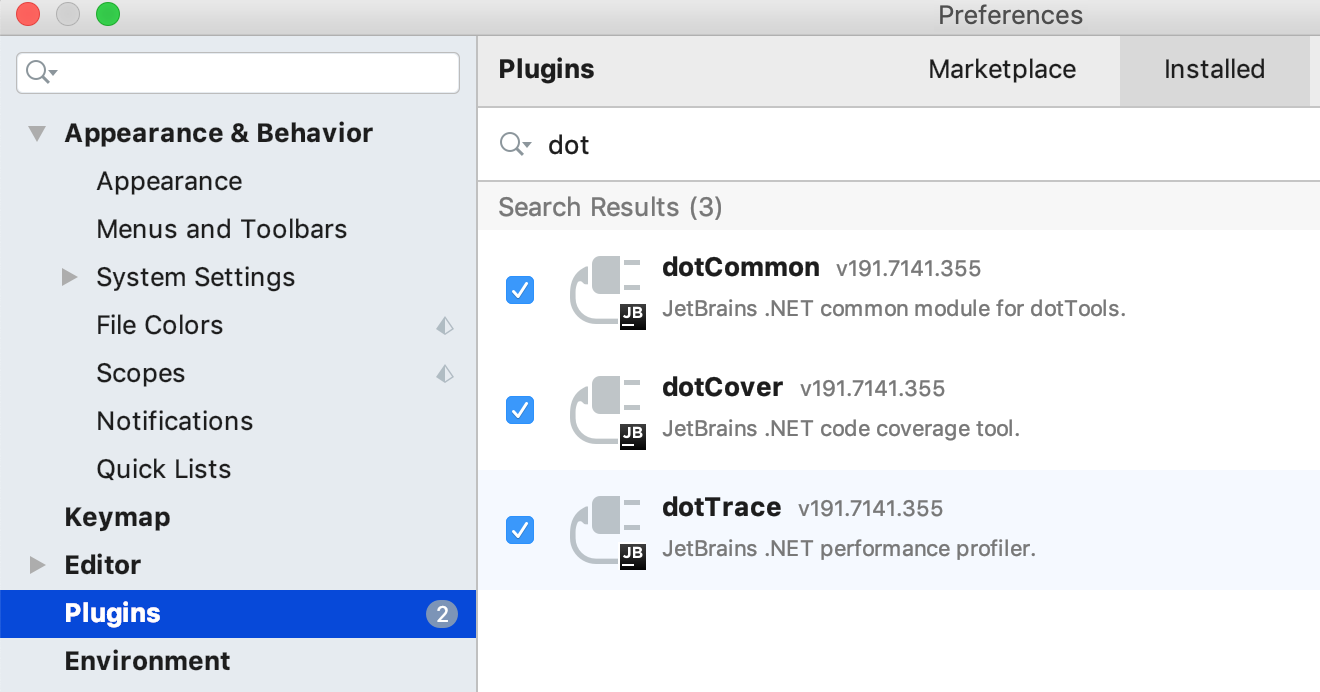
dotTrace plugin in Rider should be enabled.
van800
on 11 Jun 2019
Yeah, I tested by deleting the entire .Rider2019.1 folder and it works. Not sure exactly what makes all profiles disappear. Maybe some madness is going on because I've been using the same settings since before Rider was released, haha.
Do you know when your changes land? I want to profile them on my project against the TypeCache (partial) solution.
SugoiDev
on 11 Jun 2019
I have asked around and actually I am allowed to share the code. Will do today-tomorrow.
van800
on 11 Jun 2019
Here is a mirror https://github.com/van800/com.unity.ide.rider
Branch with recent changes is 1.1.0.
van800
on 12 Jun 2019
I tried also smarter GetAssetPostprocessorTypes, but on my solution (100 asmdef) it gives relatively small benefit 180 ms to 20ms.
Maybe on your solution it would show different result?
    public static Type[] GetAssetPostprocessorTypes()
    {
      var types = TypeCache.GetTypesDerivedFrom<AssetPostprocessor>().ToList();

      var editorPluginAssembly = EditorPluginInterop.GetEditorPluginAssembly();
      if (editorPluginAssembly != null)
      {
        types.AddRange(SafeGetTypes(editorPluginAssembly)
          .Where(x => typeof(AssetPostprocessor).IsAssignableFrom(x) && !x.IsInterface && !x.IsAbstract).ToArray());
      }

      return types.ToArray();
    }
I expect this branch would be really better https://github.com/van800/com.unity.ide.rider/tree/1.1.0-perf
van800
on 13 Jun 2019
Alright, gonna test it.
SugoiDev
on 13 Jun 2019
Alright, it seems the part that deals with types is perfect now. I tested on a project with about 60k types and it's super fast.
Now there's this path that is too hot
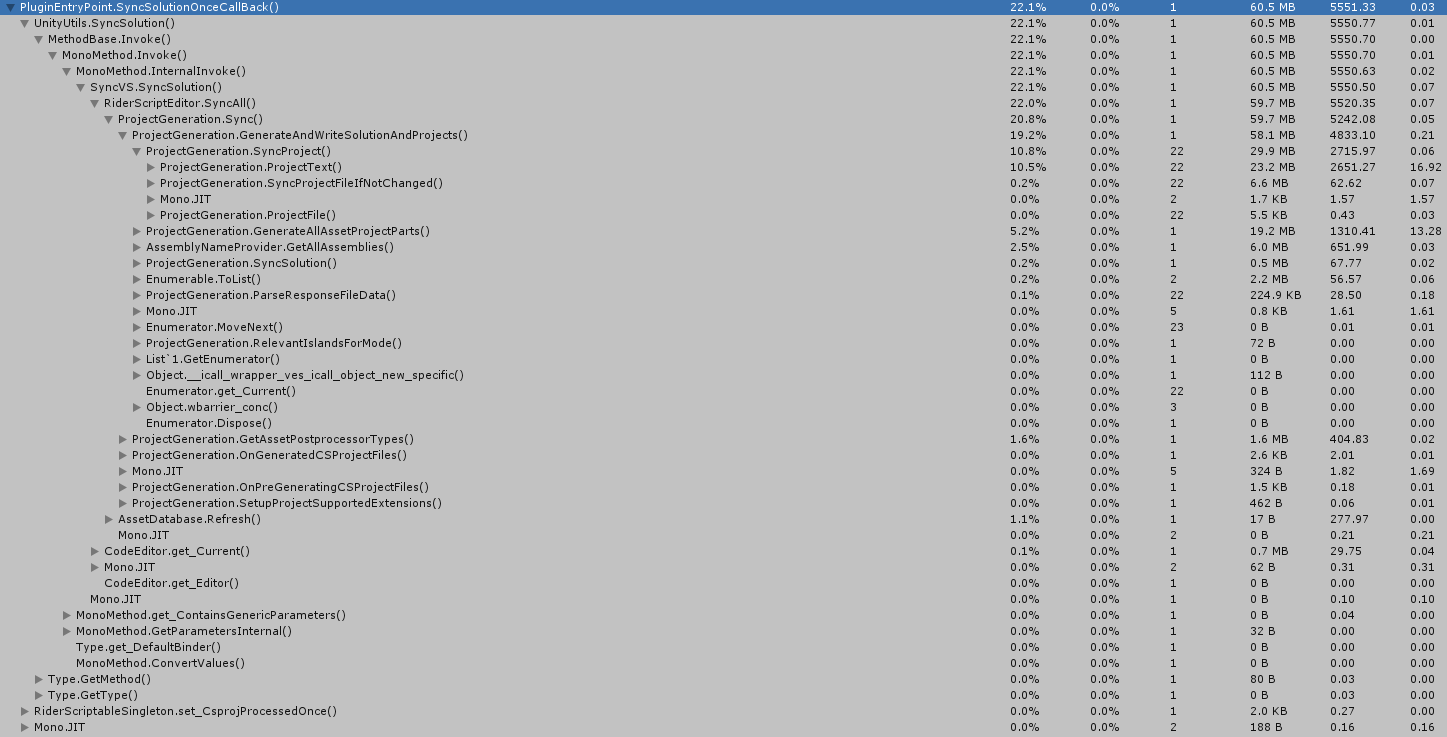
In general, it costs between 2 and 6 seconds on every reload (the higher numbers is when the Unity profiler is deep profiling)
The ProjectGeneration.ProjectText method is the one I see most frequently. It takes 2-3 seconds on every reload.
SugoiDev
on 13 Jun 2019
Here are 2 pieces of problem
- SyncSolutionOnceCallBack is currently called on every reload because to my surprise when EditorPlugin is loaded directly from Rider installation this line is always false.
https://github.com/JetBrains/resharper-unity/blob/191/unity/EditorPlugin/PluginEntryPoint.cs#L123
I have cut this problem in Rider 192. - Even when (1) is removed, SyncSolution is still get called, when Rider calls Refresh.
2.1. I tried to refresh only pieces, which were changed, but currently there is no tracking on csproj/sln files. So we need to refresh everything to avoid problem when csproj/sln was externally changed.
2.2. Straightforward optimization ofProjectGeneration.ProjectTextwould be beneficial for sure for all scenarios.
van800
on 13 Jun 2019
Rider 192 is not available yet on the toolbox, so I can't test it right now.
Even when (1) is removed, SyncSolution is still get called, when Rider calls Refresh.
Rider only calls refresh when I enable "Automatically refresh assets in Unity", right?
Or will it also be called when I refresh Unity myself? For example, I change a script in Rider, switch to Unity and tell it to compile.
(a bit of off-topic Rider praise below)
2.1. I tried to refresh only pieces, which were changed, but currently there is no tracking on csproj/sln files. So we need to refresh everything to avoid problem when csproj/sln was externally changed.
I once made a tool for Visual Studio to never reload solutions/projects. When the tool detected a file was renamed/deleted/moved, it would talk to a VS extension and use the VS api to replicate the changes to the solutions/projects. But, despite the tool actually working (never had reloads again), it was brittle and hard to maintain. Lots of arcane VS threading stuff and Unity had issues with pipes back them. Lots of trouble.
This was actually what made me switch to pre-release Rider back then. VS reloaded the solutions all the time and it took minutes to get responsive again. With Rider, I never had that again.
SugoiDev
on 13 Jun 2019
Rider only calls refresh when I enable "Automatically refresh assets in Unity", right?
Or will it also be called when I refresh Unity myself? For example, I change a script in Rider, switch to Unity and tell it to compile.
True. Rider only calls Refresh, when "Automatically refresh assets in Unity" is checked. Do you often have it disabled?
I was thinking to actually make 3 options out of that checkbox:
- No Refresh from Rider
- Refresh only projects with changed Assets (it is easy to implement - just AssetDatabase.Refresh())
- Refresh All projects
Would you use option (2)? It would be exactly similar to what Unity does, when you focus and Auto Refresh in Unity is enabled. Or would you still have it in (1)?
(a bit of off-topic Rider praise below)
2.1. I tried to refresh only pieces, which were changed, but currently there is no tracking on csproj/sln files. So we need to refresh everything to avoid problem when csproj/sln was externally changed.
I once made a tool for Visual Studio to never reload solutions/projects. When the tool detected a file was renamed/deleted/moved, it would talk to a VS extension and use the VS api to replicate the changes to the solutions/projects. But, despite the tool actually working (never had reloads again), it was brittle and hard to maintain. Lots of arcane VS threading stuff and Unity had issues with pipes back them. Lots of trouble.
This was actually what made me switch to pre-release Rider back then. VS reloaded the solutions all the time and it took minutes to get responsive again. With Rider, I never had that again.
Thanks for good words.
van800
on 13 Jun 2019
Ok, I managed to hack around the SyncSolutionOnceCallBack
https://github.com/van800/com.unity.ide.rider/commit/8372c70deb33863affc851e7bb5bd489a221812b
It would be nice if you could try it.
van800
on 13 Jun 2019
Oh, doing it now!
SugoiDev
on 13 Jun 2019
Seems to be working. I'll leave it in my project and report back if I see anything weird.
SugoiDev
on 13 Jun 2019
Thanks for your help! Could you please also comment on the "Automatically refresh assets in Unity" question?
Is it often disabled?
I was thinking to actually make 3 options out of that checkbox:
- No Refresh from Rider (as now with unchecked checkbox)
- Refresh only projects with changed Assets (it is easy to implement - just AssetDatabase.Refresh())
- Refresh All projects (as now with checked checkbox)
Would you be interested in option (2)? It would be exactly similar to what Unity does, when you focus and Auto Refresh in Unity is enabled. Or would you still have it in (1)?
van800
on 14 Jun 2019
Is it often disabled?
I never enabled it. It is disabled as a computer-wide setting.
Or would you still have it in (1)?
I think I'll still leave it fully disabled.
I'm often working on something that I back and forth several times between Rider and Unity.
I want it to refresh only when I'm done and want to see the final results.
This is so serious to me that I'll probably not be using Unity for any future personal project until they improve the assembly reload times. There are days that I probably spend over 50% of my working time waiting for Unity to finish compiling and reload the assembly :(
SugoiDev
on 14 Jun 2019
Thanks for sharing your insight.
van800
on 14 Jun 2019
Related issues
 persn
·
3Comments
persn
·
3Comments
 mihakrajnc
·
5Comments
mihakrajnc
·
5Comments
 justinlueders
·
5Comments
justinlueders
·
5Comments
 FWCorey
·
4Comments
FWCorey
·
4Comments
 ghost
·
3Comments
ghost
·
3Comments
Most helpful comment
Seems to be working. I'll leave it in my project and report back if I see anything weird.