Resharper-unity: Reference assembly action should update asmdef files
Rider has a very convenient "Reference 'assembly' and use 'type'" quick-fix action when you're trying to use a type from a non-referenced assembly. That kicks in for types from other asmdef-generated assemblies, but since Unity uses the asmdef file's references to generate .csproj references, the asmdef file has to be updated by hand to make the code compile in Unity.
Ideally, the reference assembly action should update the asmdef file automatically. Is that doable?
 Baste-RainGames
All 11 comments
This should be possible. If the reference being added is to another .asmdef based project, we should be able to do this, by implementing IModuleReferencer. This should allow us to check that the two modules can be referenced, and to do what needs to be done to make the reference happen. I suspect we'll need to modify the .asmdef, and also add the project reference, so that the type is immediately available and the quick fix completes successfully (after referencing the module, it needs to reference the type. If the module reference fails or doesn't fully complete, the type doesn't get referenced).
If the reference being added is an assembly reference, then we'll need to see if that assembly is from a .asmdef in a read only "referenced" package. If so, modify the .asmdef and add the assembly reference to the project.
You can see somewhat out of date code for this in the resharper-nuget project. It's circa ReSharper 8, and got rolled into the product for ReSharper 9. I don't think much has changed.
Unanswered questions:
- Can we have a scenario where we are trying to add a reference to an assembly that isn't from an .asmdef based package? DLLs as assets should already be added, I think. I don't know if there are other assemblies that are available to add.
- Do we need to check for circular references, or does R# already do that for us?
 citizenmatt
on 29 Oct 2018
citizenmatt
on 29 Oct 2018
For your first question: yes, there are - all of the ones from Unity's packages system. The rules for those are:
- you can reference them if they're mentioned in your project's Packages/manifest.json
- they do not have an asmdef file. Instead, their name is defined in AppData/Local/Unity/cache/packages/packages.unity.com/
@ /package.json - the string defined in that package.json is the one used to name the assembly, and the one needed to insert into your assembly's manifest.json in order to reference that assembly.
This means that if you want to filter for assemblies that should be automatically added to an asmdef, you need to look though all other asmdef files in the project, and the manifest.json file of the project.
For your second question: seems like it. If I have a reference to assembly A in assembly B, Rider won't suggest that I add a reference to assembly B in assembly A. So that should be safe.
Baste-RainGames
on 31 Oct 2018
The first question is really determining if there is ever a scenario for trying to add a _purely binary reference_ to a .asmdef file. If so, we can't do anything in this case - a .asmdef file can only contain references to other .asmdef files.
What I mean by "purely binary reference" is an assembly that isn't part of a package, or isn't already referenced. Plugins and other .dll assets are already referenced, so we're good there. Source packages are .asmdef based, but ReSharper should be asking us to add a project reference, which we can use to easily find the .asmdef file to modify.
Cached packages are a little different. To ReSharper, they'll look like a simple binary file reference, but we need to know better. Cached packages are still .asmdef based - some packages contain multiple .asmdef files, compiling to multiple assemblies. The name in package.json is the name of the package, while the name of the assembly comes from the .asmdef file Unity used to compile it. So when we get a binary reference, we'll need to look it up in an index of .asmdef files. If we know it, we can modify the .asmdef file and add the binary assembly reference to the project (which Unity would also do as soon as the project files are regenerated).
The problem is if the binary reference doesn't match a .asmdef file. We can't fix the .asmdef file in the source package here, and we need to know if we can ever get into this situation and how to handle it. This is the scenario that needs investigating - if this scenario is possible, where does that .dll come from?
The good news is that the assembly name is the same defined name in the .asmdef file (but not the filename!) and we already have an index of the .asmdef files in the C# solution. We need to extend this for various other things, and we'll be able to reuse it here, too.
I suspect that if we're modifying a .asmdef file inside a source package (i.e. it lives in Packages or is referenced with file:// in manifest.json) then we might well need to add a package reference to package.json as well. And I'm not sure about a .dll asset that lives in Assets underneath a .asmdef file - I don't know how Unity will generate references here. These will both also need investigating.
citizenmatt
on 31 Oct 2018
In 2018.3+, there is something like a "purely binary reference" in asmdef files.
First, in the import settings of your compiled DLL, you can mark it as being "explicitly referenced".
In the UI, this is being called "Auto Reference". You need to disable it for the assembly to marked as "explicitly referenced". Here's how it looks like
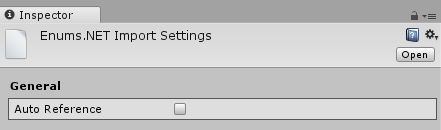
In the .meta file for that DLL, you'll have this
fileFormatVersion: 2
guid: cf2360dc86965534b80e461f9bc003ea
PluginImporter:
  (...)
  isExplicitlyReferenced: 1
  (...)
Now, you can use the "Assembly references" list in the asmdef import settings to add a reference to that
DLL.
Here's how it looks like in the UI

and what the .asmdef file itself looks like
  (...)
    "overrideReferences": true,
    "precompiledReferences": [
        "TypeSafe.dll",
        "Enums.NET.dll",
  (...)
Note that the overrideReferences switch must be true for the precompiledReferences to be used.
DLLs with the "auto reference" switch disabled will not be added to any custom assembly unless you add them in the "assembly references" list.
I'm not sure about the "normal" Unity assemblies (non asmdef based). My guess is that the DLLs will still be referenced (since there's no way to configure the normal assemblies).
 SugoiDev
on 31 Oct 2018
SugoiDev
on 31 Oct 2018
Awesome! That's brilliant to know. And I guess I need to update the asmdef JSON schema, too!
citizenmatt
on 31 Oct 2018
Oh I would love if it would correctly update the asmdef :)
 NoxMortem
on 10 Jan 2019
NoxMortem
on 10 Jan 2019
Any news on this?
 Sroka
on 15 Feb 2020
Sroka
on 15 Feb 2020
We're currently planning Rider 2020.3, hopefully we'll include it then. See also RIDER-48660
citizenmatt
on 17 Aug 2020
@citizenmatt do you think this will make it to 2020.3? EAP8 doesn't seem to have it (yet). Fingers crossed 🤞
 hybridherbst
on 22 Nov 2020
hybridherbst
on 22 Nov 2020
Sadly no. This hasn't made it for 2020.3, it's going to be 2021.1
citizenmatt
on 22 Nov 2020
Calling out an important detail that's easy to miss from above: consider also adding a package reference when adding an asmdef reference between two packages.
This is complicated with optional features, handled by version defines. These are symbols that are defined based on expressions that evaluate if a package is referenced, and what version of that package is referenced. They can be used to add optional features - support for a package wrapped inside defines. In this case, the .asmdef reference should be added, but the package reference is optional.
It doesn't appear to be possible to automatically decide if a package reference should be made. If a reference to a package that is already set up in version defines is required, then it might be an optional feature, or it might be version defines to allow handling multiple versions of the same package - it's still a required feature, but with optional behaviour. Similarly, an optional feature might add a reference to yet another package. It is unlikely that an optional feature should force a required reference, but it would be very hard to check that the consumer of the reference is an optional feature (optional feature or optional behaviour?). A simpler solution is to always prompt to add a package reference.
citizenmatt
on 14 Jan 2021
Related issues
 mihakrajnc
·
5Comments
mihakrajnc
·
5Comments
 aaronhoogstraten
·
4Comments
aaronhoogstraten
·
4Comments
 JashanChittesh
·
3Comments
JashanChittesh
·
3Comments
 AmazingThew
·
4Comments
AmazingThew
·
4Comments
 ghost
·
3Comments
ghost
·
3Comments
Most helpful comment
We're currently planning Rider 2020.3, hopefully we'll include it then. See also RIDER-48660