Resharper-unity: Speedup EditorPlugin initialization after DomainReload
Repro:
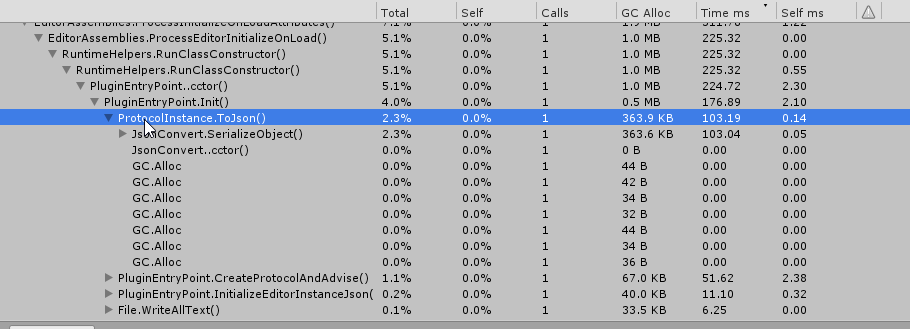
Make sure EditorPlugin is present in the project. Make sure to disable logging.
- In Unity Profiler check
1.1. Profile Editor
1.2. Deep Profile
1.3. Clear on Play - Check Record
- Click Play
- Uncheck Record
- Insert "PluginEntryPoint" into the search field
- Clean the search field
See something like
 van800
All 12 comments
If we drop support for Unity pre 5.5 - we can use JsonUtility, which is fast, instead of slow JsonConvert.
van800
on 24 Aug 2018
How about just using StringBuilder? We could drop the whole JSON.NET dependency then.
 citizenmatt
on 27 Aug 2018
citizenmatt
on 27 Aug 2018
- Don't read / write to freaking disk... (Doesn't matter if its json / xml / stringbuilder) Writing to disk itself is wrong.
- if its not a lot of data, just use EditorPrefs directly
- If it really for some reason necessary to keep the data via serialization. Then use ScriptableObject to hold & persist the data.
 joeante
on 27 Aug 2018
joeante
on 27 Aug 2018
@joeante
In order to keep the connection between Editor and Rider, UnityEditor is writing port to file, Rider watches the file and connects. We are doing it on each AppDomain Reload. I doubt, if we can completely avoid that.
van800
on 27 Aug 2018
Now PluginEntryPoint.cctor is around 111ms. I removed JsonConvert and optimized logging.
van800
on 3 Sep 2018
@joeante
In order to keep the connection between Editor and Rider, UnityEditor is writing port to file, Rider watches the file and connects. We are doing it on each AppDomain Reload. I doubt, if we can completely avoid that.
This can be avoided by writing a protocol in C ++, not C #.
C ++ unmanaged dll plugins doesn’t unload memory even if the solution is reloaded.
 Temka193
on 26 Nov 2018
Temka193
on 26 Nov 2018
We may do it in one of the next releases @Temka193
van800
on 26 Nov 2018
Did something happen with the latest versions and the last 2021 alpha Unity (a5)?
Initialization times for me are close to 3 seconds (!)
Just noticed this issue is closed. Should I open a new one?

 SugoiDev
on 17 Nov 2020
SugoiDev
on 17 Nov 2020
@SugoiDev which Rider package version? Try updating to latest?
I think this problem was fixed in 3.0.2.
van800
on 17 Nov 2020
It seems pacman is lying and showing 2.0.7 as latest.
Just manually edited the manifest and 3.0.2 indeed has it fixed. Thanks!
I'm still not sure why it isn't showing in pacman though.
SugoiDev
on 17 Nov 2020
I confirm that I see the same Package Manager behaviour. Would be nice if we all report it to Unity. I already did.
van800
on 17 Nov 2020
I have started a thread about See all versions command in Package Manager https://forum.unity.com/threads/see-all-versions-command-was-removed.1008619/
van800
on 19 Nov 2020
Related issues
 AmazingThew
·
4Comments
AmazingThew
·
4Comments
 justinlueders
·
5Comments
citizenmatt
·
5Comments
justinlueders
·
5Comments
citizenmatt
·
5Comments
 mihakrajnc
·
5Comments
mihakrajnc
·
5Comments
 RealMSHB
·
3Comments
RealMSHB
·
3Comments